
1. Introduction
The MORAYELEC ME201RSP Smart WiFi Water Level Sensor is designed for remote monitoring of water and oil tank levels. This device utilizes ultrasonic technology to provide accurate level readings, which can be accessed via the Tuya Smart Life mobile application. It supports multi-tank monitoring and features smart alerts for full or low levels, ensuring you are always informed about your tank's status.
Key Features:
- Smart Remote Monitoring: Check water or oil tank levels anytime via the Tuya Smart Life APP. Supports monitoring of up to 10 sensors.
- Long Range & High Accuracy: Measures levels from 10 cm to 4 meters (4 to 157 inches) with precise ultrasonic detection.
- Stable 2.4G WiFi Connection: Connects easily to your home WiFi network with a 30m signal range (without obstacles). Compatible with Gateway Smart Home Remote/Tuya smart systems.
- Solar Power Supply: Features a durable design with solar power capabilities for extended operation.
- Smart Alerts & Easy Installation: Receive full/low level notifications or set custom alarm limits. Simple top-mount installation with all necessary parts included.
2. Package Contents
Please verify that all the following components are included in your package:
- MORAYELEC ME201RSP Sensor
- RF433 Gateway
- USB Gateway Data Line
- Adapter
- Solar Panels
- Screws for installation
- Cotton for installation
- Instruction Manual

3. Specifications
| Feature | Detail |
|---|---|
| Model Number | ME201RSP |
| Sensor Technology | Ultrasonic Sensor |
| Maximum Range | 4 Meters (157 inches) |
| Minimum Range | 10 Centimeters (4 inches) |
| Control Method | App (Tuya Smart Life) |
| Connectivity | 2.4G WiFi, RF433MHz (Sensor to Gateway) |
| Power Source | Solar Powered, Lithium-Ion Batteries (2 Nonstandard Battery, included) |
| Voltage | 3.6 Volts |
| Wattage | 100 milliamp_hours |
| IP Rating | IP65 Waterproof |
| Product Dimensions | 9.45 x 5.51 x 3.54 inches |
| Item Weight | 1.76 pounds |
| Smart Home Compatibility | Smart Home Compatible (Tuya) |
| Operating Temperature | -20 to 70°C |
4. Setup Guide
4.1. Installation Considerations
Proper sensor placement is crucial for accurate readings. The ultrasonic sensor requires a clear path to the liquid surface. Consider the following:
- Tank Type: Suitable for various tank shapes, including square and circular water tanks.
- Smooth Inner Wall: The tank's inner wall must be smooth to prevent signal interference. Avoid rough surfaces.
- Clear Reflection Area: Ensure there are no obstacles within the sensor's beam angle (±15°) that could interfere with the ultrasonic signal. This includes pipelines, protruding outlets, floating balls, or internal boards.
- Distance from Bulkhead: The sensor installation cannot be too close to the tank's bulkhead, as this can cause strong pseudo-echoes and inaccurate readings.

4.2. Physical Installation
Follow these steps to physically install the sensor on your tank:
- Prepare the Mounting Area: Identify a suitable, flat area on the top of your tank, away from inlets or internal obstructions.
- Drill Pilot Holes: Use appropriate tools to drill pilot holes for mounting the sensor.
- Mount the Sensor: Securely attach the sensor to the tank using the provided screws and cotton installation material. Ensure the sensor is held perpendicularly to the liquid surface.
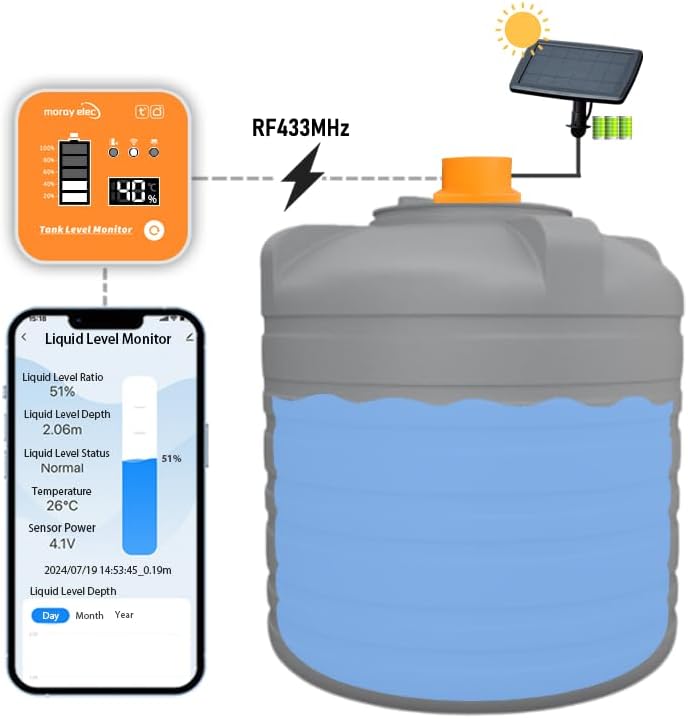
- Connect Solar Panel: Attach the solar panel to the sensor and position it to receive adequate sunlight for charging.

4.3. App Setup and Connection
To connect your sensor to the Tuya Smart Life app:
- Download App: Download the Tuya Smart Life app from your smartphone's app store.
- Register/Login: Create an account or log in to the app.
- Add Device: Follow the in-app instructions to add a new device. Select the appropriate sensor type.
- Connect Gateway: Ensure your RF433 gateway is powered on and connected to your 2.4G WiFi network. The sensor communicates with the gateway via RF433MHz, and the gateway then transmits data to the app via WiFi.
- Pair Sensor: Follow the app's prompts to pair the sensor with the gateway.
5. Operating Instructions
5.1. Remote Monitoring
Once the sensor is successfully installed and connected, you can monitor your tank's liquid level remotely:
- Open the Tuya Smart Life app on your smartphone.
- Navigate to the device list and select your MORAYELEC water level sensor.
- The app will display real-time data, including liquid level ratio, liquid level depth, status (Normal, Full, Low), temperature, and sensor power.
- The system supports monitoring up to 10 sensors simultaneously, allowing for comprehensive management of multiple tanks.
5.2. Smart Alerts and Alarms
The ME201RSP sensor provides customizable alerts to keep you informed:
- Full Level Notification: Receive an alert when the tank reaches its maximum capacity.
- Low Level Notification: Receive an alert when the liquid level drops below a predefined threshold.
- Custom Alarm Limits: You can set specific high and low alarm limits within the Tuya Smart Life app to suit your needs.

6. Maintenance
The MORAYELEC ME201RSP sensor is designed for low maintenance. Consider the following to ensure optimal performance:
- Solar Panel: Periodically clean the solar panel to ensure it receives maximum sunlight for efficient charging of the internal batteries.
- Sensor Surface: Keep the ultrasonic sensor's surface clean and free from debris, dust, or ice buildup that could obstruct the signal.
- Battery Life: The sensor is powered by two nonstandard Lithium-Ion batteries, which are recharged by the solar panel. Monitor battery status via the app. While designed for solar power, ensure the solar panel is not continuously obstructed.
- Environmental Protection: The IP65 waterproof rating protects the sensor from dust and water jets. However, avoid submerging the sensor.
7. Troubleshooting
If you encounter issues with your MORAYELEC ME201RSP sensor, refer to the following common problems and solutions:
- No Readings or Inaccurate Readings:
- Check for Obstructions: Ensure there are no pipelines, floating balls, or other objects within the sensor's beam path inside the tank.
- Tank Wall Condition: Verify that the tank's inner wall is smooth. Rough surfaces can cause signal scattering.
- Sensor Alignment: Confirm the sensor is mounted perpendicularly to the liquid surface.
- Proximity to Bulkhead: Ensure the sensor is not installed too close to the tank's bulkhead, which can cause pseudo-echoes.
- Liquid Type: While designed for water and oil, extremely viscous liquids or those with heavy foam may affect accuracy.
- Sensor Not Connecting to App:
- Gateway Connection: Ensure the RF433 gateway is powered on and properly connected to your 2.4G WiFi network.
- WiFi Signal Strength: Verify that the gateway is within range of your WiFi router (up to 30m without obstacles).
- Sensor-Gateway Communication: Ensure the sensor is within range of the RF433 gateway.
- App Pairing: Re-attempt the pairing process in the Tuya Smart Life app.
- Low Battery Warnings:
- Solar Panel Exposure: Ensure the solar panel is clean and receiving sufficient direct sunlight.
- Panel Orientation: Adjust the solar panel's angle for optimal sun exposure.
- Battery Health: If issues persist despite good solar exposure, the internal batteries may need inspection or replacement by a qualified technician.
8. Warranty and Support
8.1. Warranty Information
The MORAYELEC ME201RSP Smart WiFi Water Level Sensor comes with a 1-Year Manufacturer Warranty. This warranty covers defects in materials and workmanship under normal use. Please retain your proof of purchase for warranty claims.
8.2. Customer Support
For technical assistance, troubleshooting not covered in this manual, or warranty inquiries, please contact MORAYELEC customer support through the retailer where you purchased the product or refer to the contact information provided on the product packaging or official MORAYELEC website.

