
BAOFENG BF-T20
Contents
BAOFENG BF-T20 Two-Way Radio Instruction Manual
Model: BF-T20
Introduction
This instruction manual provides comprehensive information for the proper operation, maintenance, and troubleshooting of your BAOFENG BF-T20 Two-Way Radio. Please read this manual thoroughly before using the device to ensure safe and efficient communication.
The BAOFENG BF-T20 is a compact and durable two-way radio designed for reliable communication in various environments, from construction sites and warehouses to outdoor adventures. It features a robust design, long-range capabilities, and convenient USB charging.

Package Contents
Upon opening the package, verify that all items listed below are present and in good condition:
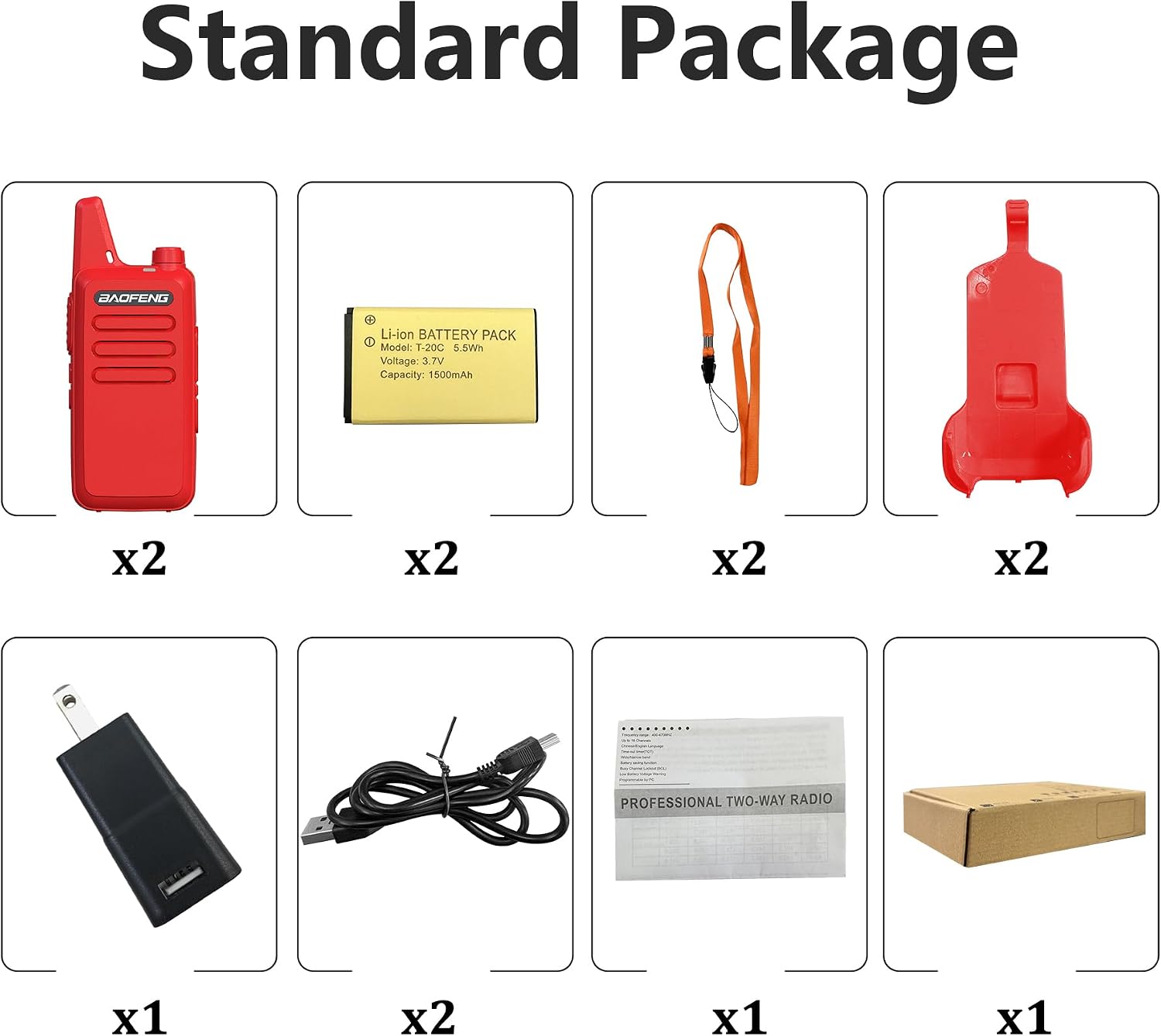
- 2 x BAOFENG BF-T20 Radios
- 2 x Mini USB Charging Cables
- 2 x 1500mAh Li-ion Batteries
- 1 x US Power Adapter
- 2 x Belt Clips
- 2 x Hand Straps
- 2 x Acoustic Headsets
- 1 x English Instruction Manual
Product Features
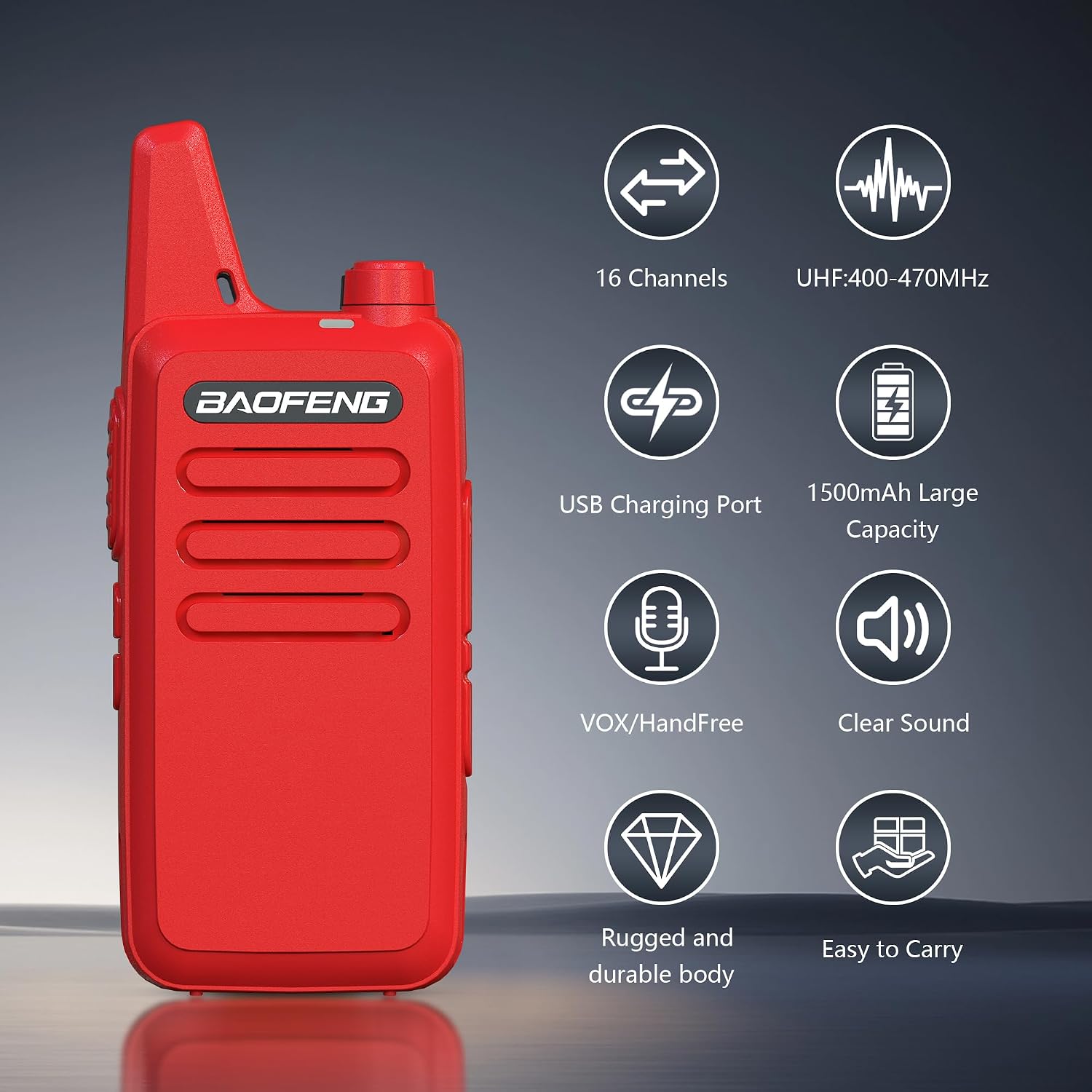
- Compact and Durable Design: Weighs only 4.2oz with a rugged, splash-proof (IP55) shell.
- Integrated Antenna: Provides reliable long-range transmission and is less prone to damage.
- Convenient Charging: Features a mini USB port for versatile charging via car charger, power bank, PC, or USB adapter.
- Multiple Channels: Offers 16 channels for diverse communication needs.
- VOX Hands-Free Mode: Allows for voice-activated transmission without pressing the PTT button.
- Clear Audio: Delivers clear sound for effective communication.
- FCC Certified: Suitable for business and personal use.


Product Overview
Familiarize yourself with the various parts of your BAOFENG BF-T20 radio:

- PTT Key (Push-to-Talk): Press and hold to transmit, release to receive.
- + Key: Increases volume or navigates menu options.
- - Key: Decreases volume or navigates menu options.
- Loudspeaker: Outputs received audio.
- Power/Volume Knob: Rotates to turn the radio on/off and adjust volume.
- Indicator: LED light indicating transmission (red) or reception (green).
- Microphone: Captures your voice for transmission.
- Mic Port: Connects external accessories like the acoustic headset.
Setup
1. Battery Installation and Charging
The BAOFENG BF-T20 comes with a 1500mAh Li-ion battery. Ensure the battery is fully charged before first use.
- Align the battery with the battery compartment on the back of the radio and press firmly until it clicks into place.
- To charge, connect the mini USB charging cable to the port at the bottom of the radio.
- Connect the other end of the USB cable to the provided US power adapter, a computer's USB port, a power bank, or a car charger.
- The indicator light will show charging status (typically red while charging, green when fully charged).


2. Attaching Accessories
- Belt Clip: Attach the belt clip to the designated slot on the back of the radio for easy carrying.
- Hand Strap: Loop the hand strap through the eyelet on the top side of the radio to prevent accidental drops.
- Acoustic Headset: Insert the 2-pin plug of the acoustic headset into the Mic Port on the side of the radio. Ensure it is fully inserted for proper function.
Operating Instructions
1. Power On/Off and Volume Adjustment
- To turn the radio ON, rotate the Power/Volume Knob clockwise until you hear a click and the radio powers on.
- To turn the radio OFF, rotate the Power/Volume Knob counter-clockwise until you hear a click.
- To adjust the volume, rotate the Power/Volume Knob clockwise to increase volume and counter-clockwise to decrease volume.
2. Channel Selection
The BF-T20 has 16 pre-programmed channels. To change channels:
- Use the + Key to cycle through channels upwards.
- Use the - Key to cycle through channels downwards.
- Ensure all radios in your group are set to the same channel for communication.
3. Transmitting and Receiving
- To transmit (send a message), press and hold the PTT Key. Speak clearly into the microphone (07). The indicator light (06) will illuminate red.
- Release the PTT Key to receive messages. The indicator light (06) will illuminate green when a signal is being received.
- Always wait for the other party to finish speaking before pressing your PTT key.
4. VOX (Voice Operated Exchange) Function
The VOX function allows for hands-free transmission. When VOX is enabled, the radio will automatically transmit when it detects your voice.
- Refer to the radio's programming software (not included) for detailed instructions on enabling and adjusting VOX sensitivity.
- When using VOX, ensure the microphone is positioned correctly to pick up your voice effectively.
Maintenance
- Cleaning: Use a soft, damp cloth to clean the radio's exterior. Do not use harsh chemicals or abrasive cleaners.
- Battery Care:
- Avoid overcharging or completely discharging the battery.
- Store the battery in a cool, dry place when not in use for extended periods.
- If the radio will not be used for a long time, remove the battery.
- Storage: Store the radio in a dry, dust-free environment away from direct sunlight and extreme temperatures.
- Water Resistance: While the radio has a splash-proof (IP55) shell, it is Not Water Resistant. Avoid submerging the radio in water or exposing it to heavy rain.
Troubleshooting
| Problem | Possible Cause | Solution |
|---|---|---|
| Radio does not power on. | Battery is low or not installed correctly. | Ensure battery is fully charged and properly seated. |
| Cannot transmit or receive. | Incorrect channel selected; out of range; battery low. | Verify both radios are on the same channel. Move closer to the other radio. Charge battery. |
| Poor audio quality / Static. | Weak signal; interference; volume too low/high. | Move to an open area. Adjust volume. Check for obstructions. |
| Headset not working. | Headset not fully plugged in; faulty headset. | Ensure headset plug is fully inserted into the Mic Port. Try another headset if available. |
Specifications
| Feature | Detail |
|---|---|
| Model Number | BF-T20 |
| Frequency Range | UHF 400-470MHz |
| Power Output | ≤5W |
| Channel Capacity | 16 Channels |
| Battery Capacity | Li-ion 1500mAh |
| Working Voltage | DC 3.7V |
| Mic/Speaker/Programming Port | 2-pin plug type |
| Antenna Type | Integrated antenna |
| Antenna Impedance | 50 Ohm |
| Weight (with battery & antenna) | 3.99oz (113g) |
| Dimensions (H x W x D, excl. antenna) | 10.5 x 2.5 x 2 cm (approx. 4.13 x 0.98 x 0.79 inches) |
| Talking Range Maximum | 3 Kilometers (approx. 1.86 miles) |
| Water Resistance Level | Not Water Resistant (Splash-proof IP55 shell) |

Warranty Information
A 1-year warranty is provided for the BAOFENG BF-T20 Two-Way Radio. This warranty is exclusively offered through "Shiqun Electronics Co., Ltd." Please retain your proof of purchase for warranty claims.
Support
For technical support, warranty claims, or further inquiries, please contact the seller "Shiqun Electronics Co., Ltd." directly through the platform where the product was purchased.
For general information about BAOFENG products, you may visit the official BAOFENG store on Amazon: BAOFENG Store
Documents and downloads
Ask a question about this manual
Ask about setup, troubleshooting, compatibility, parts, safety, or missing instructions. Manuals+ will review the question and use this page’s manual context to help answer it.