
1. Introduction
This manual provides detailed instructions for the installation, operation, and maintenance of your visiPower TUYA Smart Electronic Door Lock Z17-18cm. This smart lock offers multiple unlocking methods including fingerprint, password, IC card, mobile application (Tuya APP), and mechanical key for enhanced security and convenience. Please read this manual thoroughly before installation and use to ensure proper function and safety.
2. Package Contents
Verify that all components are present in the package before proceeding with installation.
- Front and Rear Lock Panels
- 18CM Lock Body (Mortise)
- Mechanical Keys (2)
- IC Cards (2)
- Installation Accessory Kit (screws, spindles, etc.)
- Instruction Manual (this document)

3. Setup and Installation
This section guides you through the physical installation and initial setup of your smart door lock. A Phillips screwdriver is required for installation. The lock is suitable for both left and right-handed doors.
3.1 Door Preparation
Ensure your door meets the following specifications:
- Applicable Door Type: Wooden door, aluminum door.
- Applicable Thickness: 38mm to 55mm.
Refer to the provided installation template (if included) for drilling holes. The lock body dimensions are approximately 18cm (7.1 inches) in length.

3.2 Battery Installation
The lock requires 4 AA batteries (not included). Locate the battery compartment on the interior panel of the lock. Insert the batteries according to the polarity markings. Ensure the battery cover is securely closed after installation.
3.3 Tuya App Integration
Download the Tuya Smart app from your mobile device's app store. Follow the in-app instructions to add your smart door lock. This typically involves creating an account, selecting "Add Device," and following the pairing process. The lock uses Wi-Fi connectivity for app control.

4. Operating Instructions
Your visiPower Z17-18cm smart lock offers multiple ways to unlock and secure your door.
4.1 Unlocking Methods
- Fingerprint Unlock: Place your registered fingerprint on the sensor. The lock will unlock in approximately 0.3 seconds. The system uses a highly sensitive semiconductor 3D fingerprint sensor for efficient and accurate biometric identification.
- Password Unlock: Enter your registered 6-12 digit password on the touchscreen keypad, then press the '#' key.
- IC Card Unlock: Present a registered IC card to the card reader area on the lock.
- App Unlock (Tuya Smart): Use the Tuya Smart app on your smartphone to remotely unlock the door. Note: Remote unlocking via app is primarily for responding to doorbell rings; active remote unlocking without a doorbell trigger may be limited.
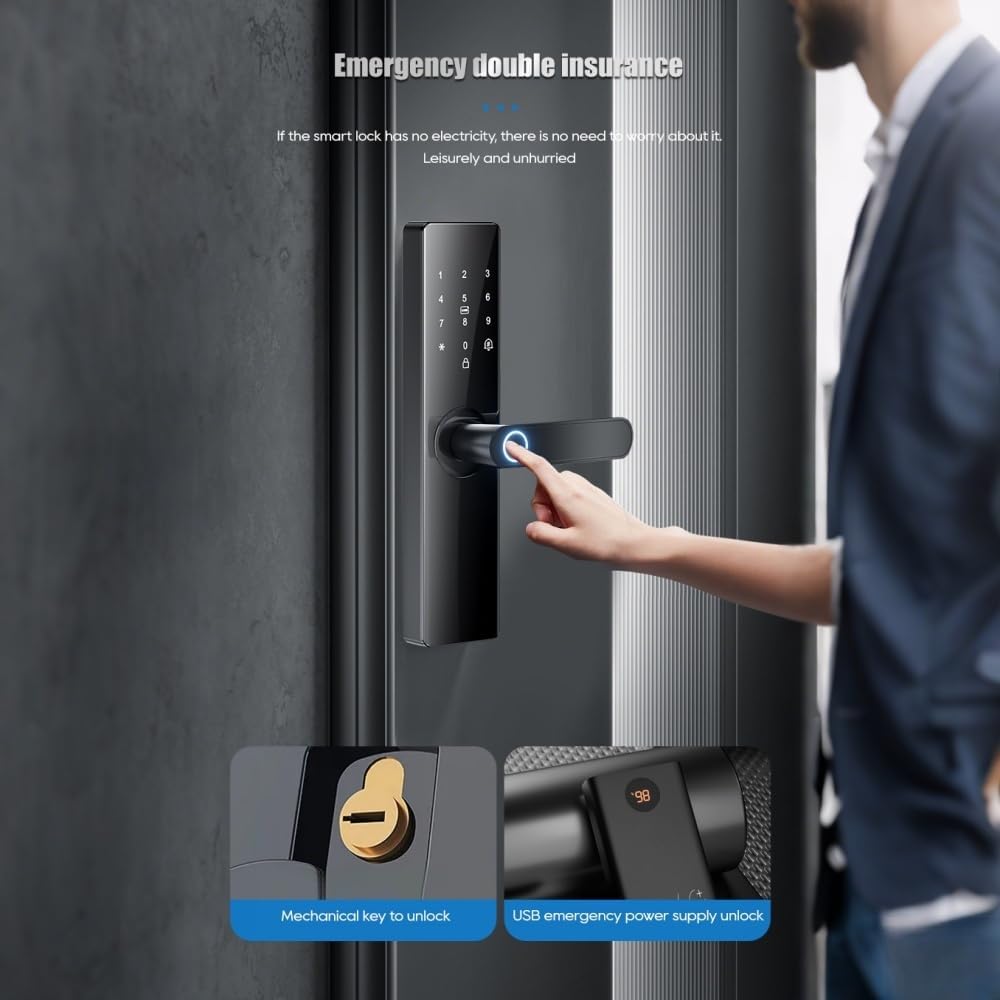
- Mechanical Key Unlock: In case of emergency or battery depletion, use the provided mechanical keys to unlock the door.


4.2 Automatic Locking
The lock can be set to automatically secure itself within 3-900 seconds after unlocking. This feature enhances security by ensuring the door is always locked after entry or exit.
4.3 Dual Verification Mode
For enhanced security, the lock supports a dual verification mode. You can configure two different unlocking methods (e.g., fingerprint + password, or two different fingerprints) to be required simultaneously to open the door. This is suitable for special occasions or areas requiring higher access control.
4.4 Administrator and User Management
The local administrator has the highest authority to manage the lock settings, including adding or deleting users, fingerprints, passwords, and IC cards. Up to 9 administrators can be registered. The total capacity for users (fingerprints, passwords, or cards) is 300.
5. Maintenance
Proper maintenance ensures the longevity and optimal performance of your smart door lock.
5.1 Battery Replacement
When the battery level drops below 20%, the lock will issue a low battery alarm (voice alert). Replace all four AA batteries promptly to avoid loss of function. The lock is designed for approximately six months of use on a single set of batteries.
5.2 Emergency Power Supply
If the batteries completely deplete, you can provide emergency power using a 5V mobile power bank connected via the Type-C interface on the lock. This allows temporary access to unlock the door and replace batteries.
5.3 Cleaning
Clean the lock's exterior surfaces with a soft, dry cloth. Avoid using abrasive cleaners or solvents, which can damage the finish or electronic components. Keep the fingerprint sensor and keypad clean for optimal performance.
6. Troubleshooting
This section addresses common issues you might encounter with your smart door lock.
| Problem | Possible Cause | Solution |
|---|---|---|
| Lock does not respond. | Dead batteries. | Replace AA batteries or use emergency Type-C power. |
| Fingerprint not recognized. | Fingerprint sensor is dirty; unregistered fingerprint; incorrect placement. | Clean sensor; ensure fingerprint is registered; place finger correctly on sensor. |
| Password not accepted. | Incorrect password entered; password not registered. | Verify password; ensure password is registered. After multiple incorrect inputs, the lock will trigger an alarm and temporarily lock for 90 seconds. |
| IC card not working. | IC card not registered; card damaged. | Register the IC card via the app or administrator settings. |
| App control not working. | No Wi-Fi connection; lock not paired with app; app issues. | Check Wi-Fi connectivity; re-pair the lock with the Tuya Smart app; restart the app. |
| Alarm triggered unexpectedly. | Anti-pry attempt; low battery; multiple incorrect password attempts. | Check for tampering; replace batteries; wait 90 seconds after incorrect password attempts. |

7. Specifications
| Feature | Detail |
|---|---|
| Model Number | Z17-18cm |
| Brand | visiPower |
| Unlocking Methods | Fingerprint, Password, IC Card, App (Tuya), Mechanical Key |
| Smart Home Platform | Tuya |
| Connectivity Protocol | Wi-Fi |
| Material | Acrylic mirror + Alloy (Aluminum) |
| Password Length | 6-12 bits |
| Applicable Door Thickness | 38mm ~ 55mm |
| Power Type | 4 x AA Batteries (not included) |
| Emergency Power Supply | Type-C USB (5V) |
| Product Dimensions (L x W x H) | 270mm x 62mm x 69mm (approx. 10.6 x 2.4 x 2.7 inches) |
| Item Weight | 5 pounds |
| Fingerprint Recognition Rate | ≤0.001% |
| Fingerprint Rejection Rate | ≤0.01% |
| Fingerprint Recognition Speed | ≤0.5s |
| Administrator Capacity | Up to 9 |
| Total User Capacity | Up to 300 (fingerprints, passwords, cards) |
8. Warranty & Support
The visiPower TUYA Smart Electronic Door Lock Z17-18cm comes with a 1-Year Manufacturer Warranty.
For technical support, warranty claims, or further assistance, please contact visiPower customer service through the official brand store or the retailer where the product was purchased. Please have your model number (Z17-18cm) and purchase information ready when contacting support.
visiPower Brand Store: visiPowersecurity on Amazon