Introduction
This manual provides comprehensive instructions for the installation, operation, maintenance, and troubleshooting of your Fortdows Navi4G64 Car Radio Stereo. This advanced head unit is designed to enhance your driving experience with modern features such as Wireless CarPlay, Android Auto, GPS navigation, Bluetooth 5.4, FM RDS radio, and steering wheel control integration. Please read this manual carefully before using the product to ensure proper functionality and safety.
Vehicle Compatibility
The Fortdows Navi4G64 Car Radio Stereo is compatible with the following vehicle models:
- Dodge Challenger: 2008-2014
- Dodge RAM Pickup 1500/2500/3500: 2009-2012
- Jeep Wrangler / Unlimited: 2007-2018
- Jeep Compass: 2009-2016
- Jeep Patriot: 2009-2016
- Jeep Grand Cherokee: 2005-2011
- Jeep Liberty: 2008-2011
- Jeep Commander: 2008-2011
- Chrysler Sebring: 2007-2010
- Chrysler Town & Country: 2007-2010
- Dodge Grand Caravan: 2011-2014
- Dodge Charger: 2008-2010
Setup
Package Contents
Before installation, please verify that all items listed below are present in your package:

Image: The package contents include the main head unit, power cable, original USB cable, two additional USB cables, RCA cable, CanBus decoder, GPS antenna, reversing line, backup camera, external microphone, and a crowbar tool for installation.
- Fortdows Navi4G64 Head Unit
- Power Cable
- Original USB Cable
- USB Cable (x2)
- RCA Cable
- CanBus Decoder
- GPS Antenna
- Reversing Line
- Backup Camera
- External Microphone
- Crowbar Tool
Installation
Installation of the Fortdows Navi4G64 Car Radio Stereo typically involves removing the existing factory radio and connecting the new unit using the provided wiring harness and accessories. Due to the complexity of vehicle electronics, professional installation is recommended. Ensure the vehicle's battery is disconnected before beginning any electrical work.
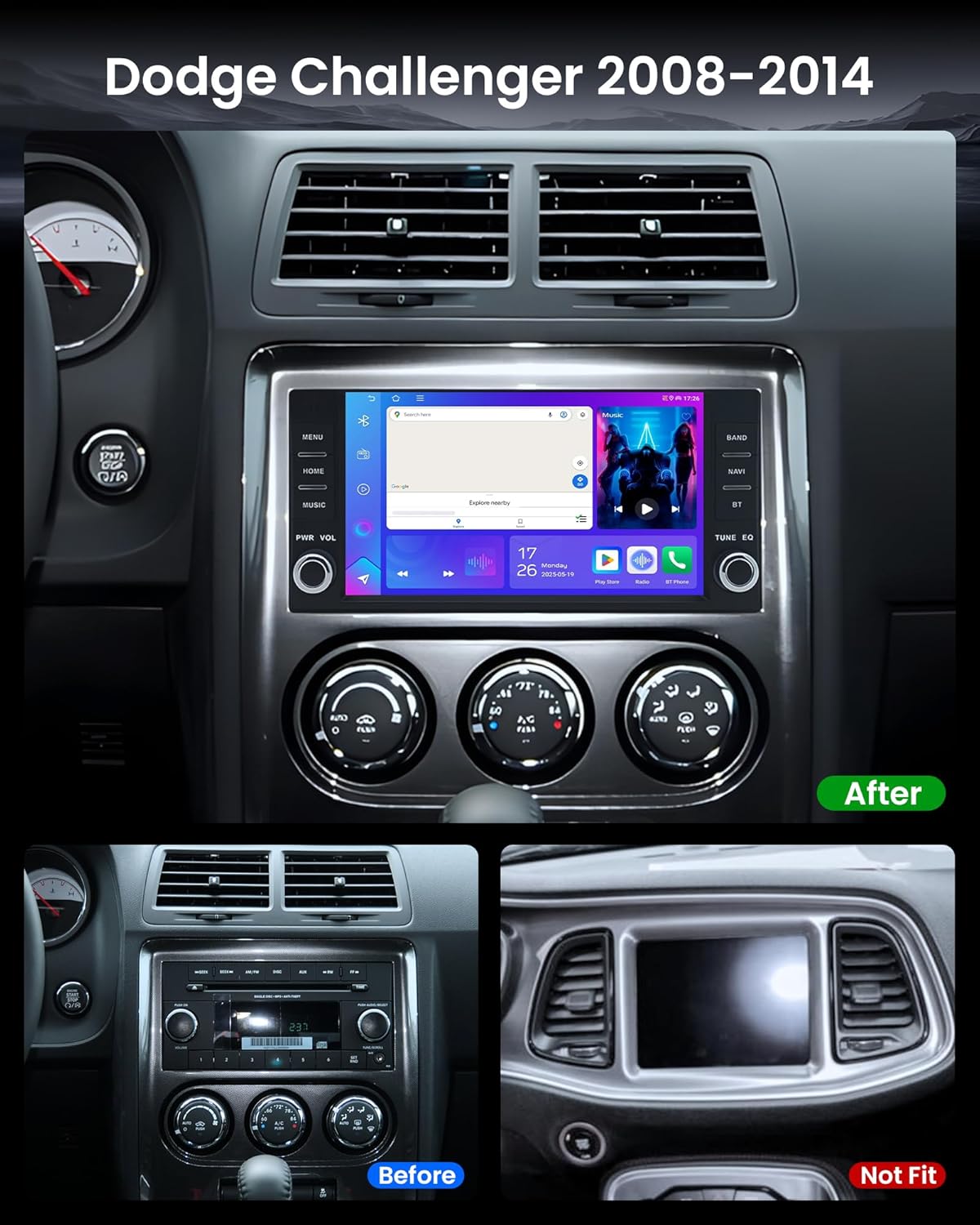
Image: A visual comparison showing the vehicle's dashboard before and after the installation of the Fortdows Navi4G64 car radio stereo. The "Before" image shows a standard factory radio, while the "After" image displays the new, larger touchscreen unit seamlessly integrated into the dashboard.
For detailed vehicle-specific installation guides, it is often helpful to consult online resources or professional automotive technicians.
Operating Instructions
Android 13 System Overview
Your Fortdows Navi4G64 operates on the Android 13 system, featuring 4GB RAM and 64GB ROM for smooth performance and ample storage. The intuitive interface allows for easy navigation through applications and settings.
Wireless CarPlay & Android Auto
Connect your smartphone wirelessly or via USB to access CarPlay or Android Auto. This feature integrates your phone's essential functions, such as navigation, messaging, music, and calls, directly onto the car stereo's touchscreen. Voice control is supported for safer operation while driving.

Image: The car radio stereo screen showing both Apple CarPlay and Android Auto interfaces, highlighting their respective app layouts and functionalities for navigation, music, and phone calls.

Image: A detailed graphic illustrating the dual-connectivity support for Wireless CarPlay and Android Auto, showing phone screen mirroring and voice command integration.
GPS Navigation & WiFi Connectivity
The unit supports both online and offline GPS navigation. Connect to a WiFi hotspot (5G WiFi supported for faster speeds) to access real-time traffic updates, stream media, and download applications from the App Store, similar to a smartphone.

Image: The car radio screen showing a GPS navigation map with a route highlighted, indicating precise positioning capabilities.

Image: A graphic illustrating the 5G WiFi function, showing improved network speed and the ability to download various applications.
Bluetooth 5.4 & FM Radio
Utilize Bluetooth 5.4 for hands-free calling, phonebook synchronization, and wireless audio streaming. The built-in microphone ensures clear communication. The FM radio function provides access to local stations, traffic updates, and news.

Image: A visual representation of Bluetooth 5.4 connectivity, showing a smartphone connected to the car radio for music playback and call management.

Image: The car radio screen showing the FM RDS radio interface, with frequency display and station selection options.
DSP Sound & Multi-EQ Settings
The built-in Digital Sound Processor (DSP) allows for extensive audio customization. Adjust balance, bass, treble, and surround settings through the multi-EQ interface to optimize your in-car audio experience.

Image: The car radio screen showing detailed professional EQ sound settings, including options for sound field, stereo sound enhancement, and bass enhancement.

Image: A graphic illustrating the DSP sound processing capabilities, showing a user enjoying high-fidelity music with customizable EQ settings.
1080P HD Backup Camera & Steering Wheel Controls (SWC)
The unit supports HD rear camera video input, including the provided backup camera, to assist with reversing and parking. The system also allows for learning and integration with your vehicle's original steering wheel control buttons for convenient operation.

Image: The car radio screen showing a 1080P rear view camera feed, with parking guidelines, enhancing safety during reversing maneuvers.
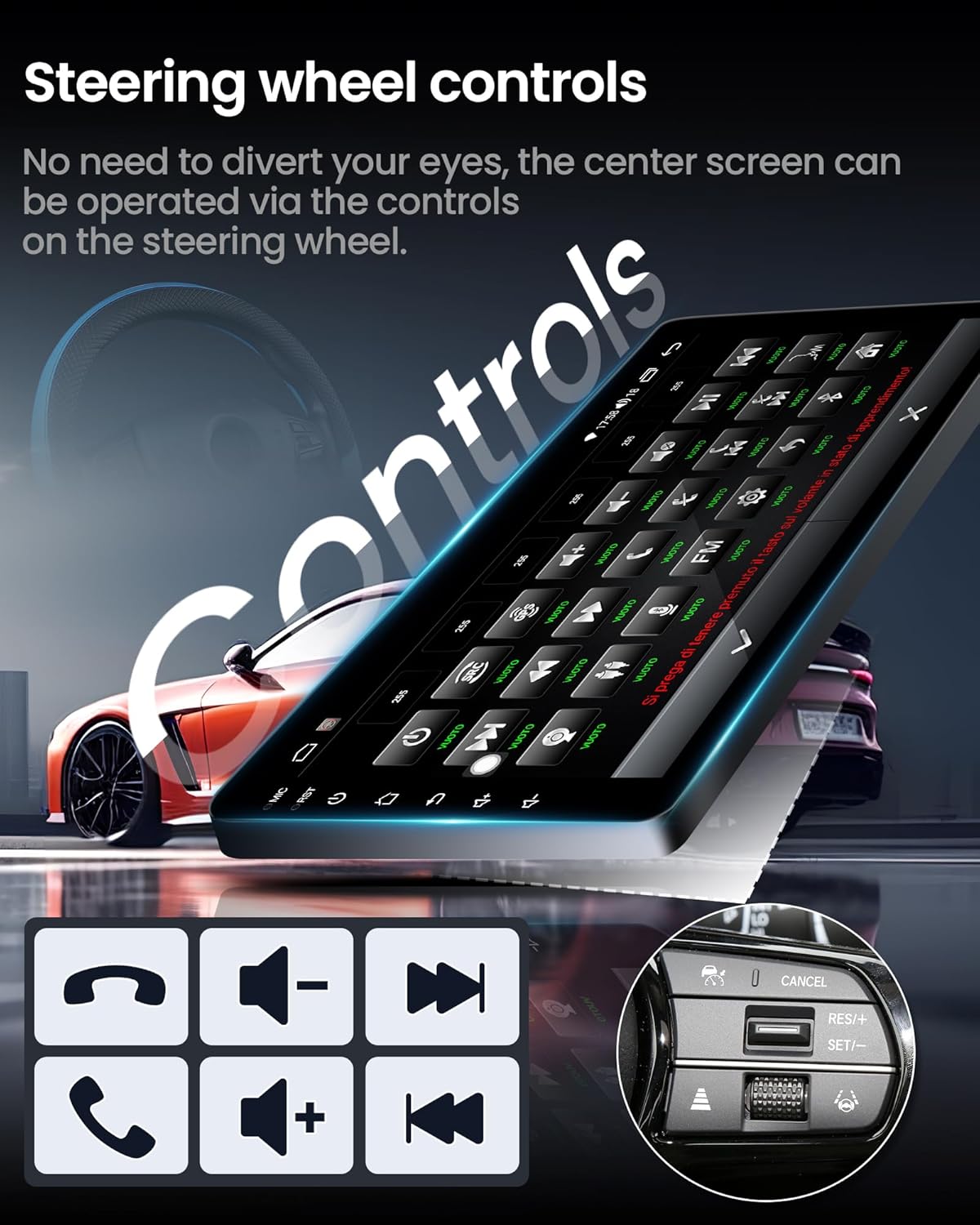
Image: A graphic demonstrating how the car radio stereo integrates with steering wheel controls, allowing drivers to operate the unit without diverting their eyes from the road.
Split Screen Function
The split-screen feature allows you to run two applications simultaneously, such as navigation on one side and music playback on the other, enhancing multitasking capabilities.

Image: The car radio screen displaying the split-screen function, showing a navigation map on one side and a music player on the other.
User Interface (UI) Customization
The system offers options for UI replacement, allowing you to select different home launcher styles to personalize your experience.
Product Demonstration Video
Video: A demonstration of the Fortdows Navi4G64 Car Radio Stereo's key features, including WiFi connection, Bluetooth 5.4 pairing, CarPlay functionality, RDS sound settings, FM radio operation, split-screen multitasking, GPS navigation, and UI replacement options.
Maintenance
- Screen Cleaning: Use a soft, lint-free cloth to clean the touchscreen. Avoid abrasive cleaners or solvents that may damage the display.
- Software Updates: Periodically check for system software updates to ensure optimal performance and access to new features. Updates can typically be performed via WiFi.
- Cable Connections: Ensure all cables are securely connected to prevent intermittent issues.
- Environmental Conditions: Avoid exposing the unit to extreme temperatures, direct sunlight for prolonged periods, or excessive moisture.
Troubleshooting
| Problem | Possible Cause | Solution |
|---|---|---|
| Unit does not power on. | Loose power connection, blown fuse, vehicle battery issue. | Check power cable connections. Inspect vehicle fuses. Verify vehicle battery charge. |
| No sound or distorted audio. | Incorrect wiring, speaker issues, audio settings misconfigured. | Verify speaker wiring. Check audio settings (EQ, balance, fade). Ensure volume is not muted. |
| Bluetooth/CarPlay/Android Auto not connecting. | Incorrect pairing, device compatibility, software glitch. | Ensure Bluetooth is enabled on both devices. Re-pair the device. Check for software updates. Verify device compatibility. |
| GPS signal loss or inaccurate positioning. | GPS antenna obstruction or faulty connection. | Ensure GPS antenna has a clear view of the sky and is securely connected. |
| Battery drain (as reported by some users). | Constant power draw, incorrect wiring. | Consult a professional installer to verify wiring, especially the ACC (accessory) and constant power connections. Ensure the unit powers off completely with the ignition. |
Specifications
| Feature | Detail |
|---|---|
| Model Name | Fortdows Navi4G64 |
| Operating System | Android 13 |
| RAM | 4GB |
| Internal Storage | 64GB |
| Screen Size | 7 Inches |
| Display Resolution | 1024*600 HD IPS Touchscreen |
| Connectivity Technology | Bluetooth 5.4, USB, Wi-Fi (5G supported) |
| Special Features | Wireless CarPlay, Android Auto, GPS Navigation, FM Radio, RDS, Voice Control, DSP Sound, Multi-EQ Settings, Backup Camera Input, Steering Wheel Control (SWC) |
| Audio Output Mode | Stereo |
| Item Weight | 3.43 pounds |
| Package Dimensions | 10.71 x 9.84 x 3.66 inches |
Warranty & Support
Fortdows is committed to providing quality products and customer satisfaction.


Images: Visuals detailing the product's 1-year warranty, 7-day return policy, and return on defects. Also includes customer support contact information: email (fortdows.cam@gmail.com) and website (www.fancygod.com).
- Warranty: This product comes with a 1-Year Warranty from the date of purchase.
- Return Policy: A 7-day return policy is applicable for eligible returns. Returns on defects are also accepted.
- Customer Support: For technical assistance, warranty claims, or any inquiries, please contact our support team:
- Email: fortdows.cam@gmail.com
- Website: www.fancygod.com
Please retain your proof of purchase for warranty services.


