
1. Introduction
This manual provides comprehensive instructions for the HUAYU RM-L1376M+ Universal TV Remote Control. Designed as a versatile replacement, this remote is compatible with a wide range of LED/LCD televisions from various brands, including Samsung, Sony, LG, and JVC. While it offers direct usability for many models, specific programming methods are available to ensure full compatibility with your television.

Figure 1: HUAYU RM-L1376M+ Universal TV Remote Control in its retail packaging.
2. Setup: Battery Installation
Before using your HUAYU RM-L1376M+ remote control, you must install two AAA batteries (not included).
- Locate the battery compartment on the back of the remote control.
- Slide the battery compartment cover downwards or outwards to open it.
- Insert two AAA batteries, ensuring the positive (+) and negative (-) terminals align correctly with the markings inside the compartment.
- Replace the battery compartment cover by sliding it back into place until it clicks securely.
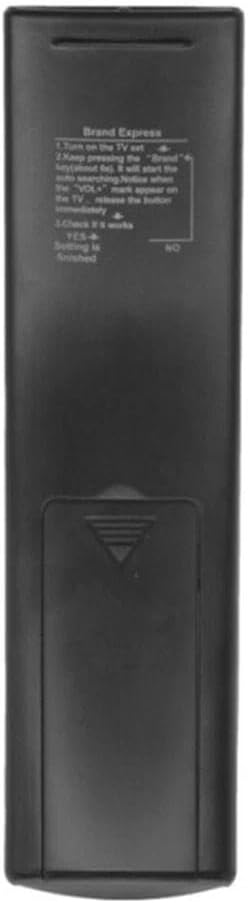
Figure 2: Back view of the remote control with the battery compartment.
3. Operating Instructions
The HUAYU RM-L1376M+ remote control is designed for ease of use with an ergonomic design and infrared connectivity. It can control one television at a time.
3.1 Basic Button Functions
Refer to the image below for a visual guide to the remote's buttons and their general functions. Common buttons include Power, Volume Up/Down, Channel Up/Down, Mute, Input/Source, and navigation keys.

Figure 3: Front view of the remote control, displaying all functional buttons.
3.2 Programming Methods for Universal Compatibility
While the remote may work directly with many TV models, if your television does not respond, use one of the following programming methods:
Method 1: Manual Search Code (SET + POWER)
- Press and hold the POWER button and the SET button simultaneously.
- Continue holding until the LED indicator on the remote lights up, then release both buttons.
- Continuously press the V+ (Volume Up) or V- (Volume Down) button. The remote will begin searching for your TV's brand code automatically.
- Stop pressing V+ or V- immediately when your TV displays the volume symbol on the screen.
- Press the SET button to store the code and exit the setup mode.
Method 2: Quick Search Code (Hold SET)
- Press and hold the SET button for approximately 6 seconds.
- The remote control will enter automatic search mode.
- Release the SET button immediately when your TV displays the volume symbol on the screen. The setting is now complete.
Method 3: Brand Search (Hold Brand Button)
This method is applicable if your remote has dedicated brand buttons (e.g., Samsung, Sony, LG, JVC, etc.).
- Press and hold the corresponding brand button (e.g., SAMSUNG) for approximately 6 seconds.
- The remote control will begin to search for the brand's specific codes.
- Release the button immediately when your TV displays the volume symbol on the screen. The setting is now complete.

Figure 4: Packaging detail with programming instructions.
4. Maintenance
To ensure the longevity and optimal performance of your remote control, follow these maintenance guidelines:
- Cleaning: Use a soft, dry cloth to clean the remote's surface. Avoid using liquid cleaners, solvents, or abrasive materials, as these can damage the remote.
- Storage: Store the remote in a cool, dry place away from direct sunlight and extreme temperatures.
- Protection: Avoid dropping the remote or exposing it to excessive force, which can damage internal components.
- Battery Care: If the remote will not be used for an extended period, remove the batteries to prevent leakage, which can cause damage.
5. Troubleshooting
If you encounter issues with your HUAYU RM-L1376M+ remote control, try the following solutions:
- Remote Not Responding:
- Check if the batteries are inserted correctly with the correct polarity.
- Replace old batteries with new AAA batteries.
- Ensure there is a clear line of sight between the remote and your TV's infrared receiver. Obstructions can block the signal.
- Remote Not Controlling TV:
- If the remote is not controlling your TV, it may not be correctly programmed for your specific TV model. Re-attempt one of the programming methods described in Section 3.2.
- Ensure your TV is powered on and not in standby mode.
- Buttons Not Working:
- Clean the remote's surface and buttons to remove any dirt or debris that might be obstructing button presses.
6. Specifications
| Feature | Detail |
|---|---|
| Model Number | RM-L1376M+ |
| Brand | HUAYU (Manufactured by XINFUTE) |
| Product Dimensions | 6 x 3 x 1 inches |
| Item Weight | 2.82 ounces |
| Batteries Required | 2 x AAA (not included) |
| Connectivity Technology | Infrared |
| Compatible Devices | Television (LED/LCD) |
| Max Supported Devices | 1 |
| Special Features | Ergonomic, Universal Compatibility |
| Material | ABS Material |
7. Warranty and Support
The HUAYU RM-L1376M+ Universal TV Remote Control comes with a one-year warranty from the date of purchase. This warranty covers manufacturing defects under normal use.
All products are inspected before shipment. If you are not satisfied with your purchase or encounter any issues, please contact the seller, XINFUTE, within 24 hours of receiving your product for assistance or to discuss return/replacement options.
For further support or inquiries, please refer to the contact information provided by your retailer or the manufacturer, XINFUTE.