
1. Introduction
This instruction manual provides essential information for the proper use and care of your Certina DS Action Gent Powermatic 80 Automatic Watch. This timepiece is designed for precision, durability, and water resistance, featuring an automatic movement with an anti-magnetic Nivachron balance spring.
Please read this manual thoroughly to ensure optimal performance and longevity of your watch.
2. Key Features
- Movement: Swiss Automatic Powermatic 80 with Nivachron anti-magnetic balance spring.
- Case Size: 40.50 mm diameter, 14.10 mm thickness.
- Water Resistance: Up to 300 meters (990 feet), suitable for diving and snorkeling.
- Crystal: Sapphire Crystal.
- Bracelet: Steel with Push Button Foldover Clasp and Safety, featuring a diver's extension.
- Functions: Date display, unidirectional rotating bezel.
- Additional Features: Luminous hands and markers (Glow In The Dark), Shock Resistant.
3. Setup
3.1 Winding the Watch
Your Certina DS Action Gent watch is equipped with an automatic movement. It is powered by the motion of your wrist. If the watch has stopped or its power reserve is low, it can be manually wound:
- Unscrew the crown counter-clockwise to unlock it from the case.
- In position 1 (neutral position, unscrewed), turn the crown clockwise approximately 30-40 times. This will provide sufficient power reserve to start the watch.
- The watch will start running automatically.
3.2 Setting the Time and Date
To set the time and date:
- Unscrew the crown counter-clockwise.
- Pull the crown out to position 2 to set the date. Turn the crown clockwise or counter-clockwise until the correct date is displayed. Avoid setting the date between 9 PM and 3 AM, as this can damage the movement.
- Pull the crown out to position 3 to set the time. Turn the crown to move the hands clockwise until the correct time is displayed. Ensure the AM/PM is correctly set by observing the date change (the date changes around midnight).
- Once the time and date are set, push the crown back into position 1 and screw it clockwise firmly against the case to ensure water resistance.

Image: Side view of the Certina DS Action Gent watch, highlighting the screw-down crown for time and date adjustment.
3.3 Adjusting the Bracelet
The steel bracelet features a push-button foldover clasp with safety and a diver's extension for fine adjustment. For initial sizing, links may need to be added or removed by a qualified watchmaker. The diver's extension allows for quick micro-adjustments to ensure a comfortable fit over a wetsuit or for daily wear.
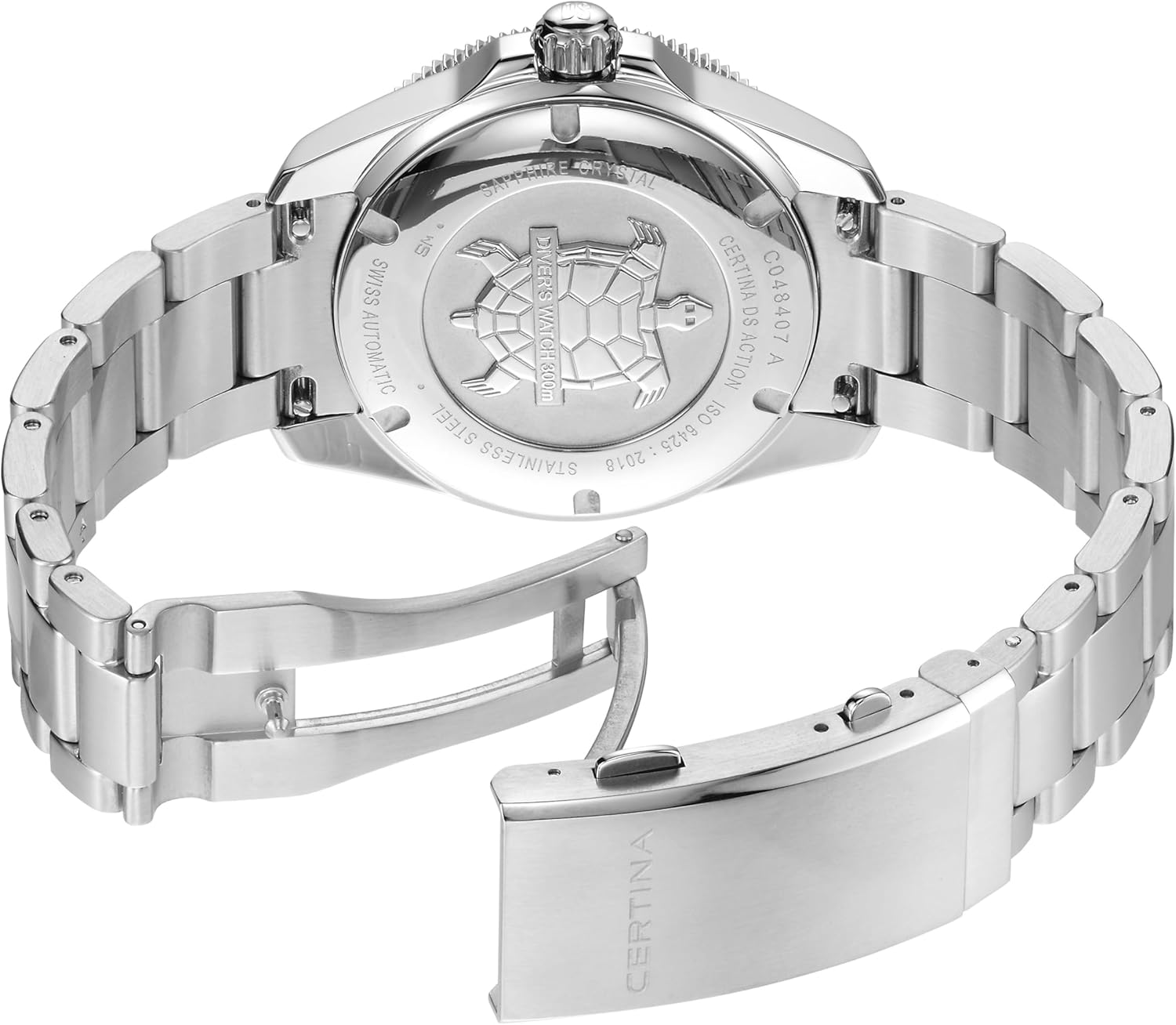
Image: View of the Certina DS Action Gent watch bracelet and its deployant clasp with safety, showing the mechanism for securing the watch on the wrist.
4. Operating Instructions
4.1 General Use
Once set, your automatic watch will continue to run as long as it is worn regularly. The Powermatic 80 movement offers an extended power reserve of approximately 80 hours when fully wound. If the watch is not worn for an extended period, it may stop and require manual winding and time/date adjustment as described in Section 3.1 and 3.2.
4.2 Using the Unidirectional Rotating Bezel
The DS Action Gent features a unidirectional rotating bezel, primarily used for timing dives or other events.
- Before starting a dive or timed event, rotate the bezel counter-clockwise until the zero marker aligns with the minute hand.
- The minute hand will then indicate the elapsed time on the bezel's scale.
- The bezel rotates only counter-clockwise to prevent accidental increases in perceived elapsed time, which is a critical safety feature for divers.

Image: Front view of the Certina DS Action Gent watch, showcasing the black dial, luminous hands and markers, and the unidirectional rotating bezel.
4.3 Water Resistance
This watch is water-resistant up to 300 meters (990 feet), making it suitable for professional diving. To maintain water resistance:
- Always ensure the crown is fully screwed down against the case before exposing the watch to water.
- Do not operate the crown or pushers (if present) while the watch is submerged or wet.
- Rinse the watch with fresh water after exposure to saltwater or chlorinated water.
- Have the water resistance checked periodically (e.g., every 2-3 years) by an authorized service center.
5. Maintenance
5.1 Cleaning
Clean your watch regularly with a soft, damp cloth. For the steel bracelet, a soft brush and soapy water can be used, followed by a thorough rinse with fresh water and drying with a soft cloth. Ensure the crown is screwed down before cleaning with water.
5.2 Service
Like any precision instrument, your automatic watch requires periodic servicing to ensure optimal performance and accuracy. It is recommended to have your watch serviced by an authorized Certina service center every 3-5 years. This service typically includes cleaning, lubrication, and adjustment of the movement, as well as replacement of seals to maintain water resistance.
5.3 Storage
When not wearing your watch, store it in a dry place away from direct sunlight, extreme temperatures, and strong magnetic fields. If storing for an extended period, a watch winder can keep the automatic movement running and prevent the lubricants from settling.

Image: Rear view of the Certina DS Action Gent watch, showing the engraved case back with the Certina turtle logo and model information.

Image: The Certina DS Action Gent watch displaying its luminous hands and hour markers glowing in low light conditions, enhancing readability.
6. Troubleshooting
- Watch has stopped: If the watch has stopped, it likely needs to be wound. Manually wind the watch by unscrewing the crown and turning it clockwise 30-40 times in position 1. If it still does not start, ensure it is not exposed to strong magnetic fields.
- Time is inaccurate: Automatic watches can gain or lose a few seconds per day. If the inaccuracy is significant (e.g., several minutes per day), the watch may need adjustment or servicing. Ensure the watch is fully wound.
- Date not changing correctly: Ensure the time is set correctly, especially the AM/PM cycle. If the date changes at noon, you need to advance the time by 12 hours. Avoid setting the date between 9 PM and 3 AM.
- Condensation under the crystal: This indicates a loss of water resistance. Immediately take the watch to an authorized service center to prevent further damage to the movement.
- Crown not screwing down: Check for any debris in the crown threads. If it still doesn't screw down, do not expose the watch to water and seek professional assistance.
For issues not covered here, please contact an authorized Certina service center.
7. Specifications
| Feature | Specification |
|---|---|
| Model Number | C0484071105101 |
| Movement Type | Swiss Automatic (Powermatic 80, Nivachron) |
| Case Material | Alloy Steel |
| Case Diameter | 40.5 mm |
| Case Thickness | 14.1 mm |
| Crystal | Sapphire Crystal |
| Band Material | Steel |
| Band Width | 20 mm |
| Band Length | 179.64 mm |
| Clasp Type | Push Button Foldover Clasp With Safety |
| Water Resistance Depth | 300 Meters (990 Feet) |
| Dial Color | Black |
| Weight | 190 Grams |
| Additional Features | Glow In The Dark, Shock Resistant |
8. Warranty and Support
Your Certina DS Action Gent watch comes with a 2-Year International Warranty. This warranty covers manufacturing defects and material flaws under normal use. Please refer to the included warranty card for full terms and conditions.
For warranty claims, service, or technical support, please contact an authorized Certina service center. Using unauthorized service providers may void your warranty.
Keep your purchase receipt and warranty card in a safe place as proof of purchase and for warranty validation.