
Introduction
This manual provides comprehensive instructions for the installation, operation, maintenance, and troubleshooting of your Aroepurt IMDH-HS phone case and tempered glass screen protector, designed specifically for the Foxx Foxxd A67m Lite smartphone. Please read this manual carefully to ensure proper use and maximize the lifespan of your product.
What's in the Box
- 1x Aroepurt IMDH-HS Phone Case
- 1x Tempered Glass Screen Protector
Setup
1. Phone Case Installation
- Ensure your Foxx Foxxd A67m Lite phone is clean and free of dust or debris.
- Gently insert the phone into the soft silicone frame of the case, starting with one side.
- Press the phone firmly into the case, ensuring all edges are securely seated within the frame. The PC hard back panel will provide rigid protection, while the silicone frame and four-corner shock airbags absorb impacts.
- Verify that all ports, buttons, and camera lenses are properly aligned with the case cutouts. The case is designed to be higher than the camera and screen for enhanced flat surface protection.

Image: Overview of the Aroepurt IMDH-HS phone case with integrated ring stand and included tempered glass screen protector.

Image: Illustration of the shockproof design featuring four-corner thickening and internal shock airbags for impact absorption.
2. Tempered Glass Screen Protector Installation
- Thoroughly clean your phone screen using an alcohol wipe and microfiber cloth to remove all dust, smudges, and fingerprints. A clean screen is crucial for bubble-free application.
- Carefully peel off the protective film from the adhesive side of the tempered glass. Avoid touching the adhesive surface.
- Align the tempered glass with your phone screen, ensuring the cutouts for the speaker and camera are correctly positioned.
- Once aligned, gently lower the tempered glass onto the screen. It will adhere automatically.
- If any small bubbles remain, gently push them towards the edges of the screen using a soft cloth or your finger.

Image: Diagram highlighting key features of the tempered glass screen protector, including 9H High Hardness, Perfect Adhesion, Shatterproof, Case Friendly, 99.9% Super Transparency, and Anti-fingerprint properties.

Image: Visual demonstration of the tempered glass screen protector's scratch-proof capability, showing resistance against sharp objects.
Operating Instructions
1. Ring Stand Functionality
- The integrated metal finger ring support can be rotated 360 degrees and flipped 180 degrees for comfortable viewing angles in landscape or portrait mode.
- It can also be used as a secure grip to prevent accidental drops, facilitating one-hand operation of your device.
- The ring stand is attached with adhesive and can be used directly on the case or separated for individual use if desired.

Image: Illustration demonstrating how the ring stand enhances one-hand operation, allowing easier access to all areas of the phone screen.
2. Magnetic Car Mount Compatibility
- The metal plate integrated into the ring stand allows for convenient attachment to magnetic car mounts (car mount not included).
- Important Note: This case does not support wireless charging due to the metal components. Please remove the case for wireless charging or use a wired charger.

Image: Visual showing the ring stand's compatibility with a magnetic car mount, allowing for secure phone placement in a vehicle.
3. Design Features
- The case features a frosted surface for a delicate feel and a unique IMD laser style that produces colorful reflection effects from different angles.
- The back panel is constructed with four layers: a solid PC base, an ultra-high definition pattern layer, a special process layer, and a clear, scratch-resistant surface layer for durability and aesthetic appeal.
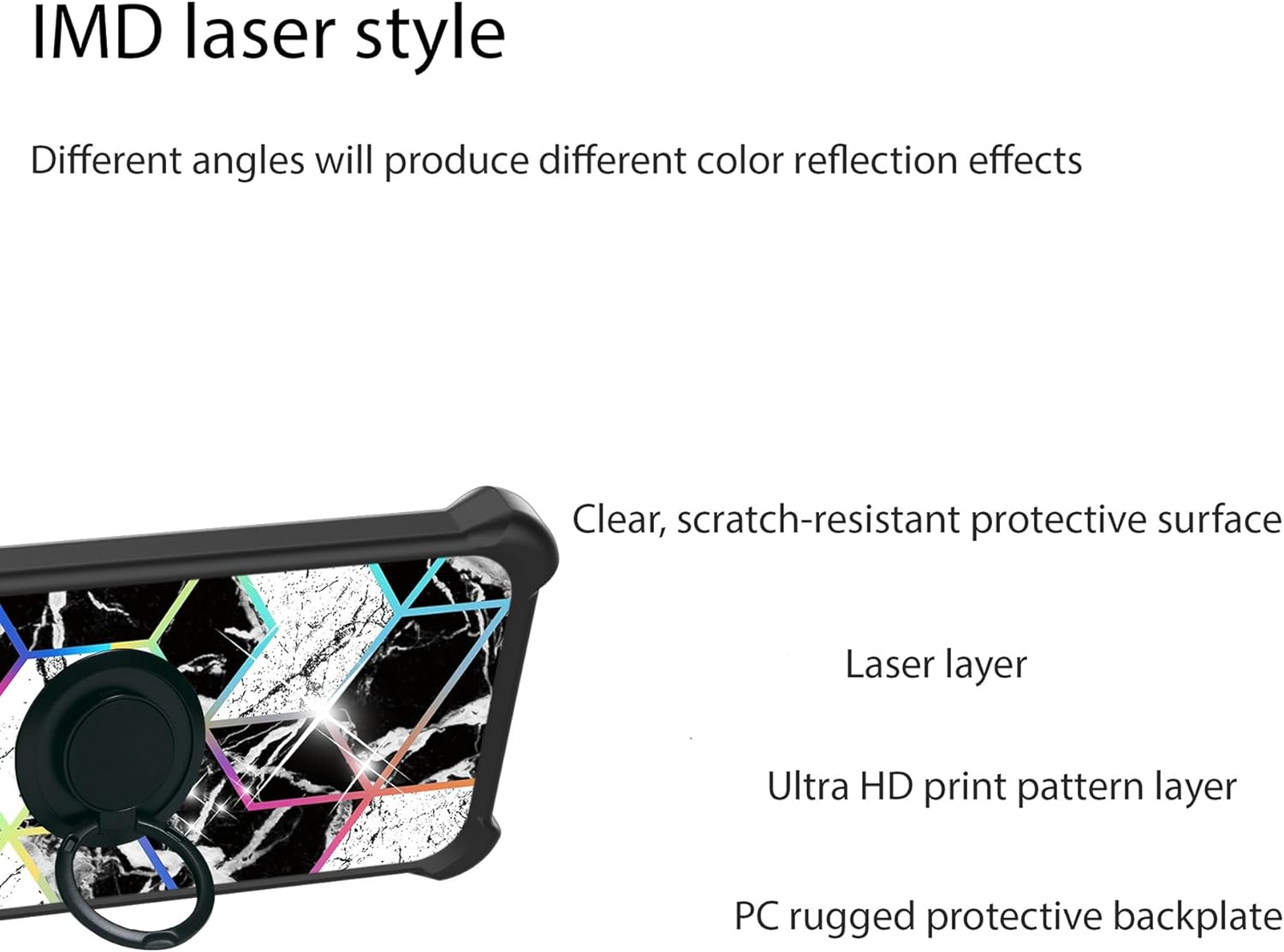
Image: Detailed view of the IMD laser style design and the layered construction of the case's back panel, highlighting the clear, scratch-resistant surface, laser layer, ultra HD print pattern, and PC rugged protective backplate.
Maintenance
- Cleaning the Case: Use a soft, damp cloth to wipe down the case. For stubborn dirt, a mild soap solution can be used. Avoid harsh chemicals or abrasive materials.
- Cleaning the Screen Protector: Use a microfiber cloth to gently wipe the screen protector. For smudges, a screen cleaner spray designed for electronics can be applied to the cloth (not directly to the screen).
- Avoid Extreme Temperatures: Do not expose the case or screen protector to extreme heat or cold, as this may affect their material integrity.
- Inspect Regularly: Periodically check the case and screen protector for any signs of wear or damage. Replace if significant damage is observed to maintain optimal protection.
Troubleshooting
Screen Protector Bubbles
- Small Bubbles: Often disappear within 24-48 hours. You can gently push them towards the edge with a soft cloth.
- Large Bubbles/Dust: If bubbles persist or are caused by dust, carefully lift the nearest corner of the screen protector, use a dust-removal sticker to lift the dust particle, and reapply.
Ring Stand Adhesion
- Ensure the surface where the ring stand is applied (if detached from the case) is clean and dry before application.
- Apply firm pressure for a few seconds after attaching to ensure strong adhesion.
Case Fit Issues
- Double-check that your phone model is indeed the Foxx Foxxd A67m Lite. This case is specifically designed for that model.
- Ensure the phone is fully seated within the case and not obstructed by any foreign objects.
Specifications
| Feature | Detail |
|---|---|
| Product Dimensions | 0.39 x 0.39 x 0.39 inches |
| Item Weight | 2.46 ounces |
| Special Features | 360 Rotating Ring, Car Magnetic Fixing, Stylish Design |
| Form Factor | Basic Case |
| Color | IMDH-HS |
| Material | Hard PC + Soft Silicone |
| Screen Protector Hardness | 9H |
Warranty and Support
For any questions, concerns, or warranty claims regarding your Aroepurt IMDH-HS phone case and tempered glass screen protector, please contact the seller directly through your purchase platform. Please retain your proof of purchase for warranty purposes.