
Introduction
Thank you for choosing the Aroepurt Phone Case and Tempered Glass Screen Protector for your Kxd Blue Sea A16 Plus. This manual provides essential information for the proper installation, use, and maintenance of your product to ensure optimal protection and functionality.
What's in the Box
- 1 x Aroepurt Phone Case (Model IMDH-HS)
- 1 x Tempered Glass Screen Protector
Setup and Installation
1. Installing the Tempered Glass Screen Protector
Follow these steps to correctly install the tempered glass screen protector:
- Clean the Screen: Use a microfiber cloth to thoroughly clean your phone's screen, removing all dust, smudges, and fingerprints. Ensure the screen is completely dry.
- Align the Protector: Carefully align the tempered glass screen protector with your phone's screen. Pay attention to the cutouts for the speaker, camera, and home button (if applicable).
- Apply: Once aligned, gently place the protector onto the screen. It will adhere automatically.
- Remove Bubbles: If any bubbles appear, gently push them towards the edges of the screen using a soft cloth or squeegee.

Image: Key features of the tempered glass screen protector.

Image: Tempered glass screen protector demonstrating scratch resistance.
2. Installing the Phone Case
To install the phone case:
- Ensure your phone is clean and free of debris.
- Gently insert your Kxd Blue Sea A16 Plus phone into the soft silicone frame of the case.
- Press firmly around the edges to ensure the phone is securely seated within the case.

Image: Phone case highlighting shockproof features and material composition.
Operating Instructions
Using the Integrated Ring Support
The phone case features an adhesive metal finger ring support for enhanced grip and hands-free viewing. This ring can rotate 360 degrees and pivot 180 degrees.
- Finger Grip: Slide your finger through the ring for a secure hold, reducing the risk of accidental drops.
- Kickstand Function: Rotate the ring to a desired angle to prop up your phone for comfortable horizontal or vertical viewing.
- One-Hand Operation: The ring support allows for easier one-handed operation, enabling you to reach more areas of your screen.

Image: Demonstrating improved one-hand operation with the ring support.
Magnetic Car Mount Compatibility
The metal plate integrated into the ring support allows for compatibility with magnetic car mounts. Simply attach your phone case to a magnetic car mount (not included) for secure in-car navigation or hands-free use.
Note: This case does not support wireless charging when the metal ring is attached or if the phone is placed on a wireless charger with the case on. Please remove the case for wireless charging.

Image: Phone case demonstrating magnetic car mount compatibility and ring rotation.
Maintenance
To keep your phone case and screen protector in optimal condition:
- Cleaning the Case: Wipe the case regularly with a soft, damp cloth. For stubborn dirt, a mild soap solution can be used, followed by wiping with a clean, damp cloth and air drying.
- Cleaning the Screen Protector: Use a microfiber cloth to gently wipe the screen protector. For smudges, a screen cleaner spray designed for electronics can be used.
- Avoid Harsh Chemicals: Do not use abrasive cleaners, solvents, or harsh chemicals, as these can damage the case material or screen protector coating.
- Avoid Extreme Temperatures: Prolonged exposure to extreme heat or cold can affect the material integrity of the case.
Troubleshooting
This section addresses common questions or minor issues you might encounter.
- Q: My screen protector has bubbles after installation.
- A: Small bubbles can often be pushed out towards the edges using a soft cloth or a credit card wrapped in a cloth. If large bubbles persist, it might indicate dust particles. Carefully lift a corner of the protector, remove any dust with a dust absorber sticker, and reapply.
- Q: The ring support feels loose.
- A: The ring support is designed for 360-degree rotation and 180-degree pivot. If it feels excessively loose or does not hold its position, ensure it is fully extended or retracted. If the adhesive base is loose, it may need to be re-adhered or replaced.
- Q: My phone is not wirelessly charging with the case on.
- A: The integrated metal ring in the case interferes with wireless charging. Please remove the case before placing your phone on a wireless charging pad.
Specifications
| Feature | Detail |
|---|---|
| Product Model | IMDH-HS |
| Compatibility | Kxd Blue Sea A16 Plus |
| Case Material | Hard PC (Polycarbonate) back panel, Soft Silicone frame |
| Case Features | Four-corner Shock Airbags, Frosted surface, Colorful Reflect Light, Raised edges for camera and screen protection |
| Ring Support | Adhesive metal, 360° rotation, 180° pivot, Magnetic car mount compatible |
| Screen Protector Type | Tempered Glass |
| Screen Protector Hardness | 9H |
| Screen Protector Transparency | 99.9% Super Transparency |
| Product Dimensions | 0.39 x 0.39 x 0.39 inches (Case only, approximate) |
| Item Weight | 2.46 ounces (Case only, approximate) |
| Manufacturer | GX2503-239 ARO-IMD |
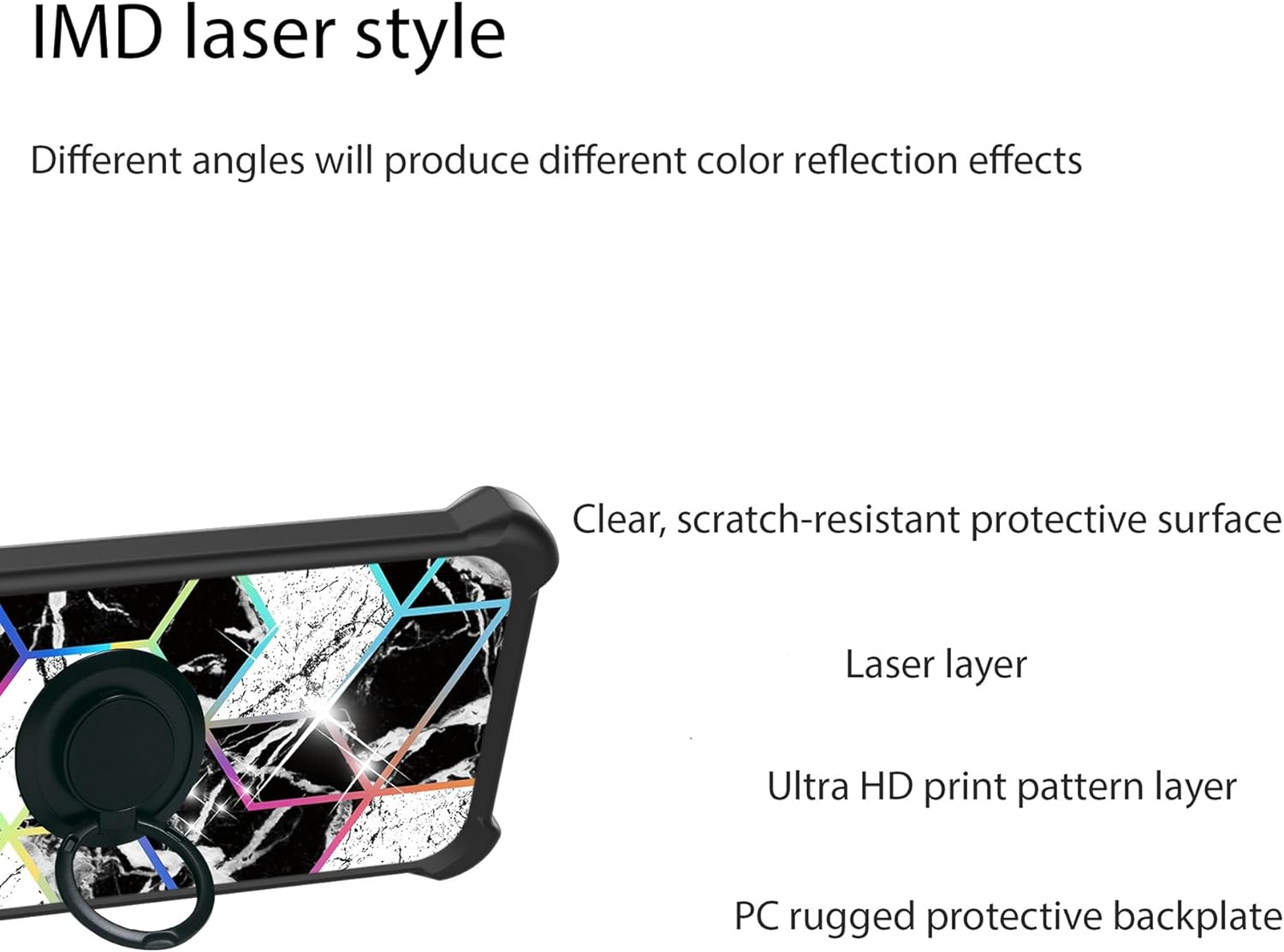
Image: Exploded view of the case's multi-layer back panel construction.
Warranty and Support
For warranty information or customer support, please refer to the seller's policy on the platform where the product was purchased or contact Aroepurt customer service directly through their official channels. Keep your purchase receipt as proof of purchase.
Manufacturer: GX2503-239 ARO-IMD
Date First Available: April 17, 2025