
1. Introduction
Thank you for choosing the Kisonli SC-01 Bluetooth Speaker. This portable wireless speaker is designed to deliver powerful audio with versatile playback options, including Bluetooth, TF card, USB, and FM radio. Its compact design and rechargeable battery make it ideal for on-the-go use. Please read this manual carefully to ensure proper use and optimal performance of your device.
2. Safety Information
- Do not expose the speaker to water, moisture, or extreme temperatures.
- Avoid dropping or subjecting the speaker to strong impacts.
- Do not attempt to disassemble or repair the speaker yourself. Refer all servicing to qualified personnel.
- Keep the speaker away from children and pets.
- Use only the provided charging cable or a certified DC 5V charger.
- Dispose of the battery according to local regulations. Do not incinerate.
3. Package Contents
Please check the package for the following items:
- Kisonli SC-01 Bluetooth Speaker
- USB Charging Cable
- User Manual
If any items are missing or damaged, please contact your retailer.
4. Product Overview
Familiarize yourself with the various parts and controls of your Kisonli SC-01 Bluetooth Speaker.

Figure 4.1: Front and side view of the Kisonli SC-01 speaker with dimensions (Length: 146.0mm, Height: 80.0mm, Depth: 43.0mm).

Figure 4.2: Rear view of the Kisonli SC-01 speaker, highlighting the control panel, ports, and solar charging panel.
Control Panel and Ports:
- ON/OFF Switch: Powers the speaker on or off.
- USB Port: For playing music from a USB flash drive.
- TF Card Slot: For playing music from a MicroSD/TF card.
- DC 5V Charging Port: Connect the USB charging cable here to charge the speaker.
- Retractable Antenna: Used for FM radio reception.
- Mode Button (M): Switches between Bluetooth, FM Radio, TF Card, and USB playback modes.
- Previous Track / Volume Down Button (-): Short press for previous track, long press to decrease volume.
- Play/Pause Button (>||): Plays or pauses music. In FM mode, long press to auto-scan stations.
- Next Track / Volume Up Button (+): Short press for next track, long press to increase volume.
Other Features:
- Solar Charging Panel: Located on the back, provides an alternative charging method using sunlight.
- Integrated Strap: For easy portability.
5. Setup
5.1 Charging the Speaker
Before first use, fully charge the speaker. There are two charging methods:
- USB Charging: Connect the provided USB charging cable to the DC 5V port on the speaker and the other end to a USB power adapter (not included) or a computer's USB port. The charging indicator light will illuminate.
- Solar Charging: Place the speaker with the solar panel facing direct sunlight. This method is slower and intended for supplementary charging or maintaining charge.
A full charge typically takes 2-3 hours via USB. The charging indicator will change or turn off once charging is complete.
5.2 Powering On/Off
Slide the ON/OFF switch located on the back of the speaker to the 'ON' position to power on. Slide it to 'OFF' to power off.
5.3 Bluetooth Pairing
- Ensure the speaker is powered on and in Bluetooth mode. If not, press the Mode (M) button until you hear a prompt indicating Bluetooth mode. The speaker will enter pairing mode, and an indicator light (usually blue) will flash.
- On your mobile device (smartphone, tablet, laptop), enable Bluetooth and search for available devices.
- Select "SC-01" from the list of found devices.
- Once paired, the speaker will emit a confirmation tone, and the Bluetooth indicator light will stop flashing and remain solid.
- You can now play audio from your device through the speaker.
6. Operating Instructions
6.1 Basic Playback Controls
- Play/Pause: Short press the Play/Pause button (>||).
- Volume Up: Long press the Volume Up button (+).
- Volume Down: Long press the Volume Down button (-).
- Next Track: Short press the Volume Up button (+).
- Previous Track: Short press the Volume Down button (-).
6.2 Switching Modes
Press the Mode (M) button repeatedly to cycle through available modes: Bluetooth, FM Radio, TF Card, and USB. The speaker will automatically switch to the relevant mode if a TF card or USB drive is inserted.
6.3 TF Card / USB Playback
- Insert a TF card or USB flash drive (with MP3/WAV audio files) into the corresponding slot.
- The speaker will automatically detect the storage device and switch to TF card or USB mode, beginning playback.
- Use the Play/Pause, Next Track, and Previous Track buttons to control playback.
6.4 FM Radio Mode
- Extend the retractable antenna for better reception.
- Press the Mode (M) button to switch to FM Radio mode.
- Auto-Scan: Long press the Play/Pause button (>||) to automatically scan and save available FM stations.
- Manual Station Selection: Short press the Next Track (+) or Previous Track (-) buttons to navigate through saved stations.
7. Maintenance
- Cleaning: Use a soft, dry cloth to clean the speaker. Do not use liquid cleaners or aerosols.
- Storage: Store the speaker in a cool, dry place away from direct sunlight and extreme temperatures when not in use for extended periods.
- Battery Care: To prolong battery life, avoid fully discharging the speaker frequently. Charge it regularly, even if not in use.
8. Troubleshooting
| Problem | Possible Cause | Solution |
|---|---|---|
| Speaker does not power on. | Battery is low or depleted. | Charge the speaker using the USB cable or solar panel. |
| No sound. | Volume is too low; device not connected; incorrect mode. | Increase volume; ensure Bluetooth is paired or TF/USB is inserted; press 'M' to select correct mode. |
| Cannot pair via Bluetooth. | Speaker not in pairing mode; device Bluetooth off; too far apart. | Ensure speaker is in Bluetooth mode (flashing indicator); enable Bluetooth on your device; move devices closer (within 10m). |
| FM radio reception is poor. | Antenna not extended; weak signal. | Fully extend the antenna; try moving the speaker to a different location. |
9. Specifications
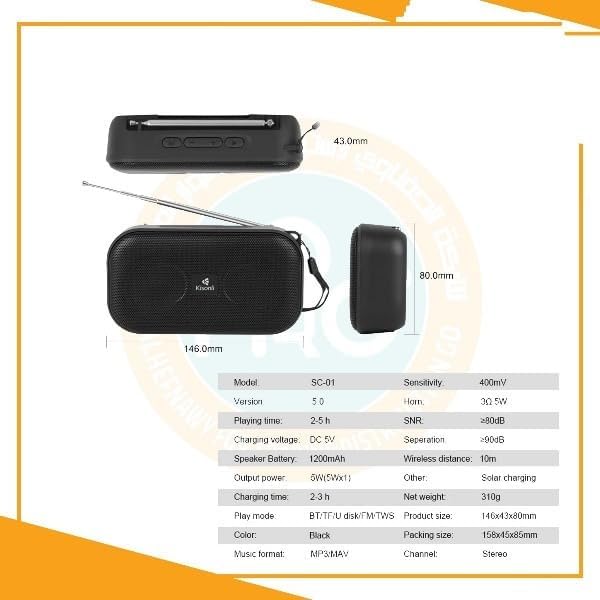
Figure 9.1: Detailed technical specifications for the Kisonli SC-01 speaker.
| Feature | Detail |
|---|---|
| Model | SC-01 |
| Brand | Kisonli |
| Color | Black |
| Output Power | 5W (5W x 1) |
| Speaker Battery | 1200mAh |
| Playtime | Up to 5 hours |
| Charging Voltage | DC 5V |
| Charging Time | 2-3 hours |
| Connectivity Technology | Wireless (Bluetooth) |
| Bluetooth Version | 5.0 |
| Wireless Distance | Up to 10 meters |
| Supported Play Modes | Bluetooth, TF Card, USB, FM Radio |
| Supported Music Formats | MP3, WAV |
| Control Method | Touch buttons |
| Special Features | Compact design, Solar charging, Rechargeable battery |
| Item Weight | 100 grams |
| Product Dimensions | 146mm x 80mm x 43mm |
| SNR (Signal-to-Noise Ratio) | ≥80dB |
| Separation | ≥90dB |
| Channel | Stereo |
10. Warranty and Support
The Kisonli SC-01 Bluetooth Speaker comes with a standard manufacturer's warranty. For specific warranty details, please refer to the warranty card included in your package or contact your point of purchase. If you encounter any issues or have questions regarding your speaker, please reach out to the retailer or manufacturer's customer support for assistance.
Please retain your proof of purchase for warranty claims.