
1. Safety Information
Please read this manual carefully before operating the Carson Akuma Buggy. Failure to follow instructions may result in damage to the product or personal injury. Keep this manual for future reference.
- Age Recommendation: This product is not suitable for individuals under 14 years of age.
- Packaging: Retain the packaging as it contains important information.
- Modifications: Illustrations may differ from the actual product. Carson reserves the right to make improvements and changes at any time.
- Battery Safety: Handle LiPo batteries with extreme care. Always use the specified charger and follow charging instructions. Do not overcharge or discharge batteries.
- Operating Environment: Operate the vehicle in open areas, away from people, pets, and obstacles. Avoid public roads.
- Water Resistance: While the RC components are waterproof, avoid prolonged submersion or extreme wet conditions to prevent damage.
2. Package Contents
The Carson Akuma Buggy 4WD 100% RTR package includes all necessary components for immediate operation:
- Carson Akuma Buggy 4WD RC Vehicle
- 2.4 GHz Remote Control System
- 2x LiPo Drive Batteries
- 4x AA Transmitter Batteries
- LiPo Battery Charger
- Instruction Manual

Image 2.1: All components included in the Carson Akuma Buggy 4WD 100% RTR package, including the buggy, remote control, batteries, and charger.
3. Setup
3.1. Charging the Drive Batteries
- Connect the LiPo charger to a suitable power source.
- Connect the LiPo drive batteries to the charger. Ensure correct polarity.
- Monitor the charging process. Do not leave batteries unattended while charging.
- Once fully charged, disconnect the batteries from the charger.
3.2. Installing Transmitter Batteries
- Open the battery compartment on the back of the 2.4 GHz remote control.
- Insert the 4x AA batteries, observing the correct polarity (+/-).
- Close the battery compartment securely.
3.3. Installing Vehicle Drive Batteries
- Remove the body clips and lift the vehicle body to access the chassis.
- Place the charged LiPo drive batteries into the battery trays.
- Secure the batteries using the provided straps.
- Connect the battery connectors to the Electronic Speed Controller (ESC). Ensure a secure connection.
- Replace the vehicle body and secure it with the body clips.

Image 3.1: View of the battery compartment showing the secure installation of the LiPo drive batteries with retention straps.
4. Operating Instructions
4.1. Powering On and Binding
- Turn on the remote control first.
- Turn on the vehicle's power switch (usually located on the ESC).
- The remote control and vehicle should automatically bind. If not, refer to the specific binding procedure in the remote control manual.
4.2. Basic Controls
- Steering Wheel: Turn left or right to control the vehicle's direction.
- Throttle Trigger: Pull to accelerate forward, push to brake or reverse.
- Trim Dials: Adjust steering and throttle trim if the vehicle does not drive straight or stops when the trigger is neutral.
4.3. Driving Tips
- Start with slow speeds to familiarize yourself with the controls.
- The Akuma Buggy is designed for off-road use. Its 4WD system and robust chassis provide excellent traction and durability on various terrains.
- Avoid driving into deep water or mud, despite the waterproof electronics, to prevent mechanical damage.
- The powerful brushless motor allows speeds up to 70 km/h. Exercise caution at high speeds.

Image 4.1: The Carson Akuma Buggy positioned on a dirt mound, demonstrating its suitability for challenging off-road environments.
5. Maintenance
Regular maintenance ensures optimal performance and longevity of your Akuma Buggy.
- Cleaning: After each use, especially in dirty or dusty conditions, clean the vehicle. Use a soft brush or compressed air to remove dirt from the chassis, suspension, and motor. Avoid using water directly on electronics unless specifically designed for it.
- Inspection: Regularly check for loose screws, damaged parts, or worn tires. Tighten any loose fasteners. Replace damaged components promptly.
- Lubrication: Periodically lubricate moving parts such as universal joints and bearings with RC-specific lubricant.
- Battery Storage: Store LiPo batteries at a 'storage charge' level (around 3.8V per cell) if not used for extended periods. Store them in a cool, dry place, away from direct sunlight and flammable materials.
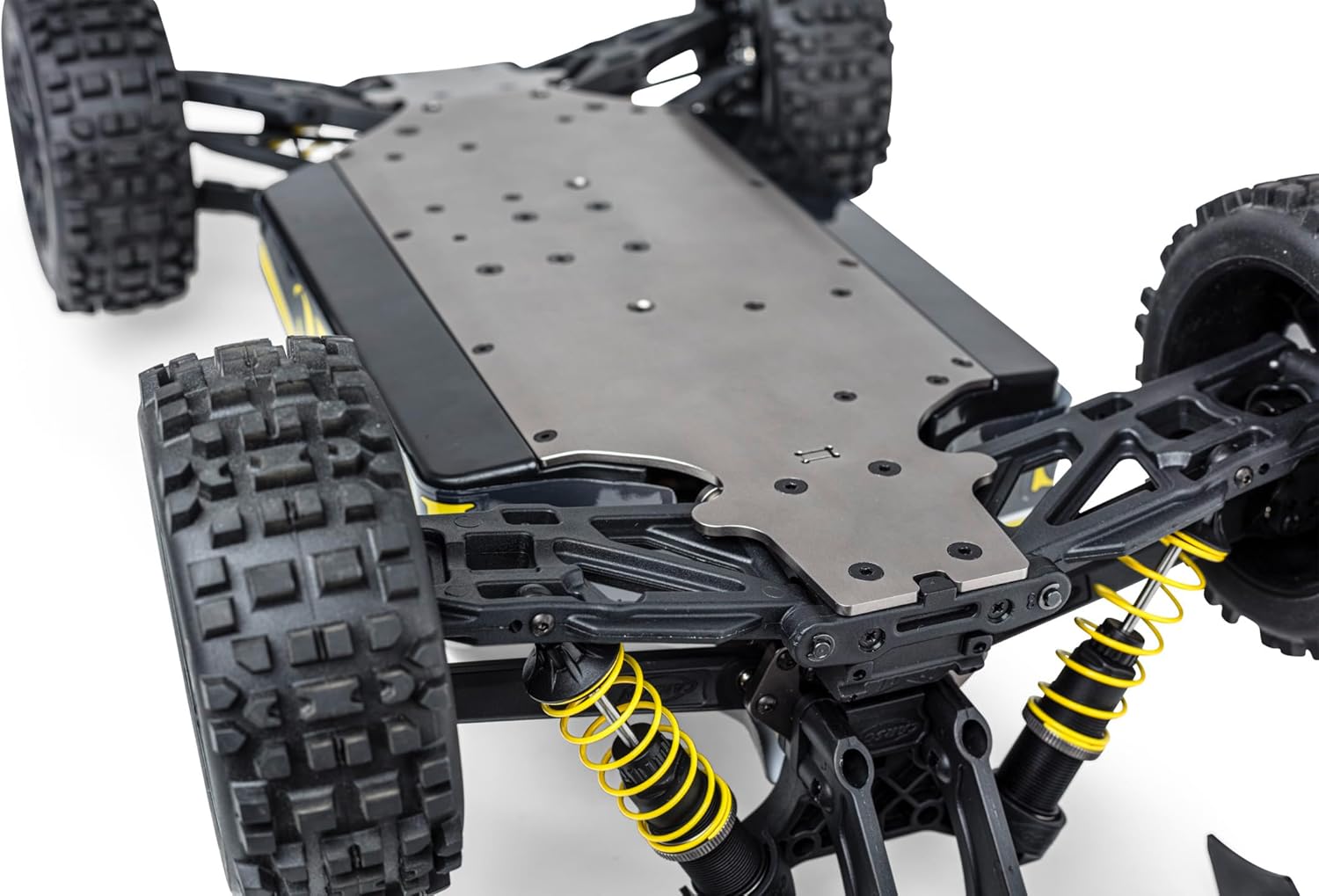
Image 5.1: The robust aluminum chassis of the Akuma Buggy, visible from below, showing the durable construction and suspension system.
6. Troubleshooting
If you encounter issues, refer to the following common troubleshooting steps:
| Problem | Possible Cause | Solution |
|---|---|---|
| Vehicle does not respond | Low or dead batteries (vehicle/transmitter), not bound, power switch off | Charge/replace batteries, ensure both power switches are ON, re-bind transmitter and receiver |
| Poor range or intermittent control | Interference, low transmitter batteries | Change operating location, replace transmitter batteries, check antenna position |
| Vehicle drives crooked | Steering trim incorrect, damaged steering components | Adjust steering trim on transmitter, inspect steering servo and linkages for damage |
| Motor not running or running slowly | Low vehicle battery, motor/ESC overheating, debris in drivetrain | Charge vehicle battery, allow components to cool, clear any obstructions from gears/motor |
7. Specifications
Key technical specifications for the Carson Akuma Buggy 4WD:
| Feature | Detail |
|---|---|
| Model Number | 500409083 |
| Scale | 1:8 |
| Drive System | 4WD (Four-Wheel Drive) |
| Motor Type | Brushless (100A 4S, 2050 Kv) |
| Maximum Speed | Up to 70 km/h |
| Chassis Material | Aluminum |
| Steering Servo | 20 kg with metal gearbox |
| Radio System | 2.4 GHz |
| Vehicle Batteries | 2x LiPo (included) |
| Transmitter Batteries | 4x AA (included) |
| Dimensions (L x W x H) | 65.5 x 34.7 x 22.5 cm (approx.) |
| Weight | 5.56 kg (approx.) |
| Material | Plastic (body), Aluminum (chassis) |
| Color | Pink |

Image 7.1: A visual representation of the Akuma Buggy's size, indicating a length of approximately 51.5 cm for scale.
8. Warranty and Support
Carson provides outstanding quality and product safety. For warranty claims or technical support, please refer to the official Carson website or contact your retailer.
- Manufacturer's Website: Visit the official Carson website for the latest support information, FAQs, and contact details.
- Proof of Purchase: Always retain your proof of purchase for any warranty-related inquiries.
