
Introduction
Thank you for choosing the Tronsmart OpenFly 2 Pro Open-Ear Bluetooth Headphones. These headphones are designed to provide a unique open-ear listening experience with advanced audio technology and a secure, comfortable fit. This manual will guide you through the setup, operation, and maintenance of your new headphones.
Safety Information
Please read all safety instructions carefully before using this product. Failure to follow these instructions may result in injury or damage to the device.
- Do not expose the headphones or charging case to extreme temperatures, humidity, or corrosive substances.
- Avoid dropping, impacting, or disassembling the device.
- Keep out of reach of children and pets.
- Do not use the headphones at excessively high volumes for prolonged periods to prevent hearing damage.
- Maintain awareness of your surroundings when using the headphones, especially in traffic or other potentially hazardous situations.
- Use only the provided or certified charging cable.
Package Contents
Please check the package for the following items:
- Tronsmart OpenFly 2 Pro Open-Ear Bluetooth Headphones (Left & Right)
- Charging Case
- USB-C Charging Cable
- User Manual

Image: The Tronsmart OpenFly 2 Pro headphones, showing both the left and right earbuds with their ear hooks, alongside their compact charging case.
Product Overview
Familiarize yourself with the components of your Tronsmart OpenFly 2 Pro headphones.
Headphones
- Ear Hook: Provides a secure and comfortable fit over the ear.
- Speaker Unit: Delivers audio. Features a 12mm bio-cellulose diaphragm.
- Touch Control Area: For managing playback, calls, and voice assistant.
- Microphones (4 total): For clear calls with AI noise reduction.
- Charging Contacts: For charging inside the case.
Charging Case
- Charging Port (USB-C): For connecting the charging cable.
- LED Indicator: Shows charging status and battery level.
- Headphone Slots: Securely holds and charges the headphones.
Setup
1. Charging the Headphones and Case
Before first use, fully charge the headphones and the charging case.
- Place the headphones into the charging case, ensuring they are correctly seated.
- Connect the USB-C charging cable to the charging port on the case and the other end to a USB power adapter (not included) or a computer's USB port.
- The LED indicator on the case will show the charging status. A full charge provides up to 40 hours of playback with the case (10 hours on a single charge, plus 30 hours from the case). A 10-minute charge provides 3 hours of music.

Image: A visual representation of the Tronsmart OpenFly 2 Pro's battery life, indicating 10 hours of playback on a single charge, 40 hours total with the charging case, and 3 hours of playback from a 10-minute quick charge.
2. Pairing with Your Device (Bluetooth)
The headphones will automatically enter pairing mode when taken out of the charging case.
- Open the charging case and take out both headphones. They will automatically power on and enter pairing mode.
- On your device (smartphone, tablet, etc.), enable Bluetooth.
- Search for "Tronsmart OpenFly 2 Pro" in the list of available Bluetooth devices and select it to connect.
- Once connected, you will hear an audio prompt, and the headphone indicator lights will turn off.
Note: The headphones will automatically reconnect to the last paired device if it's within range and Bluetooth is enabled. If pairing fails, place the headphones back into the case, close the lid, then reopen and try again.
Operating Instructions
The Tronsmart OpenFly 2 Pro headphones feature intuitive touch controls.
| Function | Action |
|---|---|
| Power On: | Take out of charging case. |
| Power Off: | Place back into charging case. |
| Play/Pause: | Single tap on either headphone. |
| Next Track: | Double tap on the Right headphone. |
| Previous Track: | Double tap on the Left headphone. |
| Volume Up: | Triple tap on the Right headphone. |
| Volume Down: | Triple tap on the Left headphone. |
| Answer/End Call: | Single tap on either headphone. |
| Reject Call: | Press and hold either headphone for 2 seconds. |
| Activate Voice Assistant: | Press and hold either headphone for 3 seconds. |
The open-ear design allows you to stay aware of your surroundings while enjoying audio. This is particularly useful for outdoor activities like running or cycling.

Image: A woman running outdoors near the water, wearing the Tronsmart OpenFly 2 Pro headphones, illustrating the enhanced awareness feature that allows users to hear their surroundings.
The headphones feature 4 microphones with AI noise reduction for crystal clear calls, reducing 90% of background noise.

Image: A woman smiling and talking on a phone call, wearing the Tronsmart OpenFly 2 Pro headphones, highlighting the clear call quality.
The 12mm biomaterial diaphragm and AbTube technology deliver deep bass and minimize sound leakage.

Image: A cutaway diagram of the Tronsmart OpenFly 2 Pro headphone, showcasing the 12mm biomaterial diaphragm and its role in producing exceptional sound.
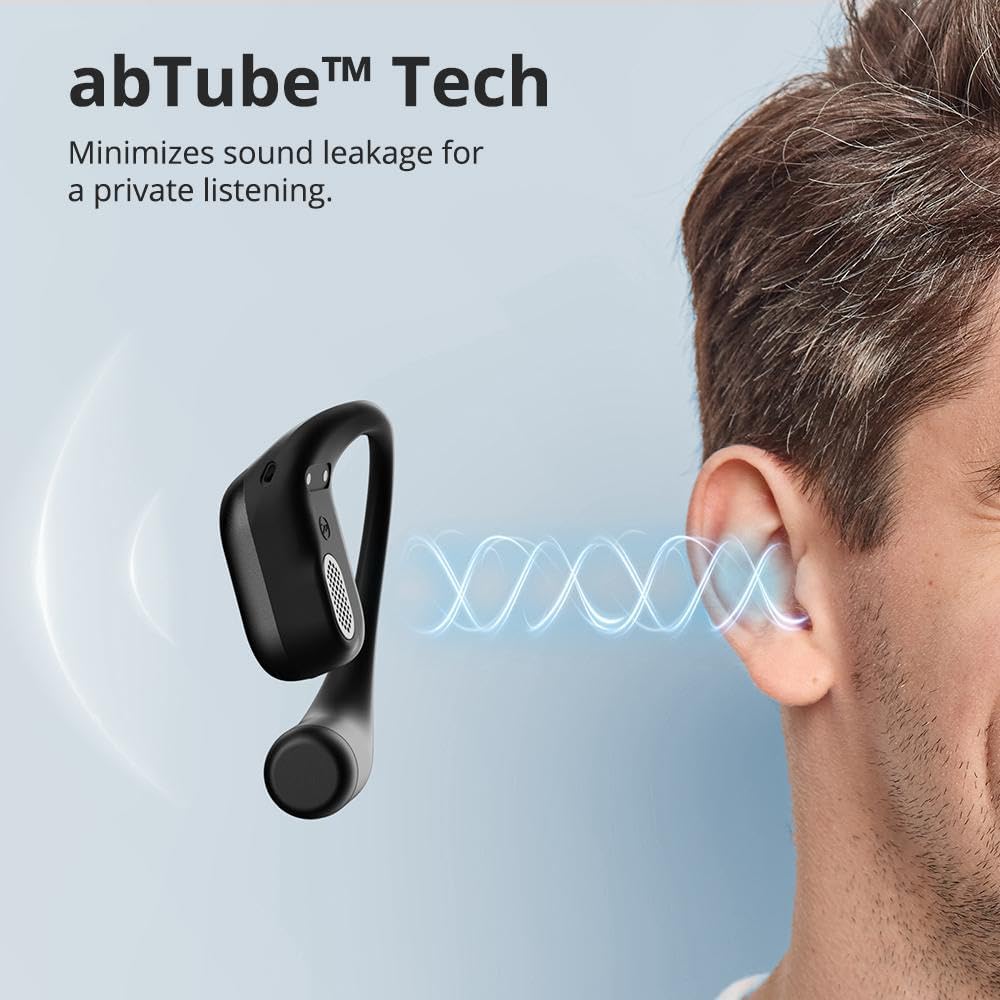
Image: A diagram showing sound waves emanating from the Tronsmart OpenFly 2 Pro headphone and being contained, illustrating the AbTube technology's ability to minimize sound leakage for private listening.
The ergonomic design ensures comfort for all-day listening.

Image: A man wearing the Tronsmart OpenFly 2 Pro headphones, demonstrating the comfortable and secure open-ear fit.
Maintenance
Cleaning
- Wipe the headphones and charging case with a soft, dry, lint-free cloth.
- Do not use abrasive cleaners, alcohol, or chemical solvents.
- Ensure charging contacts are clean and dry before placing headphones in the case.
Storage
- Store the headphones in their charging case when not in use to protect them and keep them charged.
- Store in a cool, dry place away from direct sunlight and extreme temperatures.
The headphones are IPX6 water-resistant, meaning they can withstand sweat and light rain. However, they are not designed for submersion.
Troubleshooting
| Problem | Solution |
|---|---|
| Headphones not powering on. | Ensure headphones are charged. Place them in the charging case and charge the case. |
| Headphones not pairing. |
|
| No sound or low volume. |
|
| One headphone not working. |
|
| Poor call quality. |
|
Specifications
| Feature | Detail |
|---|---|
| Model Name: | OpenFly 2 Pro |
| Model Number: | 1255823 |
| Connectivity Technology: | Wireless (Bluetooth 5.3) |
| Ear Placement: | Open-Ear |
| Diaphragm Size: | 12mm Bio-cellulose |
| Microphones: | 4 (with AI Noise Reduction) |
| Water Resistance: | IPX6 |
| Playback Time (Single Charge): | Up to 10 hours |
| Total Playback Time (with Case): | Up to 40 hours |
| Quick Charge: | 10 minutes for 3 hours playback |
| Weight (per earbud): | 8.7g (ultra-light) |
| Supported Audio Codecs: | AAC/SBC |
Warranty and Support
Tronsmart products are covered by a limited warranty from the date of purchase. For detailed warranty information, please refer to the official Tronsmart website or contact your local distributor.
If you encounter any issues or have questions regarding your Tronsmart OpenFly 2 Pro headphones, please contact Tronsmart customer support through their official website or the retailer where you purchased the product.
You can visit the official Tronsmart store on Amazon for more information: Tronsmart Store


