
Yottamaster VN400C3
Yottamaster VN400C3 4 Bay Hard Drive Enclosure User Manual
Model: VN400C3 | Brand: Yottamaster
1. Introduction
This manual provides comprehensive instructions for the installation, operation, and maintenance of your Yottamaster VN400C3 4 Bay Hard Drive Enclosure. This device is designed to expand your storage capacity with high-speed data transfer capabilities and robust construction.

Image: The Yottamaster VN400C3 4 Bay Hard Drive Enclosure, showcasing its sleek aluminum design and four drive bays.
2. Product Features
- 10Gbps High-Speed Data Transfer: Utilizes USB 3.1 Gen2 for rapid data transfer. Achieves read speeds of 503 MB/s with a single SSD and up to 1,000 MB/s with four SSDs.
- 88TB DAS Storage with Daisy Chain Capability: Supports four hard drives, each up to 22TB, for a total of 88TB. Dual 10Gbps USB-C ports allow daisy-chaining up to three VN400C3 units or other compatible devices, expanding total capacity to 264TB.
- Plug-and-Play Compatibility: Compatible with 2.5-inch SATA and 3.5-inch SATA HDD/SSDs. Supports individual disks (no Hardware RAID function) and is compatible with both Mac and Windows operating systems.
- Hot Swappable Convenience: Allows insertion or removal of hard disks without powering off the device. Features a 150W built-in power supply and supports Auto Power-On After a Power Loss.
- Durable Aluminum Enclosure & Efficient Cooling: Features a stylish aluminum casing with front and rear cooling holes and a low-noise cooling fan for effective heat dissipation. Removable metal trays facilitate easy drive installation.

Image: Visual representation of the 88TB external storage capacity, supporting 2.5" and 3.5" SATA HDD/SSD.

Image: Diagram illustrating 10Gbps data transfer speed via USB 3.1 Gen2 Type-C, showing main and HUB ports.

Image: Setup showing three VN400C3 units daisy-chained for expanded storage and simultaneous drive reading.

Image: Exploded view demonstrating the quad heat dissipation system, including aluminum alloy casing, panel heat dissipation holes, aluminum trays, and an 80x80mm cooling fan.
3. Setup Guide
3.1 Unpacking
Carefully unpack all components from the box. Verify that all items listed below are present:
- 1 x Yottamaster VN400C3 Enclosure
- 1 x Power Line
- 1 x 2-in-1 Data Cable (USB-C to USB-C with USB-A adapter)
- Screws for drive installation
- 1 x Screwdriver
- Instruction Manual (this document)
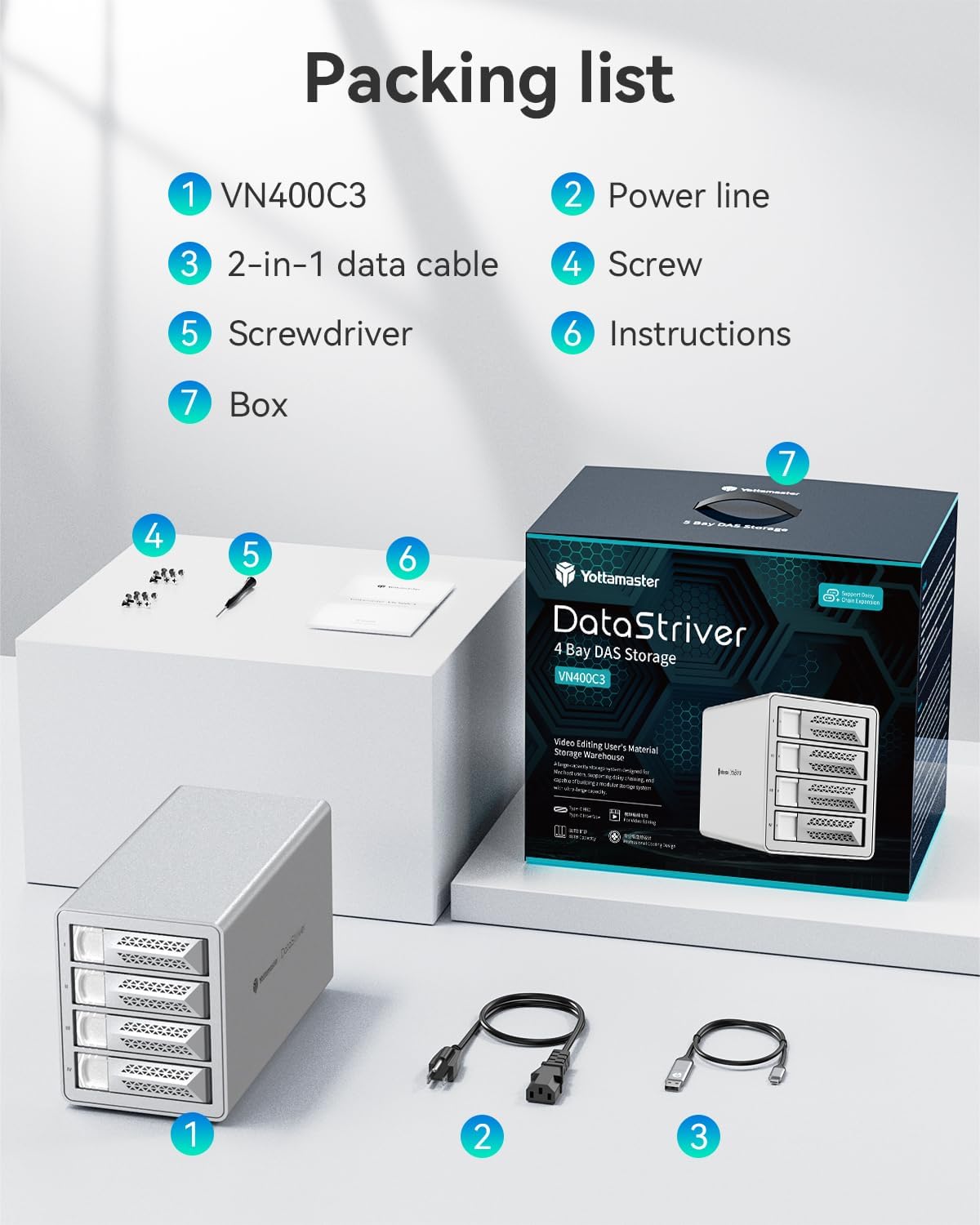
Image: Contents of the Yottamaster VN400C3 package, including the enclosure, power cable, data cable, screws, and screwdriver.
3.2 Hardware Installation
Follow these steps to install your 2.5-inch or 3.5-inch SATA HDDs/SSDs into the enclosure:
- Press the door button on the front of the enclosure and pull the tray out to open.
- For 3.5" HDDs: Place the hard drive into the metal tray and secure it with 4 side screws.
- For 2.5" HDDs/SSDs: Place the drive into the metal tray and secure it with 4 bottom screws.
- Carefully slide the loaded tray back into the empty bay until it clicks into place.
- Repeat for all desired drives.

Image: Step-by-step guide for DIY hard drive installation, showing how to open the bay, insert the drive into the tray, and secure it.
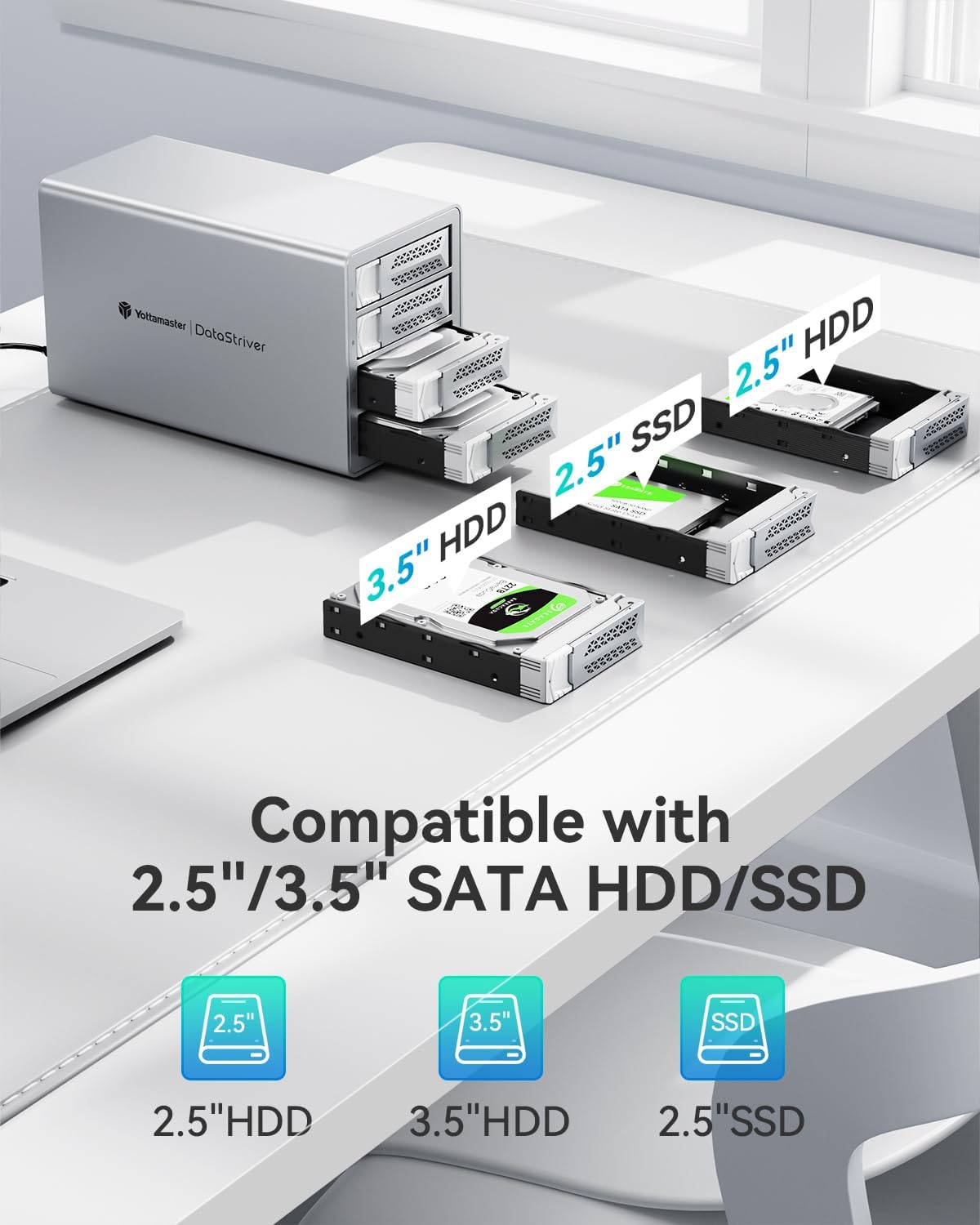
Image: Illustration of compatibility with 2.5" and 3.5" SATA HDDs and SSDs, showing how they fit into the removable trays.
3.3 Connecting to Computer
Connect the enclosure to your computer using the provided USB-C to USB-C data cable. If your computer only has USB-A ports, use the included USB-A adapter. Connect the power line to the enclosure and then to a power outlet.

Image: Close-up of the enclosure's rear panel, highlighting the dual 10Gbps Type-C ports (Main and HUB), power input, and power button. Also shows hard drive indicators (blue for normal, red for abnormality) and the door button mechanism.
4. Operating Instructions
4.1 Power On/Off
After connecting the power and data cables, press the power button on the rear of the enclosure to turn it on. The hard drive indicators on the front will illuminate. To power off, press the power button again. The device supports automatic power-on after a power loss.
4.2 Hot Swapping
The Yottamaster VN400C3 supports hot swapping. This means you can insert or remove hard drives while the enclosure is powered on and connected to your computer. Ensure that no data transfer is actively occurring to or from the drive you wish to remove to prevent data loss. Always safely eject the drive from your operating system's disk management utility before physically removing it.
4.3 Daisy Chaining
The enclosure features dual 10Gbps USB-C ports, allowing for daisy-chain connectivity. You can connect up to three Yottamaster VN400C3 units or other compatible daisy-chaining devices to expand your total storage capacity up to 264TB. Connect the "Main" port of the first enclosure to your computer, and then connect the "HUB" port of the first enclosure to the "Main" port of the second, and so on.

Image: Diagram illustrating how to connect multiple Yottamaster VN400C3 enclosures in a daisy-chain configuration for expanded storage.
4.4 Firmware Update (Disabling Auto-sleep)
To disable the auto-sleep function or for other firmware updates, follow these general steps. Specific instructions and firmware files can be found on the Yottamaster official website:
- Visit the Yottamaster Firmware Download page.
- Install the necessary software and check your current firmware version.
- Update the firmware using the corresponding .bin file.
- Restart the device after a successful update.

Image: Visual guide for the firmware update process, specifically for disabling the auto-sleep function on VN500C3/VN400C3 models.
5. Maintenance
5.1 Cleaning
To maintain optimal performance and appearance, regularly clean the exterior of the enclosure with a soft, dry cloth. Avoid using liquid cleaners or abrasive materials that could damage the finish.
5.2 Heat Dissipation
The enclosure is designed with an efficient cooling system, including an 80mm fan and ventilation holes. Ensure that the front and rear ventilation holes are not obstructed to allow for proper airflow and heat dissipation. Operating the device in a well-ventilated area will help prolong the life of your hard drives.
Image: Exploded view demonstrating the quad heat dissipation system, including aluminum alloy casing, panel heat dissipation holes, aluminum trays, and an 80x80mm cooling fan.
6. Troubleshooting
- Device not recognized: Ensure all cables (power and data) are securely connected. Try a different USB port on your computer. Verify that the enclosure is powered on.
- Drives not appearing: Ensure hard drives are properly seated in their trays and the trays are fully inserted into the enclosure. New drives may need to be initialized and formatted through your operating system's Disk Management (Windows) or Disk Utility (Mac) before they can be used.
- Slow transfer speeds: Ensure you are using a USB 3.1 Gen2 compatible port on your computer. Check the quality of your USB-C cable. Performance can also be affected by the speed of the installed hard drives and your computer's hardware.
- Hard drive indicator is red: A red indicator typically signifies a hard drive abnormality. Check the drive for errors or consider replacing it if issues persist.
- Enclosure not powering on: Verify the power cable is securely connected to both the enclosure and a working power outlet.
7. Specifications
| Feature | Detail |
|---|---|
| Model Number | VN400C3 |
| Hard Disk Form Factor | 2.5 Inches, 3.5 Inches |
| Data Transfer Rate | 10 Gigabits Per Second (USB 3.1 Gen2) |
| Maximum Capacity | 88 TB (4 x 22TB), up to 264TB with daisy chain |
| Hardware Interface | USB Type C |
| Compatible Devices | HDD, SSD (SATA) |
| Material | Aluminum Alloy (Metal) |
| Power Supply | 150W Built-in Power Supply |
| Cooling System | 80mm Cooling Fan, Front & Rear Ventilation Holes |
| Features | Hot Swappable, Auto Power-On After Power Loss, Individual Disk Support (No Hardware RAID) |
| Item Weight | 9.7 pounds |
| Manufacturer | Yottamaster |
8. Official Product Video
Video: An official product video from Yottamaster showcasing features and installation. Please note that while this video highlights a 5-bay enclosure (VN500C3), many of the features and installation steps are similar to your 4-bay VN400C3 model.
9. Warranty and Support
Yottamaster products typically come with a standard manufacturer's warranty. For detailed warranty information, product registration, technical support, and frequently asked questions, please visit the official Yottamaster website or contact their customer service directly.
Official Yottamaster Store: Yottamaster Store on Amazon
Related documentsVN400C3


Ask a question about this manual
Ask about setup, troubleshooting, compatibility, parts, safety, or missing instructions. Manuals+ will review the question and use this page’s manual context to help answer it.