
1. Safety Information
Please read all safety instructions carefully before assembly and use. Failure to follow these instructions may result in injury or damage to the product.
- Always assemble the desk on a stable, level surface.
- Ensure the desk is properly anchored to the wall or floor to prevent tipping, if applicable.
- Never overload the desk or place heavy objects on the edges.
- Always unplug the power outlets when not in use and keep them dry.
- Do not use the desk if any parts are damaged or missing.
2. Setup
The Furologee 51-inch Computer Desk requires assembly. All necessary tools and detailed instructions are included in the packaging. Please follow the step-by-step guide provided with your product for proper assembly.
2.1 Reversible Design
This desk features a reversible design, allowing you to configure the storage shelves and file cabinet on either the left or right side to best suit your space and preferences. Refer to the assembly manual for specific instructions on how to achieve your desired configuration.

This image illustrates the reversible design of the desk, showing how the storage unit can be assembled on either the left or right side of the main desktop.
2.2 Dimensions Overview
Before assembly, review the overall dimensions to ensure the desk fits your intended space. The desk measures 18.9"D x 51.2"W x 34.5"H.
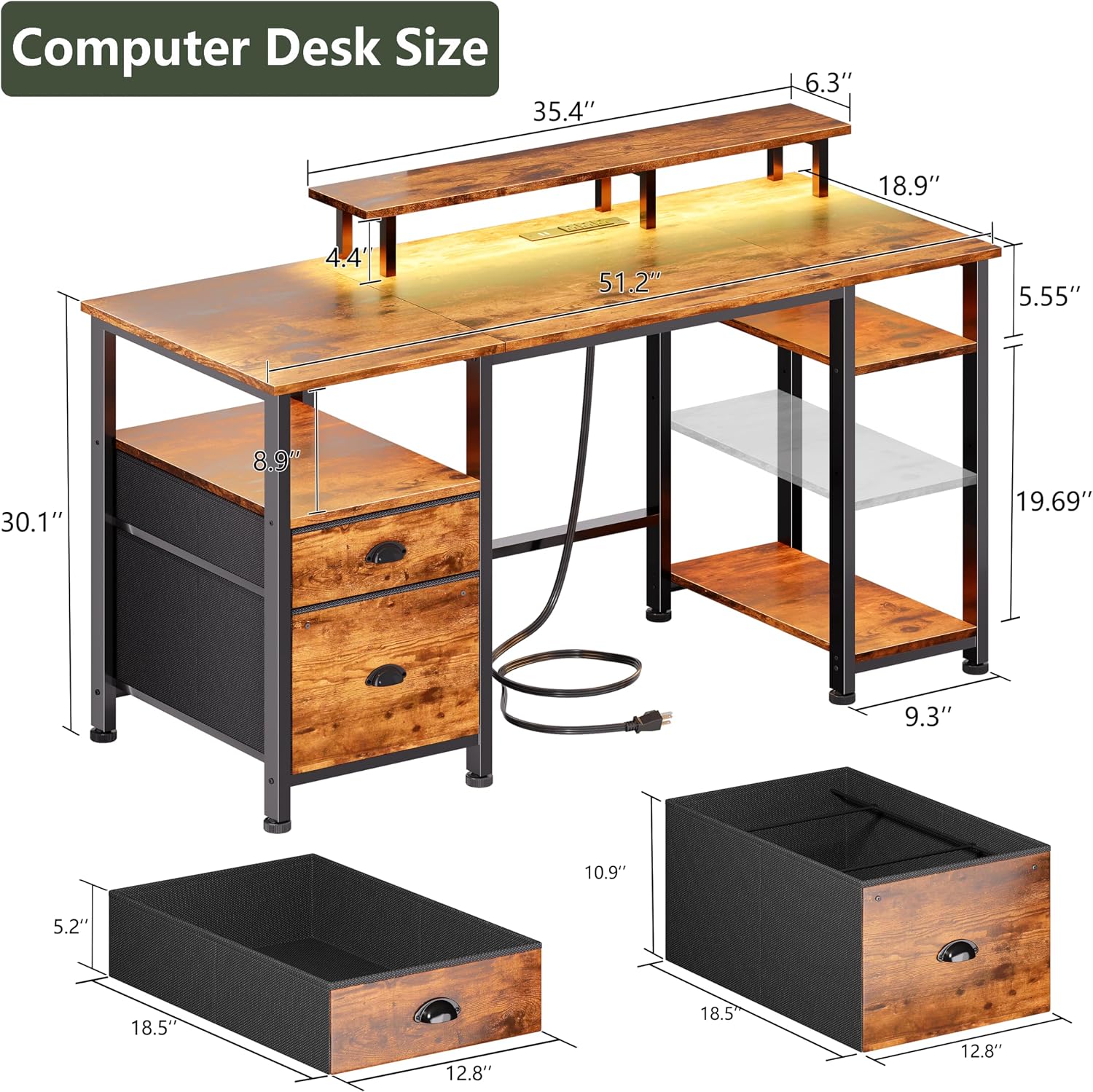
This image provides a detailed diagram of the Furologee 51-inch computer desk's dimensions, including the monitor stand, main desktop, and storage sections.
3. Operating Instructions
3.1 Built-in Power Outlets
The desk includes a built-in power outlet with 3 AC outlets (120V/12A) and 2 USB ports (5V/A2). This feature provides convenient access to power for charging your electronic devices such as phones, Bluetooth devices, headsets, and gaming gear. Ensure the power cord is securely plugged into a wall outlet.

This image shows a close-up of the desk's integrated power strip, highlighting the 3 AC outlets and 2 USB ports for convenient device charging.
3.2 LED Lighting System
The computer desk is equipped with an LED RGB lighting system. This system offers 20 color options, 22 dynamic modes, and 5 adjustable brightness levels. Use the included controller to select your preferred lighting settings to enhance your workspace or gaming environment.

This image displays the Furologee desk with its RGB LED lights active, showcasing the range of colors and dynamic modes available.
3.3 Monitor Stand Usage
The integrated monitor stand is designed to elevate your display to an ergonomic height, promoting better posture and reducing strain on your neck and back during extended use. Place your monitor(s) directly on the stand.

This image demonstrates the ergonomic advantages of the desk's long monitor stand, illustrating how it helps maintain proper posture by raising the monitor to eye level.
3.4 Storage Options
Utilize the various storage options to keep your workspace organized:
- Fabric File Cabinet: The bottom cabinet is designed to hold letter, A4, or legal-size files, protecting documents from dust.
- Open Shelf: Provides easy access storage for books, decor, or other items.
- Drawer: Ideal for storing small office supplies or personal items.
- Adjustable Shelves: The two-tier shelves can be adjusted to different heights to accommodate various items.
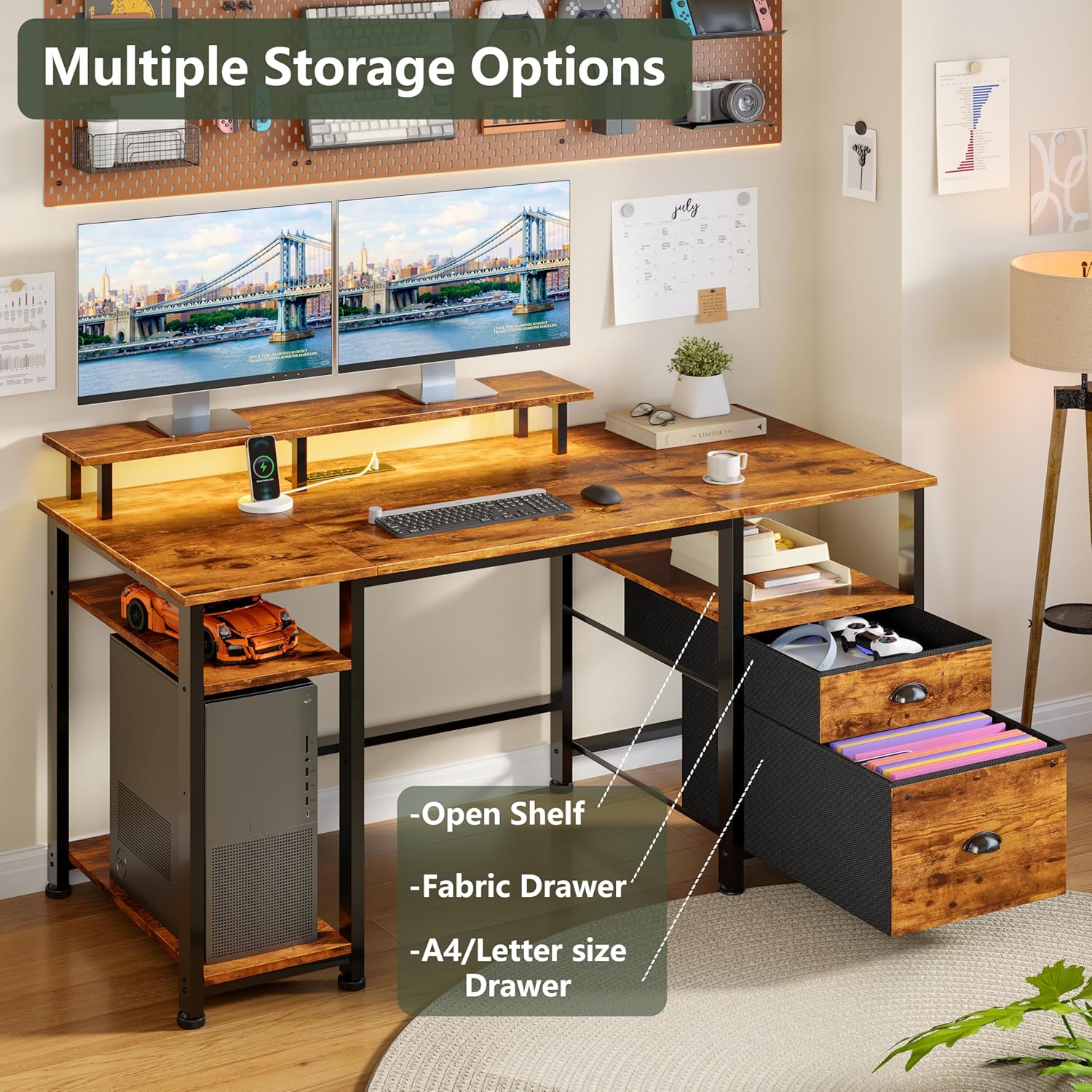
This image highlights the desk's comprehensive storage solutions, including an open shelf, a fabric drawer, and a dedicated A4/letter size file drawer.
4. Maintenance
Regular maintenance will help preserve the appearance and functionality of your Furologee computer desk.
- Cleaning the Surface: Wipe the desk surfaces with a damp cloth to remove dust and spills. For stubborn marks, use a mild cleaner and then wipe dry immediately with a clean, dry cloth. Avoid abrasive cleaners or harsh chemicals that may damage the finish.
- Power Outlets: Keep the power outlets and USB ports free from dust and debris. Ensure they remain dry at all times.
- LED Lights: The LED lights are designed for long-term use and generally require no maintenance. If issues arise, refer to the troubleshooting section.
- Hardware: Periodically check all screws and fasteners to ensure they are tight. Retighten if necessary to maintain stability.
5. Troubleshooting
If you encounter any issues with your Furologee computer desk, please refer to the following common solutions:
- Desk Wobbles: Ensure all assembly screws are securely tightened. Verify the desk is on a level surface; use the adjustable feet to stabilize if the floor is uneven.
- Power Outlets Not Working: Check if the desk's main power cord is firmly plugged into a functional wall outlet. Test the wall outlet with another device. Ensure no circuit breakers have tripped.
- LED Lights Not Functioning: Confirm the LED light strip is properly connected to its power source. Check the remote control battery if applicable. Try unplugging and replugging the LED power connection.
- Missing or Damaged Parts: If you find any parts missing or damaged during assembly, do not proceed with assembly. Contact Furologee customer support immediately for assistance.
6. Specifications
| Feature | Detail |
|---|---|
| Brand | Furologee |
| Model Number | CD011 |
| Product Dimensions | 18.9"D x 51.2"W x 34.5"H |
| Color | Rustic Brown |
| Material Type | Engineered Wood (Top), Metal (Base) |
| Special Features | Built-In USB Outlet, Monitor Stand, Reversible Design, LED Lights |
| Power Outlets | 3 AC Outlets (120V/12A), 2 USB Ports (5V/A2) |
| LED Lights | 20 Colors, 22 Modes, 5 Brightness Levels |
| Number of Drawers | 2 (1 fabric file cabinet, 1 fabric drawer) |
| Number of Shelves | 2 (adjustable) |
| Assembly Required | Yes (Tools Included) |
7. Warranty & Support
7.1 Product Warranty
The Furologee 51-inch Computer Desk comes with a Lifetime Warranty. This warranty covers manufacturing defects and ensures the product's quality under normal use. Please retain your proof of purchase for warranty claims.
7.2 Customer Support
For any questions, concerns, or assistance with assembly, operation, or warranty claims, please contact Furologee customer service. Refer to the contact information provided in your product packaging or visit the official Furologee website for support details.


