1. Introduction
This manual provides instructions for the safe and efficient operation of your boglvr CT6 Dehumidifier. This unit is designed to remove excess moisture from the air, helping to create a more comfortable indoor environment and mitigate issues such as damp walls, moldy floors, and musty odors. It is suitable for areas up to 800 sq.ft, including bedrooms, bathrooms, basements, and RVs.

Image 1.1: Internal components highlighting dual semiconductor technology and 85 oz water tank.
The boglvr CT6 Dehumidifier utilizes advanced dual-core semiconductor condensation technology for effective moisture removal. It features a 2.5L (85 OZ) water tank, quiet operation, a timer function, sleep mode, auto shut-off, and a 7-color ambient light.
2. Safety Instructions
- Read all instructions before using the appliance.
- Ensure the power supply matches the voltage specified on the rating label.
- Do not operate the unit with a damaged cord or plug.
- Keep the unit upright during operation and transport.
- Do not block air inlets or outlets. Maintain at least 20 cm (8 inches) clearance from walls or other objects.
- Do not immerse the unit, power cord, or plug in water or other liquids.
- Unplug the unit before cleaning or performing any maintenance.
- Keep out of reach of children.
- For optimal performance, keep doors and windows closed in the area where the dehumidifier is operating.
3. Product Components and Control Panel
3.1. Components
- Dehumidifier Unit
- 2.5L Water Tank
- Drain Hose (for continuous drainage)
- Reusable Filter
- User Manual

Image 3.1: Front view of the dehumidifier with control panel and water tank indicator.
3.2. Control Panel
The control panel is located on the top of the unit and features touch-sensitive buttons with LED indicators.
- On/Off Button: Powers the unit on or off.
- Light Button: Controls the ambient LED light. Press once to cycle colors, press again to lock a color, press a third time to turn off.
- Sleep Button: Activates Sleep Mode for quieter operation.
- Timer Button: Sets the operating timer for 8, 16, or 24 hours.

Image 3.2: Control panel with light and timer settings.
4. Setup
- Unpack the Unit: Carefully remove the dehumidifier and all accessories from the packaging.
- Placement: Place the dehumidifier on a flat, stable surface in the desired location. Ensure there is adequate space around the unit for proper airflow (at least 20 cm / 8 inches from walls or furniture).
- Power Connection: Plug the power cord into a suitable electrical outlet.
- Initial Check: Ensure the water tank is correctly inserted before powering on.
5. Operation
5.1. Power On/Off
Press the On/Off button to turn the dehumidifier on. Press it again to turn the unit off.
5.2. Operating Modes (Day Mode / Sleep Mode)
The unit offers two operating modes:
- Day Mode: Provides strong moisture removal during active hours. This is the default mode when the unit is powered on.
- Sleep Mode: Press the Sleep button to activate. In Sleep Mode, the fan speed is lowered, and noise levels are reduced to below 30 dB for a quiet environment.

Image 5.1: Day Mode and Sleep Mode operation.
5.3. Timer Function
Press the Timer button to set the desired operating duration. Each press cycles through 8 hours, 16 hours, and 24 hours. The unit will automatically shut off once the set time has elapsed.
5.4. Ambient Light Control
The unit features a 7-color LED night light. Press the Light button:
- Once to cycle through the 7 colors.
- Again to lock your favorite color.
- A third time to turn the light off.
6. Water Drainage
6.1. Manual Emptying (Water Tank)
When the 2.5L water tank is full, the unit will automatically shut off, and a red indicator light will illuminate. To empty the tank:
- Gently pull out the water tank from the back of the unit.
- Remove the lid and pour out the collected water.
- Replace the lid and slide the water tank back into the unit until it clicks into place.
- The unit will resume operation automatically.
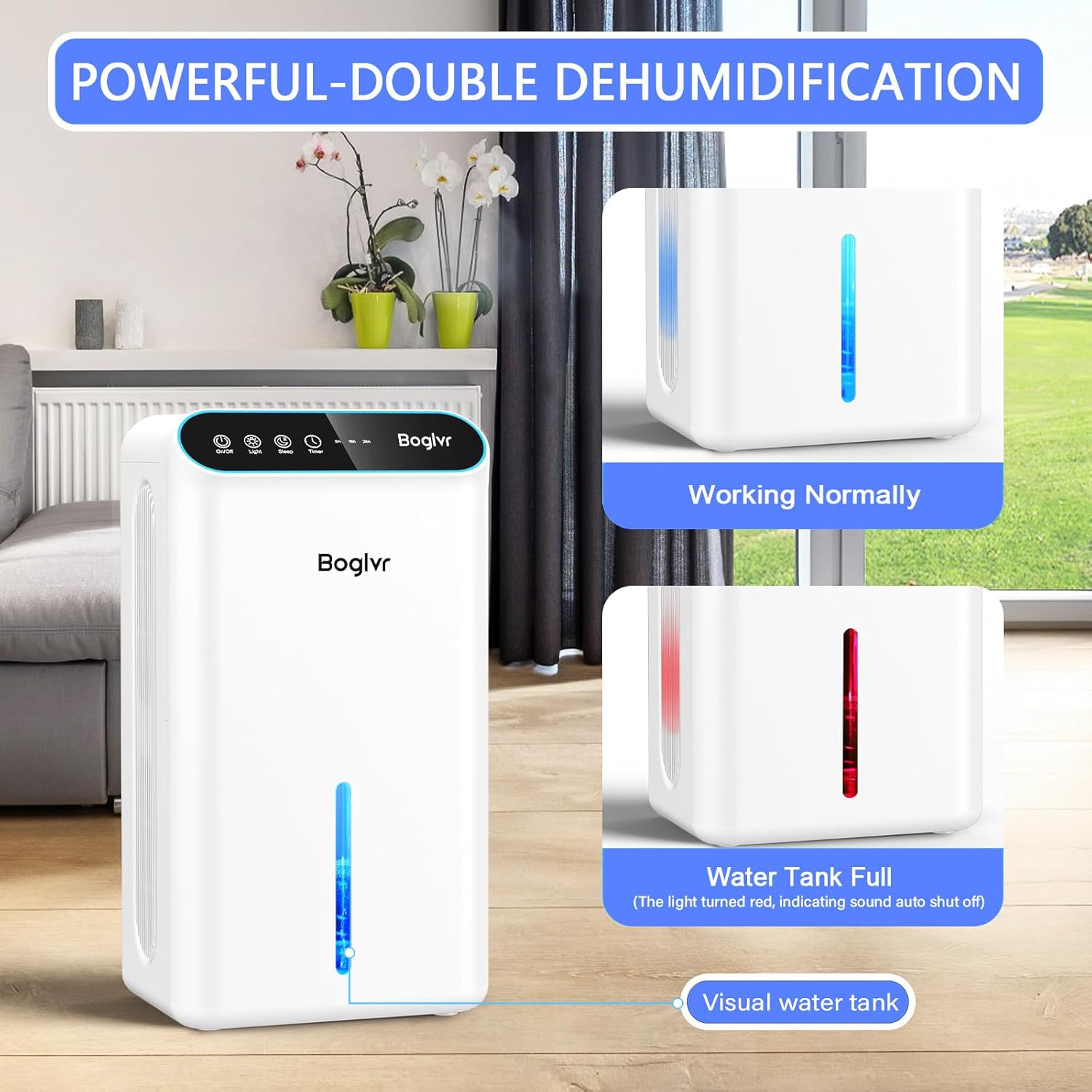
Image 6.1: Water tank full indicator.
6.2. Continuous Drainage (Drain Hose)
For uninterrupted dehumidification, especially in basements or RVs, you can use the included drain hose:
- Locate the drainage port on the back of the unit.
- Connect one end of the drain hose to the drainage port.
- Direct the other end of the hose to a suitable drain or container, ensuring it is lower than the unit's drainage port for gravity flow.
- The unit will continuously drain water without the need to empty the tank manually.
7. Maintenance
7.1. Cleaning the Water Tank
Regularly clean the water tank to prevent mold and bacteria growth:
- Remove the water tank from the unit.
- Wash the tank with mild soap and warm water.
- Rinse thoroughly and dry completely before reinserting.
7.2. Cleaning/Replacing the Filter
The reusable filter helps maintain air quality and unit efficiency. It is located on the side of the unit.
- Gently pull out the filter cover from the side of the unit.
- Remove the filter.
- Clean the filter with a soft brush or vacuum cleaner. If heavily soiled, wash with mild soap and water, then air dry completely.
- Insert the clean/new filter and replace the filter cover.
8. Troubleshooting
| Problem | Possible Cause | Solution |
|---|---|---|
| Unit does not turn on | No power supply; Water tank full or incorrectly inserted. | Check power connection; Empty and reinsert water tank correctly. |
| No water collected | Room humidity is too low; Temperature is too low; Air inlets/outlets blocked. | Ensure room humidity is above 40% RH; Operate in temperatures above 5°C (41°F); Clear any obstructions. |
| Unit is noisy | Unit not on a flat surface; Fan obstruction. | Place on a stable, flat surface; Check for and remove any fan obstructions. |
| Red indicator light on | Water tank is full. | Empty the water tank. |
9. Specifications
| Feature | Detail |
|---|---|
| Brand | boglvr |
| Model Name | CT6 |
| Floor Area Coverage | Up to 800 Square Feet |
| Water Tank Capacity | 2.5 Liters (85 Fluid Ounces) |
| Dehumidification Capacity | 1 Liters per Day |
| Product Dimensions (D x W x H) | 7.88" x 6.25" x 13.98" |
| Item Weight | 5.5 Pounds |
| Wattage | 80 watts |
| Number of Speeds | 2 (Day Mode, Sleep Mode) |
| Special Features | Dual-Core Moisture Removal, Whisper-Quiet, Auto Shut-Off, Continuous Drainage, 3 Gear Timer (8/16/24 hrs), Portable, Reusable Filter, 7-Color LED Night Light |
| Material | Plastic |
10. Warranty and Support
For warranty information or technical support, please refer to the contact details provided with your product packaging or visit the official boglvr website. Keep your purchase receipt as proof of purchase for any warranty claims.


