
WASJOYE Fireproof 1.8 Cu Ft
WASJOYE 1.8 Cubic Feet Biometric Fireproof Safe Box User Manual
Model: Fireproof 1.8 Cu Ft
Introduction
Thank you for choosing the WASJOYE 1.8 Cubic Feet Biometric Fireproof Safe Box. This manual provides essential information for the safe and efficient operation of your new safe. Please read these instructions carefully before use and retain them for future reference.
Important Safety Information
- Always keep emergency keys in a secure location away from the safe. Do not store them inside the safe.
- Do not store the user manual inside the safe.
- Ensure the safe is placed on a stable, level surface.
- Avoid exposing the safe to extreme temperatures or direct sunlight.
- Keep children and unauthorized individuals away from the safe.
- This safe is fireproof but not water-resistant. Protect it from water exposure.
Package Contents
Verify that all items are present in the package:
- WASJOYE Fireproof Safe Box (1)
- Emergency Keys (2)
- Removable Shelf (1)
- Expansion Screws (for mounting)
- User Manual (1)
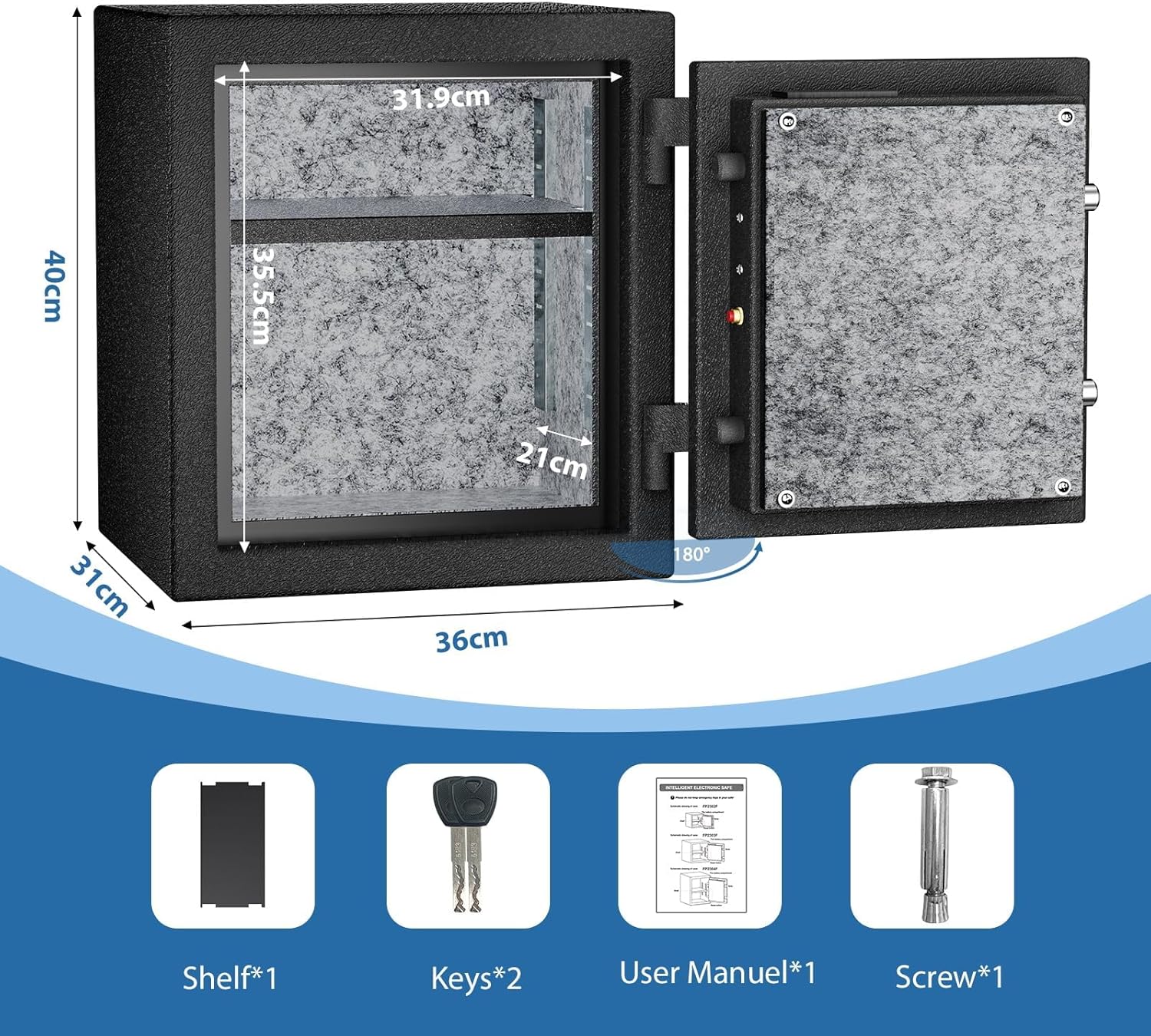
Image: The WASJOYE safe with its dimensions and a list of included accessories: shelf, keys, user manual, and expansion screws.
Setup
1. First Use and Battery Installation
- Open the Safe: Remove the control panel cover to reveal the emergency keyhole. Insert one of the emergency keys and turn it counter-clockwise. Simultaneously turn the handle clockwise to open the safe door.
- Install Batteries: Locate the battery compartment on the inside of the safe door. Install 4 AA batteries (not included), ensuring correct polarity. Close the battery compartment cover.
Video: Demonstrates the initial setup of the WASJOYE safe, including removing the control panel, using the emergency key, and installing 4 AA batteries.
2. Setting a User Code (Password)
- With the safe door open, press the red reset button located on the inside edge of the door. The keypad will illuminate.
- Enter a new 4-8 digit code on the keypad, then press the "#" key to confirm.
- Repeat the new code and press "#" again. The safe will beep twice to indicate successful code registration.

Image: Visual guide on how to set a fingerprint and a digital code for the safe. It shows pressing the reset button and entering the code.
3. Fingerprint Registration
- With the safe door open, press the red reset button. The blue fingerprint light will illuminate.
- Place your finger on the fingerprint sensor three times consecutively. The safe will beep twice to indicate successful registration.
- The safe can store up to 20 fingerprints. Repeat the process for additional fingerprints.
Video: Demonstrates the process of registering a fingerprint on the WASJOYE biometric safe, showing the user pressing the reset button and placing their finger on the sensor multiple times.
Operation
Unlocking the Safe
The safe offers three methods for unlocking:
- Key Unlock: Remove the control panel cover, insert the emergency key, turn it counter-clockwise, and turn the handle clockwise to open.
- Password Unlock: Enter your 4-8 digit user code, then press the "#" key. The safe will unlock.
- Fingerprint Unlock: Place your registered finger on the fingerprint sensor. The safe will unlock upon successful recognition.

Image: Illustrates the three methods for opening the safe: using a registered fingerprint, entering a digital password, or using the emergency key.
Video: Demonstrates unlocking the WASJOYE safe using the emergency key, a registered fingerprint, and a digital password.
Features
Fireproof Construction
The WASJOYE safe is designed with fire-resistant materials, including solid steel plate, fireproof gypsum board, and solid cement board casting. It meets UL fire detection standards, capable of withstanding 1200°F for 30 minutes, protecting your valuables from fire damage.

Image: Shows the WASJOYE safe with a UL 72 standard fireproof rating, indicating protection for 30 minutes at 1200°F.

Image: A WASJOYE safe depicted in a burning house scenario, highlighting its fireproof capability with a UL 70 standard for 60 minutes at 1200°F.
Video: Demonstrates the WASJOYE safe's fireproof capabilities, showing the safe being subjected to fire for an extended period, then retrieved with its contents intact.
Security Features
- Thickened Door and Bolts: The safe features a 60mm thickened safe cabinet door with 3 bold solid bolts for enhanced security.
- Biometric Fingerprint Technology: Advanced biometric system allows quick access within 0.1 seconds and can store up to 20 fingerprints.
- Digital Keypad Lock: Programmable 4-8 digit combination lock for secure access.

Image: Detailed view of the safe's interior, highlighting the three bold solid bolts and the thickened solid door panel for security.

Image: Explains the advanced biometric fingerprint technology, including >500DPI semiconductor high resolution, learning fingerprint system, quick access within 0.1 seconds, and 20 fingerprint capacity.

Image: Details the advanced biometric technology, emphasizing its capacity for 20 user fingerprints, ease of use for the elderly, 0.1-second quick unlock, and 99.99% high resolution rate.
Alarm System
The safe features an alarm vibration system that triggers under specific conditions:
- 5 consecutive incorrect fingerprint attempts.
- 3 consecutive incorrect password entries.
- If the safe is hit forcefully.
The alarm sound reaches 80 decibels. To clear the alarm, enter the correct password or use a valid fingerprint. To activate vibration mode after an alarm, press "9" again.

Image: Depicts the dual warning system, showing an alarm triggered by 5 failed entries or violent shaking, resulting in a 1-minute siren alarm.

Image: Illustrates the dual alarm system, which activates upon failed entry attempts or violent shaking of the safe.
Video: Demonstrates the vibrating alarm feature of the WASJOYE safe, showing the safe emitting an alarm sound when disturbed or tampered with.
Emergency Power Supply
In case of battery depletion, the safe can be powered externally using a Type-C cable connected to the Type-C port located on the control panel. This allows you to open the safe using your code or fingerprint.
Video: Shows how to use the Type-C emergency power supply port to power the safe when batteries are depleted, allowing access via code or fingerprint.
Internal Organization
The safe includes a removable shelf, allowing you to customize the internal storage space to fit various items such as documents, jewelry, cash, or electronic devices.
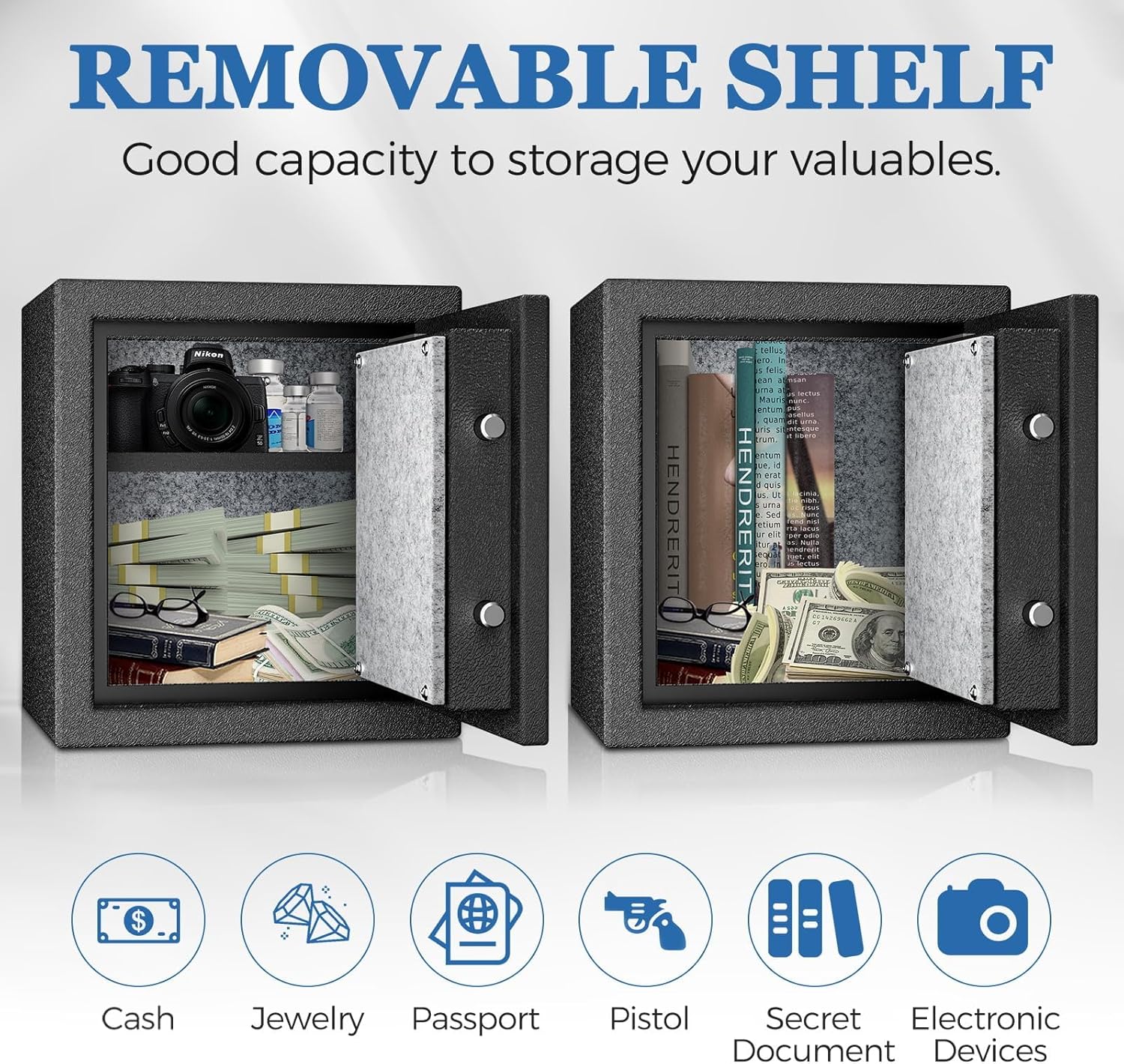
Image: Displays the safe with a removable shelf, illustrating its capacity for storing various valuables like cash, jewelry, passports, and documents.

Image: Compares the internal storage of the safe with and without the removable shelf, demonstrating flexible storage options for different items.
Specifications
| Feature | Detail |
|---|---|
| Brand | WASJOYE |
| Model Number | Fireproof 1.8 Cu Ft |
| Product Dimensions | 12.2"D x 14.2"W x 16"H |
| Lock Type | Biometric, Electronic Combination Lock, Key |
| Capacity | 1.8 Cubic Feet |
| Material | Alloy Steel |
| Special Features | Alarm System, Anti-Theft, Biometric Fingerprint, Fireproof, Heavy Duty |
| Mounting Type | Floor Mount |
| Item Weight | 57.8 Pounds |
| Alarm | Audible |
| Water Resistance Level | Not Water Resistant |

Image: Displays the external dimensions of the safe (15.75"H x 14.17"W x 12.20"D) and its net weight (53.79 lbs).
Troubleshooting
| Problem | Possible Cause | Solution |
|---|---|---|
| Safe does not open with code/fingerprint. | Low batteries, incorrect code/fingerprint, system error. | Replace batteries. Use emergency key. Use Type-C emergency power. Re-register fingerprint/code. |
| Alarm triggers frequently. | Incorrect entries, physical impact. | Ensure correct code/fingerprint. Avoid hitting the safe. Check for loose items inside. |
| Emergency key is stuck or does not turn. | Mechanism obstruction, key damage. | Do not force the key. Contact customer support for assistance. |
Warranty and Support
WASJOYE is committed to providing reliable products. If you encounter any issues or have questions regarding your safe, please contact our customer service team. We offer 24-hour online support to resolve any concerns.
Contact Information: Refer to the contact details provided in your product packaging or on the official WASJOYE website.
Warranty: Specific warranty details are available upon product registration or by contacting customer support.
Ask a question about this manual
Ask about setup, troubleshooting, compatibility, parts, safety, or missing instructions. Manuals+ will review the question and use this page’s manual context to help answer it.