
VOLTCRAFT DOV2504 LA
VOLTCRAFT DOV2504 LA Digital Oscilloscope User Manual
Model: DOV2504 LA
1. Introduction
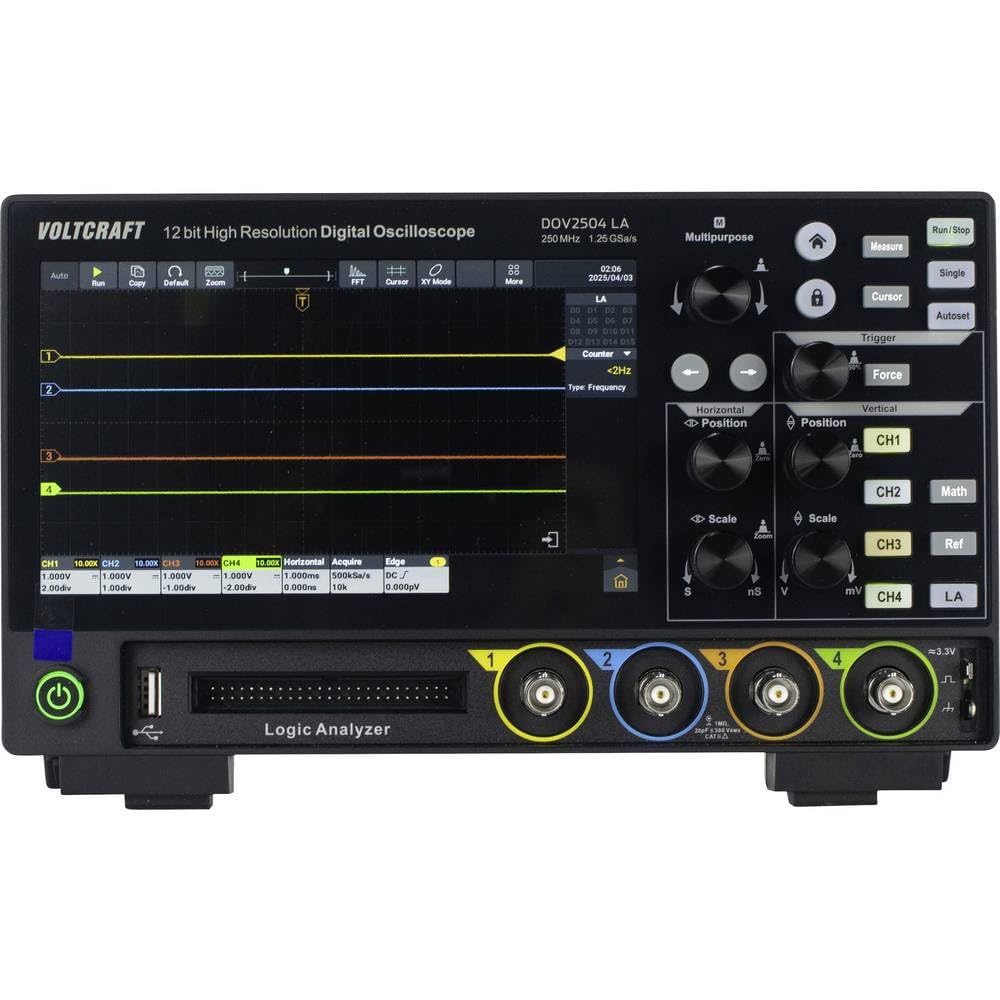
The VOLTCRAFT DOV2504 LA is a high-quality, innovative, and compact digital oscilloscope designed for precise signal analysis. Featuring a 12-bit analog-to-digital converter, a 7-inch touchscreen display, and a comprehensive set of trigger functions, this device offers exceptional performance and user comfort for a wide range of applications, including electronics development, testing, and education. It combines a 250 MHz bandwidth, 1.25 GSa/s real-time sampling rate, and a 16-channel logic analyzer into a single, powerful instrument.
2. Safety Instructions
Please read and understand all safety instructions before operating the device. Failure to do so may result in injury or damage to the instrument.
- Power Supply: Use only the provided USB Type-C power supply. Ensure the power source matches the device's requirements.
- Environment: Operate the oscilloscope in a dry, well-ventilated area, away from direct sunlight, extreme temperatures, and excessive dust or moisture.
- Probes: Always use properly rated probes for the voltage and current levels being measured. Do not exceed the maximum input voltage of the oscilloscope.
- Grounding: Ensure the oscilloscope is properly grounded to prevent electric shock.
- Maintenance: Do not attempt to open or repair the device. Refer all servicing to qualified personnel.
- Cleaning: Disconnect power before cleaning. Use a soft, dry cloth. Do not use liquid cleaners or aerosols.
3. Package Contents
Verify that all items listed below are present in your package:
- VOLTCRAFT DOV2504 LA Digital Oscilloscope
- USB Type-C Power Supply
- USB Cable
- Four (4) Test Probes
- Two (2) Probe Adjustment Kits
- Software with English User Manual (on CD)
- Quick Start Guide
4. Product Features
The VOLTCRAFT DOV2504 LA offers a robust set of features for advanced signal analysis:
- Bandwidth: 250 MHz
- Analog Channels: 4
- Logic Analyzer Channels: 16
- Real-time Sample Rate: Up to 1.25 GSa/s
- Memory Depth: 100 Mpts
- ADC Resolution: 12-bit
- Display: 7-inch (17.78 cm) capacitive touchscreen with 1024 x 600 pixel resolution, supporting gesture control.
- Waveform Capture Rate: 50,000 wfms/s (real-time), 700,000 wfms/s (segment recording).
- Horizontal Scan Speed: 1 ns/div to 1000 s/div (1-2-5 steps).
- Vertical Sensitivity: 200 µV/div to 10 V/div.
- Trigger Types: Edge, Video, Pulse, Slope, Runt, Window, Timeout, Nth, Logic, RS232/UART, I2C, SPI, CAN, LIN.
- Acquisition Modes: Sample, Peak Detect, High Resolution, Average, Segment.
- Connectivity: USB, LAN, HDMI output for external display.
5. Setup
Follow these steps for initial setup of your oscilloscope:
- Unpacking: Carefully remove the oscilloscope and all accessories from the packaging. Inspect for any signs of damage.
- Power Connection: Connect the USB Type-C power supply to the oscilloscope's power input and then plug it into a suitable power outlet.
- Power On: Press the power button located on the front panel to turn on the device. The display will illuminate.
- Probe Connection: Connect the test probes to the desired analog input channels (CH1-CH4) on the front panel. Ensure a secure connection.
- Probe Compensation: It is recommended to perform probe compensation before making critical measurements. Connect a probe to the probe compensation output (usually a square wave signal) and adjust the probe's compensation trimmer until the waveform is a perfect square.
- Logic Analyzer Connection (Optional): If using the logic analyzer, connect the logic analyzer probes to the dedicated input port.
6. Operating Instructions
6.1 Basic Operation
- Touchscreen Navigation: The 7-inch touchscreen allows intuitive control. Tap icons and menus to select functions. Gesture control simplifies common operations.
- Vertical Controls: Use the vertical position and scale knobs for each channel (CH1-CH4) to adjust the vertical position and voltage per division of the waveform.
- Horizontal Controls: Use the horizontal position and scale knobs to adjust the time base (time per division) and horizontal position of the waveform.
- Run/Stop: Press the Run/Stop button to start or pause waveform acquisition.
- Autoset: Press the Autoset button for automatic setup of vertical, horizontal, and trigger settings to display a stable waveform.

6.2 Advanced Triggering
The DOV2504 LA offers a wide array of trigger functions to capture specific events:
- Accessing Trigger Menu: Tap the "Trigger" icon on the screen or use the dedicated trigger button to access trigger settings.
- Trigger Types: Select from Edge, Video, Pulse, Slope, Runt, Window, Timeout, Nth, Logic, RS232/UART, I2C, SPI, CAN, and LIN triggers. Each type has specific parameters to configure.
- Trigger Source: The trigger source can be any of the four analog channels (CH1-CH4) or the 16-channel logic analyzer (LA).
- Trigger Level: Adjust the trigger level to define the voltage threshold at which the oscilloscope captures a waveform.
6.3 Logic Analyzer Functionality
The integrated 16-channel logic analyzer allows for digital signal analysis:
- Connecting Digital Signals: Connect your digital signals to the dedicated logic analyzer input port using the appropriate probes.
- Activating LA: Select the Logic Analyzer (LA) mode from the input channel selection or a dedicated LA menu.
- Digital Waveform Display: The oscilloscope will display the digital waveforms, allowing for timing analysis and protocol decoding (if supported by the software).

7. Maintenance
Proper maintenance ensures the longevity and accuracy of your oscilloscope:
- Cleaning: Regularly clean the exterior of the oscilloscope with a soft, dry, lint-free cloth. For stubborn dirt, slightly dampen the cloth with water. Do not use abrasive cleaners, solvents, or alcohol.
- Screen Care: Use a screen-specific cleaner and a microfiber cloth for the touchscreen. Avoid pressing hard or using sharp objects on the screen.
- Storage: When not in use, store the oscilloscope in a cool, dry place, away from direct sunlight and extreme temperatures. Protect it from dust and vibrations.
- Probe Care: Handle probes carefully. Avoid bending or kinking the cables. Store them neatly to prevent damage.

8. Troubleshooting
If you encounter issues, refer to the following common troubleshooting steps:
| Problem | Possible Cause | Solution |
|---|---|---|
| Device does not power on. | No power, faulty power supply, or loose connection. | Check power cable connection. Ensure power outlet is functional. Try a different power supply if available. |
| No waveform displayed. | Probe not connected, incorrect channel selected, trigger not set correctly, or signal too small/large. | Ensure probes are securely connected. Select the correct input channel. Use "Autoset". Adjust vertical scale (V/div) and horizontal scale (s/div). Check trigger settings. |
| Unstable waveform. | Incorrect trigger level or type, or noisy signal. | Adjust trigger level. Try a different trigger type (e.g., Edge trigger for periodic signals). Ensure proper grounding. |
| Touchscreen unresponsive. | Temporary software glitch. | Restart the oscilloscope. If the problem persists, consult the full user manual on the CD. |
For more detailed troubleshooting, refer to the comprehensive user manual provided on the included CD.
9. Specifications
| Parameter | Value |
|---|---|
| Brand | VOLTCRAFT |
| Model Number | VC-16753955 (DOV2504 LA) |
| Bandwidth | 250 MHz |
| Analog Channels | 4 |
| Logic Analyzer Channels | 16 |
| Real-time Sample Rate | 1.25 GSa/s |
| Memory Depth | 100 Mpts |
| ADC Resolution | 12-bit |
| Display | 7-inch (1024 x 600 pixels) Touchscreen |
| Waveform Capture Rate | 50,000 wfms/s (real-time), 700,000 wfms/s (segment) |
| Horizontal Scale Range | 1 ns/div to 1000 s/div |
| Vertical Sensitivity Range | 200 µV/div to 10 V/div |
| Product Dimensions | 16 x 26 x 7.8 cm |
| Product Weight | 2.72 kg |
| Interfaces | USB, LAN, HDMI |
10. Warranty and Support
This VOLTCRAFT product is designed for reliability and performance. For warranty information, please refer to the documentation included with your purchase or contact your local VOLTCRAFT distributor.
For technical support, software updates, and the full English user manual, please refer to the CD included in your package. You may also visit the official VOLTCRAFT website for additional resources and contact information.
Ask a question about this manual
Ask about setup, troubleshooting, compatibility, parts, safety, or missing instructions. Manuals+ will review the question and use this page’s manual context to help answer it.