1. Product Overview
This document provides essential instructions for the installation, operation, and maintenance of the GKNNCCBA BN41-02568A/B Motherboard. This motherboard is designed as a replacement component for specific Samsung 55-inch, 65-inch, and 75-inch television models.
The primary function of this replacement motherboard is to address issues such as:
- Fixing faults related to image and sound caused by a damaged original motherboard.
- Improving overall television performance and operation speed.
- Restoring functionality to broken interfaces and smart features.
Replacing the motherboard can be a cost-effective solution compared to purchasing a new television.
2. Safety Information
WARNING: Always disconnect the television from the main power supply before attempting any installation, maintenance, or repair. Failure to do so can result in electric shock, personal injury, or damage to the product and television.
- Ensure the work area is clean, dry, and well-lit.
- Avoid touching electronic components unnecessarily to prevent electrostatic discharge (ESD) damage. Consider using an anti-static wrist strap.
- Keep small parts away from children.
- If you are not confident in performing the installation, seek assistance from a qualified technician.
3. Package Contents
Verify that all components are present and undamaged upon opening the package.
- 1 x GKNNCCBA BN41-02568A/B Motherboard
- (Additional components, if any, will be listed on the product packaging.)
4. Setup and Installation
Installation of a television motherboard requires technical knowledge and should ideally be performed by a professional. Incorrect installation can cause further damage to the television or personal injury.
- Prepare the TV: Disconnect the television from all power sources and external devices. Place the TV face down on a soft, clean surface to protect the screen.
- Access the Motherboard: Carefully remove the back panel of the television. Refer to your specific TV model's service manual for precise instructions on panel removal and component location.
- Locate and Disconnect Old Motherboard: Identify the existing motherboard. Disconnect all cables, ribbons, and screws securing the old motherboard. Take photos of the connections before disconnecting to aid reassembly.
- Remove Old Motherboard: Gently lift and remove the old motherboard from its housing.
- Install New Motherboard: Position the new GKNNCCBA BN41-02568A/B Motherboard into the television chassis. Ensure it aligns correctly with all mounting points. Secure it with the appropriate screws.
- Reconnect Cables: Carefully reconnect all cables, ribbons, and connectors to the new motherboard. Double-check each connection for proper seating.
- Test (Before Closing): Before reattaching the back panel, temporarily connect the TV to power and an input source to verify basic functionality (power on, display, sound). If issues arise, disconnect power and recheck connections.
- Reassemble TV: Once functionality is confirmed, disconnect power again. Reattach the back panel of the television, ensuring all screws are tightened securely.
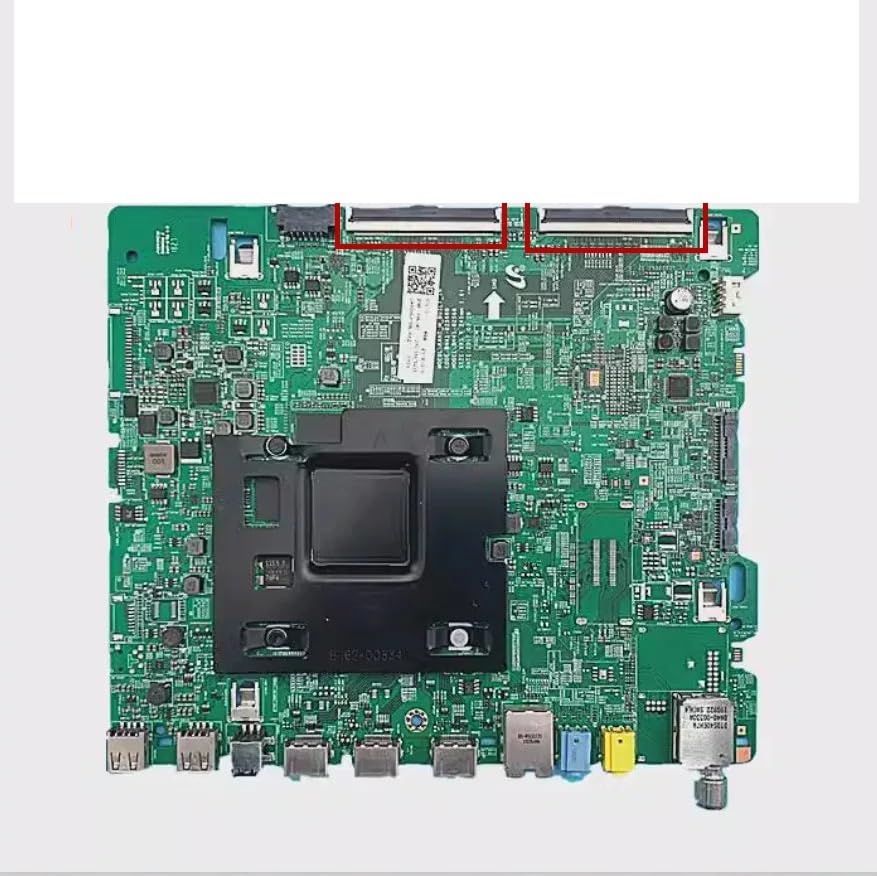
Figure 1: The GKNNCCBA BN41-02568A/B Motherboard. This image shows the general appearance of the replacement motherboard, highlighting its various ports and connectors. Use this as a visual reference during installation to ensure correct component identification and connection.
5. Operating the Television with the New Motherboard
The GKNNCCBA BN41-02568A/B Motherboard is an internal component that facilitates the core functions of your Samsung television. It does not have direct user-operable controls. Once correctly installed, the television should function as intended, allowing you to use your TV's remote control and interface normally.
If the television requires initial setup or configuration after motherboard replacement, refer to your Samsung TV's original user manual for specific instructions on first-time setup, channel scanning, and smart TV features.
6. Maintenance
The motherboard itself requires no routine user maintenance. To ensure the longevity of the component and the television:
- Keep the television in a clean, dry environment, away from excessive dust, moisture, and extreme temperatures.
- Ensure adequate ventilation around the television to prevent overheating.
- Avoid spilling liquids on or near the television.
7. Troubleshooting
If you encounter issues after installing the new motherboard, consider the following:
- No Power: Ensure the TV's power cable is securely connected to both the TV and a working power outlet. Verify that the power button on the TV or remote is functioning.
- No Picture/Sound: Check all internal cable connections to the motherboard, especially ribbon cables and power connectors. Ensure external input sources (HDMI, etc.) are correctly connected and selected.
- Distorted Image/Sound: Recheck all cable connections. If the issue persists, it may indicate a problem with the panel, speakers, or another component, or a faulty replacement board.
- Smart Features Not Working: Verify network connections (Wi-Fi/Ethernet). If the issue persists, ensure all internal data cables are properly seated.
If troubleshooting steps do not resolve the issue, it is recommended to consult a qualified television repair technician or contact the seller for further assistance.
8. Specifications
| Feature | Detail |
|---|---|
| Brand | GKNNCCBA |
| Model Numbers | BN41-02568A, BN41-02568B |
| Compatibility | Samsung 55-inch, 65-inch, 75-inch TVs |
| Item Weight | 1.76 ounces |
| Package Dimensions | 1.18 x 0.79 x 0.39 inches |
| Item Package Quantity | 1 |
| Manufacturer | weiqhao |
9. Warranty and Support
Specific warranty information for the GKNNCCBA BN41-02568A/B Motherboard is not provided in this manual. Please refer to the product listing or contact your point of purchase for details regarding warranty coverage and return policies.
For technical support or further inquiries, please contact the seller or manufacturer directly through the platform where the product was purchased.


