
T&G TG112
Contents
T&G TG112 Portable Bluetooth Speaker User Manual
Model: TG112
Introduction
The T&G TG112 Portable Bluetooth Speaker is designed to provide high-quality audio in a compact and durable form factor. Featuring seamless Bluetooth connectivity, multi-source playback options, and a long-lasting battery, it is suitable for various indoor and outdoor listening environments. This manual provides detailed instructions for setup, operation, and maintenance of your TG112 speaker.
Safety Information
Please read and understand all safety instructions before using this product. Keep this manual for future reference.
- Do not expose the speaker to extreme temperatures or direct sunlight for prolonged periods.
- Do not disassemble, repair, or modify the speaker. This may void the warranty and pose safety risks.
- Keep the speaker away from water and liquids, even though it is waterproof, excessive exposure or submersion should be avoided.
- Use only the specified charging cable and power adapter.
- Clean the speaker with a soft, dry cloth. Do not use abrasive cleaners or solvents.
- Avoid dropping or subjecting the speaker to strong impacts.
Package Contents
Verify that all items are present in the package:
- T&G TG112 Portable Bluetooth Speaker
- Power Cable (USB charging cable)
- User Manual (this document)
Product Overview
Familiarize yourself with the various parts and controls of your TG112 speaker.

Figure 1: Front view of the T&G TG112 speaker, showcasing its cylindrical design, blue fabric grille, and orange carrying handle. The T&G logo is visible on the front.
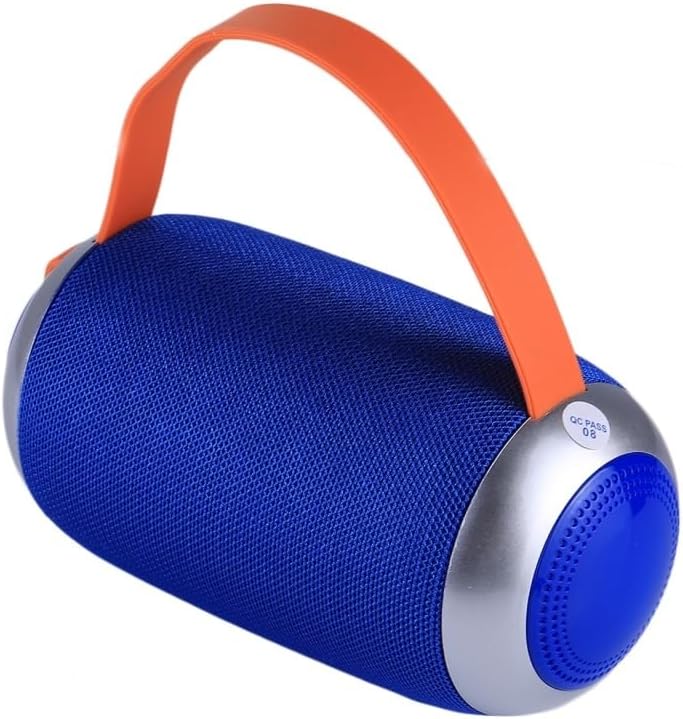
Figure 2: Side view of the T&G TG112 speaker, highlighting the control panel with buttons for power, volume, mode selection, and playback controls. The charging port and input slots are typically located near these controls.
Control Panel Functions:
- Power Button: Press and hold to turn the speaker ON/OFF.
- Mode Button (M): Short press to switch between Bluetooth, FM Radio, AUX-IN, and TF Card/USB modes.
- Play/Pause Button (▶⏸): Short press to play or pause audio. In call mode, press to answer/end calls.
- Volume Down / Previous Track (-): Short press for previous track. Long press to decrease volume.
- Volume Up / Next Track (+): Short press for next track. Long press to increase volume.
- USB Port: For USB disk playback.
- TF Card Slot: For TF (MicroSD) card playback.
- AUX-IN Port: For wired audio connection using a 3.5mm audio cable.
- DC 5V Charging Port: For charging the speaker.
Setup
1. Charging the Speaker
- Connect the provided power cable to the DC 5V charging port on the speaker.
- Connect the other end of the cable to a USB power adapter (not included) or a computer's USB port.
- The charging indicator light will illuminate during charging and turn off when fully charged.
- A full charge typically takes 2-3 hours.
2. Powering On/Off
- To Power On: Press and hold the Power button for approximately 3 seconds until you hear an audible prompt.
- To Power Off: Press and hold the Power button for approximately 3 seconds until you hear an audible prompt.
Operating Instructions
1. Bluetooth Pairing
- Ensure the speaker is powered on and in Bluetooth mode. If not, short press the "M" (Mode) button to switch to Bluetooth mode. The speaker will emit a pairing tone, and the Bluetooth indicator light will flash.
- Enable Bluetooth on your device (smartphone, tablet, etc.).
- Search for "TG112" in the list of available Bluetooth devices.
- Select "TG112" to connect. Once successfully paired, the speaker will emit a confirmation tone, and the Bluetooth indicator light will stop flashing and remain solid.
- The speaker will automatically reconnect to the last paired device when powered on, if the device is within range and Bluetooth is enabled.
2. AUX-IN Mode
- Connect one end of a 3.5mm audio cable (not included) to the AUX-IN port on the speaker.
- Connect the other end to the audio output jack of your device.
- The speaker will automatically switch to AUX-IN mode, or you may need to press the "M" (Mode) button to select it.
- Control playback and volume from your connected device.
3. TF Card / USB Disk Playback
- Insert a TF (MicroSD) card or USB disk containing MP3 audio files into the respective slot on the speaker.
- The speaker will automatically detect the storage device and begin playing audio files. If not, press the "M" (Mode) button to switch to the correct mode.
- Use the Play/Pause, Previous Track (-), and Next Track (+) buttons to control playback.
4. FM Radio Mode
- Press the "M" (Mode) button to switch to FM Radio mode.
- To auto-scan and save available stations, short press the Play/Pause button. The speaker will scan and store stations automatically.
- Use the Previous Track (-) and Next Track (+) buttons to navigate between saved stations.
- For better FM reception, connect the charging cable to the DC 5V port; it acts as an antenna.
5. Hands-Free Calling
- When connected via Bluetooth to a smartphone, the speaker can be used for hands-free calls.
- To Answer a Call: Short press the Play/Pause button.
- To End a Call: Short press the Play/Pause button.
- To Reject a Call: Press and hold the Play/Pause button.
Maintenance
- Cleaning: Wipe the speaker's surface with a soft, dry, lint-free cloth. Do not use liquid cleaners, aerosols, or solvents.
- Storage: When not in use for extended periods, store the speaker in a cool, dry place away from direct sunlight and extreme temperatures.
- Battery Care: To prolong battery life, fully charge the speaker before first use and recharge it at least once every three months if not used regularly. Avoid completely draining the battery frequently.
Troubleshooting
| Problem | Possible Cause | Solution |
|---|---|---|
| Speaker does not turn on. | Low battery. | Charge the speaker fully. |
| No sound. | Volume too low; incorrect mode; device not connected. | Increase volume; switch to correct mode (Bluetooth, AUX, etc.); ensure device is paired/connected. |
| Bluetooth pairing fails. | Speaker not in pairing mode; device Bluetooth off; too far from speaker. | Ensure speaker is in Bluetooth pairing mode; turn on device Bluetooth; move device closer (within 10m/33ft); clear previous pairings on device. |
| Poor FM radio reception. | Weak signal; no antenna. | Connect the charging cable to act as an external antenna; try repositioning the speaker. |
| Distorted sound. | Volume too high; low battery; interference. | Decrease volume; charge speaker; move away from other electronic devices. |
Specifications
| Model Name | TG112 |
| Brand | T&G |
| Connectivity Technology | Bluetooth |
| Wireless Communication Technology | Bluetooth |
| Bluetooth Range | Up to 10 meters (33 feet) |
| Speaker Type | Outdoor |
| Special Features | Bass Boost, Portable, Waterproof |
| Power Source | Battery Powered |
| Battery Capacity | 1200mAh |
| Speaker Maximum Output Power | 5 Watts |
| Frequency Response | 20 KHz |
| Product Dimensions | 6"D x 3.46"W x 6"H (16.5 x 8.8 x 8.8 cm) |
| Item Weight | 15.7 ounces (447g) |
| Material | Plastic |
| Color | Blue |
| Included Components | Power Cable |
| Country of Origin | China |
Warranty and Support
For warranty information or technical support, please refer to the product packaging or contact the retailer where the product was purchased. Specific warranty terms may vary by region and retailer.
Ask a question about this manual
Ask about setup, troubleshooting, compatibility, parts, safety, or missing instructions. Manuals+ will review the question and use this page’s manual context to help answer it.