Important Safety Instructions
Please read all instructions carefully before using this appliance and retain them for future reference. Failure to follow these instructions may result in electric shock, fire, or serious personal injury.
- Always ensure the voltage indicated on the rating label corresponds to your mains voltage.
- Do not operate any fan with a damaged cord or plug. Discard fan or return to an authorized service facility for examination and/or repair.
- Do not run cord under carpeting. Do not cover cord with throw rugs, runners, or similar coverings. Arrange cord away from traffic area and where it will not be tripped over.
- To protect against electrical hazards, do not immerse unit, plug, or cord in water or spray with liquids.
- Close supervision is necessary when any appliance is used by or near children.
- Unplug from outlet when not in use, when moving fan from one location to another, and before cleaning.
- Do not insert fingers or any other objects through the grille when the fan is operating.
- Do not use outdoors. This fan is for indoor use only.
- Place the fan on a stable, flat surface to prevent it from tipping over.
Product Overview
The EuropAce ESF5165EDCR DC Stand Fan is designed for efficient air circulation and cooling. It features an energy-efficient DC motor, a 16-inch fan blade, and convenient control options.
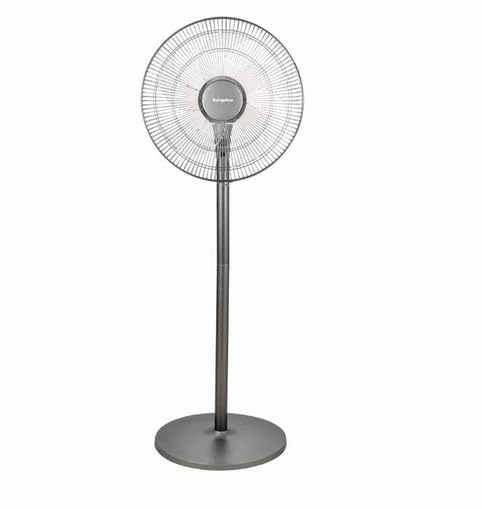
Figure 1: EuropAce ESF5165EDCR DC Stand Fan (Front View)
Components:
- Fan Head: Includes front grille, fan blade, and rear grille.
- Control Panel: Touch and knob controls for power, speed, oscillation, and timer.
- Adjustable Stand Pole: Allows for height adjustment.
- Base: Provides stability for the fan.
- Remote Control: For convenient operation from a distance.
- Power Cord: Connects the fan to an electrical outlet.
Setup and Assembly
Assembly is required before first use. Please follow these steps carefully:
- Unpack Components: Carefully remove all parts from the packaging. Ensure all components listed in the Product Overview section are present.
- Assemble the Base: Place the stand pole onto the base. Secure it using the provided screw and washer from underneath the base. Tighten firmly.
- Attach Rear Grille: Remove the spinner nut and retaining nut from the motor shaft. Place the rear grille onto the motor housing, ensuring it aligns with the positioning pins. Secure it with the retaining nut, turning clockwise.
- Install Fan Blade: Slide the fan blade onto the motor shaft, ensuring the notch on the blade aligns with the pin on the shaft. Secure it with the spinner nut, turning counter-clockwise to tighten.
- Attach Front Grille: Place the front grille over the rear grille, aligning the clips. Secure the grilles together using the provided clips or screws around the rim. Ensure the grilles are securely fastened.
- Adjust Height: Loosen the height adjustment knob on the stand pole, adjust the pole to the desired height, and then tighten the knob securely.
- Position Fan: Place the assembled fan on a stable, flat surface.
Operating Instructions
The fan can be operated using the control panel on the unit or the included remote control.
Control Panel Operation:
- Power On/Off: Turn the main knob clockwise to power on the fan. Turn it counter-clockwise to power off.
- Speed Adjustment: Once powered on, rotate the knob to increase or decrease the fan speed. The fan features multiple speed settings.
- Oscillation: Press the oscillation button (often indicated by an arrow icon) on the control panel to start or stop the fan head oscillating horizontally.
- Timer Function: Press the timer button to set the desired operating duration. Each press typically adds an increment of time (e.g., 1 hour, 2 hours, up to a maximum). The fan will automatically turn off after the set time.
Remote Control Operation:
Ensure batteries are correctly inserted into the remote control. Point the remote control towards the fan's receiver when operating.
- Power Button: Press to turn the fan on or off.
- Speed Buttons: Use '+' and '-' buttons to adjust the fan speed.
- Oscillation Button: Press to activate or deactivate the oscillation function.
- Timer Button: Press to cycle through available timer settings.
- Mode Button (if applicable): Some models may have different modes (e.g., normal, natural, sleep). Press to cycle through these modes.
Maintenance and Cleaning
Regular cleaning and maintenance will ensure optimal performance and extend the lifespan of your fan.
- Before Cleaning: Always unplug the fan from the power outlet before cleaning or performing any maintenance.
- Exterior Cleaning: Wipe the exterior surfaces of the fan with a soft, damp cloth. Do not use abrasive cleaners or solvents, as these may damage the finish.
- Grille and Blade Cleaning:
- To clean the fan blades and inside the grilles, you may need to remove the front grille. Refer to the "Setup and Assembly" section for reverse steps.
- Carefully wipe the blades and grilles with a soft, damp cloth or use a vacuum cleaner with a brush attachment to remove dust.
- Ensure all parts are completely dry before reassembling and operating the fan.
- Storage: When not in use for extended periods, store the fan in a cool, dry place, preferably in its original packaging, to protect it from dust and damage.
Troubleshooting
If you encounter any issues with your fan, please refer to the following troubleshooting guide before contacting customer support.
| Problem | Possible Cause | Solution |
|---|---|---|
| Fan does not turn on. |
|
|
| Weak or no airflow. |
|
|
| Fan makes unusual noise. |
|
|
| Remote control not working. |
|
|
Specifications
| Model | ESF5165EDCR |
| Brand | EuropAce |
| Electric Fan Design | Floor Fan |
| Power Source | DC Motor |
| Product Dimensions | 45D x 40W x 126H centimetres |
| Special Features | Oscillating, Pedestal Base, Remote Controlled |
| Included Components | Remote |
| Assembly Required | Yes |
Warranty and Support
This product is covered by a manufacturer's warranty. Please refer to the warranty card included in your product packaging for specific terms and conditions, including warranty period and coverage details.
For technical support, service inquiries, or to purchase replacement parts, please contact EuropAce customer service. Contact information can typically be found on the EuropAce official website or on the product packaging.
Please retain your proof of purchase for warranty claims.


