
1. Introduction
This manual provides detailed instructions for the safe and effective use of your RockSeed LV05GT2 Laser Level. This device is designed for precise leveling and alignment tasks, featuring a 360° horizontal line and a 150° vertical line, a self-leveling mechanism, and a rechargeable battery. Please read this manual thoroughly before operation and retain it for future reference.
2. Package Contents
Verify that all items listed below are included in your package:
- 1 x RockSeed LV05GT2 Laser Level
- 1 x 1.2m Adjustable Tripod
- 1 x Canvas Carrying Bag
- 1 x USB Type-C Charging Cable
- 1 x User Manual

3. Product Features
- 360° Horizontal and 150° Vertical Lines: Projects a full 360° horizontal line and a wide 150° vertical line for comprehensive leveling and alignment tasks.
- Self-Leveling and Manual Mode: Automatically levels within a certain range. For angled applications, the manual mode allows locking the laser lines at any desired angle.
- Bright Green Laser Beam: Utilizes a powerful green laser, which is significantly brighter and more visible than standard red lasers, especially in well-lit conditions.
- Rechargeable Lithium Battery: Equipped with a built-in rechargeable lithium battery, providing up to 8 hours of continuous operation on a full charge.
- 1.2m Adjustable Tripod: Includes a stable metal tripod with an adjustable height range from 0.43m to 1.2m, offering flexibility for various applications.
- High Protection Rating: Features an IP54 protection rating, making it resistant to dust and splashes, suitable for various working environments.
4. Setup
4.1 Charging the Battery
The device comes with a built-in rechargeable lithium battery. Before first use, ensure the battery is fully charged. Connect the provided USB Type-C charging cable to the laser level's charging port and to a suitable USB power adapter (not included).

4.2 Tripod Assembly and Mounting
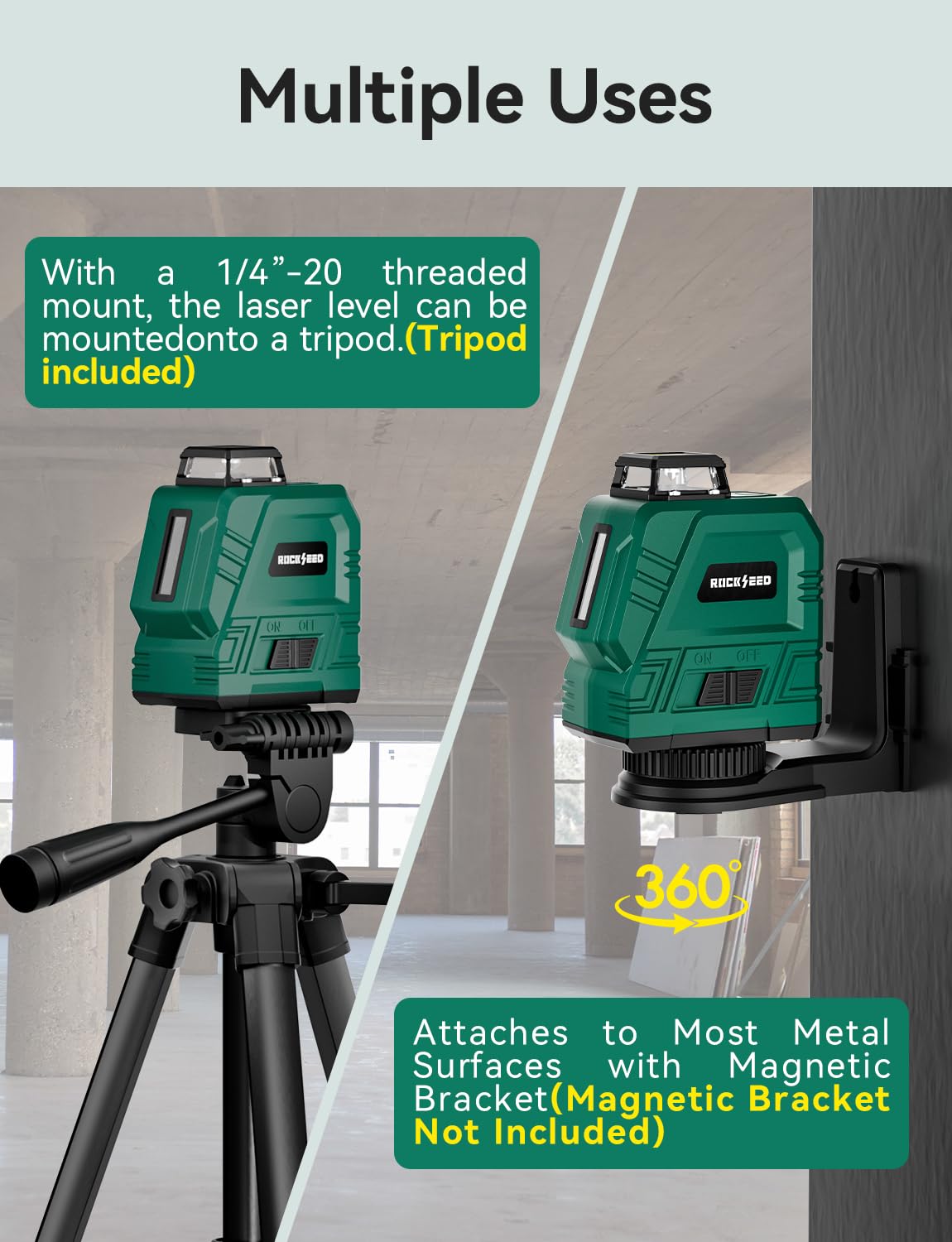
- Unfold the legs of the 1.2m tripod and extend them to the desired height. Secure the leg locks.
- Place the laser level onto the tripod's 1/4-inch threaded screw.
- Rotate the laser level clockwise until it is securely fastened to the tripod.
- Adjust the tripod head to achieve the approximate desired position for the laser level.


5. Operating Modes
5.1 Self-Leveling Mode
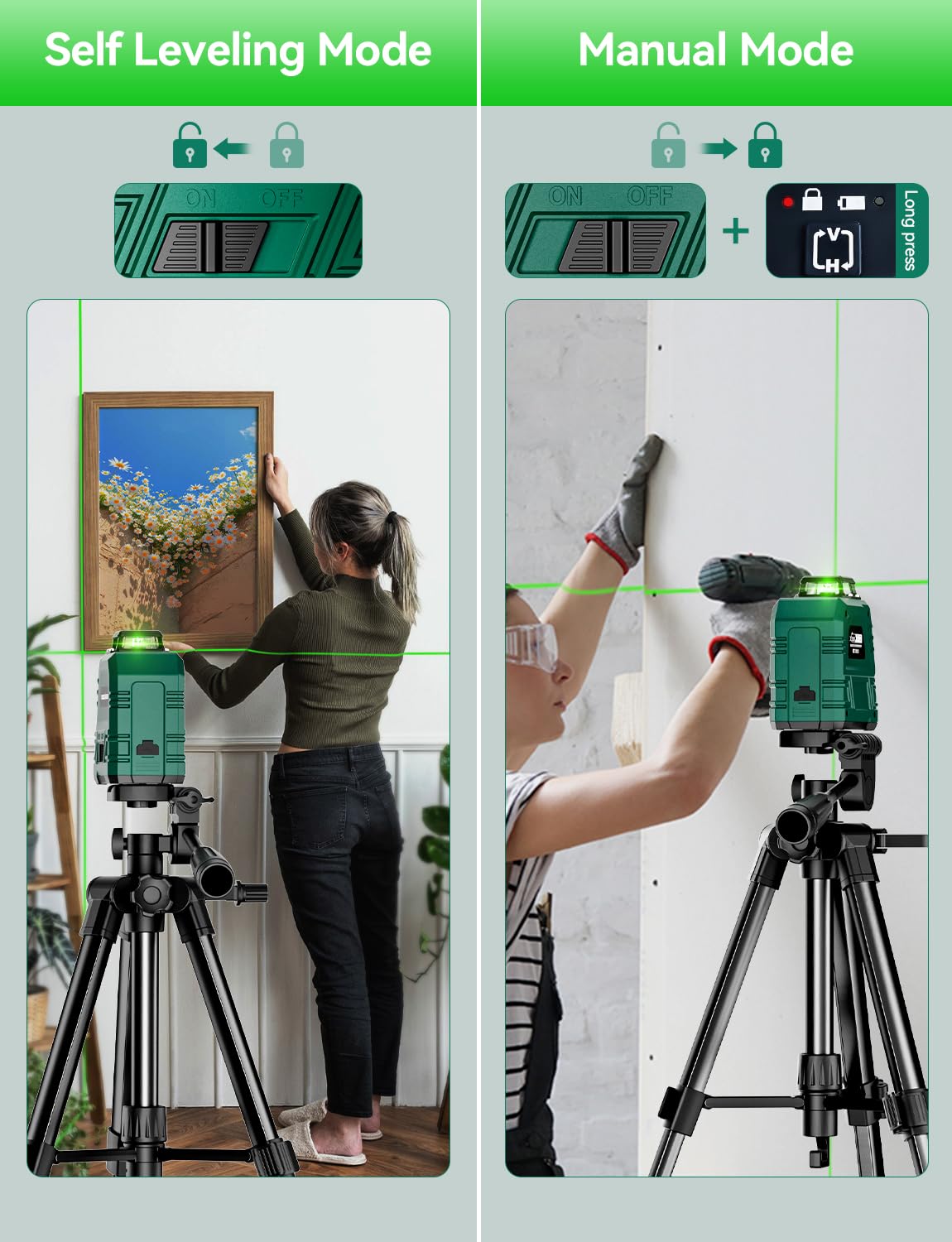
- Slide the power switch to the unlocked position (usually indicated by an open padlock icon).
- The laser level will automatically self-level. If the device is tilted beyond its self-leveling range (typically ±3° to ±4°), the laser lines will flash rapidly to indicate it is out of level.
- Adjust the tripod or the device's position until the laser lines stop flashing and become steady, indicating a level state.
5.2 Manual Mode (Locked Mode)
- To activate manual mode, slide the power switch to the locked position (closed padlock icon).
- Press and hold the laser button (often marked with 'H' or 'V' or a power symbol) for approximately 3 seconds. The laser lines will activate and remain locked at any angle, allowing for projection of non-level lines.
- In manual mode, the self-leveling function is disabled, and the laser lines will not flash if the device is tilted.
5.3 Switching Laser Lines
Once the device is powered on, short press the 'H' button to toggle the horizontal line and the 'V' button to toggle the vertical line. You can activate both lines simultaneously to create a cross-line pattern.


6. Safety Information
- Laser Safety: This product emits a Class 2 laser beam. Do not stare directly into the laser beam or direct it towards others. Avoid direct eye exposure.
- Children: Keep the device out of reach of children.
- Operating Environment: Use the device in a stable environment. Avoid extreme temperatures, humidity, or dusty conditions beyond its IP54 rating.
- Modifications: Do not attempt to modify or disassemble the laser level. This can cause damage and void the warranty.
7. Maintenance
- Cleaning: Wipe the device with a soft, damp cloth. Do not use abrasive cleaners or solvents.
- Storage: Store the laser level and tripod in the provided carrying bag in a cool, dry place when not in use.
- Battery Care: For optimal battery life, charge the device regularly, even if not in frequent use. Avoid fully discharging the battery for extended periods.
8. Troubleshooting
- Laser lines are flashing: In self-leveling mode, this indicates the device is tilted beyond its self-leveling range. Adjust the position until the lines become steady.
- Laser lines are dim or not visible: Ensure the battery is charged. In very bright environments, the visibility of green laser lines can be reduced, though green is generally superior to red.
- Device does not turn on: Check if the battery is charged. Ensure the power switch is in the correct position.
9. Specifications
| Specification | Value |
|---|---|
| Brand | RockSeed |
| Model Number | LV05GT2 |
| Material | Acrylonitrile Butadiene Styrene (ABS) |
| Operating Mode | Automatic |
| Laser Type | Green Laser |
| Horizontal Line Coverage | 360° |
| Vertical Line Coverage | 150° |
| Self-Leveling Range | Typically ±3° to ±4° |
| Battery Type | Rechargeable Lithium Battery |
| Continuous Operation Time | Up to 8 hours (on full charge) |
| Tripod Height (Adjustable) | 0.43m to 1.2m |
| Protection Rating | IP54 (Dust and Splash Resistant) |
10. Warranty and Support
RockSeed products are manufactured to high-quality standards. For warranty information or technical support, please refer to the contact details provided with your purchase documentation or visit the official RockSeed website. Keep your proof of purchase for any warranty claims.

