
Introduction
This manual provides essential instructions for the installation and proper use of the A-MIND LCD Display and Digitizer Replacement Kit for the Tecno Camon 20 Pro CK7n. This kit is designed to replace faulty screens, addressing issues such as cracks, broken pixels, unresponsive touch, and display problems. Please read all instructions carefully before proceeding with installation.
Package Contents
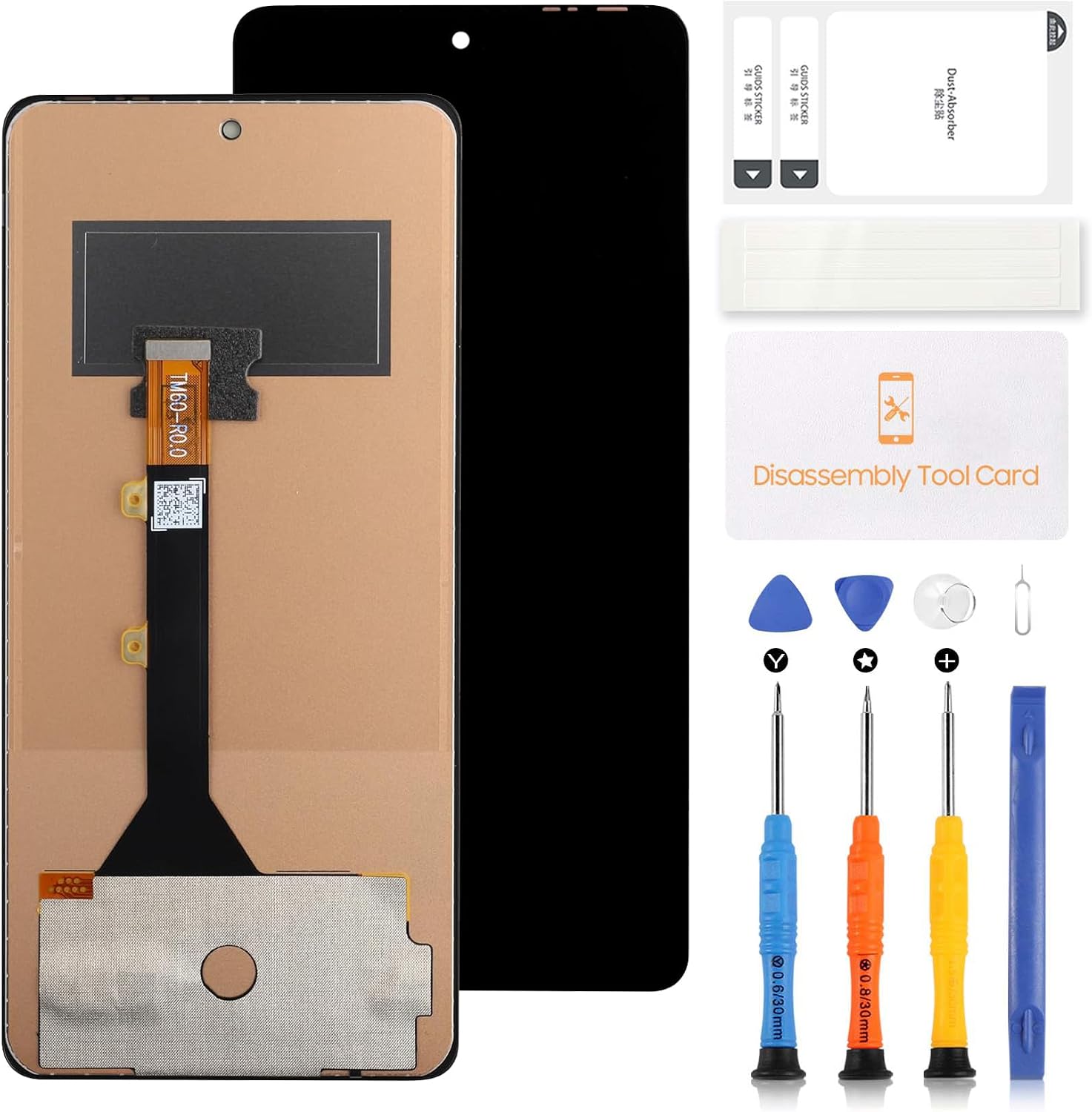
The A-MIND LCD Display and Digitizer Replacement Kit includes the following items:
- 1x LCD Display Touch Screen Digitizer Assembly Replacement for Tecno Camon 20 Pro CK7n
- 1x Strong Suction Cup
- 2x Triangle Opening Tools (Pry Picks)
- 1x Card Pin (SIM Ejector Tool)
- 1x Plastic Spudger
- Screwdriver Set (0.6/30mm Y-type, 0.8/30mm Pentalobe, Phillips)
- Dust Absorber and Guide Stickers
Setup and Pre-Installation Notes
Careful preparation and testing are crucial before proceeding with the full installation. Improper installation can damage your device.
- Test Before Installation: Before removing any protective films or tags, connect the new LCD assembly to the phone's motherboard. Power on the device and test the display and touch functionality thoroughly. Ensure all areas of the screen respond correctly to touch and that the display shows no abnormalities. If the test is successful, proceed with installation. If not, contact customer support.
- Static Electricity Precaution: Static electricity can damage electronic components. Before attempting any repair, ground yourself using an ESD (electrostatic discharge) strap. If an ESD strap is unavailable, frequently touch a grounded metal object to discharge static electricity.
- Eye Protection: Wear eye protection during the repair process to prevent injury from glass splinters.
- Handle with Care: The screen replacement is a fragile product. Avoid applying excessive force during handling and installation.
- Cable Management: Do not over-bend the flex cables. Bending them beyond 90 degrees can cause permanent damage, leading to a black display or other malfunctions.
- Professional Installation Recommended: Installation instructions are not included in this package. It is highly recommended to search for video tutorials on platforms like YouTube or Google for detailed guidance specific to the Tecno Camon 20 Pro CK7n screen replacement. If you are not confident in your ability to perform the installation, seek professional assistance.
Operating (Post-Installation)
Once the new LCD display and digitizer assembly is successfully installed, your Tecno Camon 20 Pro CK7n should function as intended. Operate your device normally, ensuring all touch and display features are responsive. If any issues arise after installation, refer to the Troubleshooting section.
Maintenance
To ensure the longevity and optimal performance of your new screen:
- Cleaning: Use a soft, lint-free cloth to clean the screen. Avoid harsh chemicals or abrasive materials.
- Protection: Consider using a screen protector and a protective case to prevent future damage from drops or scratches.
- Avoid Extreme Conditions: Protect your device from extreme temperatures and direct exposure to water or excessive humidity.
Troubleshooting
If you encounter any issues after installation, consider the following common problems and solutions:
- Black Display / No Image:
- Ensure all flex cables are securely connected to the motherboard.
- Check for any kinks or tears in the flex cables. Over-bending can cause this issue.
- Verify the phone's battery is charged.
- Unresponsive Touch / Touch Issues:
- Ensure the digitizer flex cable is properly seated.
- Perform a soft reset of the device.
- Re-test the screen before final installation to rule out a faulty unit.
- Display Problems (e.g., wrong colors, dead pixels, lines):
- Recheck all connections.
- Ensure no debris or foreign objects are between the screen and the phone's frame.
- If the issue persists after re-checking connections and a soft reset, the screen unit may be defective.
For persistent issues not resolved by these steps, please contact customer support.
Specifications
| Product Name | LCD Display Touch Digitizer Full Assembly Replacement |
| Brand | A-MIND |
| Compatible Model | Tecno Camon 20 Pro CK7n (Not compatible with Tecno Camon 20 Pro 5G / Camon 20) |
| Screen Size | 6.67 inches |
| Resolution | 1080x2400 pixels |
| Color | Black |
| Item Model Number | LCD for Tecno Camon 20 Pro |
Warranty and Support
Warranty: A-MIND provides a 3-month warranty for this LCD screen replacement. The warranty covers manufacturing defects and issues where the screen does not function normally, provided there is no man-made or physical damage.
Customer Support: If you have any problems with your order or require assistance, please contact our customer service team. We aim to provide support within 24 hours.