
1. Safety Instructions
Always observe basic safety precautions when using electric tools to reduce the risk of fire, electric shock, and personal injury. Read all instructions before operating this tool.
1.1 General Power Tool Safety
- Work Area Safety: Keep your work area clean and well-lit. Cluttered or dark areas invite accidents. Do not operate power tools in explosive atmospheres, such as in the presence of flammable liquids, gases, or dust.
- Electrical Safety: Avoid body contact with earthed or grounded surfaces such as pipes, radiators, ranges, and refrigerators. There is an increased risk of electric shock if your body is earthed or grounded.
- Personal Safety: Always wear eye protection. Use personal protective equipment such as dust masks, non-skid safety shoes, hard hats, or hearing protection when appropriate. Dress properly. Do not wear loose clothing or jewelry. Keep your hair and clothing away from moving parts.
1.2 Battery Safety
- Only use the charger specified by the manufacturer. A charger that is suitable for one type of battery pack may create a risk of fire when used with another battery pack.
- Do not use battery packs other than those specifically designated for the power tool. Use of any other battery packs may create a risk of injury and fire.
- When battery pack is not in use, keep it away from other metal objects, like paper clips, coins, keys, nails, screws or other small metal objects, that can make a connection from one terminal to another. Shorting the battery terminals together may cause burns or a fire.
2. Package Contents
Verify that all items are present and in good condition upon opening the package. If any items are missing or damaged, please contact customer support.
- 1x Avhrit 1/2 Cordless Impact Wrench (1000 N.m)
- 2x 4000 mAh Lithium-ion Batteries
- 1x Fast Charger
- 1x Carrying Case
- 4x Impact Sockets
- 1x 12.7 cm Extension Bar

Figure 2.1: Included accessories and components.
3. Product Overview
The Avhrit AH03 Cordless Impact Wrench is designed for efficient fastening and loosening of nuts and bolts. It features a brushless motor for enhanced performance and durability.

Figure 3.1: Avhrit Cordless Impact Wrench.
3.1 Key Components
- Square Drive Anvil: For attaching impact sockets.
- Brushless Motor: Provides high torque and speed with increased efficiency and lifespan.
- Trigger Switch: Controls the tool's power and speed.
- Forward/Reverse Switch: Changes the rotation direction.
- LED Work Light: Illuminates the work area.
- Battery Pack: Provides power to the tool.
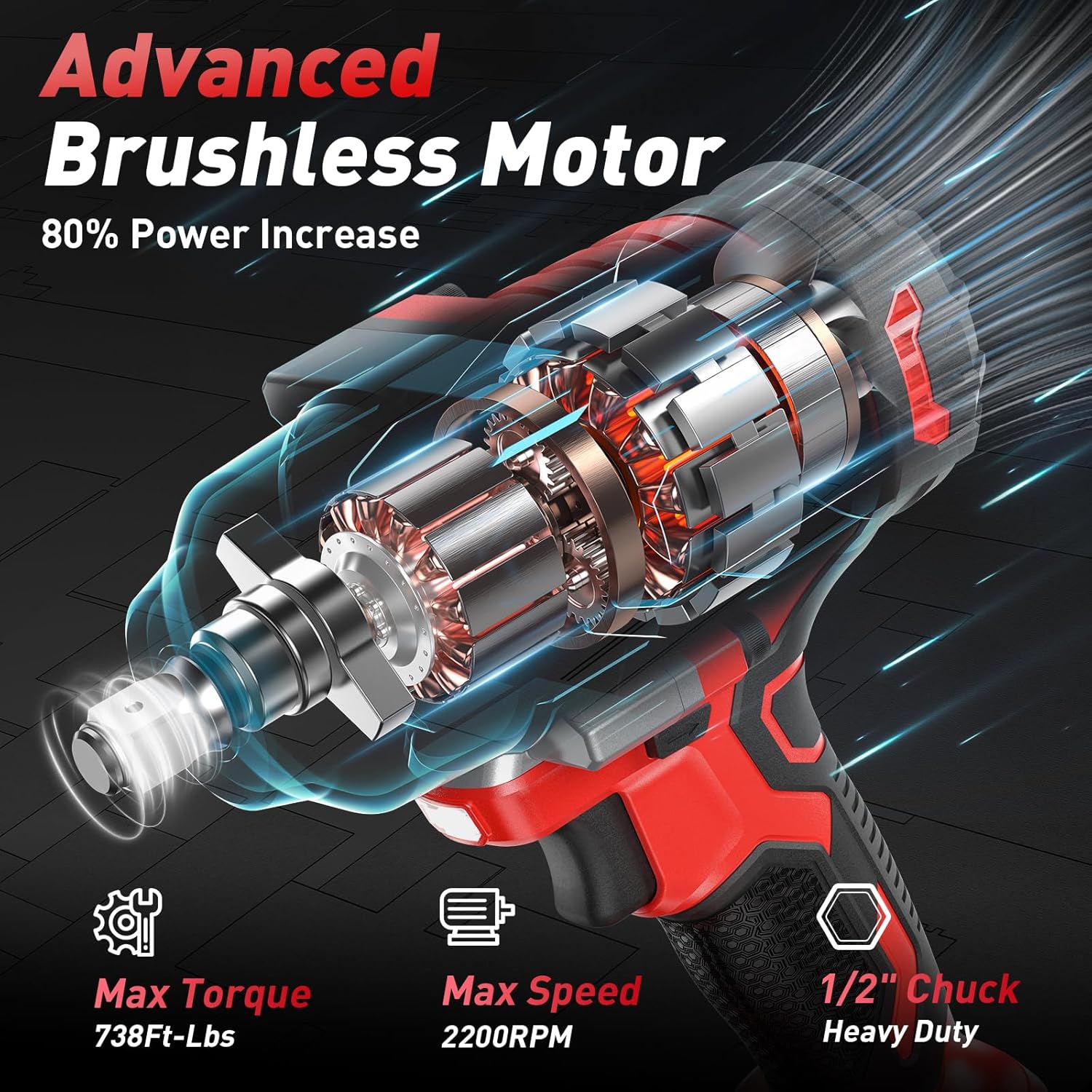
Figure 3.2: Internal view of the brushless motor.
4. Setup
4.1 Charging the Battery
- Connect the fast charger to a standard power outlet.
- Slide the battery pack onto the charger until it clicks into place.
- The charger indicator light will show the charging status. A full charge typically takes approximately 4 hours.
- Once fully charged, remove the battery from the charger.

Figure 4.1: Battery charging process.
4.2 Installing and Removing the Battery
- To Install: Align the battery pack with the base of the impact wrench and slide it in until it locks securely.
- To Remove: Press the battery release button (if present) and slide the battery pack out.

Figure 4.2: Battery installation and removal.
4.3 Attaching and Removing Sockets
- To Attach: Push the desired impact socket onto the square drive anvil until it is firmly seated. Ensure it is securely locked in place.
- To Remove: Pull the socket firmly off the square drive anvil.
5. Operating Instructions
5.1 Powering On/Off
To turn the tool on, press the trigger switch. To turn it off, release the trigger switch.
5.2 Adjusting Speed
The impact wrench features 3 variable speed settings, allowing you to adjust the speed based on the application. The speed is also variable by how much you depress the trigger.
- Speed Modes: The tool offers distinct speed modes (e.g., 0-1500 RPM, 0-1800 RPM, 0-2200 RPM) which can be selected via a mode button or switch.
- Variable Speed Trigger: The harder you press the trigger, the higher the speed, providing precise control.

Figure 5.1: Variable speed settings.
5.3 Forward and Reverse Operation
The forward/reverse switch allows you to change the direction of rotation for tightening or loosening fasteners.
- Forward (Tighten): Push the switch to the 'F' position for clockwise rotation.
- Reverse (Loosen): Push the switch to the 'R' position for counter-clockwise rotation.
- Lock Position: Center the switch to lock the trigger and prevent accidental operation.

Figure 5.2: Forward and Reverse switch.
5.4 Brake Stop Mode (Reverse)
In reverse mode, once a nut or bolt is loosened, the tool's brake function activates. This reduces speed and torque to prevent the fastener from flying off or getting stuck, enhancing safety and control.
5.5 Using the LED Work Light
The integrated LED light automatically illuminates when the trigger is pressed, providing visibility in dark or confined work areas.

Figure 5.3: LED work light in action.
6. Maintenance
6.1 Cleaning
- Regularly clean the ventilation openings of the tool to prevent dust accumulation.
- Use a soft, damp cloth to wipe down the tool's exterior. Do not use harsh chemicals or abrasive cleaners.
6.2 Battery Care
- Store batteries in a cool, dry place away from direct sunlight and extreme temperatures.
- Do not store batteries in a discharged state for extended periods. Charge them periodically if not in use.
6.3 Storage
When not in use, store the impact wrench and its accessories in the provided carrying case in a secure, dry location, out of reach of children.
7. Troubleshooting
| Problem | Possible Cause | Solution |
|---|---|---|
| Tool does not start | Battery not charged or improperly installed. Forward/Reverse switch in lock position. | Charge battery. Reinstall battery correctly. Move switch out of center lock position. |
| Reduced power/torque | Battery charge is low. Incorrect speed setting. | Recharge battery. Select a higher speed setting. |
| Battery not charging | Charger not plugged in. Faulty battery or charger. | Ensure charger is properly connected. Contact customer support if issue persists. |
8. Specifications
| Feature | Specification |
|---|---|
| Model Number | AH03 |
| Max Torque | 1000 N.m (738 ft-lbs) |
| Max Speed | 2200 RPM |
| Voltage | 21 Volts (DC) |
| Wattage | 700 Watts |
| Drive Size | 1/2 inch Square Drive |
| Motor Type | Brushless |
| Battery Type | Lithium-ion |
| Battery Capacity | 4000 mAh (x2) |
| Material | Tungsten Steel |
| Weight | 5.3 Kilograms |
| Dimensions (Package) | 42.4 x 33.6 x 12.7 cm |
9. Warranty and Support
For warranty information or technical support, please refer to the documentation included with your purchase or contact Avhrit customer service. Keep your purchase receipt as proof of purchase.
