
Introduction
This manual provides essential instructions for the safe and efficient operation, maintenance, and troubleshooting of your Eureka NEW400 Gen2 Cordless Vacuum Floor Washer. Please read this manual thoroughly before first use and keep it for future reference.
Important Safety Instructions
- Always ensure the device is switched off and unplugged before performing any maintenance or cleaning.
- Do not immerse the main unit in water or other liquids.
- Keep hair, loose clothing, fingers, and all parts of the body away from openings and moving parts.
- Use only Eureka recommended cleaning solutions.
- Use only on hard floor surfaces as specified. Not suitable for carpets.
- Store the appliance indoors in a dry place.
- This appliance is not intended for use by persons (including children) with reduced physical, sensory or mental capabilities, or lack of experience and knowledge, unless they have been given supervision or instruction concerning use of the appliance by a person responsible for their safety.
- Children should be supervised to ensure that they do not play with the appliance.
What's in the Box

Image: The Eureka NEW400 Gen2 cordless vacuum, accessory rack, roller brush, and cleaning solution are shown as included components.
- Main Unit
- Accessory Holder
- Self-cleaning Storage Tray
- Cleaning Brush
- Filter
- Power Adapter
- User Manual
- Cleaning Solution
- Roller Brush
Setup
1. Assembly
- Carefully unpack all components from the box.
- Insert the handle into the main unit until it clicks securely into place.
- Place the main unit onto the self-cleaning storage tray.
2. Charging the Battery

Image: The battery indicator on the device, illustrating its extended battery life of up to 30 minutes.
- Connect the power adapter to the charging port on the main unit and plug it into a wall outlet.
- The battery indicator lights will show the charging status. A full charge takes approximately 5 hours.
- Ensure the device is fully charged before its first use for optimal performance.
3. Filling the Clean Water Tank
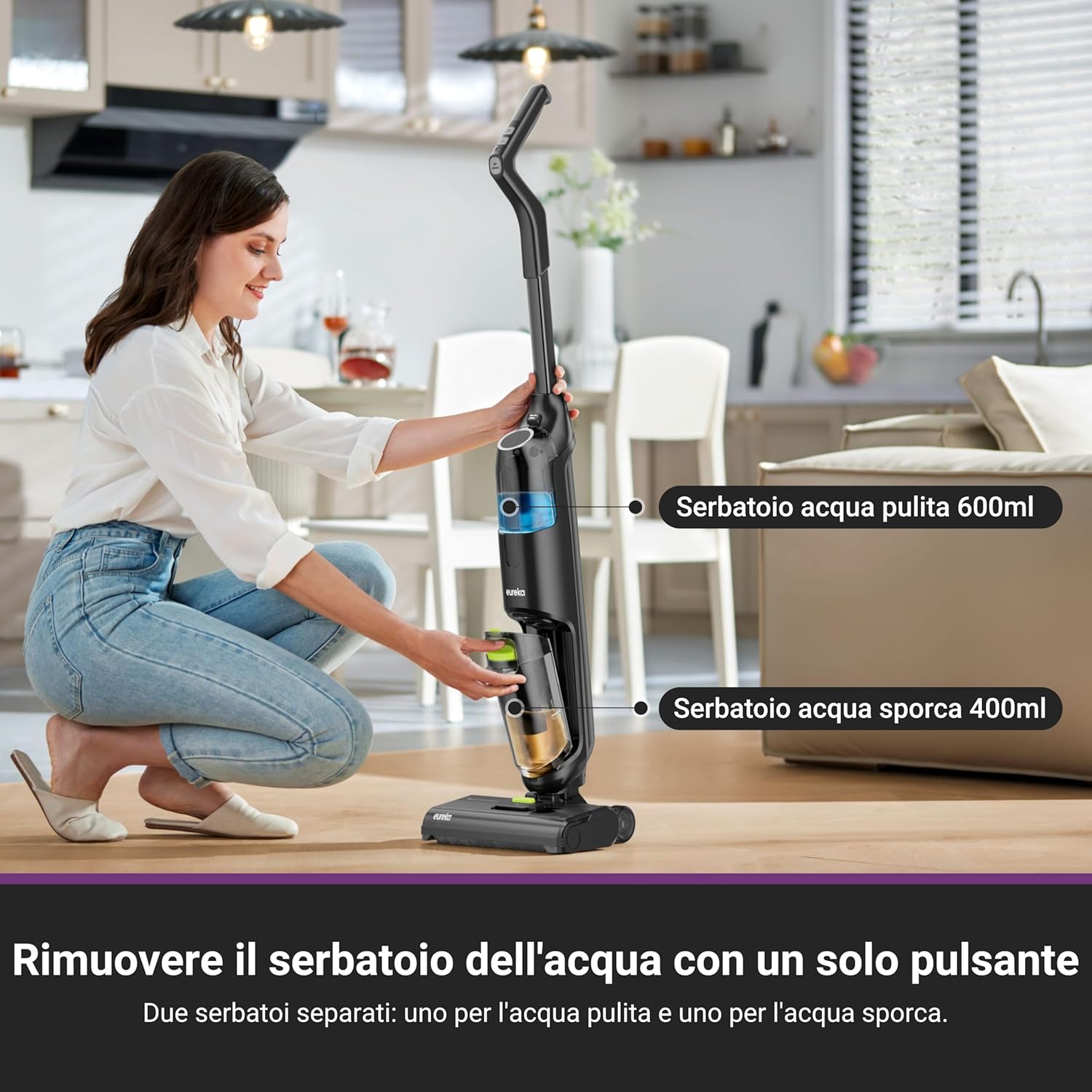
Image: Removing the clean water tank with a single button press, highlighting the separate clean (600ml) and dirty (400ml) water tanks.
- Press the release button to detach the clean water tank (600 ml) from the main unit.
- Open the tank cap and fill with clean tap water. For enhanced cleaning and odor removal, add the recommended Eureka cleaning solution as per instructions on the solution bottle.
- Close the cap securely and reattach the clean water tank to the main unit until it clicks.
Operating Instructions
1. Powering On and Cleaning Modes
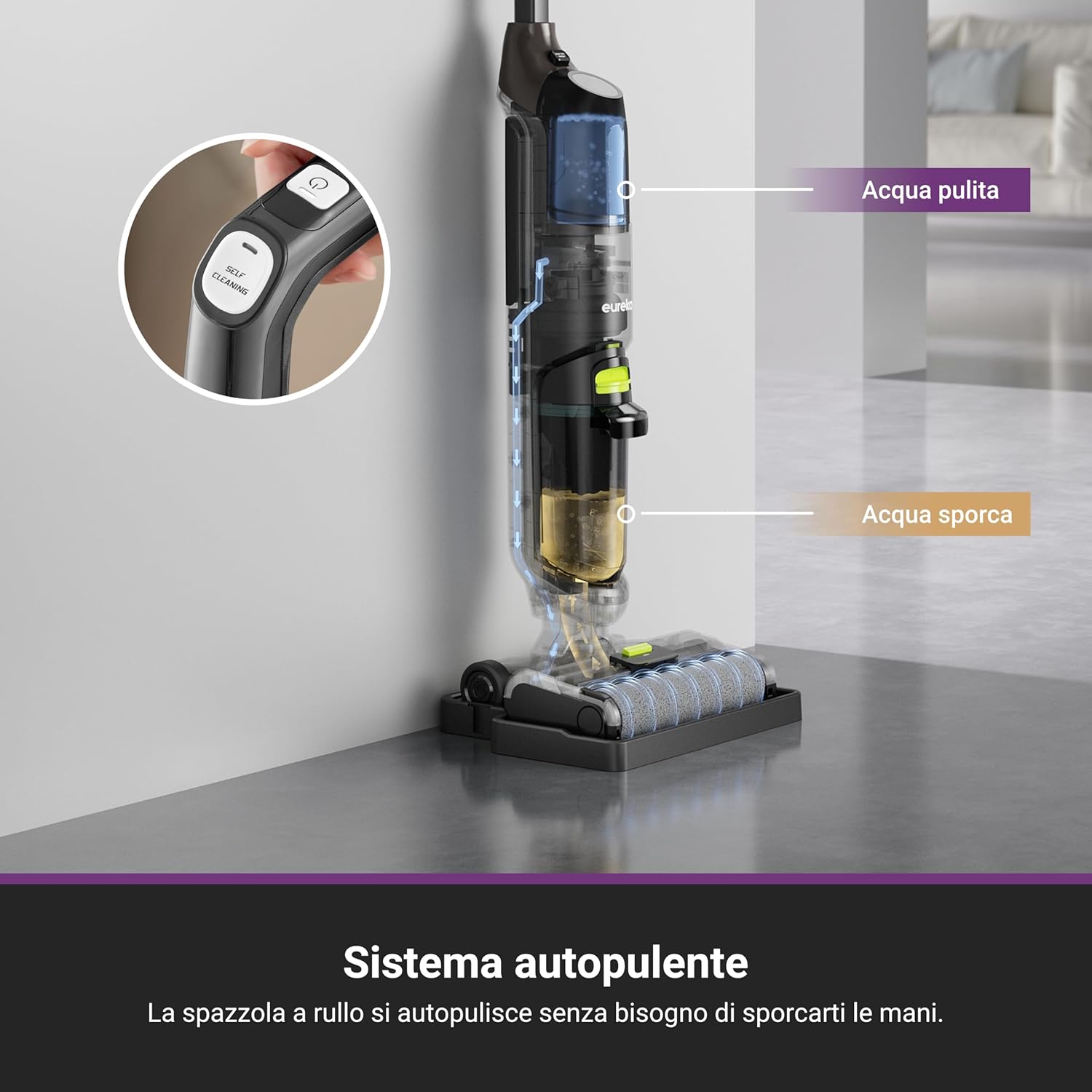
Image: A user cleaning a floor with the Eureka NEW400 Gen2, demonstrating its ability to vacuum and wash in one step.
- Press the power button to turn on the device.
- Select the desired cleaning mode (e.g., standard, max) if available. The device offers 2 power levels.
- The 3-in-1 functionality allows for simultaneous vacuuming, washing, and drying of hard floors.
2. Cleaning Performance

Image: The device performing multi-scenario cleaning on different hard floor types, effectively removing debris and spills.
- The self-propelled system makes cleaning effortless, reducing physical strain.
- The flexible nozzle and pivoting steering allow for easy maneuverability around furniture and into tight spaces.
- Suitable for various hard floor types including tiles, hardwood, and ceramic. Not recommended for carpets.
- The device automatically stops when placed in an upright position, enhancing safety and efficiency.
3. Dual Tank System

Image: The Eureka NEW400 Gen2 is shown to be effective for pet-owning families, capable of eliminating odors with its cleaning solution.
- The separate 600 ml clean water tank and 400 ml dirty water tank prevent cross-contamination.
- The device will alert you and automatically shut off when the dirty water tank is full to prevent overflow.
- High dirty water recovery efficiency (over 90%) ensures quick drying and streak-free floors.
Maintenance
1. Self-Cleaning Cycle

Image: The self-cleaning system diagram, indicating how the roller brush self-cleans without manual intervention.
- After each use, place the device on its self-cleaning storage tray.
- Press and hold the self-cleaning button for 3 seconds to activate the cycle.
- The roller brush will automatically clean itself, removing residues and bacteria, ensuring hygienic operation for the next use.
2. Emptying the Dirty Water Tank
- After each cleaning session or when the dirty water tank full indicator activates, remove the dirty water tank (400 ml).
- Carefully empty the contents into a drain.
- Rinse the tank thoroughly with clean water and allow it to air dry before reattaching.
3. Cleaning the Roller Brush and Filter
- Even with the self-cleaning function, occasional manual cleaning of the roller brush may be necessary. Remove the roller brush and use the provided cleaning brush to remove any tangled hair or debris.
- Remove the filter from the dirty water tank. Rinse it under running water until clean. Allow it to dry completely before reinserting.
- Replace the filter every 3-6 months, or as needed, to maintain optimal suction and cleaning performance.
Troubleshooting
| Problem | Possible Cause | Solution |
|---|---|---|
| Device does not turn on. | Battery is not charged. | Charge the battery for 5 hours. |
| Poor suction/cleaning performance. | Dirty water tank is full or filter is clogged. | Empty and clean the dirty water tank. Clean or replace the filter. |
| Water not dispensing. | Clean water tank is empty or improperly installed. | Fill the clean water tank. Ensure it is securely attached. |
| Device stops unexpectedly. | Dirty water tank is full or device is in upright position. | Empty the dirty water tank. Tilt the device to resume operation. |
| Roller brush not spinning. | Obstruction in the brush roll area. | Turn off the device, remove any obstructions from the brush roll. |
Specifications
| Brand | EUREKA |
| Model Name | NEW400 Gen2 |
| Special Features | High Power, Portable |
| Filter Type | Cartridge |
| Recommended Surfaces | Hard floors, Pet hair |
| Power Source | Battery powered |
| Noise Level | 77.6 Decibels |
| Number of Power Levels | 2 |
| Indoor Usage | Indoor |
| Voltage | 230 Volts |
| Wattage | 120 watts |
| Amperage | 8.2 |
| Control Method | Button |
| Item Weight | 3.95 Kilograms |
| Item Dimensions (LxWxH) | 29L x 26W x 119H cm |
| Battery Charge Time | 5 Hours |
| Battery Type | Lithium Ion |
| Run Time | Up to 30 minutes |
| Clean Water Tank Capacity | 600 ml |
| Dirty Water Tank Capacity | 400 ml |
Warranty and Support
EUREKA is committed to providing reliable after-sales warranty and support for its products. For warranty claims, technical assistance, or spare parts, please contact EUREKA customer service through their official website or the retailer where the product was purchased.
Please retain your proof of purchase for warranty purposes.