
1. Introduction
Thank you for choosing TOZO T6 Wireless Earbuds. This manual provides essential information for setting up, operating, maintaining, and troubleshooting your new earbuds. Please read it carefully before use and retain it for future reference.
2. What's in the Box
- TOZO T6 Wireless Earbuds
- Wireless Charging Case
- Eartips (multiple sizes)
- USB A to C Charging Cable
- User Manual
3. Product Overview
The TOZO T6 earbuds are designed for an immersive audio experience with advanced features and comfortable wear.
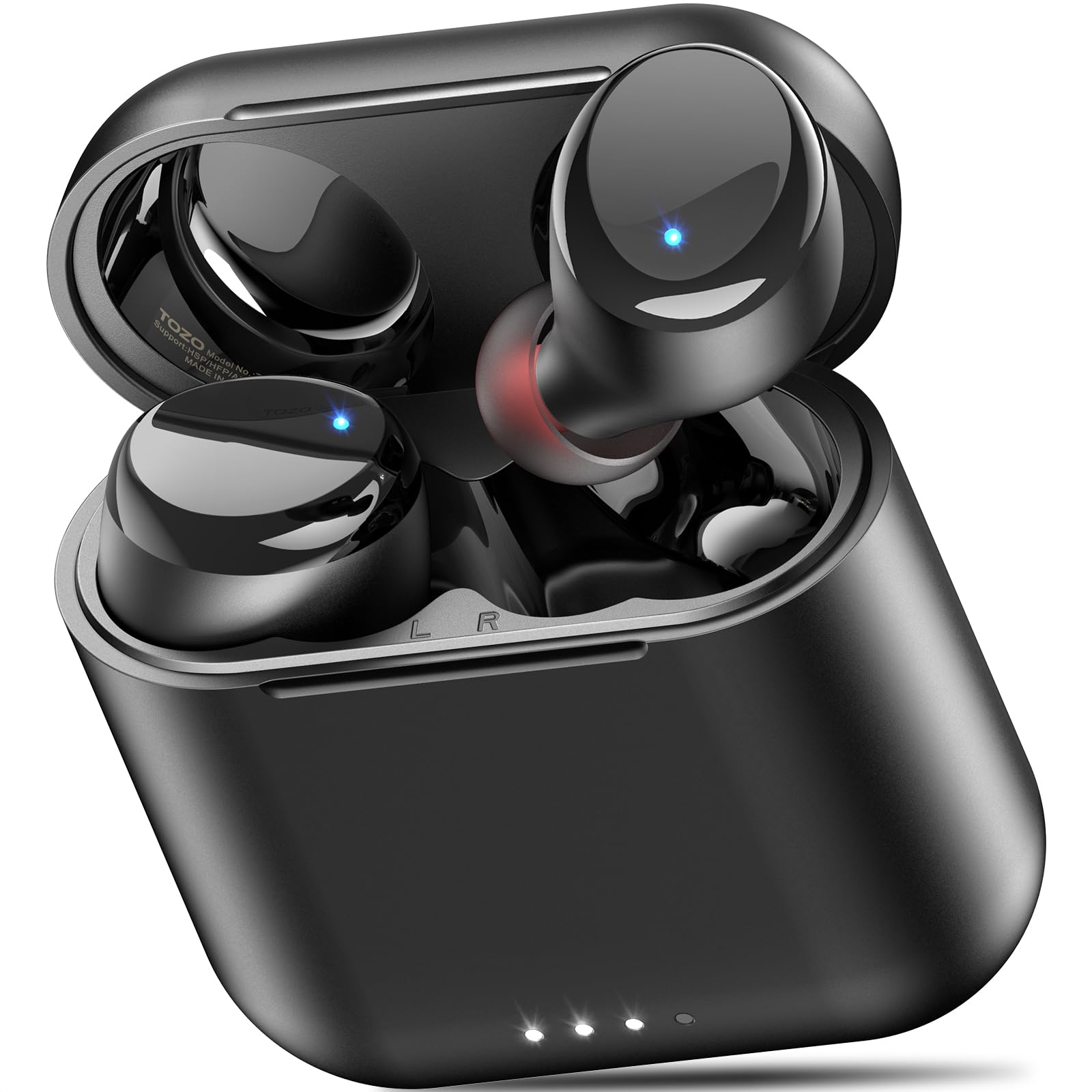
Figure 1: TOZO T6 Wireless Earbuds and Charging Case.

Figure 2: TOZO T6 Earbud highlighting OrigX 2.0 Acoustics for powerful bass and clear audio.

Figure 3: TOZO T6 Earbuds with a selection of ultra-soft silicone ear tips for a secure and comfortable fit.
4. Setup
4.1. Initial Pairing
- Open the charging case. The earbuds will automatically enter pairing mode.
- On your device (smartphone, tablet, etc.), enable Bluetooth.
- Search for "TOZO-T6" in the list of available Bluetooth devices and select it to connect.
- Once connected, you will hear an audio prompt confirming successful pairing.
4.2. Fitting the Earbuds
For optimal sound quality and comfort, choose the correct ear tip size. The TOZO T6 comes with multiple sizes of silicone ear tips. Experiment to find the size that provides a snug fit and good seal in your ear canal.
- Gently insert the earbud into your ear canal.
- Rotate the earbud slightly until it feels secure and comfortable.
- Ensure a good seal to maximize bass response and noise isolation.
5. Operating Instructions
5.1. Touch Controls
The TOZO T6 earbuds feature intuitive touch controls for easy management of music and calls.

Figure 4: Visual guide to TOZO T6 Smart Touch Controls.
- Play/Pause: Tap L or R earbud once.
- Volume Up: Hold R earbud for 2 seconds.
- Volume Down: Hold L earbud for 2 seconds.
- Next Song: Tap R earbud twice.
- Previous Song: Tap L earbud twice.
- Answer/End Call: Tap L or R earbud once.
- Reject Call: Hold L or R earbud for 2 seconds.
5.2. Charging
The TOZO T6 earbuds and charging case offer both wireless and USB-C charging options.

Figure 5: The TOZO T6 charging case being charged wirelessly.
- Earbud Charging: Place the earbuds into the charging case. They will automatically begin charging. The indicator lights on the earbuds will show their charging status.
- Case Charging (USB-C): Connect the provided USB A to C charging cable to the charging port on the case and a power source. The case fully charges in approximately 55 minutes.
- Case Charging (Wireless): Place the charging case on a compatible wireless charging pad. The case fully charges in under 2 hours wirelessly.
- Battery Life: Enjoy up to 12 hours of listening time on a single charge, with a total of 50 hours using the charging case.
5.3. TOZO APP Compatibility
Enhance your audio experience by connecting your TOZO T6 earbuds to the TOZO app.

Figure 6: The TOZO App interface showing customizable EQ settings.
- Download the TOZO app from the App Store or Google Play.
- Connect your earbuds via the app to access 32 preset EQ modes or create your own custom sound profiles.
- The app also offers over 100 white noise tracks and AI-powered features for productivity.
6. Maintenance
6.1. Cleaning
Regular cleaning helps maintain optimal performance and hygiene.
- Wipe the earbuds and charging case with a soft, dry, lint-free cloth.
- Remove ear tips and clean them with mild soap and water, then dry thoroughly before reattaching.
- Gently clean any debris from the charging contacts on the earbuds and inside the case using a dry cotton swab.
6.2. Water Resistance (IPX8)
The TOZO T6 earbuds are IPX8 waterproof, offering protection against water immersion.

Figure 7: TOZO T6 Earbuds demonstrating IPX8 waterproof protection.
- IPX8 rating means the earbuds can withstand complete immersion in water under specific laboratory conditions (up to 1.5 meters for 30 minutes).
- They are designed to handle heavy sweat, rain, and daily water exposure.
- Ensure earbuds are dry before placing them back into the charging case to prevent damage.
7. Troubleshooting
If you encounter any issues with your TOZO T6 earbuds, try the following steps:
- No Sound: Ensure earbuds are paired correctly and volume is turned up on both the earbuds and your device. Check if the earbuds are charged.
- Pairing Issues: Turn off Bluetooth on your device, then turn it back on. Reset the earbuds by placing them in the case, closing it, and then reopening. Try pairing again.
- Unbalanced Sound: Ensure both earbuds are properly seated in your ears and that the ear tips provide a good seal. Check for debris in the earbud nozzles.
- Charging Problems: Ensure the charging cable is securely connected or the wireless charging pad is properly aligned. Clean the charging contacts.
- Touch Control Unresponsive: Ensure your fingers are clean and dry. Try resetting the earbuds.
For persistent issues, refer to the TOZO official website or contact customer support.
8. Specifications
| Feature | Specification |
|---|---|
| Model Name | T6 |
| Bluetooth Version | 5.3 |
| Bluetooth Range | 20 Meters |
| Battery Life (Earbuds) | Up to 12 Hours |
| Total Playtime (with Case) | Up to 50 Hours |
| Charging Time (Case via USB-C) | Approx. 55 minutes |
| Charging Time (Case via Wireless) | Under 2 Hours |
| Water Resistance Rating | IPX8 |
| Noise Control | Sound Isolation |
| Audio Driver Size | 6 Millimeters |
| Item Weight | 0.2 Ounces |
9. Warranty and Support
TOZO products are designed for durability and performance. For warranty information and customer support, please visit the official TOZO website or contact their customer service team. Keep your purchase receipt for warranty claims.
For additional resources and FAQs, visit the TOZO Brand Store.


