
E-FAST 0-20A 12/24V Automatic Smart Battery Charger
Contents
E-FAST Battery Charger User Manual
Model: 0-20A 12/24V Automatic Smart Battery Charger
1. Introduction
Thank you for choosing the E-FAST Automatic Smart Battery Charger. This device is an all-in-one solution designed for charging, maintaining, trickle charging, and desulfating various 12V and 24V batteries. It is suitable for lead-acid automotive, RV, powersports, and deep cycle batteries, including flooded, gel, AGM, SLA, and LiFePO4 types. This manual provides essential information for safe and efficient operation, setup, maintenance, and troubleshooting.
The charger features a 7-stage automatic charging process, intelligent protections against reverse polarity, overheating, overcurrent, overvoltage, and short circuits, and an efficient pulse repair function to help restore battery performance. Its visualization display provides real-time information on voltage, current, and temperature.
2. Safety Information
Please read all safety warnings and instructions before using this product. Failure to follow these instructions may result in electric shock, fire, and/or serious injury.
- Risk of Explosive Gases: Batteries generate explosive gases during normal operation. Ensure adequate ventilation when charging. Do not smoke or allow a spark or flame in the vicinity of the battery or engine.
- Eye Protection: Always wear eye protection when working near batteries.
- Skin Protection: Wear protective clothing and gloves. Battery acid is corrosive. If acid contacts skin or clothing, wash immediately with soap and water. If acid enters eye, flush immediately with running cold water for at least 10 minutes and get medical attention immediately.
- Electrical Safety: Do not expose the charger to rain or wet conditions. Do not operate the charger with a damaged cord or plug. Do not disassemble the charger; refer all servicing to qualified personnel.
- Connection Order: Connect the output clips to the battery and chassis in the order specified in the operating instructions to reduce the risk of a spark.
- Child Safety Lock: The charger includes a child lock feature that automatically activates during charging. Keep out of reach of children.
- Temperature Adaptive: The charger automatically adjusts charging voltage based on ambient temperature. Do not attempt to override this feature.
- Battery Compatibility: This charger is designed for 12V and 24V lead-acid (Flooded, Gel, AGM, SLA) and LiFePO4 batteries. Do not attempt to charge other battery types. The lithium battery charging function is only suitable for LiFePO4; other lithium batteries cannot be charged.
- Repair Function: The pulse repair function cannot activate a completely dead battery or repair a physically damaged battery. It also cannot jump-start a car.
3. Product Overview
The E-FAST battery charger is designed for ease of use and durability. Below are the key components and features.
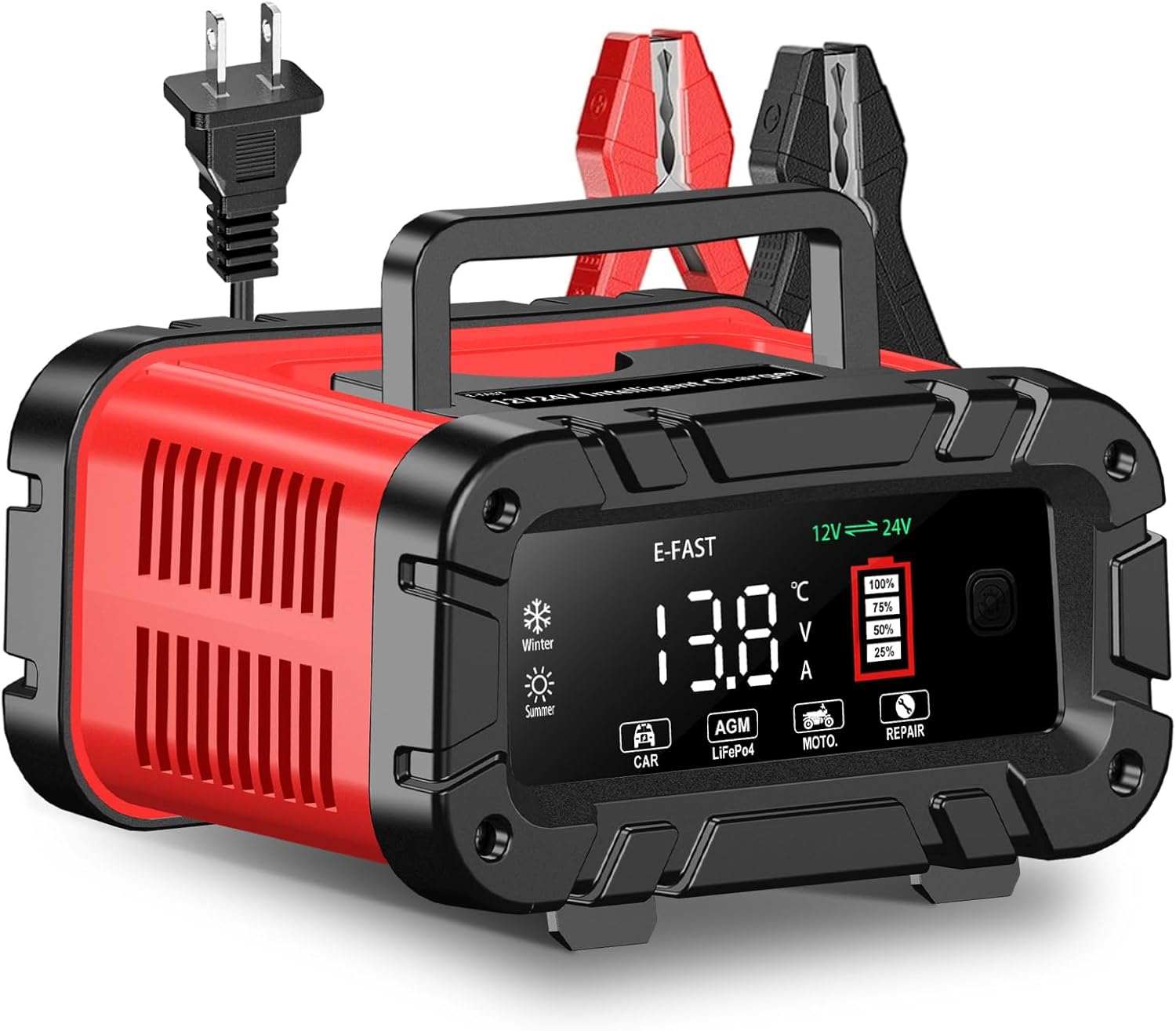
Figure 3.1: Front view of the E-FAST Battery Charger showing the display, power cord, and battery clamps.
3.1 Key Features and Components
High Power Output & Brighter Screen
This charger delivers 12V/20A and 24V/10A for efficient charging. The large, bright display provides clear visibility of charging status, voltage, current, and temperature.
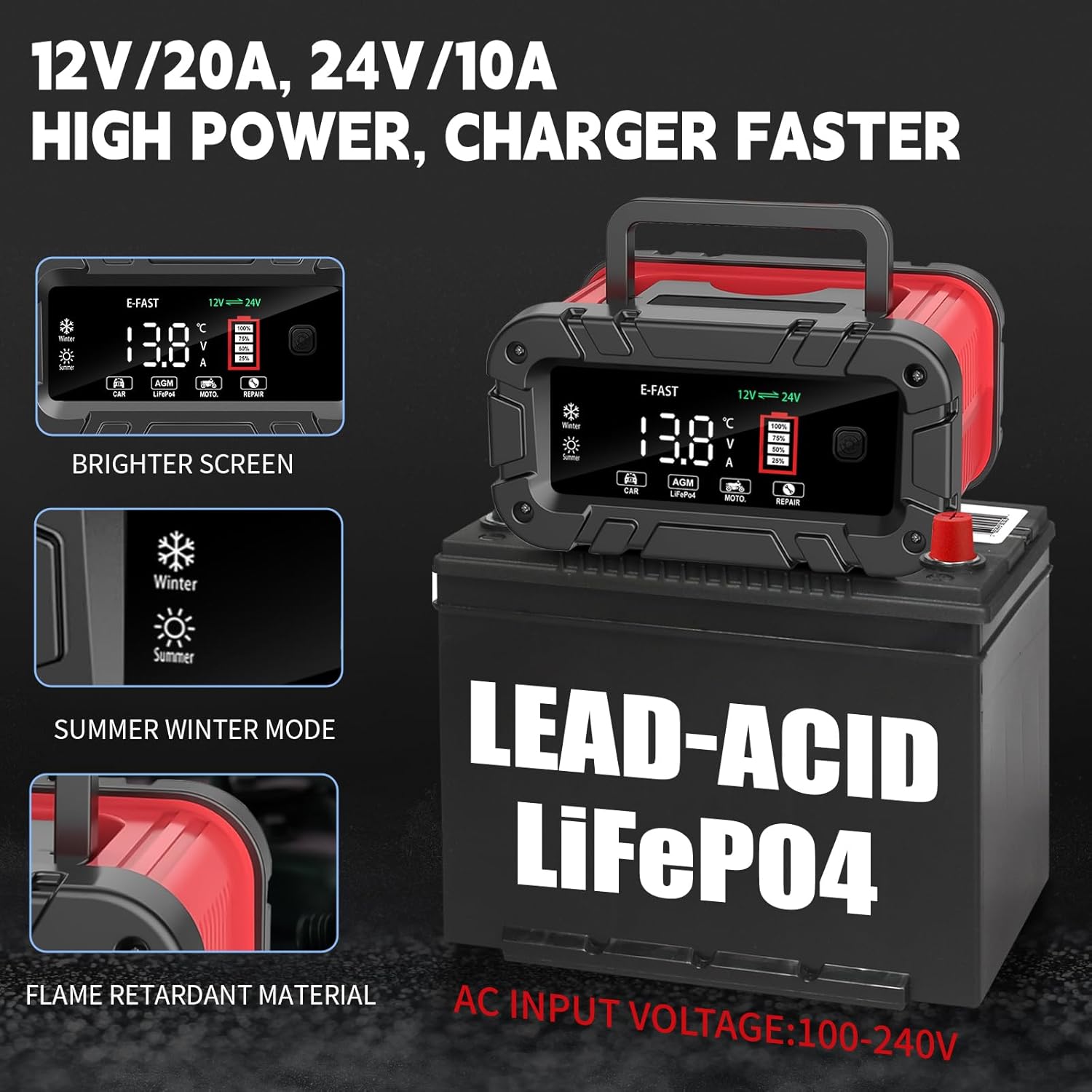
Figure 3.2: Charger display and mode indicators.
Multiple Charging Modes
Select from four distinct modes: Car, LiFePO4, Moto, and Repair, to optimize charging for different battery types and conditions. Ensure the correct mode is selected for your battery.

Figure 3.3: Four selectable charging modes.
Efficient Pulse Repair Technology
Utilizes high-power, high-frequency, low-frequency pulse technology to help eliminate vulcanization and restore lost performance in old or idle batteries. This feature is beneficial for batteries suffering from long idle times, low voltage, or weak power.

Figure 3.4: Pulse repair function overview.
User-Friendly Design
Features a foldable handle for portability and support feet for stable placement. The clips and wires are designed for easy storage, and the charging clips are sturdy for secure connection.

Figure 3.5: Design features for convenience.
4. Setup
Follow these steps to set up your E-FAST Battery Charger for safe operation.
- Prepare the Battery: Ensure the battery terminals are clean and free of corrosion. If necessary, clean them with a wire brush and baking soda solution.
- Ventilation: Ensure the charging area is well-ventilated to prevent the accumulation of explosive gases.
- Connect the Charger to the Battery:
- Connect the RED positive (+) clamp to the positive (+) terminal of the battery.
- Connect the BLACK negative (-) clamp to the negative (-) terminal of the battery.
- If charging a battery installed in a vehicle, connect the negative (-) clamp to the vehicle chassis away from the battery and fuel line.
- Connect to Power: Plug the charger's AC power cord into a standard 100-240V AC electrical outlet. The charger will power on and display the current battery status.
- Select Charging Mode: Once powered on, use the mode selection button on the charger to choose the appropriate charging mode (Car, LiFePO4, Moto, Repair) for your battery type. Refer to Section 5 for details on modes.
5. Operating Instructions
The E-FAST charger features a smart 7-stage charging process and various modes for optimal battery care.
5.1 Charging Modes
The charger offers four selectable modes. Press the mode button to cycle through them:
- CAR Mode: For standard 12V/24V lead-acid batteries found in cars, trucks, SUVs, and other vehicles.
- LiFePO4 Mode: Specifically for 12V/24V Lithium Iron Phosphate (LiFePO4) batteries. Note: This mode is only for LiFePO4 batteries; other lithium battery types are not supported.
- MOTO Mode: For smaller 12V/24V lead-acid batteries typically found in motorcycles, ATVs, lawn mowers, and similar equipment.
- REPAIR Mode: Activates the pulse repair function to help desulfate and restore old or idle batteries. This mode does not charge the battery but attempts to improve its condition.

Figure 5.1: Charger display and mode selection details.
5.2 7-Stage Smart Charging Process
The charger automatically adjusts its charging process based on the battery's status to optimize power and extend battery life.
- Desulfurization: Removes lead sulfate that may have built up on the battery plates, which can reduce battery capacity.
- Trickle Charging: Initial low-current charge for deeply discharged batteries.
- Constant Current Charging: Charges the battery at a constant, high current until voltage reaches a set level.
- Constant Voltage Charging: Charges at a constant voltage while current gradually decreases.
- Battery Current Detection: Monitors the battery's current to determine its charge level.
- Compensation Charging: Provides a small current to ensure the battery is fully charged.
- Floating Charging: Maintains the battery at full charge with a low, constant voltage, preventing overcharging.

Figure 5.2: The 7-stage smart charging process.
5.3 Temperature Adaptive Charging
The charger automatically adjusts the charging voltage based on the ambient temperature to prevent overcharging or undercharging.
- Winter Mode: In cold conditions, the charger increases the charging voltage to ensure the battery charges fully.
- Summer Mode: In warm conditions, the charger lowers the charging voltage to prevent overcharging and battery damage.

Figure 5.3: Temperature adaptive charging feature.
5.4 Visualization Charging
The digital display provides real-time information:
- Real-time Voltage: Displays the current battery voltage.
- Current: Shows the charging current.
- Temperature: Indicates the ambient temperature.
- Charging Stage: Shows the current stage of the 7-stage charging process.
- Battery Status: Displays battery charge percentage. When 100% is reached, the charger automatically stops charging.
6. Maintenance
Proper maintenance ensures the longevity and optimal performance of your E-FAST Battery Charger.
- Cleaning: Disconnect the charger from power and battery before cleaning. Wipe the exterior with a soft, damp cloth. Do not use harsh chemicals or abrasives.
- Storage: Store the charger in a cool, dry place when not in use. Ensure the cables are neatly coiled and the clamps are clean and dry. The foldable handle and wire organization features aid in compact storage.
- Cable Inspection: Periodically inspect the power cord and charging cables for any signs of damage, cuts, or fraying. Do not use the charger if cables are damaged.
- Battery Terminals: Keep battery terminals clean to ensure good electrical contact during charging.
7. Troubleshooting
If you encounter issues with your E-FAST Battery Charger, refer to the following common problems and solutions.
| Problem | Possible Cause | Solution |
|---|---|---|
| Charger does not turn on. | No power from outlet; loose connection; internal fault. | Check power outlet with another device. Ensure power cord is securely plugged in. If problem persists, contact support. |
| Charger displays "dE5" during charging. | Normal automatic adjustment. | No action required. Wait at least 5 minutes for the charger to automatically adjust and resume charging. |
| Battery not charging or charging slowly. | Incorrect mode selected; poor connection; battery deeply discharged or damaged. | Ensure correct mode is selected for battery type. Check clamps for secure connection to battery terminals. Battery may be too damaged for charging (charger cannot activate dead batteries). |
| Charger shows error code (e.g., reverse polarity). | Safety protection activated. | Refer to the charger's display for the specific error. Disconnect and re-connect correctly (e.g., reverse polarity protection means clamps are reversed). |
| Pulse Repair mode not effective. | Battery is too damaged or completely dead. | The repair function cannot fix all battery issues or activate dead batteries. Battery may need replacement. |
If troubleshooting steps do not resolve the issue, please contact E-FAST customer support.
8. Specifications
| Specification | Value |
|---|---|
| Brand | E-FAST |
| Product Dimensions | 4.9 x 7.8 x 3.7 inches (4.9"D x 7.8"W x 3.7"H) |
| Item Weight | 2.61 pounds |
| Input Voltage | 100-240V AC (110 Volts listed in specifications, but feature bullets state 100-240V) |
| Output Voltage | 12 Volts, 24 Volts |
| Output Current | 12V/20A, 24V/10A |
| Max Input Power | 300W |
| Color | Red |
| Manufacturer | EFAST |
| First Available Date | June 1, 2025 |
Note: Specifications are subject to change without notice.
9. Warranty and Support
For warranty information or technical support, please contact E-FAST customer service through the retailer where the product was purchased or visit the official E-FAST website. Please have your product model and purchase date available when contacting support.
Protection Plans: Additional protection plans may be available for purchase. Please refer to your purchase documentation for details on extended warranty options.
Documents and downloads
Ask a question about this manual
Ask about setup, troubleshooting, compatibility, parts, safety, or missing instructions. Manuals+ will review the question and use this page’s manual context to help answer it.