
OSCAL OSCAL Flat 2 Mobile Phone(2025 Second Generation)
OSCAL Flat 2 Mobile Phone User Manual
Model: OSCAL Flat 2 (2025 Second Generation) | Brand: OSCAL
1. Introduction
Welcome to the user manual for your new OSCAL Flat 2 Mobile Phone. This guide provides comprehensive instructions to help you set up, operate, maintain, and troubleshoot your device. The OSCAL Flat 2 is designed to offer a smooth and efficient smartphone experience, featuring Android 14, Gemini AI integration, a powerful 5000mAh battery, and a vibrant 90Hz display.

Image: The OSCAL Flat 2 Mobile Phone, highlighting its sleek design and key features like 12GB RAM, 256GB storage, and 90Hz display.
2. What's in the Box
Upon unboxing your OSCAL Flat 2, please ensure all the following items are present:
- 1x Flat 2 (2025 Second Generation) Mobile Phone (Blue)
- 1x Mobile Phone Charger
- 1x Type C Charging Cable
- 1x Transparent Phone Case
- 1x Screen Protector
- 1x SIM Card Pin
- 1x User Manual
3. Initial Setup
3.1 Inserting SIM Card and Powering On
To begin using your phone, insert your SIM card(s) and/or microSD card:
- Locate the SIM tray on the side of the phone.
- Insert the provided SIM card pin into the small hole next to the tray to eject it.
- Place your Nano-SIM card(s) and/or microSD card into the tray according to the diagram.
- Carefully reinsert the tray into the phone.
- Press and hold the Power button until the OSCAL logo appears to power on the device.
3.2 First Time Use
Upon first power-on, the phone will guide you through the initial setup process:
- Select your preferred language.
- Connect to a Wi-Fi network.
- Sign in with your Google account or create a new one.
- Set up screen lock (PIN, pattern, password, fingerprint, or face unlock).
- Review and accept terms and conditions.
4. Operating Your OSCAL Flat 2
4.1 Display and Navigation
The OSCAL Flat 2 features a 6.56-inch HD+ display with a 90Hz refresh rate for smooth visuals and responsive touch. It also includes multiple eye-care modes to reduce strain during extended use.

Image: The phone's 6.56" HD+ IPS display with 90Hz refresh rate, 720*1612 resolution, 450 Nit brightness, and eye comfort modes.
- Navigation Gestures: Swipe from the bottom for Home, swipe and hold for Recent Apps, swipe from the left/right edge for Back.
- Brightness Adjustment: Swipe down from the top to access Quick Settings and adjust the brightness slider.
- Eye-Care Modes: Access display settings to enable Reading Mode, Night Light, or Dark Mode for enhanced visual comfort.
4.2 Performance and Storage
Equipped with an Octa-core processor and 12GB RAM (4GB physical + 8GB virtual expansion), the Flat 2 ensures smooth multitasking. It comes with 256GB of internal storage, expandable up to 2TB via a microSD card.

Image: Visual representation of the phone's 12GB RAM (expandable) and 256GB internal storage, with 2TB TF card expansion capability.
- RAM Expansion: Go to Settings > About Phone > RAM to adjust virtual RAM. Restart the phone to apply changes.
- Storage Management: Use the Files app to manage your internal and external storage.
4.3 Battery Management
The 5000mAh battery provides extended usage, offering up to 624 hours of standby time. Optimize battery life by managing app usage and screen brightness.
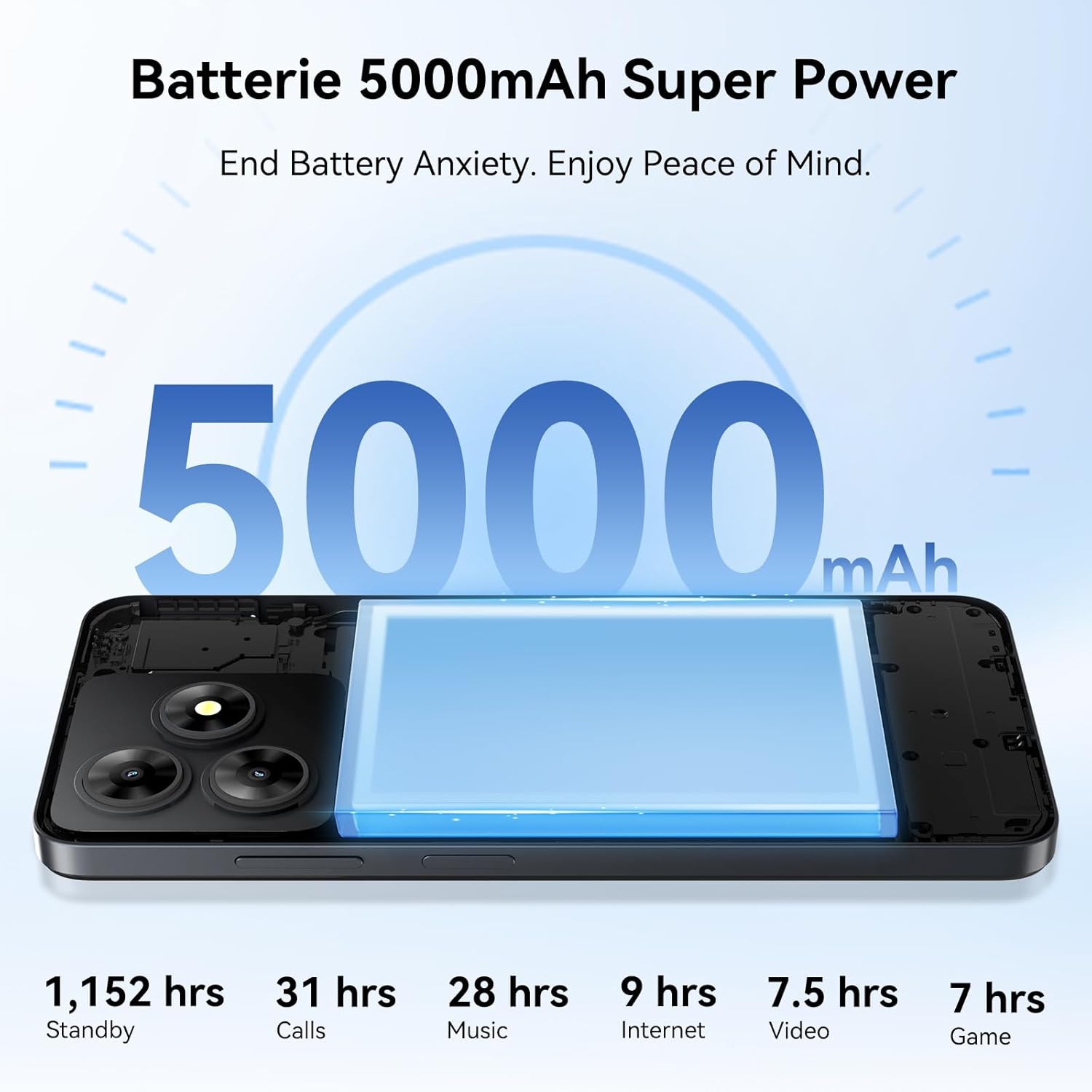
Image: The 5000mAh battery, illustrating its capacity and estimated usage times for standby, calls, music, internet, video, and gaming.
- Battery Saver: Enable Battery Saver mode in Settings > Battery to extend usage when low on power.
- Charging: Use the provided charger and Type-C cable for optimal charging speed.
4.4 Camera Features
Capture moments with the 13MP rear camera and 8MP front camera. The phone supports various shooting modes and 1080P video recording.

Image: The phone's camera capabilities, including 13MP rear and 8MP front cameras, with various modes such as HDR, Beauty, Portrait, Night, Pro, and Panorama.
- Shooting Modes: Access modes like Portrait, Night, Panorama, and Professional from the camera interface.
- Face Fill Light: Utilize the front camera's face fill light for better selfies in low-light conditions.
4.5 Gemini AI Integration
The OSCAL Flat 2 integrates Gemini AI to provide efficient and customized AI solutions. This includes quick app sifting, reliable answers, brainstorming ideas, and high-quality output generation.

Image: The Android 14 interface, showcasing various applications and the integration of Gemini AI for enhanced user experience.
- Accessing Gemini AI: Specific access methods may vary based on software updates. Refer to on-screen prompts or the phone's help section.
4.6 Connectivity and Security
The phone supports comprehensive positioning systems (GPS, GLONASS, GALILEO, BDS), Bluetooth, and a 3.5mm audio jack. For security, it offers both fingerprint and facial recognition unlock options.
- Fingerprint ID: Register your fingerprints in Settings > Security > Fingerprint.
- Face Unlock: Set up face unlock in Settings > Security > Face Unlock.
- OTG Function: Connect USB drives and other peripherals via an OTG adapter (not included) for easy file management.
5. Maintenance and Care
To ensure the longevity and optimal performance of your OSCAL Flat 2, follow these maintenance guidelines:
- Cleaning: Use a soft, lint-free cloth to clean the screen and body. Avoid harsh chemicals.
- Software Updates: Regularly check for and install system updates to ensure your phone has the latest features and security patches. Go to Settings > System > System update.
- Battery Care: Avoid extreme temperatures. Do not let the battery completely drain frequently.
- Protection: Use the provided transparent phone case and screen protector to guard against scratches and minor impacts.
6. Troubleshooting Common Issues
This section addresses common problems you might encounter and their solutions.
| Problem | Possible Solution |
|---|---|
| Phone does not turn on | Ensure the battery is charged. Press and hold the Power button for at least 10 seconds. |
| Apps are slow or crashing | Clear app cache (Settings > Apps > [App Name] > Storage > Clear cache). Restart the phone. Consider expanding virtual RAM. |
| Cannot connect to Wi-Fi | Restart your router and phone. Forget the network and reconnect. Check Wi-Fi settings on the phone. |
| Battery drains quickly | Reduce screen brightness. Close unused apps. Disable unnecessary features like Bluetooth/GPS when not in use. Enable Battery Saver mode. |
| SIM card not detected | Ensure the SIM card is correctly inserted. Restart the phone. Check if the SIM card is active with your carrier. |
7. Technical Specifications
Key specifications for the OSCAL Flat 2 Mobile Phone:
| Feature | Specification |
|---|---|
| Model Name | OSCAL Flat 2 Mobile Phone (2025 Second Generation) |
| Operating System | Android 14 |
| RAM Memory | 12 GB (4GB physical + 8GB virtual) |
| Internal Storage | 256 GB (Expandable up to 2TB via TF card) |
| CPU Model | Octa-core Unisoc T606 |
| CPU Speed | 1.6 GHz |
| Screen Size | 6.56 Inches |
| Resolution | 720 x 1600 |
| Refresh Rate | 90 Hz |
| Battery | 5000mAh |
| Product Dimensions | 16.32 x 7.52 x 0.88 cm; 192 g |
| Cameras | 13MP Rear, 8MP Front |
| Connectivity | 4G, GPS, GLONASS, GALILEO, BDS, Bluetooth, 3.5mm Jack |
8. Warranty and Support
Your OSCAL Flat 2 Mobile Phone comes with a 2-year warranty, ensuring peace of mind. OSCAL is committed to providing excellent customer service and technical support.

Image: Visual representation of OSCAL's customer support, highlighting 24/7 online call support and 2-year repair support.
- Warranty Coverage: The 2-year warranty covers manufacturing defects. Please retain your proof of purchase.
- Customer Support: For any inquiries or technical assistance, you can access 24/7 professional customer support. Refer to the contact information provided in your product packaging or visit the official OSCAL website.
- Repair Support: Enjoy 2-year repair support for eligible issues.
Related documentsOSCAL Flat 2 Mobile Phone(2025 Second Generation)


Ask a question about this manual
Ask about setup, troubleshooting, compatibility, parts, safety, or missing instructions. Manuals+ will review the question and use this page’s manual context to help answer it.