
1. Introduction
The BAOFENG DM-32UV is a versatile 10W Digital Mobile Radio designed for reliable communication across various environments. It supports both digital and analog modes, offering dual band (U/V) and dual time slot (TDMA) capabilities. Equipped with GPS and APRS functionality, it provides accurate location tracking and enhanced situational awareness. This manual provides essential information for setting up, operating, maintaining, and troubleshooting your DM-32UV radio.
2. Product Overview
Familiarize yourself with the components of your BAOFENG DM-32UV radio and its included accessories.
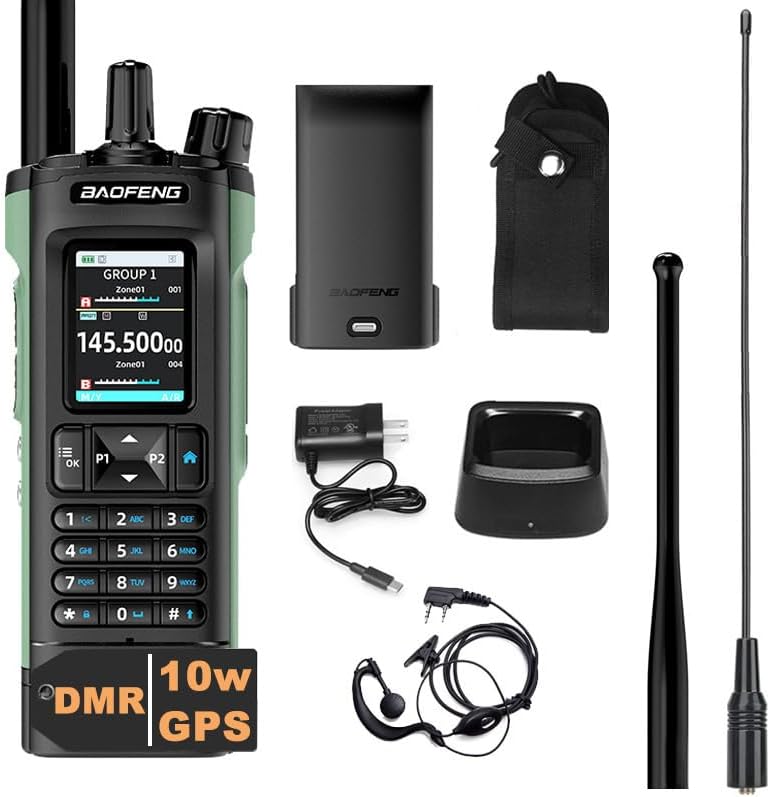
Image: The BAOFENG DM-32UV radio shown with its complete set of accessories, including the radio unit, antenna, battery, charging base, power adapter, belt clip, and earpiece.
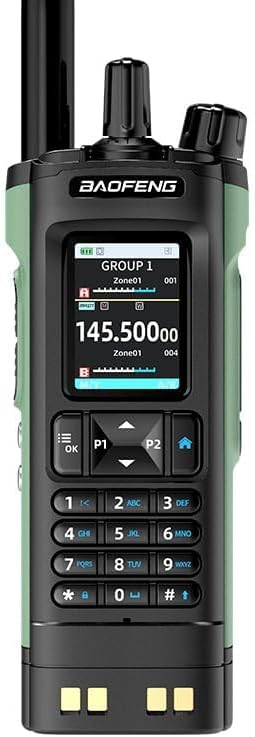
Image: A close-up front view of the BAOFENG DM-32UV radio, highlighting its display screen, full keypad, and control buttons.
Key Features:
- TDMA Dual Time Slot
- Built-in GPS and APRS support
- Dual Mode (Digital and Analog)
- U/V Dual Frequency Band (VHF:136-174MHz, AM:108-136MHz, UHF:400-470MHz)
- 4000 Channels
- One Touch Search Frequency
- Digital Call (Single, Group, All Call)
- AMBE+2 Voice Encoder
- Information Encryption
- Drop Detection Alerts
3. Setup
3.1 Battery Installation
- Align the battery pack with the grooves on the back of the radio.
- Slide the battery pack upwards until it clicks into place.
- Ensure the battery release latch is securely engaged.
3.2 Antenna Attachment
- Screw the antenna clockwise into the antenna connector on the top of the radio until it is finger-tight. Do not overtighten.
3.3 Charging the Battery
- Connect the AC adapter to the charging base.
- Plug the AC adapter into a standard wall outlet.
- Place the radio (with battery installed) into the charging base. The charging indicator light will illuminate, typically red during charging and green when fully charged.
- A full charge typically takes several hours.
4. Operating Instructions
4.1 Power On/Off
- To power on: Rotate the Power/Volume knob clockwise until you hear a click.
- To power off: Rotate the Power/Volume knob counter-clockwise until you hear a click.
4.2 Channel and Frequency Selection
The DM-32UV supports 4000 channels. You can switch between channels or input frequencies directly using the keypad.
- Use the Up/Down arrow keys to navigate through channels.
- To enter a specific frequency, use the numerical keypad.
4.3 Dual Mode Operation (Digital/Analog)
The radio automatically detects and operates in either digital (DMR) or analog mode based on the channel settings or incoming signal. This ensures a smooth transition between different communication systems.

Image: Illustrates the BAOFENG DM-32UV's capability for both digital and analog communication, ensuring seamless operation across different radio systems.
4.4 GPS and APRS Functionality
The built-in GPS provides accurate location tracking. The Automated Position Reporting System (APRS) automatically sends your location data, enhancing situational awareness and coordination, especially useful for outdoor activities.
4.5 Digital Call Types
The DM-32UV supports various digital call types:
- Single Call: Direct communication with a specific individual radio.
- Group Call: Communication with a predefined group of radios.
- All Call: Broadcast communication to all radios within range.
4.6 One Touch Search Frequency
This feature simplifies pairing and frequency searching. Press the designated 'One Touch Search Frequency' button to quickly find and connect to available frequencies.
4.7 AM/FM Radio Reception
The radio can receive AM (108-136MHz aviation frequency band) and FM radio broadcasts.

Image: Highlights the BAOFENG DM-32UV's U/V dual frequency capability, along with its ability to receive AM aviation frequencies and FM radio broadcasts.
5. Advanced Features
5.1 TDMA Dual Time Slot Technology
The TDMA (Time Division Multiple Access) dual time slot feature allows two groups of calls to communicate simultaneously on a single frequency. This doubles communication efficiency and optimizes frequency resource utilization.

Image: Emphasizes the BAOFENG DM-32UV's TDMA dual time slot technology, which enhances communication efficiency.
5.2 Digital Encryption and AMBE+2 Voice Encoder
The radio incorporates information encryption to protect privacy and security during digital communications. It utilizes the AMBE+2 voice encoder for clear digital audio.
5.3 SMS Function and Call Records
The DM-32UV supports a 128-word SMS function for text messaging. It also maintains call records for review.

Image: A detailed list of features for the BAOFENG DM-32UV radio, including its digital and analog compatibility, TDMA, GPS, SMS function, and various other operational capabilities.
5.4 Drop Detection Alerts
The radio includes a built-in fall injury detection alarm function. If a fall is detected, the radio can automatically trigger an alarm, enhancing personal safety in emergency situations.
6. Maintenance
- Cleaning: Use a soft, damp cloth to clean the radio's surface. Do not use harsh chemicals or abrasive cleaners.
- Battery Care: To prolong battery life, avoid overcharging or completely discharging the battery. Store the radio and battery in a cool, dry place when not in use for extended periods.
- Antenna: Ensure the antenna is securely attached but do not force it. Avoid bending or damaging the antenna.
7. Troubleshooting
| Problem | Possible Cause | Solution |
|---|---|---|
| Radio does not power on | Battery is low or not installed correctly. | Charge the battery or re-install it securely. |
| Cannot transmit or receive | Incorrect frequency/channel, antenna not attached, or out of range. | Verify frequency/channel settings. Ensure antenna is attached. Move closer to other radios. |
| Poor audio quality | Weak signal, interference, or microphone/speaker issue. | Check signal strength. Move away from sources of interference. Ensure microphone/speaker are clear. |
| GPS not acquiring signal | Obstructed view of sky or indoor location. | Move to an open outdoor area with clear view of the sky. |
8. Specifications
| Feature | Detail |
|---|---|
| Model Number | DM-32UV |
| Item Weight | 1.68 pounds |
| Package Dimensions | 10 x 8.6 x 2.56 inches |
| Batteries | 1 Lithium Ion battery required (included) |
| Number of Channels | 4000 |
| Frequency Range | VHF:136-174MHz, AM:108-136MHz, UHF:400-470MHz |
| Talking Range Maximum | 6 Mile |
| Voltage | 7.4 Volts |
| Water Resistance Level | Not Water Resistant |
| Special Feature | Battery Saver Mode |
| Included Components | Battery Included |
9. Warranty and Support
Please note that this product comes with No Warranty as per manufacturer specifications. For technical support or inquiries, please refer to the official BAOFENG support channels or your point of purchase.