
1. Introduction
This manual provides essential information for the safe and efficient operation of your Voltcraft DOV704 Digital Oscilloscope. The DOV704 is a high-quality, innovative, and compact 4-channel digital storage oscilloscope featuring a 70 MHz bandwidth, 1.25 GSa/s maximum sampling rate, and a 12-bit analog-to-digital converter. It is equipped with a 7-inch touchscreen display supporting gesture control, USB, LAN, and HDMI interfaces. Please read this manual thoroughly before using the device.
2. Safety Information
Always observe the following safety precautions to prevent injury and damage to the device:
- Ensure the power supply voltage matches the requirements specified on the device.
- Do not operate the oscilloscope in wet or damp conditions.
- Avoid exposing the device to direct sunlight or extreme temperatures.
- Only use the provided power adapter and accessories.
- Do not attempt to open or modify the device. Refer all servicing to qualified personnel.
- Before making any connections, ensure the device is powered off.
3. Package Contents
Verify that all items listed below are present in your package:
- Voltcraft DOV704 Digital Oscilloscope
- USB Type-C Power Adapter
- USB Cable
- Four (4) Test Probes
- Two (2) Probe Adjustment Kits
- Software with English Manual (on CD)
- Quick Start Guide
- Product Data Sheet
4. Product Overview
The Voltcraft DOV704 is designed for precise signal analysis. Below are key features and a visual representation of the device.
4.1 Key Features
- 70 MHz Bandwidth
- 4 Analog Input Channels
- 7-inch (17.78 cm) Touchscreen Display with Gesture Control (1024 x 600 pixels)
- 12-bit Analog-to-Digital Converter
- Maximum Sampling Rate: 1.25 GSa/s
- Real-time Waveform Capture Rate: 50,000 wfms/s
- Segmented Waveform Capture Rate: 700,000 wfms/s
- Record Length: 50 Mpts
- Horizontal Scan Speed: 1 ns/div to 1000 s/div (1-2-5 steps)
- Vertical Sensitivity: 500 µV/div to 10 V/div
- Multiple Trigger Functions: Edge, Video, Pulse, Slope, Runt, Window, Timeout, Nth, Logic, RS232/UART, I2C, SPI, CAN, LIN
- Connectivity: USB, LAN, HDMI
4.2 Device Layout
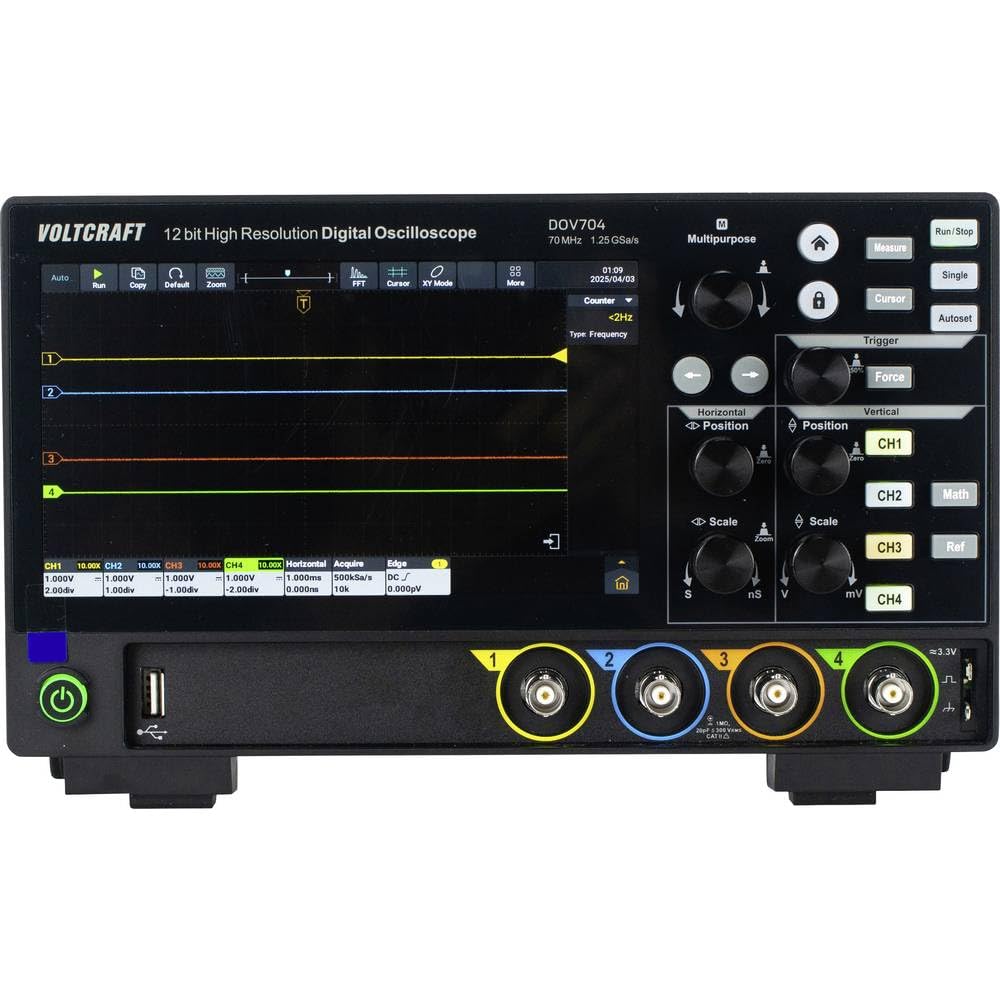
Figure 1: Front view of the Voltcraft DOV704 Digital Oscilloscope, showing the 7-inch touchscreen display, control knobs, buttons, and four BNC input connectors at the bottom. The power button and USB ports are also visible.

Figure 2: Angled front view of the Voltcraft DOV704 Digital Oscilloscope, providing a clearer perspective of the control panel and input ports. The screen displays a waveform.

Figure 3: Side view of the Voltcraft DOV704 Digital Oscilloscope, illustrating its compact profile and ventilation grilles.
5. Setup
5.1 Powering On the Device
- Connect the USB Type-C power adapter to the oscilloscope's power input port.
- Plug the power adapter into a suitable electrical outlet.
- Press the power button located on the front panel to turn on the oscilloscope. The display will illuminate.
5.2 Probe Connection and Compensation
- Connect a test probe to one of the BNC input channels (CH1-CH4) on the front panel.
- Attach the probe tip to the probe compensation output (usually a square wave signal output on the front or side).
- Adjust the probe compensation screw (located on the probe body) until the square wave displayed on the screen has flat tops and bottoms, without overshoot or undershoot.
- Repeat this process for all probes you intend to use.
6. Operating Instructions
6.1 Basic Waveform Display
- Channel Selection: Press the CH1, CH2, CH3, or CH4 buttons to enable or disable a channel.
- Vertical Scale: Use the Vertical Scale knob to adjust the volts per division (V/div) for the selected channel.
- Vertical Position: Use the Vertical Position knob to move the waveform up or down on the screen.
- Horizontal Scale: Use the Horizontal Scale knob to adjust the time per division (s/div).
- Horizontal Position: Use the Horizontal Position knob to shift the waveform left or right.
6.2 Trigger Functions
The oscilloscope offers various trigger types to stabilize and capture specific parts of a waveform.
- Press the Trigger button to access trigger settings.
- Select the desired trigger type (e.g., Edge, Pulse, Video) from the menu.
- Adjust the trigger level using the dedicated Trigger Level knob or via the touchscreen.
- Choose the trigger source (CH1-CH4) as needed.
6.3 Touchscreen and Gesture Control
The 7-inch touchscreen allows for intuitive control.
- Tap: Select menu items, buttons, or adjust settings.
- Pinch-to-Zoom: Use two fingers to zoom in or out on waveforms (horizontal and vertical scaling).
- Drag: Move waveforms or menu elements across the screen.
6.4 Data Storage and Connectivity
The DOV704 supports various methods for data storage and external connectivity.
- USB: Connect a USB flash drive to save waveform data, screenshots, or settings. Use the USB cable to connect to a computer for data transfer.
- LAN: Connect the oscilloscope to a network for remote control and data access using the provided software.
- HDMI: Connect an external display via the HDMI port for larger viewing of waveforms.
7. Maintenance
7.1 Cleaning
- Disconnect the power before cleaning.
- Use a soft, dry cloth to wipe the exterior of the device.
- For the touchscreen, use a soft, lint-free cloth slightly dampened with a screen cleaner. Avoid abrasive cleaners.
- Do not allow liquids to enter the device.
7.2 Storage
When not in use, store the oscilloscope in a clean, dry environment, away from direct sunlight and extreme temperatures.
8. Troubleshooting
| Problem | Possible Cause | Solution |
|---|---|---|
| Device does not power on. | Power cable not connected or faulty. | Check power cable connection. Ensure power outlet is functional. Use the provided power adapter. |
| No waveform displayed. | Channel disabled, probe not connected, or signal too weak/strong. | Ensure the desired channel is enabled. Check probe connection. Adjust vertical scale (V/div) and horizontal scale (s/div). Check trigger settings. |
| Waveform is unstable. | Incorrect trigger settings. | Adjust trigger level and trigger type. Ensure trigger source is correctly selected. |
| Touchscreen unresponsive. | Temporary software glitch. | Restart the device. If the problem persists, contact support. |
9. Specifications
| Parameter | Value |
|---|---|
| Model Number | VC-16753910 |
| Bandwidth | 70 MHz |
| Analog Channels | 4 |
| Max. Sampling Rate | 1.25 GSa/s |
| Record Length | 50 Mpts |
| ADC Resolution | 12 Bit |
| Waveform Capture Rate (Real-time) | 50,000 wfms/s |
| Waveform Capture Rate (Segmented) | 700,000 wfms/s |
| Display | 7-inch Touchscreen (1024 x 600 pixels) |
| Horizontal Scan Speed | 1 ns/div to 1000 s/div |
| Vertical Sensitivity | 500 µV/div to 10 V/div |
| Interfaces | USB, LAN, HDMI |
| Product Dimensions (W x D x H) | 26 x 7.8 x 16 cm |
| Weight | 2.71 kg |
10. Warranty and Support
For warranty information, please refer to the product data sheet included in your package or visit the official VOLTCRAFT website. For technical support, troubleshooting assistance beyond this manual, or service inquiries, please contact VOLTCRAFT customer service. Contact details can typically be found on the manufacturer's website or in the documentation provided with your product.


