
Hbada P2 Ergonomic Office Chair
Hbada P2 Ergonomic Office Chair User Manual
Model: P2 | Brand: Hbada
1. Introduction
Welcome to the user manual for your new Hbada P2 Ergonomic Office Chair. This chair is meticulously designed to provide superior comfort and support, adapting to the natural curve of your spine. It features advanced adjustability for various components, ensuring an optimal sitting experience for long hours of work, gaming, or relaxation. Please read this manual carefully to understand the chair's features, proper assembly, operation, and maintenance to ensure its longevity and your comfort.
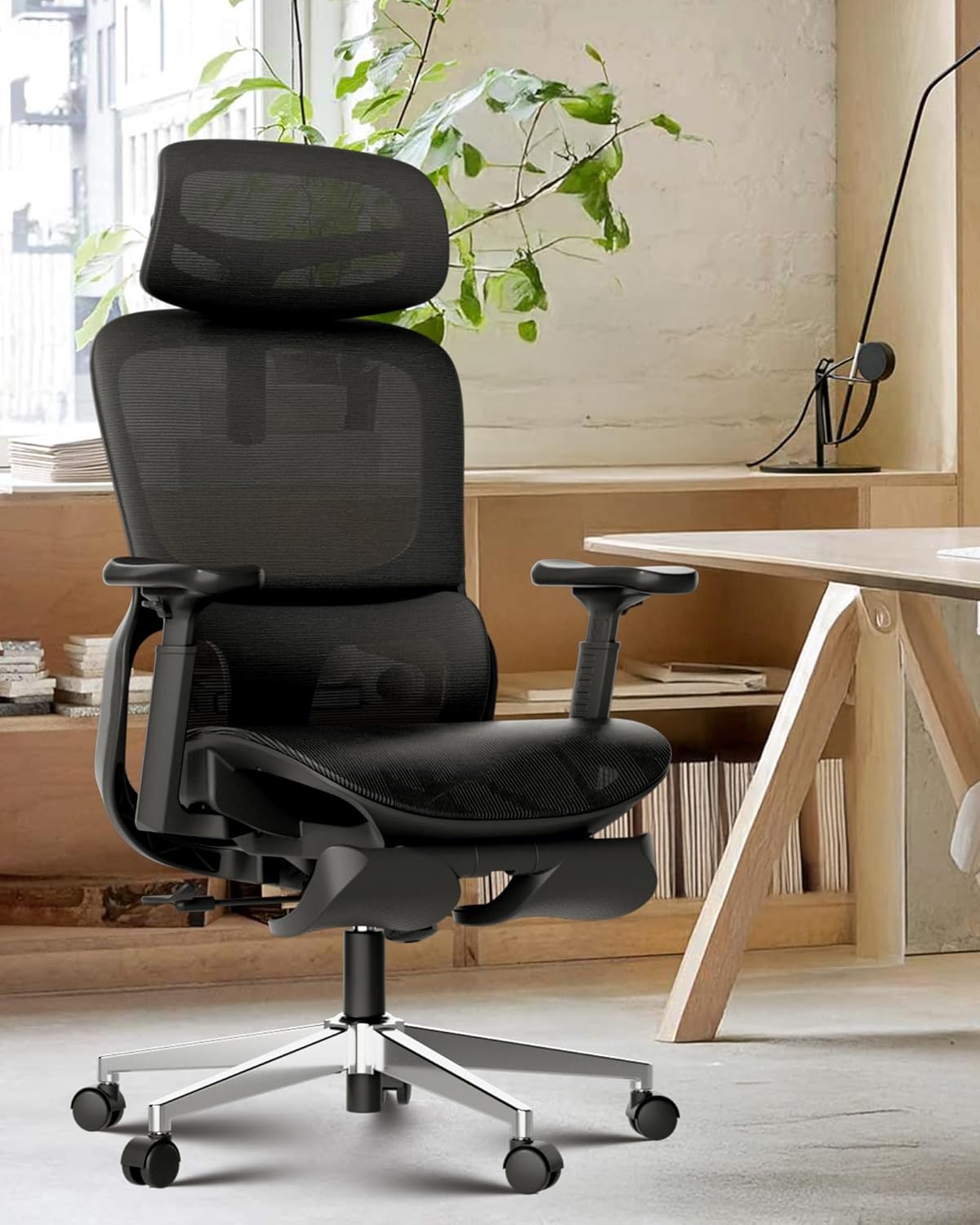
Figure 1: The Hbada P2 Ergonomic Office Chair, designed for comfort and versatility.
2. Key Features
The Hbada P2 chair is equipped with several advanced features to enhance your ergonomic experience:
2.1. Ergonomic Design
The chair's overall design follows the natural curve of the human spine, promoting healthy posture. It integrates fully adjustable components to cater to individual body types and preferences, providing a balanced blend of support and comfort.
2.2. 3D Lumbar Support
The P2 office chair features a breathable mesh back with a dual-back design. Its 3D lumbar support is fully adjustable in height, depth, and width, allowing it to move dynamically with your body. This ensures optimal spinal alignment and provides customized support, suitable for users between 5'4" and 6'2".
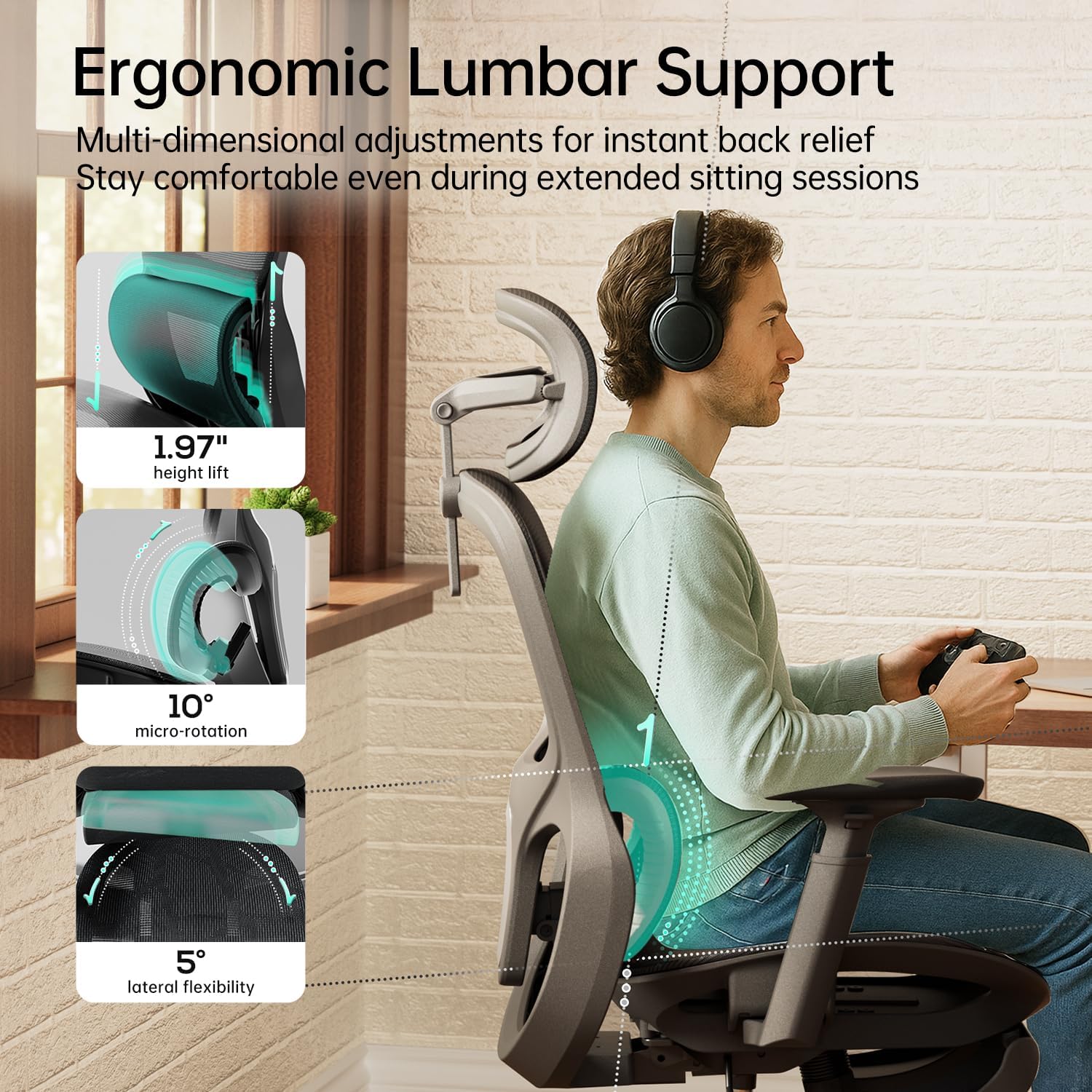
Figure 2: Detailed view of the multi-dimensional adjustable lumbar support.

Figure 3: The lumbar support offers 4-level height adjustment and adaptive rotation.
2.3. 360° 3D Adjustable Armrests
The ergonomic armrests offer extensive adjustability, including 7.5 cm (2.95 inches) height adjustment, 4.2 cm (1.65 inches) forward/backward movement, and 360° rotation. This allows users to find the perfect position to alleviate elbow and shoulder strain. The soft, skin-friendly material ensures comfort during prolonged use.

Figure 4: The armrests provide wide-range motion and flexible elbow support.

Figure 5: Flexible 3D armrests adapt to your ideal angle for various activities.
2.4. 3D Adjustable Headrest
The headrest offers dual-axis rotation and extended vertical travel (up to 5.12 inches height adjustment, 180° neck pillow surface rotation, and 40° neck pillow frame rotation). This allows for precise neck support, adapting to your posture and contours.
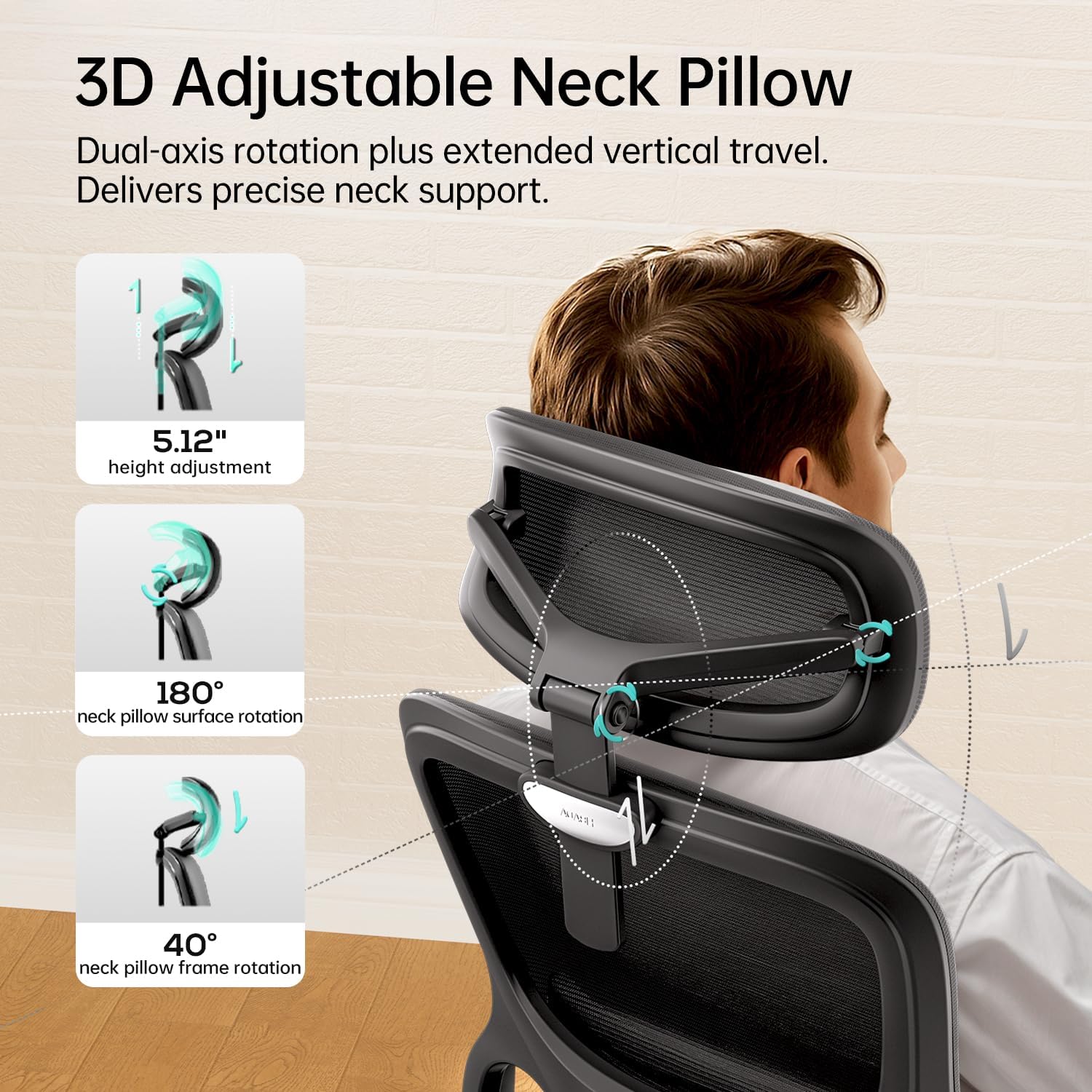
Figure 6: The 3D adjustable neck pillow provides comprehensive support.

Figure 7: Advanced neck support adapts to your posture and contours.
2.5. Multi-angle Reclining & Footrest
The chair features a 135° stepless tilt function with a 3-position locking mechanism, allowing you to customize angles for different activities: 105° for optimal office posture, 120° for immersive gaming, and 135° for relaxed leisure mode. An included footrest provides additional comfort for breaks.

Figure 8: The multi-angle reclining feature with 3-position locking mechanism.

Figure 9: Three-level reclining backrest for optimal comfort in various activities.
2.6. Breathable & Comfortable Materials
The chair is constructed with high-resilience, breathable mesh fabric to prevent sweating during extended sitting. The cushion utilizes premium elastic material that resists flattening, featuring a micro-perforated design for continuous comfort even after 8 hours of work.

Figure 10: Premium mesh fabric ensures breathability and support.

Figure 11: High-rebound mesh cushion reduces pressure on hips and thighs.
3. Setup and Assembly
Your Hbada P2 Ergonomic Office Chair is designed for straightforward assembly. Please follow the steps below carefully. It is recommended to assemble the chair on a soft, clean surface to prevent scratches.
- Unpack Components: Carefully remove all parts from the packaging and lay them out. Verify that all components listed in the included assembly guide are present.
- Attach Casters to Base: Insert the five casters (wheels) into the holes at the end of each leg of the chair base. Push firmly until they click into place.
- Insert Gas Lift: Place the gas lift cylinder into the center hole of the assembled chair base.
- Assemble Seat Mechanism: Attach the seat mechanism to the underside of the seat cushion using the provided screws. Ensure the front of the mechanism aligns with the front of the seat.
- Attach Seat to Gas Lift: Carefully place the assembled seat onto the gas lift cylinder, ensuring it is securely seated.
- Attach Backrest: Connect the backrest to the seat mechanism using the designated screws. Tighten all screws securely.
- Install Armrests: Attach the armrests to the sides of the seat using the provided screws.
- Attach Headrest: Slide the headrest into the top of the backrest until it is securely in place.
- Final Check: Once assembled, check all connections to ensure they are tight and secure. Test all adjustment functions.
4. Operation and Adjustments
To maximize your comfort and ergonomic benefits, familiarize yourself with the various adjustment features of your Hbada P2 chair:
4.1. Seat Height Adjustment
Locate the lever on the right side, beneath the seat. To raise the seat, lift the lever while taking your weight off the chair. To lower the seat, lift the lever while remaining seated. Release the lever at your desired height.
4.2. Tilt and Recline Adjustment
The same lever used for seat height also controls the tilt function. Pull the lever outwards to unlock the tilt mechanism, allowing the chair to recline. Push the lever inwards to lock the chair in an upright position or at a desired recline angle (105°, 120°, or 135°).
4.3. Tilt Tension Adjustment
The round knob located under the front of the seat controls the tilt tension. Turn it clockwise to increase tension (making it harder to recline) or counter-clockwise to decrease tension (making it easier to recline).
4.4. Lumbar Support Adjustment
The 3D lumbar support can be adjusted in multiple ways. Use the side levers or knobs (refer to your specific model's diagram) to adjust its height, depth, and width to perfectly support your lower back.
4.5. Armrest Adjustment
The armrests offer three-dimensional adjustments:
- Height: Press the button on the side of each armrest and slide it up or down.
- Forward/Backward: Slide the armrest pad forward or backward.
- Rotation: Rotate the armrest pad left or right (360°).
4.6. Headrest Adjustment
The headrest can be adjusted for height and angle. Grasp the headrest and move it up or down to your preferred height. It also features dual-axis rotation for precise neck support.
4.7. Footrest Operation
To use the footrest, pull it out from beneath the seat. You can then extend and adjust its position for comfortable leg support when reclining.
5. Maintenance and Care
Regular maintenance will help preserve the appearance and functionality of your Hbada P2 chair:
- Cleaning Mesh Fabric: For general cleaning, use a soft brush or vacuum cleaner to remove dust and debris. For spills, gently blot with a clean, damp cloth and mild soap solution. Avoid harsh chemicals or abrasive cleaners.
- Cleaning Frame and Base: Wipe down plastic and metal parts with a soft, damp cloth. Dry immediately to prevent water spots.
- Caster Maintenance: Periodically check casters for tangled hair or debris and clean as needed to ensure smooth movement.
- Hardware Check: Every few months, inspect all screws and bolts to ensure they are tight. Re-tighten if necessary to maintain stability and safety.
- Avoid Direct Sunlight: Prolonged exposure to direct sunlight can cause fading or degradation of materials. Position your chair away from direct sunlight when possible.
6. Troubleshooting
If you encounter any issues with your Hbada P2 chair, refer to the common problems and solutions below:
| Problem | Possible Cause | Solution |
|---|---|---|
| Chair does not raise or lower | Gas lift malfunction or lever not engaged. | Ensure the height adjustment lever is fully engaged. If the issue persists, the gas lift may need replacement. Contact customer service. |
| Chair wobbles or feels unstable | Loose screws or uneven floor. | Check and tighten all assembly screws. Ensure the chair is on a flat, even surface. |
| Casters not rolling smoothly | Debris caught in casters or damaged casters. | Turn the chair over and remove any hair or debris from the casters. If damaged, casters may need replacement. |
| Backrest does not recline or lock | Tilt mechanism locked or tension too high. | Ensure the tilt lever is unlocked. Adjust the tilt tension knob counter-clockwise to reduce tension. |
7. Specifications
Detailed technical specifications for the Hbada P2 Ergonomic Office Chair:
| Attribute | Detail |
|---|---|
| Brand | Hbada |
| Model | P2 |
| Color | Black |
| Style | Classic With Footrest |
| Product Dimensions (D x W x H) | 29.33"D x 12.99"W x 20.86"H |
| Item Weight | 32.6 pounds |
| Lumbar Support | 3D Adjustable (Height, Depth, Width) |
| Armrests | 3D Adjustable (Height, Forward/Backward, 360° Rotation) |
| Headrest | 3D Adjustable (Height, Dual-axis Rotation) |
| Tilt Function | 135° Stepless Tilt with 3-position Lock |
| Casters | Silent, Multi-surface Adaptive |
| Gas Lift | SGS-certified Grade 4 |
| Certifications | U.S. BIFMA Standards (Tested over 10,000 cycles) |

Figure 12: Premium components ensure safety and long-lasting reliability.
8. Warranty and Customer Support
Hbada is committed to providing high-quality products and excellent customer service. Your Hbada P2 Ergonomic Office Chair comes with the following:
- 3-Year Worry-Free Warranty: Covers manufacturing defects and major component failures under normal use.
- 30-Day Free Return: If you are not satisfied with your purchase, you may return it within 30 days for a full refund.
- 15-Day Price Match Guarantee: Ensures you get the best price within 15 days of purchase.
- Friendly Customer Service: Our dedicated support team is available to assist you with any questions, concerns, or issues you may have.
For support, please refer to the contact information provided with your purchase or visit the official Hbada website. You can also visit the Hbada Store on Amazon for more information.
Related documentsP2 Ergonomic Office Chair


Ask a question about this manual
Ask about setup, troubleshooting, compatibility, parts, safety, or missing instructions. Manuals+ will review the question and use this page’s manual context to help answer it.