1. Introduction
This manual provides detailed instructions for the installation and operation of your CAMECHO Snapdragon 8-Core Android 15 Car Stereo. This premium car radio is specifically designed for Mercedes Benz C-Class W203 and W209 models, including C180 and C200, manufactured between 2005 and 2009. It features a powerful 9-inch touchscreen, 4GB RAM, and 64GB ROM, ensuring a smooth and stable user experience.
Important Note on Compatibility: Vehicle compatibility may vary based on specific vehicle options, production dates, and installation requirements. Please verify your vehicle's original sound system specifications before purchasing. The wire harness is not compatible with premium BOSE, amplified sound systems, or Onstar. Different configurations may require different wiring and parts.
2. Package Contents
Verify that all the following items are included in your package:
- Radio Housing ×1
- Power Cable ×1
- Radio Antenna ×1
- Antenna Adapter ×1
- Canbus ×1
- Installation Tool ×1
- Accessories ×1 (May include USB cable, RCA cables, camera input cable, user manual, etc.)
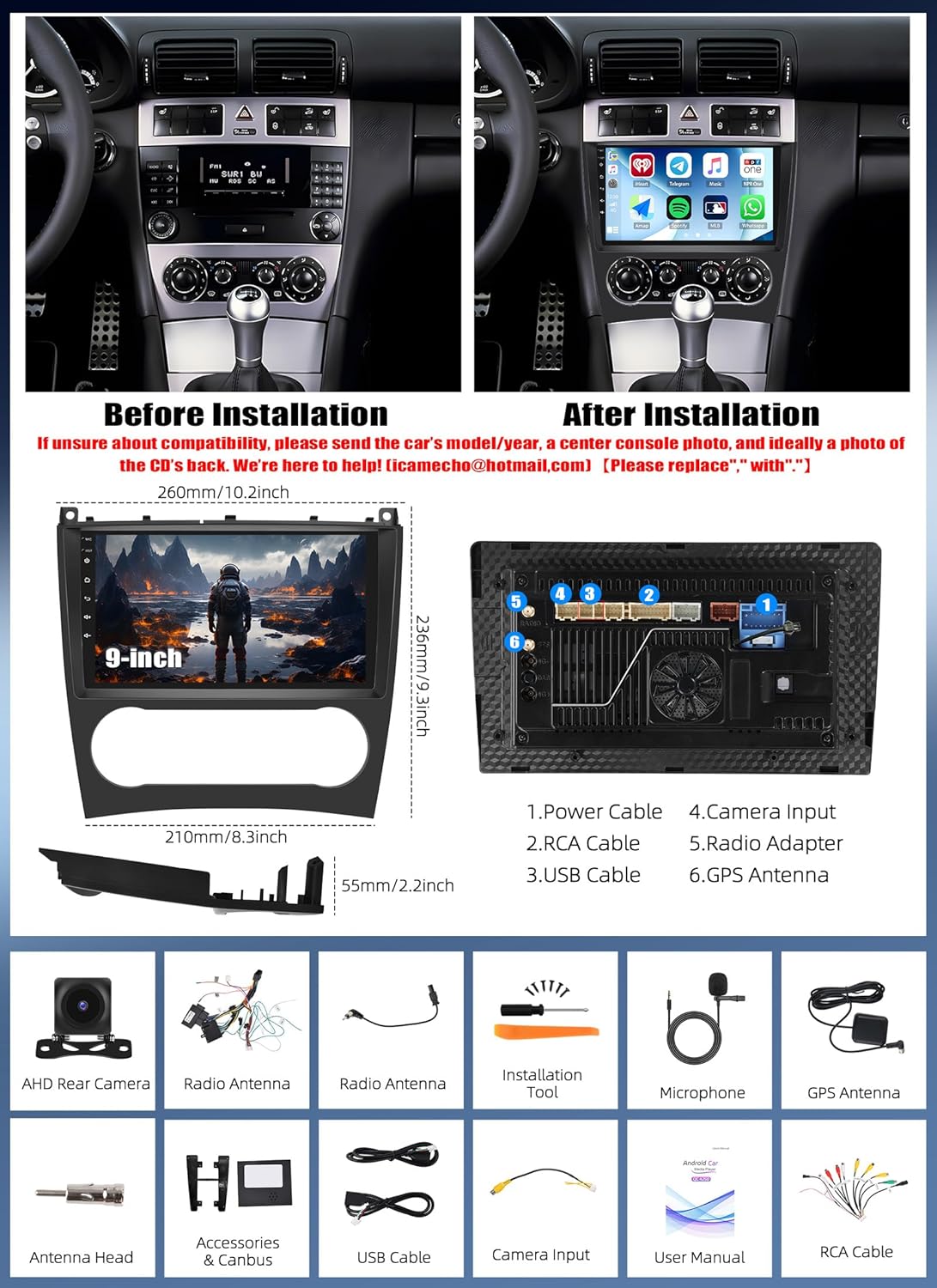
Figure 2.1: Overview of the car stereo installation and included accessories. The top panel shows a Mercedes Benz C-Class dashboard before and after the CAMECHO car stereo installation. The middle section illustrates the product dimensions (260mm/10.2in width, 235mm/9.8in height, 210mm/8.3in depth, 55mm/2.2in thickness) and the rear connections. The bottom section displays various included cables and tools such as AHD rear camera, radio antennas, installation tool, microphone, GPS antenna, antenna head, accessories & Canbus, USB cable, camera input, user manual, and RCA cable.
3. Installation
The installation kit is designed and contoured to match the factory dashboard, ensuring a seamless fit. It features high-grade ABS plastic construction with a factory-style textured design for quick and easy installation. The quality is crafted to meet rigid factory specifications, including a high-quality, ABS plastic molded connector for a perfect fit. The unit plugs into the factory harness without cutting any wires and includes an ISO extension trim ring and all necessary hardware to ensure a gapless fit between the dash and the kit.
3.1 General Installation Steps
- Preparation: Ensure the vehicle's power is off and disconnect the battery to prevent electrical shorts.
- Remove Old Unit: Carefully remove the existing car radio and dashboard trim using the provided installation tools.
- Connect Wiring: Connect the power cable, radio antenna, antenna adapter, and Canbus to the new CAMECHO unit. Refer to the wiring diagram in the included user manual for specific connections.
- Install Housing: Mount the new radio housing into the dashboard opening, ensuring all clips and screws are securely fastened.
- Connect Peripherals: Connect any additional accessories such as the rear camera, USB cables, and RCA cables as needed.
- Test Functionality: Reconnect the battery and power on the unit to test all functions before fully reassembling the dashboard.
- Final Assembly: Reinstall all dashboard trim pieces.
4. Features Overview
- High-Performance Processor: Equipped with a Qualcomm Snapdragon SM4250 chipset, 11nm technology, octa-core processor (4x Cortex-A53 at 1.8GHz + 4x Cortex-A53 at 1.6GHz), 64-bit CPU architecture, and Adreno 610 GPU. This provides exceptional central processing power for embedded multimedia systems, with a benchmark over 100,000 points for fast startup and smooth operation.
- Memory and Storage: Features 4GB RAM and 64GB ROM for powerful and stable processing and storage without lag.
- Display: 9-inch powerful touchscreen with 1280*720 resolution, offering high resolution and excellent color performance for a detailed and colorful picture. Supports 1080P video playback.
- Audio Quality: Supports Hi-Res Audio and Dolby for superior clarity and detail. Integrated DSP (Digital Sound Processor) allows frequency adjustment, AE, 36-band EQ, and 10-band EQ for enhanced lossless sound quality.
- Connectivity: Bluetooth 5.1 for faster data transfer, longer range, and dual audio support. Dual-band WiFi (2.4GHz/5GHz) for stable wireless signal and faster transmission speed.
- Cooling System: Features an efficient cooling fan for better performance and enhanced durability.

Figure 4.1: Key features of the CAMECHO car stereo, highlighting the Snapdragon 8-core processor, Android 15 operating system, 4GB RAM, 64GB ROM, WiFi 6 (2.4GHz/5GHz), Wireless CarPlay/Android Auto, Screen Mirroring, Hi-Res Audio & Dolby support, Bluetooth 5.1, IPS screen, and FM/RDS radio capabilities.

Figure 4.2: Advanced audio and connectivity features. This image emphasizes Hi-Res Audio and Dolby for high-resolution sound, Bluetooth 5.1 for fast and stable connections, and DSP for advanced audio processing and sound quality customization.

Figure 4.3: Car entertainment system display showing various application icons including Android, music, and navigation. Three additional components are illustrated below the main unit, representing connectivity options.

Figure 4.4: Details of the cooling fan and the 1280*720 IPS high-performance touch screen. The cooling fan provides efficient cooling for better performance and durability. The screen offers high resolution, excellent color performance, and features like high temperature protection, anti-knock, and scratch resistance.
5. Operating Instructions
5.1 Wireless CarPlay / Android Auto & Mirror Link
This car radio supports wireless CarPlay and Android Auto connections. This allows you to access music, make calls, send messages, and use GPS navigation directly from your smartphone, displayed on the car stereo screen. The Mirror Link function enables synchronization of your smartphone's content to the large 9-inch display.

Figure 5.1: Wireless CarPlay and Android Auto interface, showing various applications like Spotify, phone calls, messages, and navigation. The image illustrates how calls, GPS, music, and videos can be accessed through these platforms.
5.2 GPS Navigation & WiFi
The unit supports both online and offline GPS navigation. You can download various online navigation programs and offline maps. Connect via dual-band WiFi (2.4GHz/5GHz) for a stable and fast internet connection, enabling seamless use of online maps and downloading applications.

Figure 5.2: GPS navigation interface displaying a map with route information and online/offline map support. The lower panel shows the FM radio interface with RDS functionality, indicating support for multi-band FM signal transmission to the original car audio system.

Figure 5.3: Dual Band WiFi functionality (2.4GHz and 5GHz) for faster and more stable connectivity. The image shows various streaming and social media applications, indicating the ability to use online services on the car stereo.
5.3 FM/RDS Radio
The car stereo supports FM/RDS function with 18 preset stations. It features enhanced noise reduction and anti-interference for clear radio reception.
5.4 Rear Camera & Steering Wheel Controls
The CAMECHO car radio integrates a rear camera for precise parking and collision avoidance in confined spaces, making parking safer and easier. It also supports the steering wheel button learning function, allowing you to control necessary functions directly from your steering wheel for convenience and safety.
5.5 Voice Assistance, OBD2, and DAB
The unit supports voice assistance (activation required) for hands-free control. It also includes OBD2 functionality (requires activation) to support fault detection, real-time data monitoring, emission control, and vehicle maintenance. A DAB function is available for better sound quality and stronger signal, though the DAB module is not included and needs to be purchased separately (ASIN: B0B457NJBY).

Figure 5.4: Various operational features including reverse assistance with HD image, night vision, waterproof, and wide-angle capabilities. Also shown are voice assistance (activation required), DAB function (module not included), steering wheel control learning, and OBD2 function (activation required) for vehicle diagnostics.
6. Specifications
| Feature | Detail |
|---|---|
| Brand | CAMECHO |
| Item Model Number | 1 |
| Connectivity Technology | AHD/CVBS, USB, Wi-Fi, Bluetooth |
| Special Features | GPS Navigation, Bluetooth 5.1, Hi-Res Audio, Dolby, Wireless CarPlay, Wireless Android Auto, Dual WiFi, Voice Assistant |
| Compatible Devices | Smartphone, Tablet, Speaker |
| Rechargeable Battery | No |
| Manufacturer Warranty | 2 years manufacturer |
| Connector Type | RCA, Radio |
| Audio Output Mode | Surround |
| Surround Sound Channel Configuration | 4.0 |
| Video Encoding | MPEG-4 |
| Output Power | 200 Watts |
| Manufacturer | CAMECHO |
| Country of Origin | China |
7. Troubleshooting
If you encounter any issues with your CAMECHO car stereo, please refer to the following general troubleshooting steps:
- No Power: Check all power connections and ensure the vehicle's battery is properly connected and charged. Verify fuses are intact.
- No Sound: Ensure speakers are correctly wired. Check audio settings and volume levels. Confirm that the wiring harness is compatible with your vehicle's sound system (not compatible with premium BOSE or amplified systems).
- Touchscreen Unresponsive: Try restarting the unit. If the issue persists, ensure the screen is clean and free from obstructions.
- GPS Not Working: Ensure the GPS antenna is properly connected and has a clear view of the sky. Check internet connection for online maps.
- Bluetooth/WiFi Connectivity Issues: Ensure Bluetooth/WiFi is enabled on both the car stereo and your device. Try re-pairing devices or restarting the unit.
- Rear Camera Not Displaying: Verify the camera is correctly wired and receiving power. Check the camera input connection on the main unit.
For more specific issues or if troubleshooting steps do not resolve the problem, please contact customer support.
8. Warranty and Support
Your CAMECHO car stereo comes with a 2-year manufacturer warranty. For warranty claims, technical support, or any inquiries, please contact CAMECHO customer service.
Customer Support Email: icamecho@hotmail.com
When contacting support, please provide your product model number (1) and a detailed description of the issue.

Figure 8.1: Professional office setting with a customer service representative wearing a headset in front of a computer screen, symbolizing available support.