
Introduction
Thank you for choosing the KNQZE Foot Massager, Model KF9. This device is designed to provide a comprehensive foot massage experience, incorporating 3D kneading, shiatsu rollers, 360° full-wrapped air compression, and adjustable heat. This manual provides essential information for safe operation, setup, maintenance, and troubleshooting to ensure optimal performance and user satisfaction.
Safety Information
Please read all safety instructions carefully before using the KNQZE Foot Massager. Failure to follow these instructions may result in injury or damage to the device.
- May cause burns if used for extended periods at high heat settings.
- Avoid use if you have a blood clotting disorder, deep vein thrombosis, or are pregnant.
- Do not use on broken skin or open wounds.
- Keep away from water.
- Unplug the massager when not in use.
- Always follow the instructions in this user manual.
- This foot massager accommodates up to men's size 12. It is not suitable for wider or larger feet.
Package Contents
Verify that all items are present in the package:
- 1x KNQZE Foot Massager Machine (Model KF9)
- 1x Wireless Remote Control
- 1x UL Listed Power Adapter
- 1x User Manual
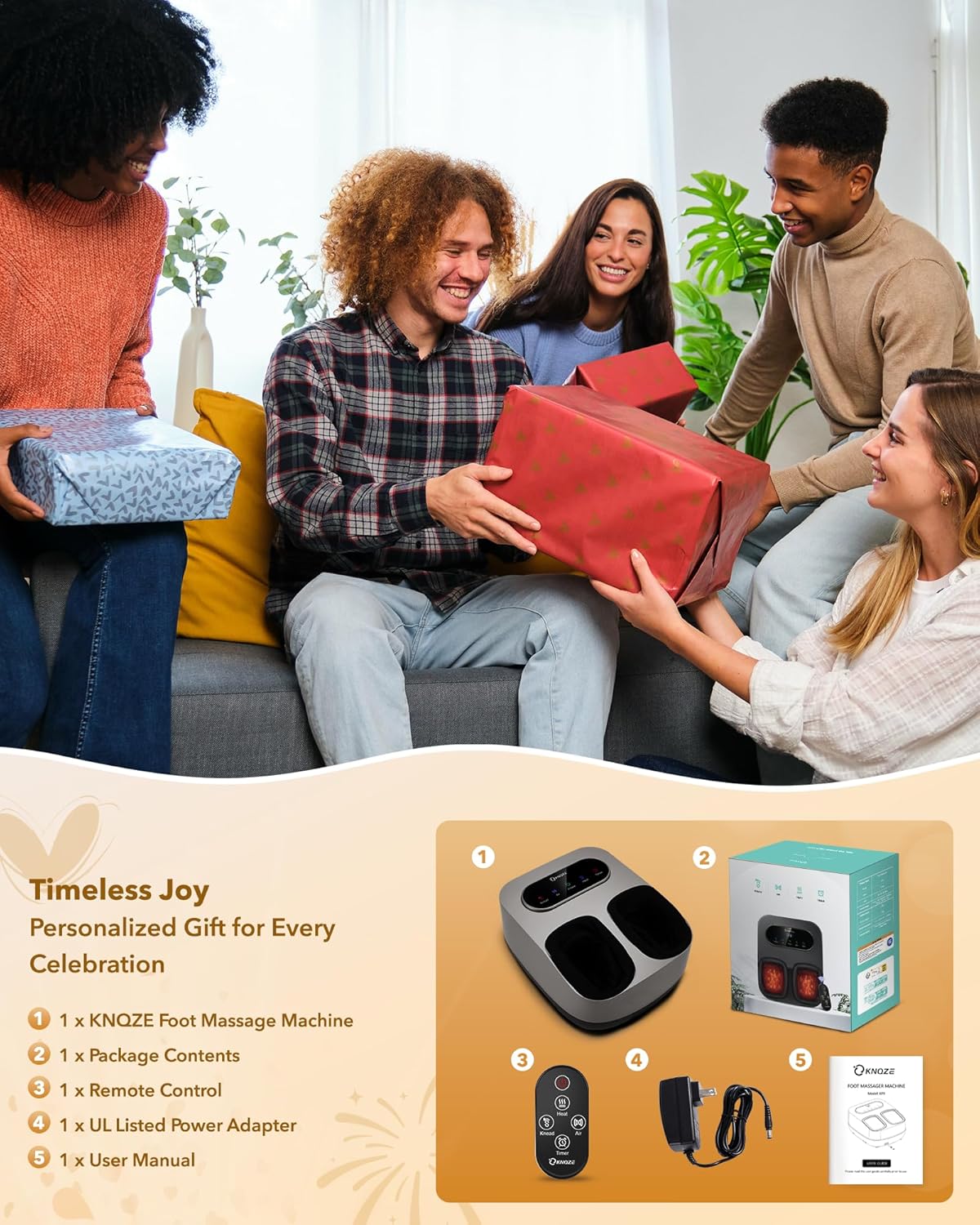
Figure 1: Package contents of the KNQZE Foot Massager, including the main unit, remote, power adapter, and user guide.
Product Features & Controls
The KNQZE Foot Massager offers multiple features for a personalized massage experience:
- 3D Kneading & Shiatsu Rollers: Provides deep tissue massage to the soles and arches of the feet.
- 360° Air Compression: Full-wrapped air compression with adjustable intensities (OFF/L/M/H) for comprehensive foot relaxation.
- Heat Function: 3 adjustable heat levels (113°F, 122°F, 131°F) to improve circulation and relieve muscle soreness.
- Timer Settings: 3 timer options (15/20/30 minutes) for customized session durations.
- Wireless Remote Control & LCD Touchscreen: Allows for easy adjustment of settings without bending over. The illuminated display ensures clear navigation.

Figure 2: KNQZE Foot Massager control panel and foot inserts.

Figure 3: Wireless remote control for convenient operation.

Figure 4: Professional Shiatsu Massage zones and techniques.
Setup
- Unpack: Carefully remove the foot massager and all accessories from the packaging.
- Placement: Place the massager on a flat, stable surface near an electrical outlet. Ensure there is enough space for comfortable use.
- Connect Power: Plug the UL Listed Power Adapter into the massager's power port, then plug the adapter into a standard electrical outlet.
- Prepare for Use: Ensure the removable foot covers are properly installed.
Operating Instructions
The KNQZE Foot Massager can be operated using the integrated LCD touchscreen panel or the wireless remote control.
- Power On: Place your feet into the foot inserts. Press the Power button on the control panel or remote to turn on the device. The default session time is 15 minutes.
- Adjust Kneading Intensity: Press the Knead button to cycle through 3 levels of kneading massage (L/M/H) or turn it off. It is recommended to start at lower settings.
- Adjust Air Compression Intensity: Press the Air button to cycle through 3 levels of air compression (L/M/H) or turn it off.
- Adjust Heat Level: Press the Heat button to select from 3 heat levels (113°F, 122°F, 131°F) or turn it off.
- Set Timer: Press the Timer button to choose a session duration of 15, 20, or 30 minutes.
- Power Off: The massager will automatically shut off after the selected timer duration. To manually turn off the device, press the Power button.
Note: For optimal comfort, ensure your feet are placed centrally within the foot inserts. The remote control allows for convenient adjustments without needing to reach the main unit.

Figure 5: Easy operation with remote control and LCD touchscreen.
Maintenance
Regular cleaning and maintenance will prolong the life of your KNQZE Foot Massager.
- Cleaning the Exterior: The massager is crafted with upgraded water-resistant ABS material. Wipe the exterior with a soft, damp cloth. Do not use abrasive cleaners or immerse the unit in water.
- Cleaning Foot Covers: The internal foot covers are removable and machine-washable for superior hygiene. Unzip and remove the covers, then wash them according to fabric care instructions. Ensure they are completely dry before reattaching.
- Storage: Store the massager in a cool, dry place away from direct sunlight when not in use. Its compact design allows for easy storage under furniture or in a closet.

Figure 6: Maintenance features: removable foot covers and water-resistant material.
Specifications
| Brand | KNQZE |
| Model Number | KF9 |
| Product Dimensions | 15.7 x 13.38 x 7.48 inches |
| Item Weight | 7 Pounds |
| Power Source | Corded Electric |
| Material | Plastic, Polyester |
| Max Foot Size | Men's US Size 12 |
Warranty and Support
The KNQZE Foot Massager comes with a one-year warranty. If you encounter any issues or have questions regarding your product, please reach out to customer support. Information on extending the warranty may be available through product registration or specific promotions.