
Introduction
This manual provides detailed instructions for the installation, operation, maintenance, and troubleshooting of your STEAMEMO 8-Port Gigabit Easy Smart Managed Ethernet Switch. This device is designed to expand your network with 8 Gigabit Ethernet ports, offering advanced features such as VLAN, QoS, and remote management for both home and office environments.

Image: Front view of the STEAMEMO 8-Port Gigabit Easy Smart Managed Ethernet Switch, showing 8 RJ45 ports and a power indicator.
Setup
The STEAMEMO 8-Port Gigabit Easy Smart Managed Ethernet Switch offers plug-and-play simplicity for basic network expansion. Follow these steps for initial setup:
- Connect to Power: Connect the provided power adapter to the switch's power input and then to a power outlet. The power indicator (PWR) on the switch will illuminate.
- Connect Devices: Use standard Ethernet cables to connect your network devices (e.g., computers, routers, smart TVs, gaming consoles) to any of the 8 RJ45 ports on the switch. The switch supports auto-negotiation and auto MDI/MDIX, so cable type (straight-through or crossover) is automatically detected.
- Network Integration: Connect one of the switch's ports to your existing router or modem to integrate it into your network.

Image: Visual guide illustrating the three simple setup steps: 1. Connect to power, 2. Connect devices, 3. Enjoy network connectivity.
Operating the Switch
This smart managed switch offers various features accessible via a web interface, desktop software, or a mobile application.
Remote Management
The switch can be managed remotely, allowing you to monitor real-time traffic and configure settings from various devices.

Image: Depicts the remote management utility, web interface, and mobile application for configuring the switch.
VLAN Configuration (802.1Q)
Virtual Local Area Networks (VLANs) allow you to segment your network for improved security and traffic management. The switch supports 802.1Q VLANs.
- Access the management interface (web, desktop, or mobile app).
- Navigate to the VLAN settings section.
- Enable VLAN functionality and configure port-based or tag-based VLANs as required for your network segmentation.

Image: Shows the VLAN settings within the switch's management interface and a diagram illustrating how VLANs segment network traffic (e.g., VLAN 1 and VLAN 2).
Quality of Service (QoS)
QoS allows you to prioritize network traffic, ensuring critical applications receive sufficient bandwidth. You can set upload and download limits individually for connected devices.
- Access the management interface.
- Go to the QoS or Port Settings section.
- Configure bandwidth limits or priority levels for specific ports or traffic types.

Image: Displays the QoS configuration screen on a mobile device, allowing users to set uplink and downlink rates for individual ports.
Port Mirroring
Port mirroring allows you to monitor network traffic by sending a copy of packets from one port to another. This is useful for network diagnostics and analysis.
- Refer to the management interface for specific instructions on configuring port mirroring.
Remote Port Reboot and Scheduled Restart
The switch features remote port reboot capabilities, allowing you to restart individual ports or schedule automatic reboots to resolve connectivity issues or maintain network stability.
- Access the management interface.
- Navigate to the Port Settings or Timing Reboot section.
- Enable or schedule port reboots as needed.

Image: Shows the mobile app interface for setting sleep times and scheduling timing reboots for individual ports on the switch.
Maintenance
The STEAMEMO 8-Port Gigabit Easy Smart Managed Ethernet Switch is designed for reliable, long-term operation with minimal maintenance.
- Fanless Design: The switch operates silently due to its fanless design, which also reduces dust accumulation and potential mechanical failures.
- Heat Dissipation: The rugged casing and advanced heat dissipation technology ensure stable performance. Ensure adequate airflow around the device and avoid blocking ventilation openings.
- Cleaning: Periodically wipe the exterior of the switch with a soft, dry cloth to remove dust. Do not use liquid cleaners or aerosols.
- Power Supply: Use only the power adapter provided with the switch to prevent damage.
Troubleshooting
If you encounter issues with your switch, consider the following troubleshooting steps:
- No Power: Ensure the power adapter is securely connected to the switch and a working power outlet. Check if the PWR indicator light is on.
- No Link/Connectivity:
- Verify that Ethernet cables are securely connected to both the switch and the connected device.
- Check the port status indicators on the switch. Refer to the 'Color-Coded Port Intelligence' section below for indicator meanings.
- Try a different Ethernet cable or port.
- Restart the connected device and the switch.
- Slow Network Speed:
- Ensure all connected devices and cables support Gigabit Ethernet (Cat5e or higher).
- Check for excessive network traffic or bandwidth-intensive applications.
- Review QoS settings in the management interface to ensure proper prioritization.
- Management Interface Access Issues:
- Ensure your device is on the same network as the switch.
- Verify the correct IP address or access method for the web interface.
- Check your firewall settings if accessing via desktop software or mobile app.
Color-Coded Port Intelligence
The switch features color-coded port indicators to help you quickly identify network health and status.
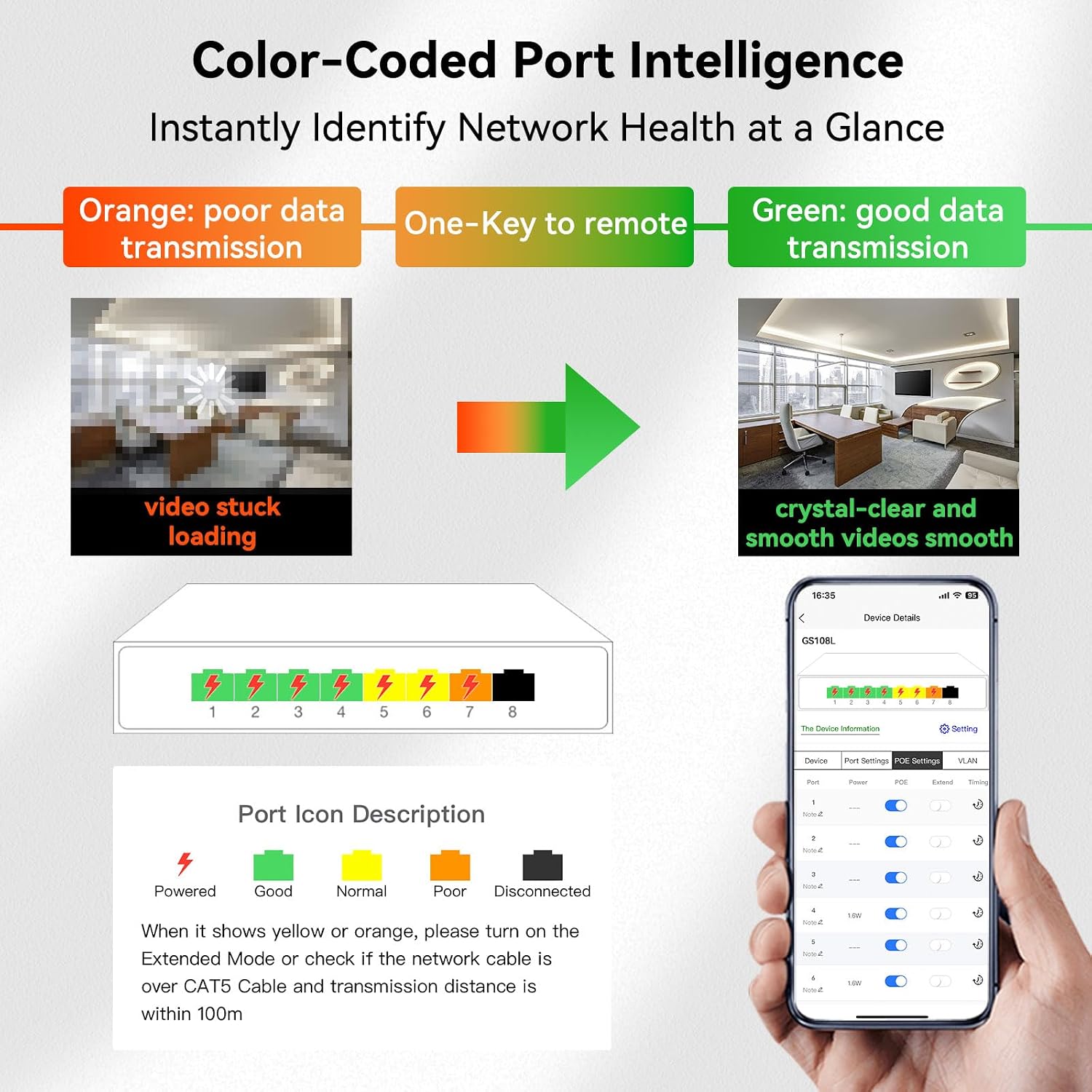
Image: Explains the color codes for port indicators: Green for good data transmission, Yellow for normal, Orange for poor data transmission (e.g., video stuck loading), and Black for disconnected. It also advises checking cable quality for orange indicators.
Specifications
| Feature | Detail |
|---|---|
| Brand | STEAMEMO |
| Model Number | 8 Port | 1G |
| Number of Ports | 8 |
| Interface Type | RJ45 |
| Data Transfer Rate | 8 Gigabits Per Second (10/100/1000Mbps per port) |
| Color | Black |
| Item Weight | 6.4 ounces |
| Package Dimensions | 6.42 x 4.21 x 1.26 inches |
| Included Components | Ethernet switch, user manual |
| Compatible Devices | Desktop, Laptop, Printer, Gaming Consoles, Smart TVs, IP Cameras |

Image: Illustrates the physical dimensions of the 8-Port Gigabit Managed Switch: 5.20 inches (length), 3.07 inches (width), and 1.06 inches (height).
Warranty and Support
Your STEAMEMO 8-Port Gigabit Easy Smart Managed Ethernet Switch comes with comprehensive support and warranty coverage.
- Warranty: A 1-year replacement warranty is provided for manufacturing defects.
- Return Policy: The product is eligible for a 30-day refund/replacement policy from the date of purchase.
- Customer Service: Dedicated customer service is available to assist with any questions or issues you may encounter. Please refer to the product packaging or the official STEAMEMO website for contact information.
- Mobile App Support: For convenient management and support, download the official mobile application.

Image: Displays QR codes for downloading the STEAMEMO management application from the Google Play Store (Android) and the Apple App Store (iOS).
