1. Product Overview
The COSTWAY 20-inch High Velocity Industrial Pedestal Fan is designed to provide powerful and focused airflow for various environments. Its robust construction and adjustable features make it suitable for both residential and commercial applications.

Image: The COSTWAY 20-inch High Velocity Industrial Pedestal Fan in a warehouse environment.
This fan features a 20-inch diameter, 3 speed settings, 360-degree rotation, and adjustable height. It is equipped with a UL-certified motor and lightweight aluminum blades for efficient operation.

Image: The fan's versatility across different settings including home, restaurants, garages, and warehouses.
2. Important Safety Instructions
Read all instructions before using this fan. Failure to follow these instructions may result in electric shock, fire, or serious personal injury.
- Always unplug the fan from the power outlet before cleaning, servicing, or relocating.
- Do not operate the fan with a damaged cord or plug. If the cord or plug is damaged, contact qualified service personnel for repair or replacement.
- Keep the fan away from water and moisture. Do not use in wet locations such as bathrooms or laundry areas.
- Do not insert fingers or foreign objects into the grille while the fan is operating.
- Ensure the fan is placed on a stable, level surface to prevent tipping.
- This fan is intended for indoor use only.
- Do not use this fan with any solid-state speed control device.
- Supervise children when the fan is in use.
3. Package Contents
Verify that all components are present before assembly. If any parts are missing or damaged, do not proceed with assembly and contact customer service.
- Fan Head Assembly
- U-shaped Support Frame
- Small Brackets (2 pcs)
- Adjustable Height Pole
- Main Pole
- Round Base
- Base Cover
- Hardware Pack (Screws, Washers, Nuts, Screw Knobs, Rubber Ring)
- User Guide
4. Assembly Instructions
Follow these steps to assemble your COSTWAY Pedestal Fan. Refer to the assembly video for visual guidance.
Step 1: Attach U-shaped Support Frame to Fan Head
Align the U-shaped support frame with the mounting holes on the fan head. Secure it using the provided screw knobs and rubber rings. Ensure it is firmly attached.
Step 2: Attach Small Brackets to Support Frame
Attach the two small brackets to the U-shaped support frame using the provided screws (screw A), washers, and nuts. Tighten securely.
Step 3: Attach Adjustable Height Pole to Brackets
Connect the adjustable height pole to the small brackets using the remaining screws (screw A), washers, and nuts. Tighten securely.
Step 4: Assemble the Main Pole and Base
Place the main pole onto the round base. Secure it from underneath the base using the provided screws (screw B) and nuts. Then, place the base cover over the base.
Step 5: Connect Fan Assembly to Main Pole
Insert the adjustable height pole (with the fan head and support frame attached) into the top of the main pole. Adjust to the desired height and secure it with the height adjustment knob.

Image: Close-up of the fan's stable base and handle, illustrating reliable details.
Assembly Video Guide
For a visual guide on the assembly process, please refer to the official video below:
Official assembly video for the COSTWAY 20" High Velocity Industrial Pedestal Fan, demonstrating step-by-step installation.
5. Operating Instructions
Powering On/Off
Plug the fan into a standard 120V, 60Hz electrical outlet. Use the rotary switch located on the back of the fan head to turn the fan ON or OFF.
Speed Settings
The fan features three speed settings:
- Low: 2695 CFM (4578 m³/h)
- Medium: 3368 CFM (5722 m³/h)
- High: 4210 CFM (7152 m³/h)
Rotate the switch to select the desired airflow intensity.

Image: Visual representation of the fan's three speed settings and airflow capabilities.
Adjusting Airflow Direction and Height
- 360° Rotation: The fan head can be manually rotated 360 degrees to direct airflow as needed. Loosen the screw knob on the side of the fan head, adjust the angle, and then tighten the knob to secure.
- Adjustable Height: The fan's height can be adjusted between 50 inches and 61.5 inches. Loosen the height adjustment knob on the pole, slide the inner pole to the desired height, and then tighten the knob firmly.

Image: Demonstrations of the fan's 360-degree rotation and adjustable height features.
6. Maintenance
Regular maintenance ensures optimal performance and longevity of your fan.
- Cleaning: Always unplug the fan before cleaning. Use a soft, damp cloth to wipe the exterior surfaces. Do not use abrasive cleaners or solvents. For the fan blades, carefully remove the front grille (if applicable and designed for removal) and wipe the blades with a soft cloth. Ensure all parts are dry before reassembling and operating.
- Storage: When not in use for extended periods, store the fan in a cool, dry place. It is recommended to cover the fan to protect it from dust.
- Cord Care: Do not wrap the power cord tightly around the fan. Use the integrated wire organizer for neat storage.
7. Troubleshooting
If you encounter issues with your fan, refer to the following common problems and solutions:
| Problem | Possible Cause | Solution |
|---|---|---|
| Fan does not turn on. | No power supply; fan not plugged in; power switch off. | Ensure the fan is securely plugged into a working outlet. Turn the power switch to an ON position. Check circuit breaker. |
| Reduced airflow. | Fan blades or grille are dirty; incorrect speed setting. | Clean the fan blades and grille. Select a higher speed setting. |
| Unusual noise or vibration. | Loose parts; fan not on a level surface; foreign object in grille. | Check all assembly screws and tighten if loose. Place the fan on a stable, level surface. Unplug and inspect for obstructions. |
8. Specifications
| Model Number | ES10421US-BK |
| Color | Black |
| Material | Metal, Aluminum |
| Product Dimensions (Dia. x H) | 21.5" x 50"-61.5" (55 cm x 126.5-156 cm) |
| Fan Cover Diameter | 21" (54 cm) |
| Fan Blade Diameter | 20" (50 cm) |
| Power Cord Length | 6 ft (183 cm) |
| Number of Blades | 3 |
| Voltage | 120V |
| Frequency | 60Hz |
| Rated Power | 120 W |
| Airflow (Low/Medium/High) | 2695 CFM / 3368 CFM / 4210 CFM |
| Noise Level (Low/Medium/High) | 66 dB / 71 dB / 74 dB |
| Net Weight | 21 lbs (9.5 kg) |
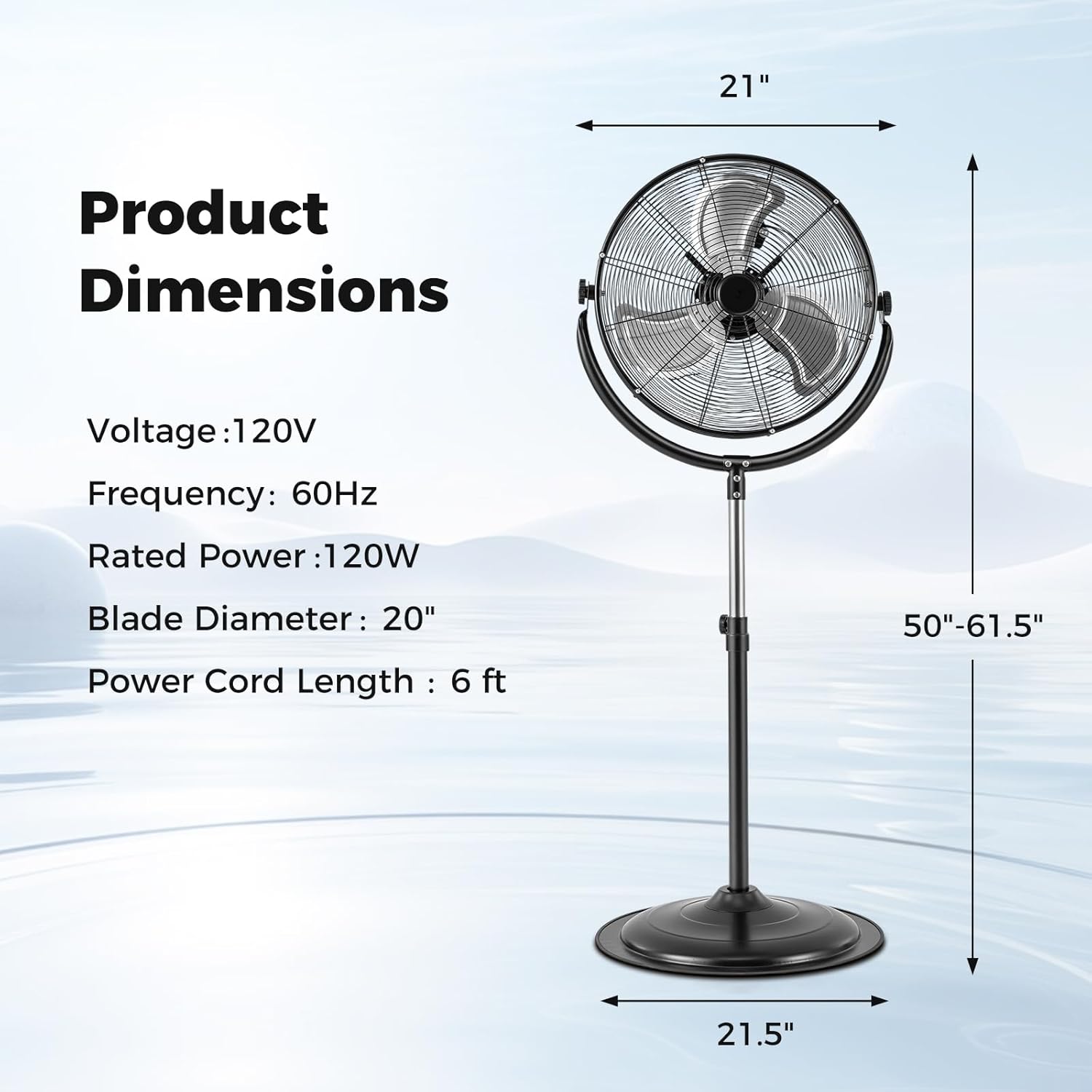
Image: Detailed product dimensions and electrical specifications.

Image: Close-up of the fan's UL-certified motor with double ball bearings, indicating lower noise and extended lifespan.
9. Warranty and Support
For warranty information or technical support, please refer to the documentation included with your purchase or contact COSTWAY customer service. Keep your purchase receipt for warranty claims.