
Introduction
Thank you for choosing the Callaway Golf Prestige 3-Wheel Cart. This manual provides essential information for the proper setup, operation, and maintenance of your golf cart. Please read these instructions carefully before using the product to ensure safe and efficient use.
Product Features
The Callaway Golf Prestige 3-Wheel Cart is designed for convenience and durability on the golf course. Key features include:
- Quick one-button folding mechanism for fast and easy storage and transport.
- Integrated PWR plate designed to securely hold all your magnetic devices.
- Versatile front wheel that can be locked for straight tracking or allowed to swivel for ultimate maneuverability.
- Adjustable handle to ensure a comfortable and ergonomic fit for users of various heights, eliminating twisting during use.
- Integrated accessories including a scorecard holder, a spacious storage compartment, a convenient cup holder, and a dedicated mobile phone/GPS holder.
Setup
Your Callaway Golf Prestige 3-Wheel Cart comes largely pre-assembled. Follow these steps to prepare it for use:
- Unfolding the Cart: Locate the quick-fold button (usually near the handle or main frame joint). Press the button and gently pull the handle upwards while simultaneously extending the frame until the cart locks into its open position. Ensure all locking mechanisms are securely engaged.
- Adjusting the Handle: The handle height is adjustable. Loosen the adjustment mechanism (if present, usually a lever or knob) and set the handle to a comfortable height. Securely tighten the mechanism.
- Front Wheel Adjustment: The front wheel can be set to swivel or lock. For general use and maneuverability, allow it to swivel. For straight-line tracking on uneven terrain, engage the locking mechanism.
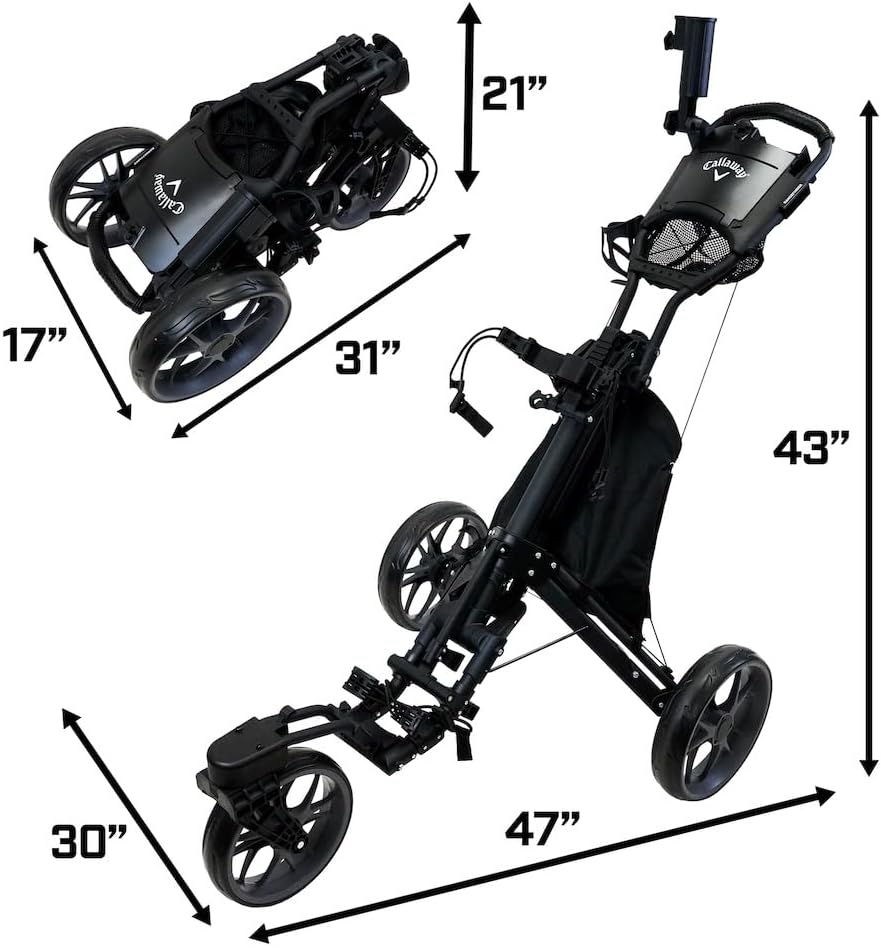
Image: The Callaway Golf Prestige 3-Wheel Cart shown in both its unfolded and folded states, with key dimensions indicated. Unfolded dimensions are approximately 43 inches high, 47 inches long, and 30 inches wide. Folded dimensions are approximately 21 inches high, 31 inches long, and 17 inches wide.
Operating Instructions
Using your golf cart effectively will enhance your golfing experience:
- Attaching Your Golf Bag: Place your golf bag onto the cart's bag supports. Secure it firmly using the elastic straps or bungee cords provided, ensuring the bag does not shift during movement.
- Brake System: The cart is equipped with a foot-operated brake. To engage the brake, press down on the brake lever. To release, lift the lever. Always engage the brake when the cart is stationary, especially on inclines.
- Using Integrated Accessories:
- Scorecard Holder: Utilize the dedicated slot for your scorecard and pencil.
- Storage Compartment: Store small personal items like keys, wallets, or extra golf balls in the secure compartment.
- Cup Holder: Place your beverage in the integrated cup holder.
- Mobile Phone/GPS Holder: Secure your mobile phone or GPS device in the designated holder.
- Magnetic PWR Plate: Attach magnetic accessories such as rangefinders or other devices to the integrated magnetic plate for easy access.

Image: A close-up view of the integrated bungee cell phone cradle, designed to securely hold most mobile phones during use.

Image: A hand demonstrating the use of the integrated metal plate, which securely holds magnetic devices such as a rangefinder.
Maintenance
Regular maintenance will prolong the life and performance of your golf cart:
- Cleaning: After each use, wipe down the cart frame and wheels with a damp cloth to remove dirt, grass, and debris. Avoid using harsh chemicals that may damage the finish.
- Wheel Care: Periodically check the wheels for any debris caught in the axles or treads. Ensure the wheels spin freely. If necessary, clean and lubricate moving parts with a silicone-based spray.
- Storage: When not in use, fold the cart using the quick-fold mechanism and store it in a dry, cool place away from direct sunlight and extreme temperatures.
- Fasteners: Occasionally check all screws, bolts, and fasteners to ensure they are tight. Do not overtighten.
Troubleshooting
Here are solutions to common issues you might encounter:
| Problem | Possible Cause | Solution |
|---|---|---|
| Cart does not fold/unfold smoothly. | Mechanism is stiff or obstructed. | Ensure the quick-fold button is fully pressed. Check for any debris or obstructions in the folding joints. Apply a silicone lubricant to moving parts if necessary. |
| Front wheel does not swivel or track straight. | Locking mechanism engaged or debris in the wheel assembly. | Check if the front wheel lock is engaged. Disengage it for swiveling. If locked, ensure it is fully engaged. Clean any debris from the wheel axle. |
| Brake is not holding the cart. | Brake mechanism needs adjustment or is worn. | Ensure the brake lever is fully engaged. Inspect the brake pads for wear. If the issue persists, contact customer support. |
Specifications
- Model Number: C99926
- Brand: Callaway
- Color: Black
- Unfolded Dimensions (Approximate): 43" H x 47" L x 30" W (109 cm H x 119 cm L x 76 cm W)
- Folded Dimensions (Approximate): 21" H x 31" L x 17" W (53 cm H x 79 cm L x 43 cm W)
- Weight: 7.26 kg (16 lbs)
- Components Included: Golf Cart (main assembly with integrated accessories)
Warranty and Support
For warranty information, product registration, or technical support, please refer to the official Callaway Golf website or contact their customer service department. Keep your purchase receipt as proof of purchase.
Website: www.callawaygolf.com