
MiLESEEY GenePro G1
MILESEEY GenePro G1 Touchscreen & GPS Rangefinder User Manual
Model: GenePro G1 | Brand: MiLESEEY
1. Product Overview
The MILESEEY GenePro G1 is an advanced touchscreen and GPS rangefinder designed for golf. It combines precise laser measurement with comprehensive GPS course mapping to enhance your game strategy and accuracy.
- 43,000+ Preloaded Golf Courses: Access a vast database of global golf courses with free lifetime updates, requiring no subscription or external device.
- Large 2.13” AMOLED Touchscreen: Provides clear visuals in various lighting conditions and intuitive touch navigation.
- Dynamic GPS Yardages: Obtain real-time distances to the front, center, and back of the green.
- SmartSlope with Tournament-Legal Switch: Calculates distances based on elevation, temperature, and humidity. The external switch allows for tournament compliance.
- 600-Yard Flag-Lock: Fast and accurate flag-locking with vibration feedback, achieving ±0.5-yard accuracy in 0.1 seconds.
- Rain & Fog Mode with IP65 Protection: Designed for all-weather performance with fog-resistant optics and waterproof housing.
- 6X Magnification: Provides clear and detailed views.

Figure 1.1: The MILESEEY GenePro G1 Touchscreen & GPS Rangefinder.
2. What's in the Box
Upon unboxing your MILESEEY GenePro G1, ensure all the following components are present:
- GenePro G1 Rangefinder (x1)
- USB-C Cable (x1)
- Snap Hook (x1)
- Packing Box (x1)
- Carrying Case (x1)
- User Manual (x1)
- Lens Cleaning Cloth (x1)
- Accessories Box (x1)

Figure 2.1: All included accessories for the GenePro G1 Rangefinder.
3. Setup
3.1 Charging the Device
Before first use, fully charge your GenePro G1 using the provided USB-C cable. Connect the cable to the device's USB-C port and the other end to a standard USB power adapter (not included).
3.2 Power On/Off
To power on the device, press and hold the power button located on the top. To power off, press and hold the power button again until the screen shuts down.
3.3 Initial Setup and Course Download
The GenePro G1 comes with over 43,000 golf courses preloaded. No subscription is required for updates. If your course is new or not listed, contact MiLESEEY customer support for remote addition within 1 week.

Figure 3.1: The GenePro G1 displaying course selection options.
4. Operating Instructions
4.1 General Operation and Touchscreen Navigation
The 2.13" AMOLED touchscreen allows for intuitive navigation through menus and features. Swipe and tap to select options and view different modes.
Video 4.1: An overview of the GenePro G1's features and operation. This video demonstrates the touchscreen interface and various functionalities of the device.
4.2 Laser Ranging and Flag-Lock
To measure distance, aim the rangefinder at your target and press the measurement button. The device will quickly provide an accurate distance. The 600-yard Flag-Lock feature with vibration feedback ensures you lock onto the flagstick, not background objects, with ±0.5-yard accuracy in 0.1 seconds.
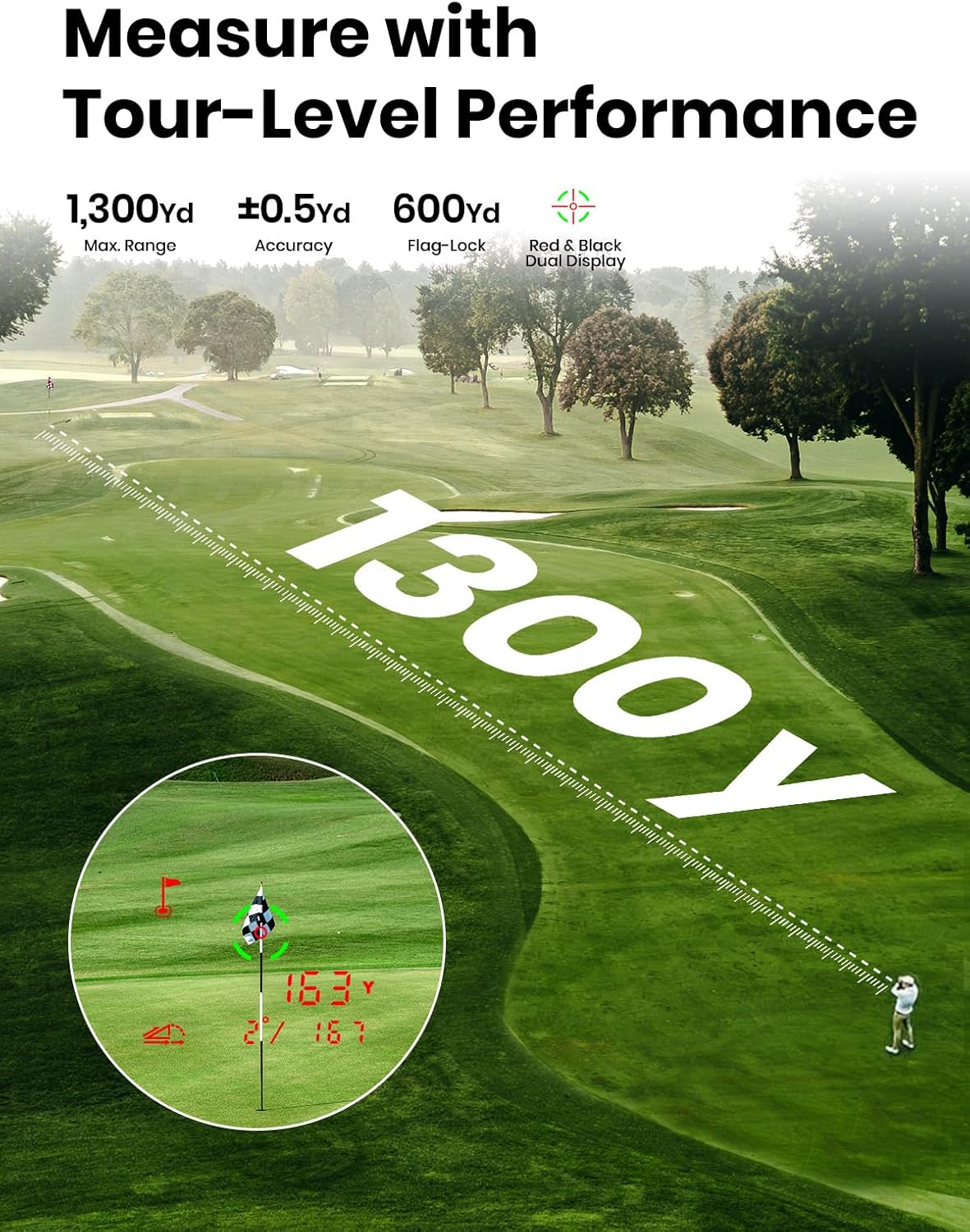
Figure 4.1: The GenePro G1 demonstrating its laser ranging capabilities and flag-lock feature.
4.3 GPS Yardages and Course View
The GenePro G1 provides dynamic GPS yardages to the front, center, and back of the green. Use the touchscreen to navigate the course map and get precise distances for improved club selection.

Figure 4.2: The GenePro G1 displaying a detailed GPS course map on its AMOLED screen.

Figure 4.3: Visual representation of front, center, and back distances provided by the GenePro G1.
4.4 SmartSlope Technology
SmartSlope adjusts distances based on environmental factors like elevation, temperature, and humidity for maximum accuracy. An external slope switch allows you to easily toggle this feature on or off to comply with tournament rules.
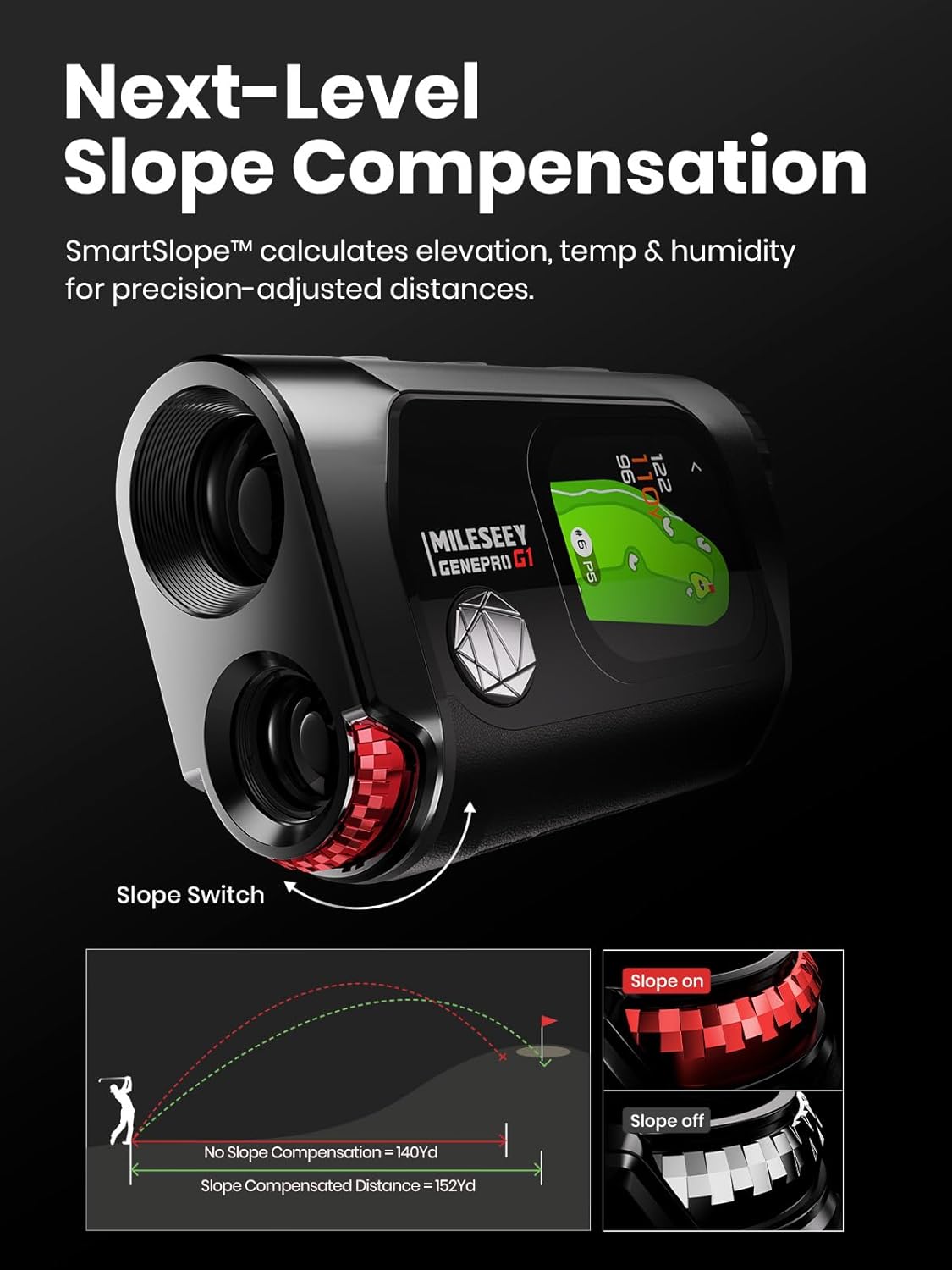
Figure 4.4: Diagram illustrating the SmartSlope feature and its impact on distance calculation.
4.5 Ball-to-Pin™ Mode
This patented mode allows golfers to measure distances between any two points on the course from any location, which is particularly useful for blind shots or when your cart cannot reach a specific spot.

Figure 4.5: An illustration of the Ball-to-Pin™ mode, showing how to measure distances between two points on the course.
4.6 Score Card and Performance Tracking
The GenePro G1 includes a digital score card feature. It also collects in-round shot data which can be synced to the MILESEEY Golf App for post-round analysis (App availability and features may vary).
5. Maintenance
5.1 Cleaning
Use the provided lens cleaning cloth to gently wipe the lenses and screen. For the body of the device, a soft, damp cloth can be used. Avoid abrasive materials or harsh chemicals.
5.2 Storage
When not in use, store the GenePro G1 in its sturdy carrying case to protect it from dust, impacts, and extreme temperatures. Avoid storing it in direct sunlight or in very humid conditions.
Note: The G1 does not have a magnet to prevent interference with the GPS device. Always use the carrying case for safe storage.
5.3 Battery Care
To prolong battery life, avoid fully discharging the device frequently. Charge it regularly, especially if it will be stored for an extended period.
6. Troubleshooting
| Problem | Possible Cause | Solution |
|---|---|---|
| Device does not power on. | Low battery; device malfunction. | Charge the device fully. If problem persists, contact support. |
| Inaccurate distance readings. | Dirty lens; unstable aim; environmental factors. | Clean lenses. Ensure stable aim. Check for fog/rain mode if applicable. |
| GPS not locating courses. | Poor satellite signal; course not preloaded. | Move to an open area. Contact MiLESEEY support if course is new. |
| Touchscreen unresponsive. | Software glitch; physical damage. | Restart the device. If problem persists, contact support. |
7. Specifications
| Feature | Detail |
|---|---|
| Model Name | GenePro G1 |
| Max. Range | 1300 Yards |
| Flag-Lock Range | 600 Yards |
| Accuracy | ±0.5 Yard |
| Response Time | 0.1 Seconds |
| Magnification | 6X |
| Display | 2.13” AMOLED Touchscreen (Red & Green Dual Display) |
| GPS Courses | 43,000+ Preloaded (Free Lifetime Updates) |
| Water Protection | IP65 (Rain & Fog Mode) |
| Material | Plastic |
| Color | Black |
| Item Package Dimensions | 5.8 x 4.3 x 3.6 inches |
| Package Weight | 0.65 Pounds |
8. Warranty and Support
The MILESEEY GenePro G1 comes with a 5-Year Manufacturer Warranty.
For technical support, warranty claims, or assistance with course updates, please contact MILESEEY Outdoor directly. You can find their contact information through the Amazon seller page or the official MiLESEEY website.
If your golf course is newly opened or isn’t listed in the preloaded courses, please contact MiLESEEY. Their technical team can add it remotely within 1 week.
Ask a question about this manual
Ask about setup, troubleshooting, compatibility, parts, safety, or missing instructions. Manuals+ will review the question and use this page’s manual context to help answer it.