
Introduction
Welcome to your MENDUNER Earbud Translator. This manual provides detailed instructions for the proper use and care of your device. Please read it thoroughly before operation to ensure optimal performance and longevity.
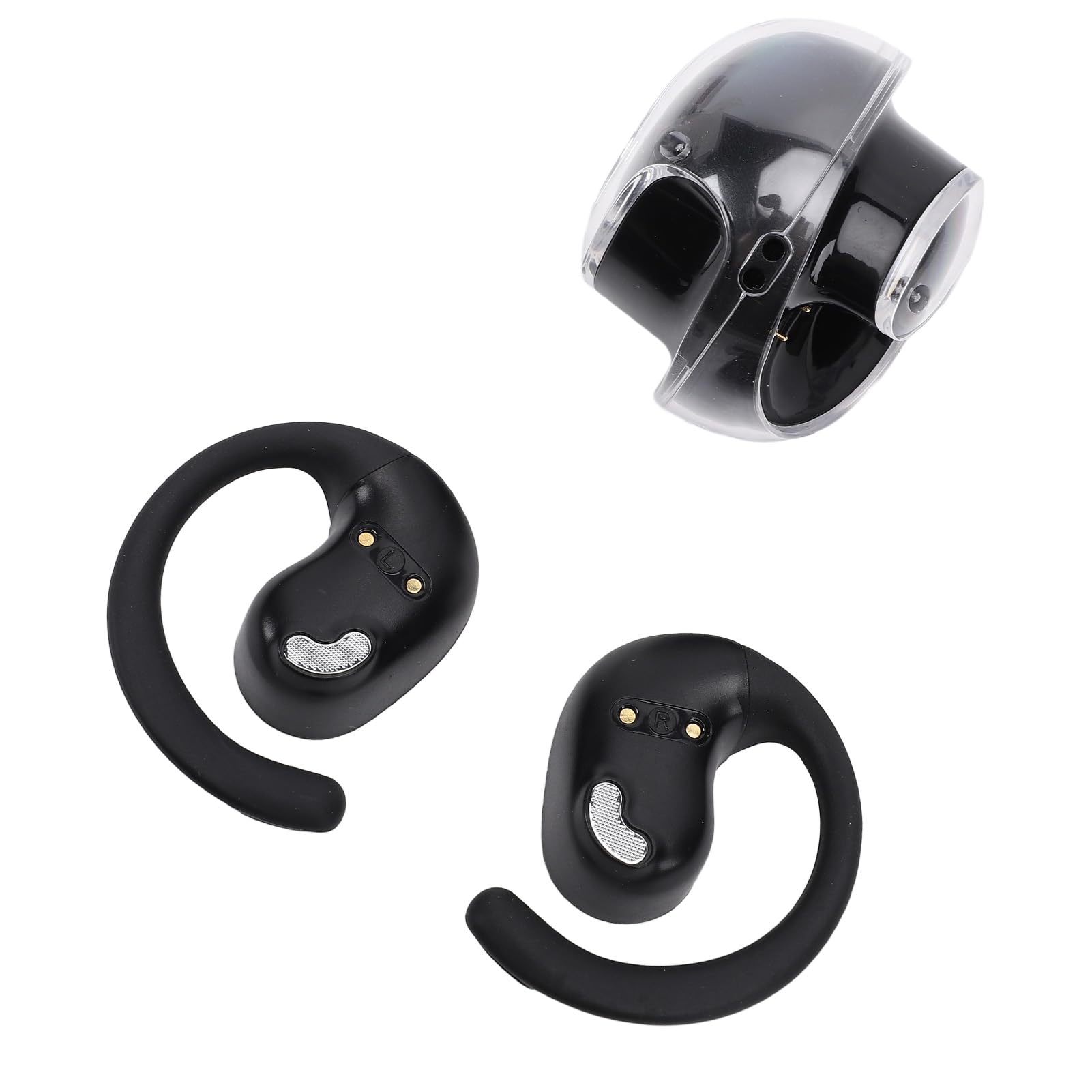
The MENDUNER Earbud Translator offers real-time language translation, music playback, and call functions, supporting 144 languages. It features 5.4 wireless technology for stable connections and a comfortable ergonomic design, making it ideal for travel, social interaction, and learning.
Package Contents
Verify that all items are present in the package:
- 1 x Charging Case
- 2 x Language Earbuds (Left and Right)
- 1 x Lanyard
- 1 x Data Cable

Specifications
| Feature | Detail |
|---|---|
| Item Type | Language Translation Earbuds |
| Material | PC, ABS |
| Approximate Weight | 86.00g / 3.03oz |
| Single Earbud Battery | LiPo Battery, 40mAh (Included) |
| Charging Case Battery | LiPo Battery, 300mAh (Included) |
| Play Format | Single Ear or Double Ear |
| Operation Method | Touch Control |
| Connection Distance | 10 to 15 meters |
| Online Language Support | 144 Languages (e.g., African, Albanian, Amharic, Arabic) |
| Model Number | MENDUNER76zb8wh2sp-11 |
| Brand | MENDUNER |
| Color | Black and Silver |
Setup
Charging the Device
Before first use, fully charge the earbuds and the charging case.
- Place both earbuds into the charging case. Ensure they are correctly seated to make contact with the charging pins.
- Connect the provided data cable to the charging case and a compatible USB power source (e.g., computer USB port, USB wall adapter).
- The indicator lights on the charging case and/or earbuds will show charging status. Refer to the app for detailed battery levels.
Pairing with Your Device
- Ensure the earbuds are charged and removed from the charging case. They will automatically enter pairing mode.
- On your smartphone or tablet, enable 5.4 (Bluetooth) and search for available devices.
- Select "MENDUNER Translator" (or similar name) from the list of found devices to pair.
- Once paired, a confirmation sound or indicator light will signal a successful connection.
App Installation
Download and install the dedicated MENDUNER translator application from your device's app store. This app is essential for accessing translation features and managing settings.
Operating Instructions
Power On/Off
The earbuds typically power on automatically when removed from the charging case and power off when placed back in the case. Manual power control may be available via touch controls (refer to app for customization).
Translation Mode
- Open the MENDUNER translator app on your paired device.
- Select the desired source and target languages from the app interface (supports 144 languages).
- Activate the real-time translation function within the app.
- Speak into the earbud's microphone. The translated audio will be played through the other earbud or your paired device.
- For two-way conversation, the other person can speak, and their words will be translated and played back to you.
Music Playback
After pairing, the earbuds can be used for music playback. Use your paired device's media controls or the earbud's touch controls (if configured) to play, pause, skip tracks, and adjust volume.
Answering Calls
When a call comes in, you can answer it using the earbud's touch controls (if configured) or directly from your paired smartphone. Audio will be routed through the earbuds.

Maintenance
Proper maintenance ensures the longevity and optimal performance of your MENDUNER Earbud Translator.
- Cleaning: Regularly wipe the earbuds and charging case with a soft, dry, lint-free cloth. Avoid using abrasive materials, solvents, or harsh chemicals.
- Storage: When not in use, store the earbuds in their charging case to protect them and keep them charged. Store in a cool, dry place away from direct sunlight and extreme temperatures.
- Battery Care: To prolong battery life, avoid fully discharging the earbuds and charging case frequently. Charge them regularly, even if not in constant use.
- Water Resistance: The earbuds are not waterproof. Avoid exposure to water, sweat, or high humidity.

Troubleshooting
If you encounter issues with your MENDUNER Earbud Translator, refer to the following common solutions:
| Problem | Possible Cause | Solution |
|---|---|---|
| Earbuds not pairing | Not in pairing mode, low battery, Bluetooth off | Ensure earbuds are out of case and charged. Turn Bluetooth off and on on your device. Restart both devices. |
| No sound | Volume too low, not connected, app issue | Increase volume on your device. Re-pair earbuds. Check app settings. |
| Translation not working | Internet connection, incorrect language settings, app error | Ensure stable internet connection. Verify language selections in the app. Restart the app. |
| Charging issue | Loose connection, dirty pins, faulty cable | Ensure earbuds are correctly seated. Clean charging pins. Try a different USB cable or power source. |
| Poor connection/range | Obstacles, interference, distance | Reduce distance between earbuds and paired device. Avoid physical obstructions. |

Warranty Information
MENDUNER products are typically covered by a limited manufacturer's warranty. Please refer to the warranty card included in your product packaging or visit the official MENDUNER website for detailed terms and conditions. Keep your proof of purchase for warranty claims.
Note: Information regarding specific warranty duration or coverage was not provided in the product details.
Support
For further assistance, technical support, or inquiries, please contact MENDUNER customer service.
- Online Support: Visit the official MENDUNER website for FAQs, support articles, and contact forms.
- Email Support: Refer to your product packaging or the MENDUNER website for customer service email addresses.
- Phone Support: Check the MENDUNER website for available phone support numbers in your region.
When contacting support, please have your model number (MENDUNER76zb8wh2sp-11) and proof of purchase ready.