
1. Introduction
Thank you for choosing the Joying 7 Inch Double Din Car Stereo. This manual provides detailed instructions for the installation, operation, and maintenance of your new car audio receiver. Please read this manual thoroughly before use to ensure proper functionality and to maximize your user experience. Keep this manual for future reference.
2. Safety Information
- Always prioritize safe driving. Do not operate the device in a manner that distracts you from the road.
- Ensure all wiring is correctly connected to prevent short circuits or damage to the vehicle's electrical system.
- Consult a professional for installation if you are unsure about any steps.
- Avoid exposing the unit to extreme temperatures, direct sunlight for prolonged periods, or excessive moisture.
- Do not attempt to disassemble or modify the unit. This may void the warranty and cause damage.
3. Package Contents
Verify that all items listed below are included in your package:
- 7" Radio x 1
- Double Din Cage x 1
- Left & Right Bracket x 1
- Reinforced Shims x 1
- User Manual x 1
- Installation Manual x 1
- WiFi Antenna x 1
- GPS Antenna x 1
- 4G Antenna x 2
- External Mic x 1
- USB Cable x 2
- AR Cable x 1
- Screen Ribbon Cable x 1
- ISO Cable x 1

Image: Overview of all included package contents.
4. Product Overview
4.1 Front Panel
The front panel features a 7-inch IPS touchscreen display for intuitive control and an integrated volume knob for easy audio adjustments. The Android 13 operating system provides a user-friendly interface for various applications.

Image: Front view of the car stereo unit.
4.2 Rear Panel and Connections
The rear panel provides various input and output ports for comprehensive connectivity with your vehicle's systems and external devices.
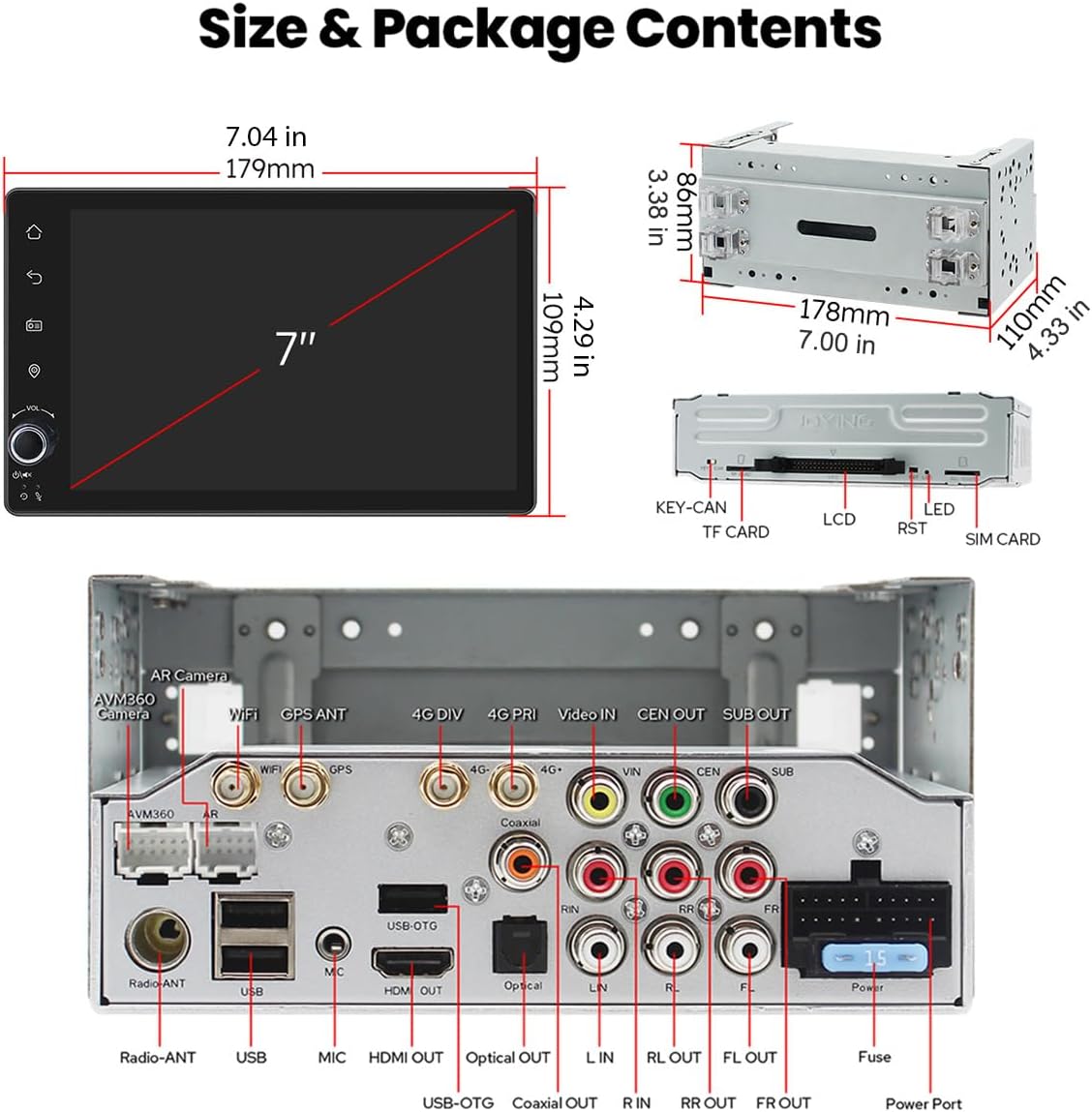
Image: Rear panel connections including USB, HDMI, Optical, Coaxial, and antenna ports.
4.3 Dimensions
The unit is designed to fit standard double din openings. Refer to the diagram for precise measurements.
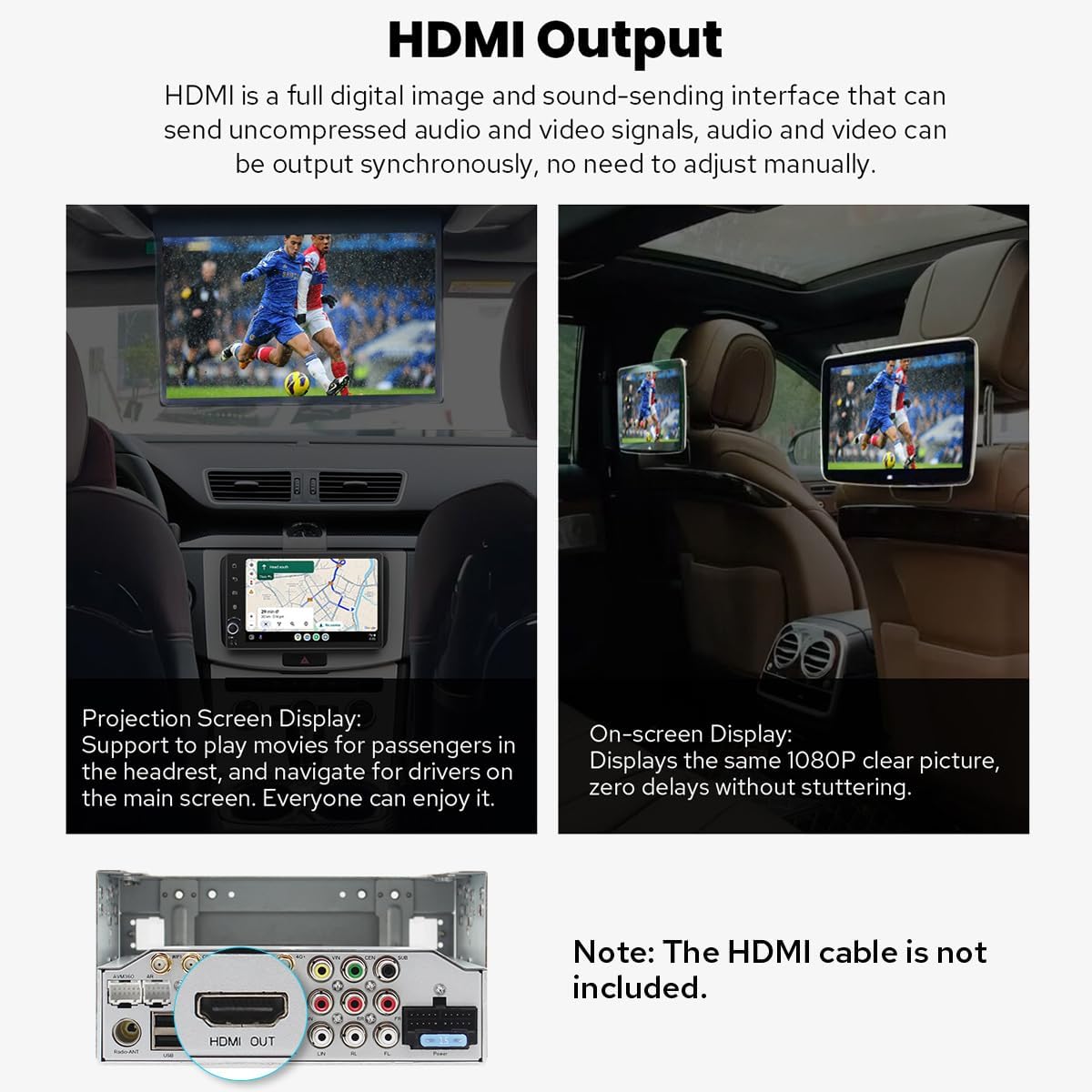
Image: Product dimensions for installation planning.
5. Setup and Installation
Proper installation is crucial for optimal performance. It is recommended to consult a professional installer if you are unfamiliar with car audio system wiring.
5.1 General Installation Notes
- An installation frame kit with an inner size of 178 x 102mm may be required.
- A special ISO harness, amplifier adapter, or CANbus decoder might be necessary depending on your car's specific configuration.
- This unit does not support factory car GPS antennas, backup cameras, Bluetooth, USB, or microphones. Only Joying accessories are compatible.
5.2 Installation Structure
The left and right brackets are adjustable, allowing for extension or telescoping to achieve the best fixing position within your car's center console. This design adapts to a wider range of vehicles.

Image: Adjustable installation brackets for flexible fitting.
Note: If your car is a Hyundai or Kia brand, please contact Joying for a different bracket.
5.3 Cooling System
The unit features a dual heat sink design for superior heat dissipation, improved temperature control, and enhanced performance stability. You can set a warning value for CPU temperature or radio volume. If these values are exceeded, the fan will automatically activate to prevent overheating.

Image: Internal view of the upgraded cooling system.
5.4 WiFi Antenna
An independent WiFi antenna ensures stable signal quality and provides fast, smooth internet access. It supports 802.11a/b/g/n/AC standards with 2.4GHz/5GHz spectral bands.

Image: Dedicated WiFi antenna for improved connectivity.
6. Operating Instructions
6.1 Initial Boot-up
After the first power-on, the system will take approximately 30-40 seconds to boot. Subsequent boot-ups will be significantly faster, entering the user interface in about 2 seconds once the car key is turned.
6.2 User Interface
The unit runs on Android 13, offering a customizable and intuitive interface. Navigate through apps and settings using the touchscreen.
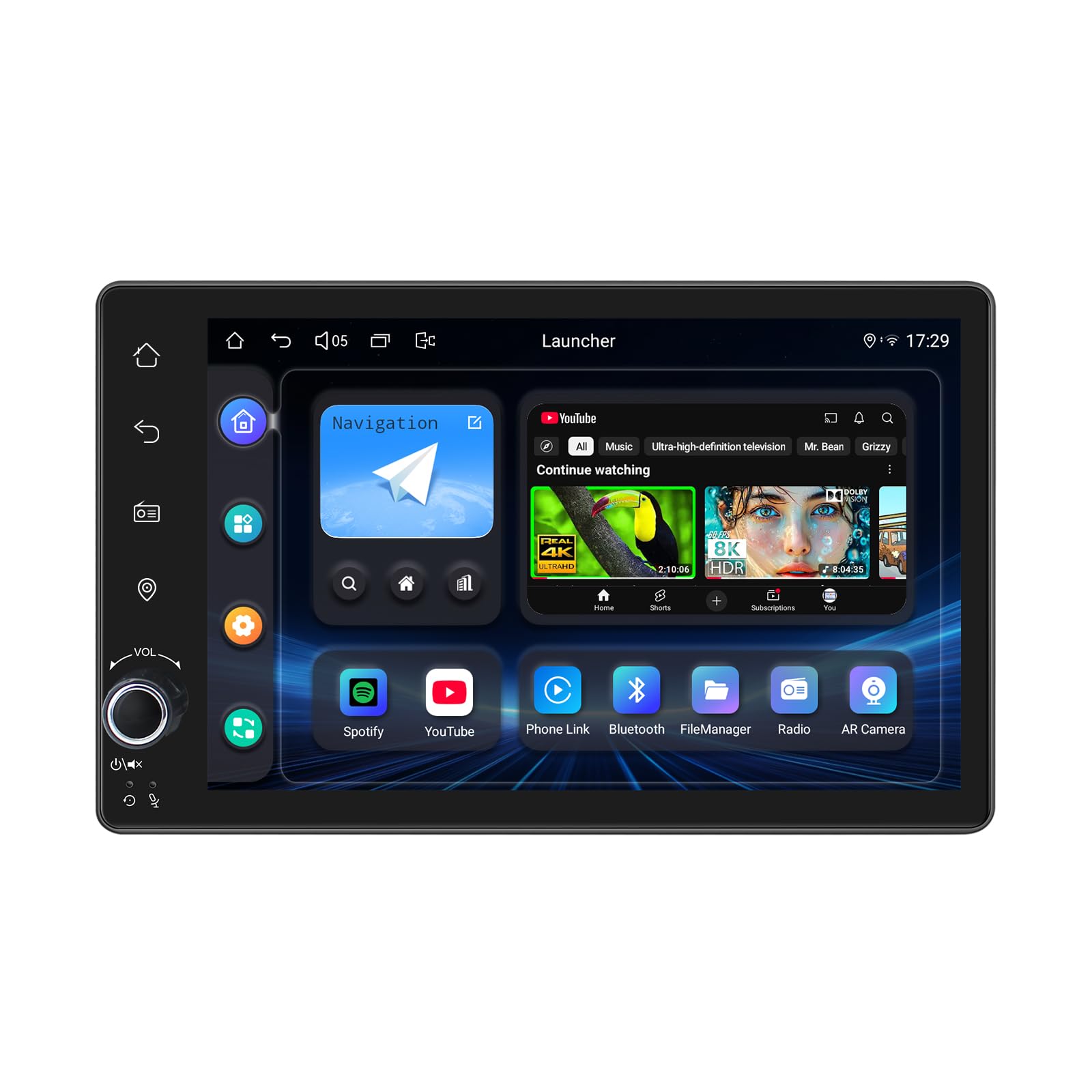
Image: Android 13 user interface with various application icons.
6.3 CarPlay & Android Auto
Connect your mobile phone via USB cable or Bluetooth to utilize Apple CarPlay or Android Auto. This allows you to access phone apps, navigation, make calls, and listen to music directly on the car stereo's screen.

Image: CarPlay and Android Auto integration.
6.4 GPS Navigation
The unit includes precise GPS engines and an antenna for accurate positioning and real-time navigation. It supports offline maps; you can download map data for specific areas and use it without an internet connection. Mobile phone map data can also be synchronized via CarPlay/Android Auto.
6.5 Audio Features
Experience high-quality sound with the built-in TDA7851 DSP chip and 48-band graphic equalizer. The unit provides 4x50W maximum output power and supports aftermarket amplifiers with 4 audio outputs and 1 subwoofer output. For ultimate sound quality, utilize the optical fiber or coaxial digital output if your external amplifier supports it.

Image: High-quality sound features and amplifier support.
6.6 Built-in 4G Module
Insert a SIM card into the dedicated slot for internet access. The module supports FDD-LTE (B2/B4/B5/B7/B12/B13/B14/B17/B25/B26/B38/B66/B71) and TDD-LTE (B41) types. Note that it does not support making phone calls or sending SMS messages.
6.7 Steering Wheel Control (SWC)
The unit supports steering wheel controls, allowing you to switch songs, change radio channels, and adjust volume safely while driving. For vehicles with a CAN system, an additional CANbus cable may be required to enable this feature.

Image: Steering wheel control functionality.
6.8 Hands-free Calling
Utilize Bluetooth connectivity for hands-free calling, enhancing safety and convenience while driving.
7. Advanced Features
7.1 Split-screen Multitasking
The split-screen feature allows you to run two applications simultaneously on the display. To activate, tap the recent apps icon, find the desired app, and tap the split-screen button. The first app will display on the left, and you can select a second app from recent applications for the right side.
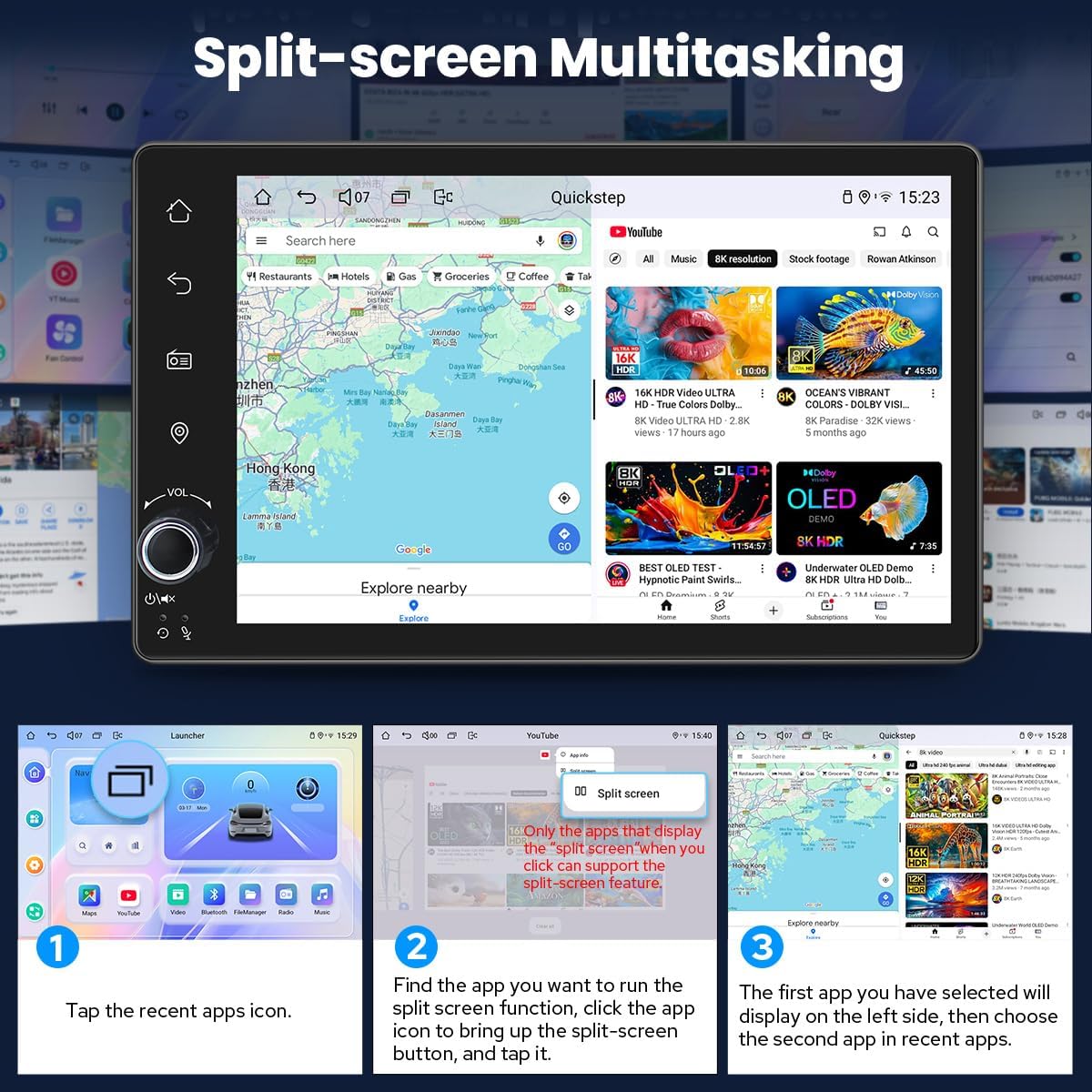
Image: Split-screen functionality for running two apps concurrently.
7.2 HDMI Output
The HDMI output provides a full digital image and sound-sending interface, allowing you to output uncompressed audio and video signals synchronously to external displays without manual adjustment. This is ideal for projection screen displays for passengers or on-screen displays with 1080p clarity and zero delays.
Image: HDMI output port and its application for external displays.
Note: The HDMI cable is not included.
7.3 Personalized Settings
Customize your stereo's appearance and functionality:
- Car Boot Logo: Set a custom logo to display during startup.
- Customizable Wallpapers: Choose from various wallpapers or upload your own.
- Changeable Button Color: Adjust the color of the physical buttons to match your vehicle's interior lighting.
- Adjustable Screen Brightness: Optimize display visibility for different lighting conditions.
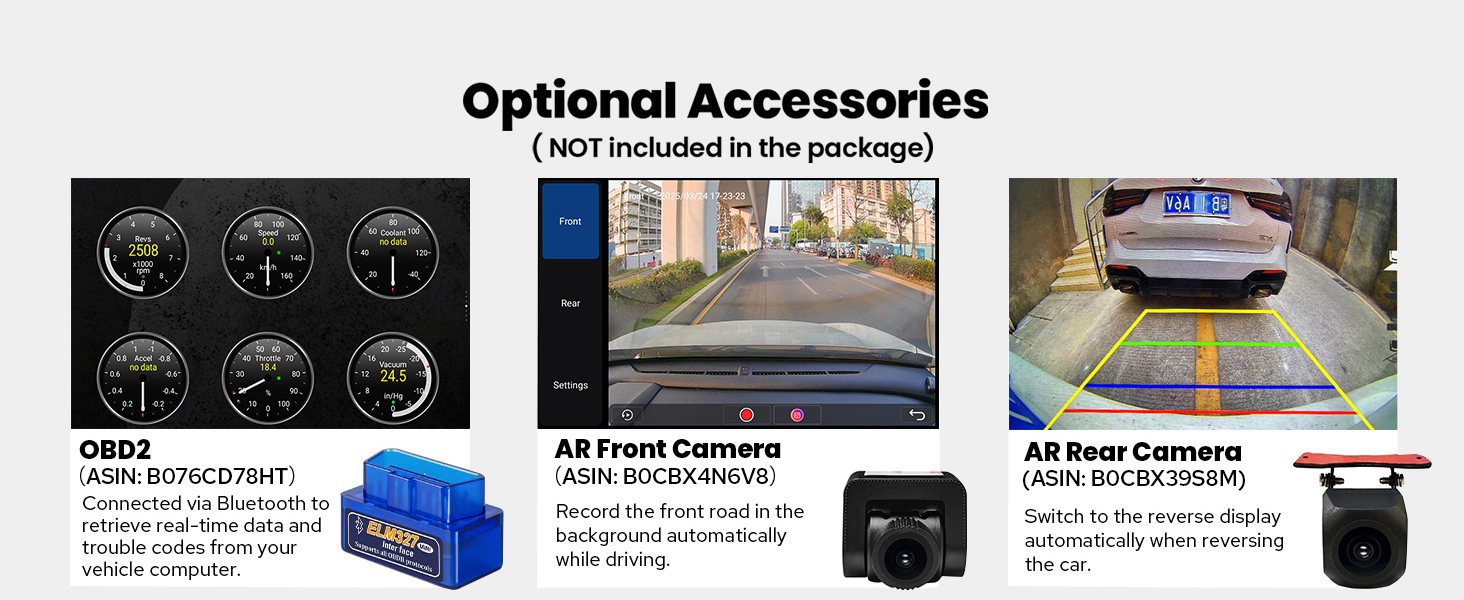
Image: Options for personalizing the car stereo's interface.
8. Maintenance
- Cleaning the Screen: Use a soft, lint-free cloth to gently wipe the touchscreen. Avoid abrasive cleaners or solvents.
- Software Updates: Periodically check the Joying official website or contact support for available software updates to ensure optimal performance and access to new features.
- General Care: Keep the unit free from dust and debris. Ensure proper ventilation around the unit to prevent overheating.
9. Troubleshooting
| Problem | Possible Cause | Solution |
|---|---|---|
| Unit does not power on. | Incorrect wiring; Blown fuse; Power supply issue. | Check power connections and fuse. Ensure proper grounding. Consult installation manual. |
| No sound output. | Speaker wires disconnected; Volume too low; Amplifier issue. | Verify speaker connections. Increase volume. Check external amplifier status if used. |
| GPS signal is weak or inaccurate. | GPS antenna improperly installed or obstructed. | Ensure GPS antenna has a clear view of the sky and is securely connected. |
| Bluetooth connection issues. | Device not in pairing mode; Interference; Software glitch. | Ensure both devices are in pairing mode. Restart both devices. Clear Bluetooth cache on phone. |
| Slow performance or freezing. | Too many apps running; Low storage; Software issue. | Close unnecessary applications. Clear cache. Perform a system reset if necessary (data will be lost). |
For further assistance, please refer to the detailed installation manual or contact Joying customer support.
10. Specifications
- Product Dimensions: 5.91 x 7.99 x 4.72 inches
- Item Weight: 2.65 pounds
- Item Model Number: JY-UTD03N4-B
- Connectivity Technology: Bluetooth, Ethernet, HDMI, USB, Wi-Fi
- Controller Type: Android
- Special Features: Android Auto, Apple CarPlay, DSP, Equalizer, RDS
- Compatible Devices: Amplifier, Camera, Speaker
- Total HDMI Ports: 1
- Connector Type: Coaxial, Optical
- Audio Output Mode: Stereo
- Surround Sound Channel Configuration: 5.1
- Video Encoding Support: H264/H265/MP4/AVI/MKV/FLV
11. Optional Accessories (Not Included)
Enhance your car stereo's functionality with these compatible Joying accessories:
- OBD2 Scanner: Connects via Bluetooth to retrieve real-time vehicle data and trouble codes.
- AR Front Camera: Records the front road automatically while driving.
- AR Rear Camera: Provides a reverse display when backing up the car.

Image: Optional accessories for extended functionality.
12. Warranty and Support
For warranty information, technical support, or any inquiries regarding your Joying car stereo, please refer to the warranty card included with your product or visit the official Joying website. You may also contact Joying customer service directly for assistance.
