
Introduction
This manual provides comprehensive instructions for the installation, operation, maintenance, and troubleshooting of your Fortdows 10-inch Android Car Radio Stereo. Please read this manual carefully before using the product to ensure proper function and to maximize your user experience.
Setup
Vehicle Compatibility
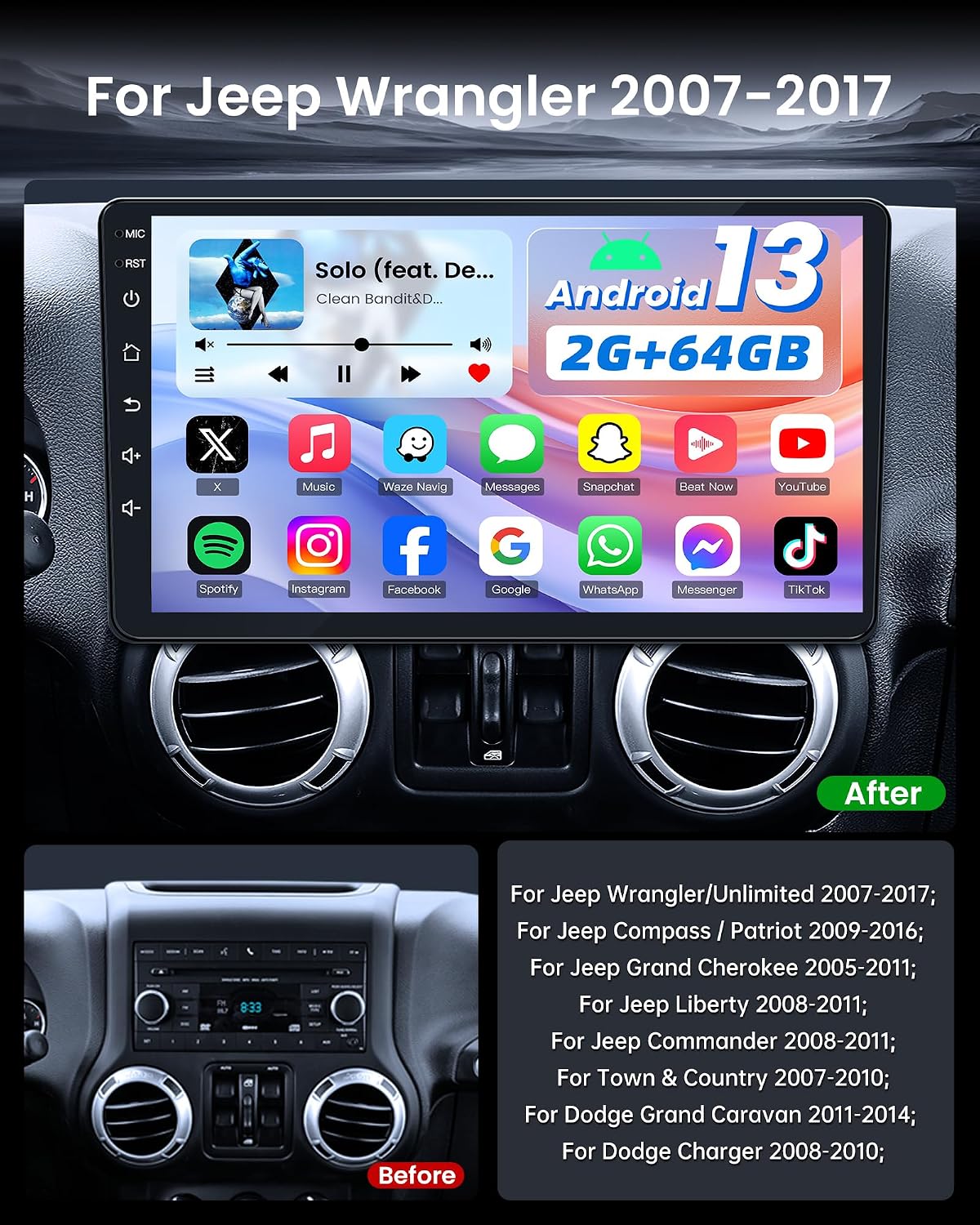
This head unit is designed for a true plug-and-play installation in Jeep Wrangler JK models from 2007 to 2017. No wire cutting is required for installation. The included CANBUS decoder ensures seamless integration with your vehicle's existing systems, providing information such as reverse signals, door status, handbrake, air conditioning, and amplifier data.
Package Contents
Verify that all components are present in the package before beginning installation:
- Head Unit
- Power Cable
- Original USB Cable
- USB Cable (x2)
- RCA Cable
- CANBUS Decoder
- GPS Antenna
- Reversing Line
- Backup Camera
- External Microphone
- Crowbar (for trim removal)

Installation Overview
The installation process involves removing your vehicle's original radio and connecting the new head unit using the provided wiring harness and CANBUS decoder. Ensure all connections are secure before reassembling the dashboard.
Video: Car Radio Installation
GPS Antenna Connection
Connect the GPS antenna to the designated port on the back of the head unit. Position the antenna in a location with a clear view of the sky for optimal signal reception.
Backup Camera Installation
The included 1080P backup camera provides a clear view when reversing. Connect the camera to the designated input on the head unit and ensure it is mounted securely at the rear of the vehicle.

Operating Instructions
Touchscreen Display
The unit features a 10-inch IPS capacitive touchscreen with a 1280x800 resolution, offering clear visuals and responsive interaction. It supports full 1080p video playback.

Wireless CarPlay & Android Auto
Connect your smartphone wirelessly via Bluetooth for CarPlay or Android Auto functionality. This allows access to navigation, music, calls, and messages directly on the 10-inch touchscreen. Voice controls via Siri or Google Assistant are supported for hands-free operation.

GPS Navigation
The head unit includes built-in GPS with pre-installed Google Maps for real-time navigation and route optimization. Ensure the GPS antenna is properly installed for accurate positioning.

Connectivity (WiFi & Bluetooth)
Dual-band WiFi (2.4GHz/5GHz) provides stable internet access for streaming, map updates, and online video. Bluetooth 5.0 enables reliable, high-quality hands-free calls and audio streaming.

Audio Features (FM RDS Radio & EQ)
Experience high-fidelity sound with the built-in 4x45W amplifier. The 15-band EQ allows for sound customization. The QN8035 radio chip ensures stable FM reception (87.5–108.0 MHz) with 18 preset stations and real-time RDS display.


Steering Wheel Controls (SWC)
The unit supports your vehicle's original steering wheel controls, allowing you to operate the screen without diverting your eyes from the road.

Maintenance
Cleaning the Screen
To clean the touchscreen, use a soft, lint-free cloth. For stubborn smudges, lightly dampen the cloth with water or a screen-safe cleaner. Avoid abrasive materials or harsh chemicals.
Software Updates (OTA)
The unit supports Over-The-Air (OTA) updates. Periodically check for available software updates in the system settings to ensure optimal performance and access to new features. A stable Wi-Fi connection is recommended for updates.
Troubleshooting
If you encounter issues with your Fortdows car radio stereo, refer to the following common problems and solutions:
| Problem | Possible Cause | Solution |
|---|---|---|
| No sound from speakers | Incorrect wiring, amplifier issue, volume muted. | Check all speaker wire connections. Ensure the volume is not muted and is turned up. Verify amplifier settings if applicable. |
| Slow performance or app loading | Too many apps running, low RAM, system cache. | Close unnecessary applications. Clear system cache in settings. Restart the unit. |
| System crashes or freezes | Software glitch, incompatible app, overheating. | Perform a system restart. Uninstall recently installed applications that may be causing conflicts. Ensure proper ventilation around the unit. |
| GPS signal loss or inaccuracy | GPS antenna obstruction or improper placement. | Ensure the GPS antenna has a clear view of the sky and is securely connected. Avoid placing it under metal objects. |
| Wireless CarPlay/Android Auto not connecting | Bluetooth not enabled, phone compatibility, software issue. | Ensure Bluetooth is enabled on both the head unit and your phone. Check phone compatibility. Restart both devices. |
If the issue persists after attempting these solutions, please contact customer support.
Specifications
| Feature | Detail |
|---|---|
| Brand | Fortdows |
| Model | 4Core 64GB ROM 10.1 Inch |
| Vehicle Service Type | Car (Jeep Wrangler JK 2007-2017) |
| Screen Size | 10 Inches |
| Display Type | LCD, IPS Capacitive Touchscreen |
| Resolution | 1280x800P |
| Operating System | Android 13 |
| CPU | 4-core |
| RAM | 2GB |
| Internal Storage | 64GB |
| Connectivity Technology | Bluetooth 5.0, Wi-Fi (2.4GHz/5GHz) |
| Supported Satellite Navigation System | GPS (with pre-installed Google Maps) |
| Audio Output Mode | Stereo (4x45W amplifier, 15-band EQ) |
| Radio Tuner | FM RDS Radio (87.5-108.0 MHz, QN8035 chip) |
| Special Features | Wireless CarPlay & Android Auto, Mirror Link, SWC, 1080P Backup Camera, OTA Update Support |
| Included Components | Head unit + Accessories (as listed in Package Contents) |
Warranty and Support
Warranty Information
This product comes with a 1-Year Warranty from the date of purchase. This warranty covers manufacturing defects. Please retain your proof of purchase for warranty claims.
Return Policy
A 7-Day Return Policy is available for this product. Returns are accepted for defects or if the product does not meet expectations within this period. Please refer to your retailer's specific return guidelines.
Customer Support
For technical assistance, troubleshooting, or warranty inquiries, please contact Fortdows customer support:
- Email: fortdows.cam@gmail.com
- Website: www.fancygod.com


