
1. Safety Information
Please read all instructions carefully before using the BOSGAME P2 Plus Mini PC. Keep this manual for future reference.
- Do not expose the device to rain, moisture, or extreme temperatures.
- Avoid placing the device near heat sources or in direct sunlight.
- Use only the provided power adapter.
- Do not open the casing of the Mini PC. Refer all servicing to qualified personnel.
- Ensure proper ventilation around the device to prevent overheating.
2. Package Contents
Verify that all items are present in your package:
- 1 × BOSGAME P2 Mini PC
- 1 × HDMI Cable
- 1 × Power Adapter
- 1 × VESA Mount & Screws
- 1 × User Manual (this document)
3. Product Overview
The BOSGAME P2 Plus Mini PC is a compact and powerful computer designed for various applications, from business to entertainment. Familiarize yourself with its components and ports.

Figure 3.1: Front view of the BOSGAME P2 Plus Mini PC.
3.1 Front Panel
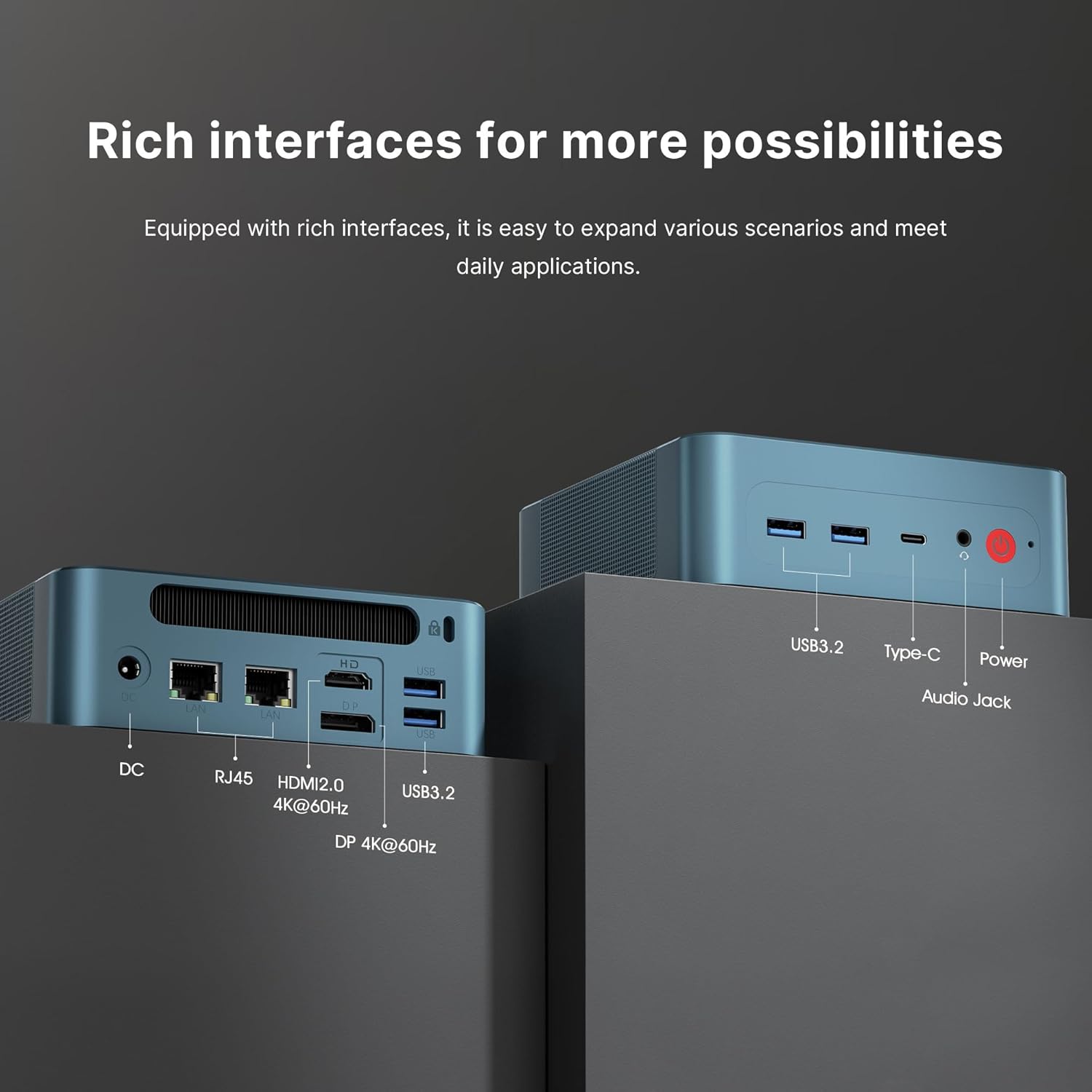
Figure 3.2: Front panel ports including USB 3.2, USB-C, Audio Jack, and Power button.
- USB 3.2 Gen 2 Ports: For connecting USB devices such as keyboards, mice, or external storage.
- USB-C Port (Thunderbolt 4): Supports data transfer, video output (up to 8K), and Power Delivery (PD 3.0).
- 3.5mm Headphone Jack: For audio output to headphones or speakers.
- Power Button: To turn the device on or off.
3.2 Rear Panel

Figure 3.3: Rear panel ports including DC-in, RJ45 LAN, HDMI 2.0, DisplayPort, and additional USB 3.2 ports.
- DC Jack: Connect the provided power adapter here.
- Dual 2.5Gb RJ45 LAN Ports: For wired network connections.
- HDMI 2.0 Port: For connecting to a display (up to 4K@60Hz).
- DisplayPort (DP): For connecting to a display (up to 4K@60Hz).
- USB 3.2 Gen 2 Ports: Additional ports for connecting USB devices.
3.3 Product Features Overview Video
Video 3.1: An overview of the BOSGAME P2 Plus Mini PC's features, including its compact design, powerful processor, and various connectivity options. This video demonstrates the device's capabilities and its suitability for different usage scenarios.
4. Setup Guide
Follow these steps for initial setup of your Mini PC:
- Connect Display: Connect your monitor(s) to the Mini PC using the HDMI, DisplayPort, or USB-C (Thunderbolt 4) ports.
- Connect Peripherals: Plug in your keyboard, mouse, and any other USB devices into the available USB ports.
- Connect Network: For a wired connection, connect an Ethernet cable to one of the RJ45 LAN ports. For Wi-Fi, you will configure it after the initial boot.
- Connect Power: Plug the power adapter into the DC jack on the rear panel, then plug the adapter into a power outlet.
- Power On: Press the power button on the front panel. The device will boot up, and you will see the operating system (Windows 11 Pro) setup screen. Follow the on-screen instructions to complete the Windows setup.
5. Operating Instructions
5.1 Basic Operation
Once the initial setup is complete, your BOSGAME P2 Plus Mini PC is ready for use. You can navigate the Windows 11 Pro operating system, install applications, and connect to the internet.
5.2 Triple Display Setup
The Mini PC supports connecting up to three displays simultaneously for an extended workspace or immersive experience.

Figure 5.1: Example of a triple display setup with the Mini PC.
To set up multiple displays:
- Connect your monitors to the HDMI, DisplayPort, and USB-C (Thunderbolt 4) ports.
- Once connected, Windows should automatically detect the displays.
- Right-click on the desktop, select "Display settings," and configure the display arrangement (extend, duplicate, etc.) as needed.
5.3 Thunderbolt 4 Functionality
The USB-C port on the front panel is a full-featured Thunderbolt 4 port, offering versatile connectivity:
- Power Delivery (PD 3.0): Can provide power to compatible devices or receive power from a compatible power source (e.g., a portable power station).
- 40Gbps Data Transmission: High-speed data transfer for external SSDs or other Thunderbolt devices.
- 8K Video Output: Supports connecting to an 8K display for ultra-high-resolution visuals.

Figure 5.2: The Thunderbolt 4 port enables power delivery, high-speed data, and video output, ideal for portable setups.
6. Storage and Memory Expansion
The BOSGAME P2 Plus Mini PC comes equipped with 32GB DDR5 4800MHz SODIMM RAM and a 512GB PCIe Gen 4 x 4 SSD. Both can be upgraded.

Figure 6.1: Internal components showing the dual-channel DDR5 SODIMM memory and M.2 NVMe SSD.
- RAM: The dual-channel DDR5 4800MHz SODIMM memory can be expanded up to 64GB.
- SSD: The device features dual M.2 SSD slots, allowing for expansion up to 4TB PCIe Gen 4 x 4 SSD.
Note: Upgrading internal components should be performed by experienced users. Refer to the detailed upgrade guide on the BOSGAME support website or consult professional assistance to avoid damage.
7. Connectivity
The Mini PC offers robust connectivity options:
- Wi-Fi 6: Provides faster and more stable wireless internet access compared to previous Wi-Fi standards.
- Bluetooth 5.2: For connecting wireless peripherals such as headphones, keyboards, and mice.
- Dual 2.5Gb LAN: Two RJ45 ports for high-speed wired network connections.
8. Heat Dissipation
The BOSGAME P2 Plus Mini PC incorporates an efficient heat dissipation system to maintain optimal performance and ensure quiet operation.

Figure 8.1: Illustration of the highly efficient heat dissipation system within the Mini PC.
To ensure effective cooling:
- Place the Mini PC in a well-ventilated area.
- Avoid blocking the ventilation grilles on the device.
- Regularly clean dust from the device's exterior to prevent accumulation in the vents.
9. Troubleshooting
This section addresses common issues you might encounter with your BOSGAME P2 Plus Mini PC.
| Problem | Possible Cause | Solution |
|---|---|---|
| No power/Device does not turn on | Power adapter not connected, faulty outlet, power button issue. | Ensure power adapter is securely connected to both the device and a working power outlet. Try a different outlet. |
| No display output | Loose display cable, incorrect input source on monitor, faulty cable. | Check display cable connections. Ensure monitor is set to the correct input source (HDMI, DP, USB-C). Try a different cable or monitor. |
| Wi-Fi/Bluetooth not working | Drivers not installed, disabled in OS, hardware issue. | Check device manager for driver status. Ensure Wi-Fi/Bluetooth is enabled in Windows settings. Restart the device. |
| Device overheating | Poor ventilation, heavy workload. | Ensure adequate airflow around the device. Reduce demanding tasks. Clean dust from vents. |
If you encounter issues not listed here or if the suggested solutions do not resolve the problem, please contact BOSGAME customer support.
10. Specifications
Key technical specifications for the BOSGAME P2 Plus Mini PC:
| Feature | Specification |
|---|---|
| Processor | Intel Core i7-12700H (14 Cores, 20 Threads, up to 4.7 GHz) |
| Graphics | Intel Iris Xe Graphics (Integrated) |
| RAM | 32GB DDR5 4800MHz SODIMM (Max 64GB) |
| Storage | 512GB PCIe Gen 4 x 4 NVMe M.2 SSD (Expandable to 4TB) |
| Operating System | Windows 11 Pro (pre-installed) |
| Wi-Fi | Wi-Fi 6 |
| Bluetooth | Bluetooth 5.2 |
| Ethernet | Dual 2.5Gb RJ45 LAN Ports |
| USB Ports | 4 x USB 3.2 Gen 2, 1 x USB-C (Thunderbolt 4) |
| Video Output | 1 x HDMI 2.0 (4K@60Hz), 1 x DisplayPort (4K@60Hz), 1 x USB-C (Thunderbolt 4, up to 8K) |
| Audio | 1 x 3.5mm Headphone Jack |
| Dimensions | 129 x 123 x 44 mm (approx. 5.08 x 4.84 x 1.73 inches) |
| Weight | Approx. 2 Pounds (0.91 kg) |
11. Warranty and Support
BOSGAME provides comprehensive support for your P2 Plus Mini PC.
11.1 Warranty Information
Your BOSGAME P2 Plus Mini PC comes with a Three-Year limited warranty from the date of purchase. This warranty covers manufacturing defects and hardware malfunctions under normal use. Please retain your proof of purchase for warranty claims.
11.2 Customer Support
For any pre-sale or after-sale inquiries, technical assistance, or warranty claims, please use the following methods:
- Contact Us on Amazon: Log into your Amazon buyer's account, find your order, and click 'Get help' for assistance with this product.
- Email Support: Send an email to the After-sales Support Team at support@bosgame.com. You will receive a response as soon as possible.
BOSGAME is committed to providing professional customer service and support throughout the lifetime of your product.


