
1. Introduction
Thank you for choosing the LEFANT M330 Robot Vacuum Cleaner. This manual provides essential information for the safe operation, maintenance, and troubleshooting of your device. The LEFANT M330 features advanced dToF navigation, powerful 5000Pa suction, and a 3-in-1 cleaning system (sweeping, vacuuming, mopping) for efficient home cleaning. It supports smart app control and voice commands via Alexa and Google Assistant.
2. Safety Instructions
- Read all instructions carefully before using the robot vacuum cleaner.
- This appliance is for indoor use only. Do not use it outdoors or on wet surfaces.
- Do not allow children or pets to operate the robot. Supervise children when the robot is in use.
- Use only the original charging adapter and charging base provided by LEFANT.
- Before operation, clear the area of loose cables, small objects, rugs with tassels, and any fragile items.
- Do not use the robot to pick up large debris, liquids, burning or smoking materials, or sharp objects.
- Ensure the robot's sensors are clean for optimal performance.
- Do not block the robot's suction port or air vents.
- If the power cord is damaged, it must be replaced by the manufacturer or a qualified service agent.
3. Package Contents
Verify that all components are present in the package:
- LEFANT M330 Robot Vacuum Cleaner
- Charging Base
- Power Adapter
- Side Brushes (2 pairs)
- Mop Holder
- Disposable Mop Cloths
- User Manual

Figure 3.1: LEFANT M330 Robot Vacuum Cleaner with charging base and app interface.
4. Product Overview
The LEFANT M330 is designed for comprehensive floor cleaning. Familiarize yourself with its main components:
Robot Components:
- Top Cover: Houses the dustbin and power button.
- Power Button: For manual start/pause/stop and Wi-Fi pairing.
- dToF Laser Navigation Sensor: Located on top for precise mapping and navigation.
- Dustbin: Transparent, 450ml capacity for collecting debris.
- PSD Obstacle Detection Sensors: Front-mounted for active obstacle avoidance.
- Side Brushes: Two brushes for sweeping edges and corners.
- Charging Contacts: On the underside, for connecting to the charging base.
- Mop Holder: Attaches to the underside for mopping functionality.
- Driving Wheels: For movement across various floor types.
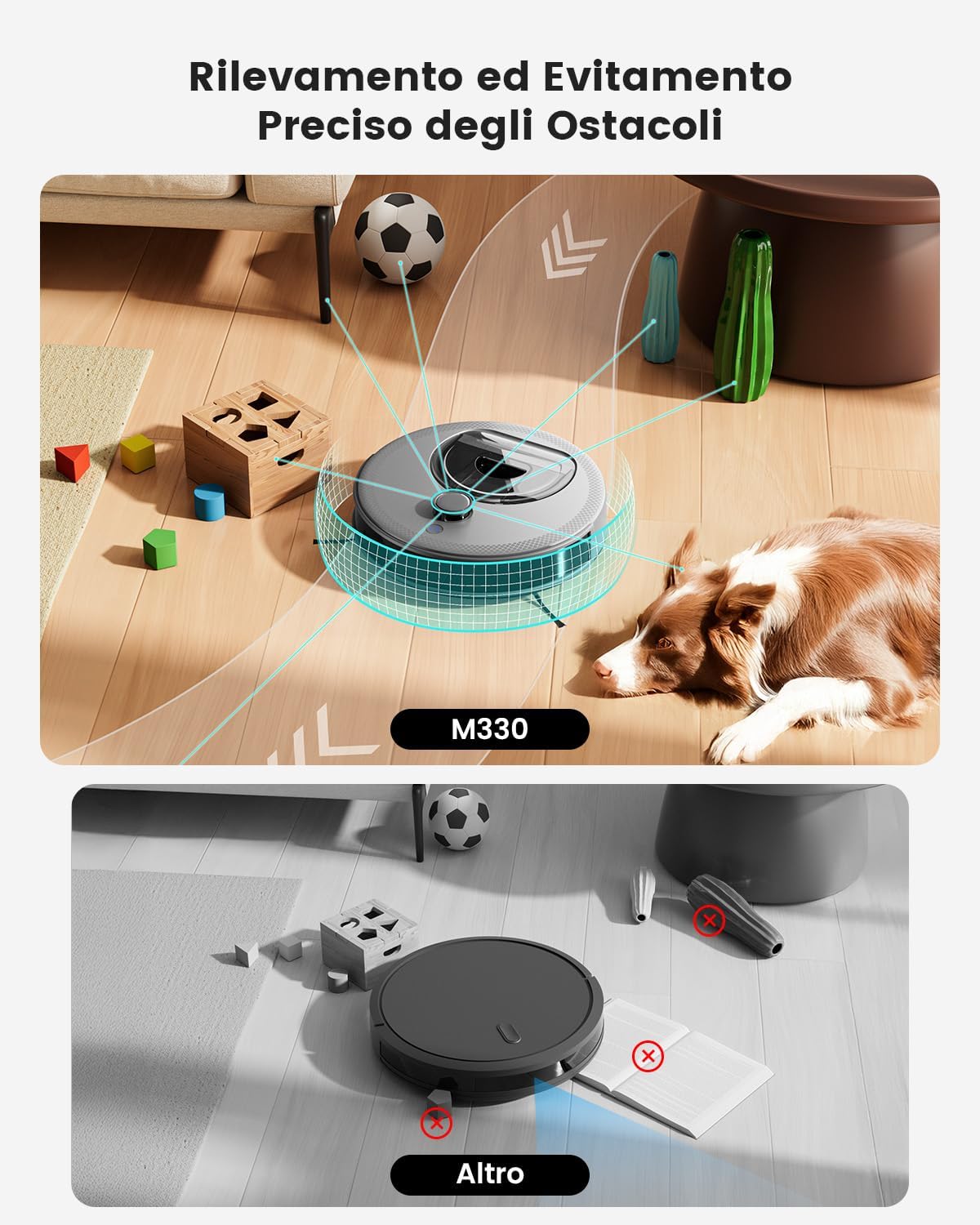
Figure 4.1: The LEFANT M330 uses advanced sensors for precise obstacle detection and avoidance.
5. Setup
5.1 Charging Base Placement
- Place the charging base against a wall in an open area, ensuring at least 0.5 meters of clear space on both sides and 1.5 meters in front.
- Connect the power adapter to the charging base and plug it into a wall outlet.
- Ensure the charging base is placed on a hard, level surface.
5.2 Initial Charge
Before first use, fully charge the robot. Place the robot on the charging base, ensuring the charging contacts align. The indicator light will show charging status.
5.3 App Connection
Control your LEFANT M330 via the smart app:
- Press and hold the power button for 3 seconds to turn on the robot.
- Download the Lefant app from your app store or by visiting https://mobile.useerobot.com/#/pages/center/downloadLink/downloadLink.
- Press and hold the power button for 6 seconds until the light starts flashing to enter pairing mode.
- Open the Lefant app and add the M330 robot vacuum cleaner.
- Connect to a 2.4 GHz or 5 GHz Wi-Fi network.
- Wait for the connection to complete.

Figure 5.1: Steps to connect the LEFANT M330 to the mobile application.
5.4 Connecting to Alexa
Integrate your robot with Amazon Alexa for voice control:
- Open the Lefant app - Mine - Third-party voice services to access the service.
- Register your voice account and password.
- Open the Alexa app - More - Skills & Games.
- Search for "Smart Life".
- Click on "Enable to Use".
- Select your region - Enter the voice account and password from step 2.
- Wait for the connection to complete successfully.

Figure 5.2: Instructions for connecting the LEFANT M330 with Amazon Alexa.
5.5 Controlling with Apple Watch
Control your robot directly from your Apple Watch:
- Download the Lefant app on your phone and the Watch app on your Apple Watch.
- Pair the Watch app to your Apple Watch.
- Select the Lefant app on your Apple Watch.
- You must click on the Lefant app on your phone and log in.
- Once logged in, connect your robot.
- Return to your Apple Watch, from which you can now control your robot.

Figure 5.3: Guide to controlling the LEFANT M330 using an Apple Watch.
6. Operating Instructions
6.1 Starting/Pausing/Stopping
- Start Cleaning: Press the power button on the robot or use the 'Start' command in the app.
- Pause Cleaning: Press the power button again or use the 'Pause' command in the app.
- Stop Cleaning: Press and hold the power button for 3 seconds or use the 'Stop' command in the app.
6.2 Cleaning Modes
The LEFANT M330 offers various cleaning modes accessible via the app:
- Auto Cleaning: The robot intelligently navigates and cleans the entire area.
- Spot Cleaning: Cleans a specific area more intensely.
- Edge Cleaning: Focuses on cleaning along walls and furniture edges.
- Custom Routines: Schedule specific cleaning times and areas for each room.
- Zone-Targeted Cleaning: Define specific zones for the robot to clean.
6.3 Mopping Function
To use the mopping function:
- Attach the mop holder to the underside of the robot.
- Secure a disposable mop cloth to the mop holder.
- Select the mopping mode in the app. The robot will avoid carpets during mopping.

Figure 6.1: The LEFANT M330 provides efficient 3-in-1 cleaning, sweeping, vacuuming, and mopping simultaneously.
6.4 Carpet Detection
The robot intelligently adapts to different floor types:
- In vacuuming mode, the robot automatically increases suction power when it detects a carpet for deeper cleaning.
- In mopping mode, the robot will avoid carpets to prevent them from getting wet or tangled.

Figure 6.2: LEFANT M330 automatically adjusts suction on carpets and avoids them during mopping.
6.5 dToF Navigation and Mapping
The LEFANT M330 uses advanced dToF laser navigation for precise mapping:
- It automatically creates and saves maps of your home, allowing for organized and efficient cleaning paths.
- Supports multi-level mapping, allowing you to save up to three different floor plans.
- Use the app to define virtual boundaries or "No-Go Zones" to prevent the robot from entering specific areas (e.g., pet feeding areas, bathrooms).

Figure 6.3: LEFANT M330's dToF navigation creates precise maps for efficient cleaning, supporting multi-level mapping.
6.6 Automatic Recharging and Resume
When the battery is low, the robot will automatically return to its charging base. Once sufficiently charged, it will resume cleaning from where it left off to ensure complete coverage.

Figure 6.4: The LEFANT M330 automatically returns to its charging base and resumes cleaning after recharging.
7. Maintenance
Regular maintenance ensures optimal performance and extends the lifespan of your robot vacuum cleaner.
7.1 Emptying and Cleaning the Dustbin
- Press the dustbin release button and pull out the dustbin.
- Open the dustbin cover and empty the contents into a trash bin.
- Clean the filter inside the dustbin with the cleaning tool or a soft brush.
- Rinse the dustbin with water if necessary, ensuring it is completely dry before reinserting.

Figure 7.1: The LEFANT M330 features a large, transparent 450ml dustbin for less frequent emptying.
7.2 Cleaning Side Brushes
Periodically check the side brushes for tangled hair or debris. Remove them by gently pulling upwards and clean them with the provided cleaning tool or scissors. Reattach them securely.
7.3 Cleaning Sensors and Charging Contacts
Wipe the dToF laser navigation sensor, PSD obstacle detection sensors, and charging contacts on both the robot and the charging base with a clean, dry cloth to ensure proper function.
7.4 Replacing Mop Cloths
After each mopping session, remove and dispose of the used mop cloth. Attach a new disposable mop cloth for the next use.
8. Troubleshooting
If you encounter issues with your LEFANT M330, refer to the following common problems and solutions:
| Problem | Possible Cause | Solution |
|---|---|---|
| Robot does not turn on | Low battery; Power button not pressed correctly | Place on charging base; Press and hold power button for 3 seconds |
| Robot not charging | Charging contacts dirty; Charging base not powered | Clean contacts; Ensure power adapter is plugged in |
| Robot gets stuck frequently | Obstacles in cleaning path; Sensors dirty | Clear cables/small objects; Clean sensors |
| Cannot connect to Wi-Fi | Incorrect Wi-Fi password; Robot too far from router; Not in pairing mode | Verify password; Move robot closer; Re-enter pairing mode (hold power button 6s) |
| Poor cleaning performance | Dustbin full; Brushes tangled; Filter dirty | Empty dustbin; Clean brushes; Clean/replace filter |
If the problem persists, please contact LEFANT customer support.
9. Specifications
| Feature | Detail |
|---|---|
| Brand | LEFANT |
| Model | M330 |
| Color | M330-Grey |
| Product Dimensions | 28 x 28 x 9.5 cm |
| Item Weight | 3.4 kg |
| Dustbin Capacity | 450 ml |
| Battery Life | Up to 150 minutes |
| Special Features | Continuous Suction, No-Go Zones, Multi-floor Mapping, Carpet Detection, dToF Navigation |
| Connectivity | Wi-Fi (2.4 GHz & 5 GHz), Alexa, Google Assistant |
10. Warranty and Support
The LEFANT M330 Robot Vacuum Cleaner comes with a standard manufacturer's warranty. Please refer to the warranty card included in your package for specific terms and conditions. For technical support, troubleshooting assistance, or warranty claims, please contact LEFANT customer service through the official website or your purchase platform.


