
Introduction
Thank you for choosing the homeTro HM2 Foldable Walking Pad Treadmill. This manual provides essential information for the safe and efficient operation, maintenance, and storage of your treadmill. Please read it thoroughly before use and retain it for future reference.
Setup
The homeTro HM2 treadmill is designed for minimal assembly, allowing for quick setup directly out of the box.
- Unboxing: Carefully remove the treadmill and all components from the packaging.
- Handlebar Deployment: Lift the handlebar into its upright position.
- Secure the Feet: Lock the support feet into place to ensure stability.
- Power Connection: Plug the power cord into a suitable electrical outlet.
Your treadmill is now ready for use. The compact design and minimal assembly ensure you can begin your workout quickly.


Operating the Treadmill
The homeTro HM2 offers versatile operation modes to suit your fitness needs.
Modes of Operation:
- Walking Pad Mode: With the handlebar folded down, the treadmill functions as a walking pad, ideal for use under a desk. Maximum speed in this mode is 5 mph.
- Full Treadmill Mode: With the handlebar raised, the treadmill supports walking, jogging, and running at speeds up to 7.5 mph.
Controls:
- Handlebar Controls: The handlebar features speed controls and quick access buttons for 3 mph and 6 mph.
- Remote Control: An included remote allows for convenient speed adjustment and pausing, especially useful when the handlebar is folded down. The remote has a magnetic back for easy storage on the treadmill.
- LED Display: The front of the treadmill features a large LED display that shows your current speed, workout time, distance covered, and calories burned.

Incline Feature:
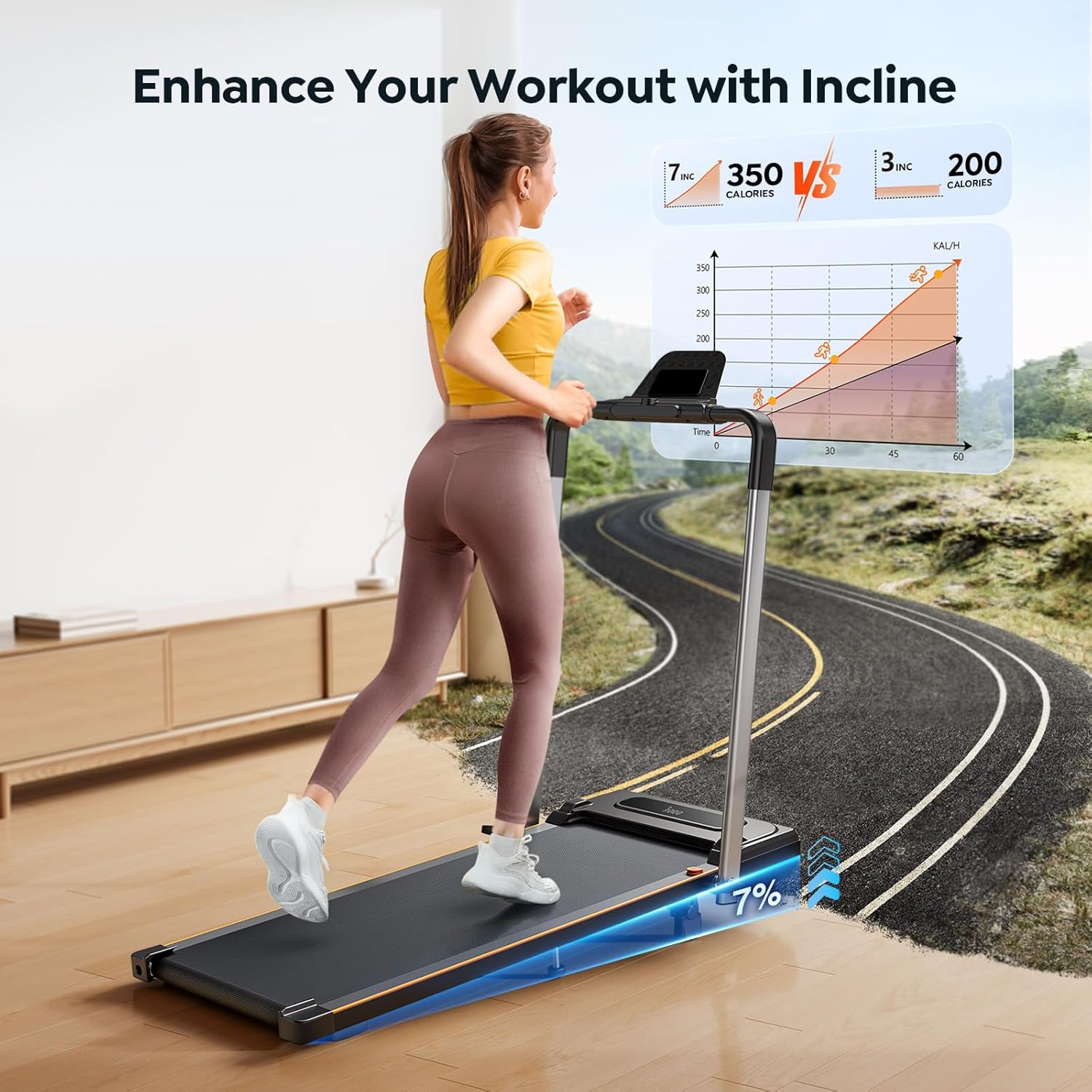
The treadmill includes a manual 7% incline feature to enhance your workout intensity. To activate the incline:
- Locate the supporting bolt in the middle of the treadmill.
- Adjust the bolt to raise the front of the treadmill, creating a 7% slope.
- Ensure the treadmill is stable before beginning your workout.
The incline simulates uphill walking, increasing calorie expenditure and muscle engagement.
Smart Features & App Integration
Enhance your fitness journey with the treadmill's smart capabilities:
- APP Connectivity: Connect your treadmill to the FitShow APP via Bluetooth. The app allows you to record exercise data, track progress, and share with friends.
- Device Holder: A built-in device holder on the handlebar allows you to place your phone or tablet, enabling you to enjoy media or follow guided workouts during your session.
Maintenance
Regular maintenance ensures the longevity and optimal performance of your treadmill.
- Lubrication: The treadmill features a unique lubricating hole for easy access. Lubricate the running belt every 2-3 months to maintain smooth operation. Refer to the detailed instructions in the included user manual for the correct lubrication procedure.
- Cleaning: Regularly wipe down the treadmill with a damp cloth to remove dust and sweat. Avoid using abrasive cleaners.
- Belt Adjustment: Periodically check the tension and alignment of the running belt. Adjust as needed according to the instructions in the full user manual to prevent slipping or excessive wear.
Troubleshooting
If you encounter any issues with your homeTro HM2 treadmill, please refer to the following common troubleshooting tips:
- Treadmill not starting: Ensure the power cord is securely plugged in and the safety key is properly engaged. Check the power switch on the treadmill.
- Belt slipping: The running belt may need adjustment or lubrication. Refer to the maintenance section or the full user manual for detailed instructions.
- Unusual noises: Check for any loose parts or foreign objects under the belt. If the noise persists, contact customer support.
- Display not working: Ensure all connections are secure. If the issue continues, contact customer support.
For more complex issues, please contact homeTro customer support.
Storage
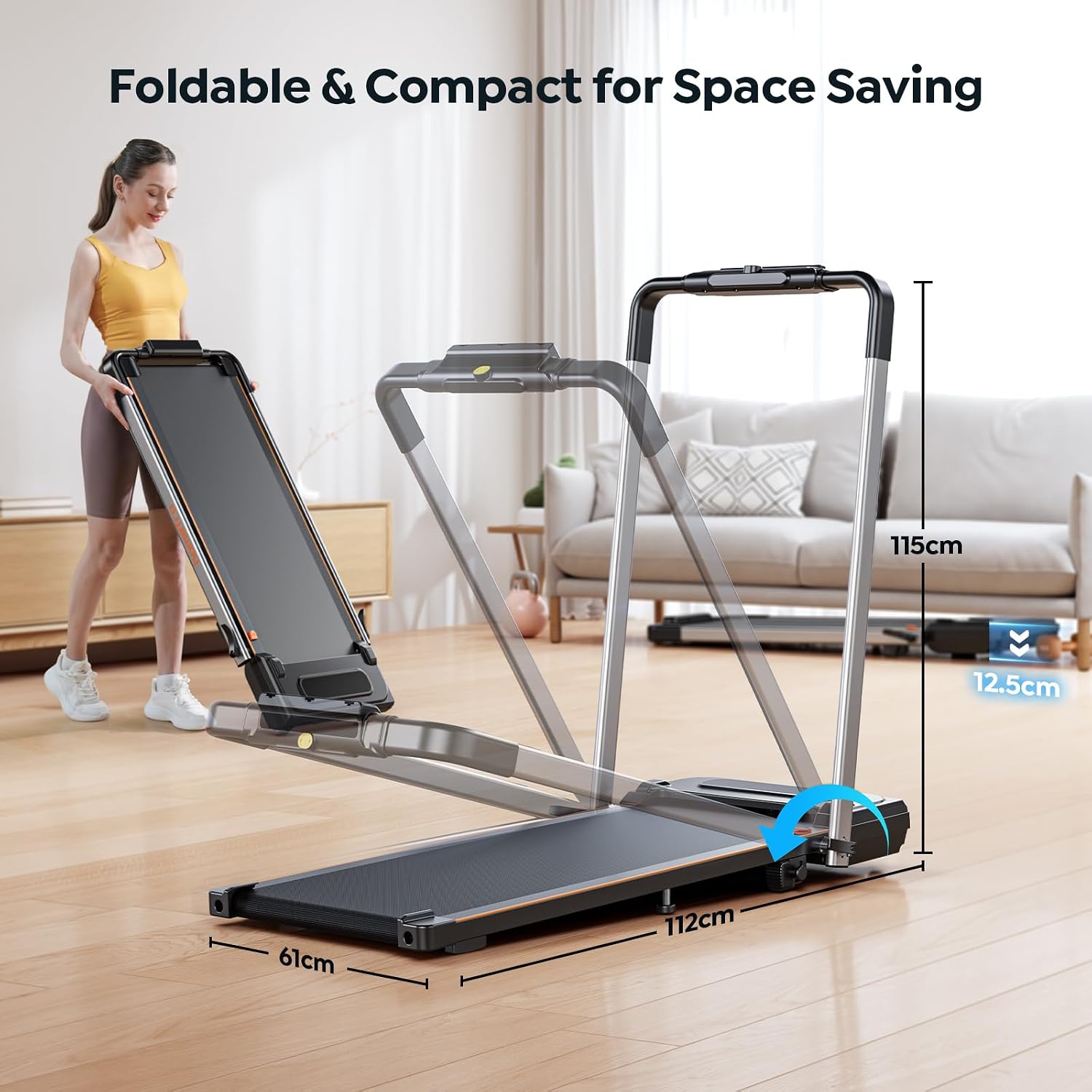
The homeTro HM2 treadmill is designed for convenient storage due to its foldable and compact nature.
- Folding: To fold the treadmill, release the handlebar locking mechanism and gently lower the handlebar until it rests flat against the running deck.
- Portability: Utilize the built-in wheels to easily move the folded treadmill.
- Storage Options: The compact design allows for storage under a bed, sofa, or simply leaning it against a wall, minimizing space requirements.
Specifications
| Model Number | HM2 |
| Brand | homeTro |
| Product Dimensions | 124D x 62W x 10H Centimetres |
| Item Weight | 22.68 kg |
| Material | Alloy Steel |
| Maximum Speed | 7.5 Miles per Hour |
| Minimum Speed | 0.6 Miles per Hour |
| Maximum Incline Percentage | 7% (Manual) |
| Maximum Horsepower | 2.5 Horsepower |
| Maximum Weight Recommendation | 265 Pounds |
| Display | LED |
| Number of Programs | 12 |
| Special Features | Compact Design, Foldable, Manual Incline, Touch Screen, Wheeled |
| Included Components | Power Cord, Remote Control, Safety Key, Tool Kit, User Manual |
| Assembly Required | No |
Warranty and Support
homeTro provides a 12-month free replacement warranty for quality problems. For any support inquiries or to claim warranty service, please follow these steps:
- Log in to your Amazon account.
- Navigate to "Your orders".
- Find the order ID for your homeTro treadmill.
- Click "Contact Seller" to reach customer support.
Manufacturer Contact Information: No. 999, Meilong Avenue, Jinglong Community, Longhua Street Unit 702, 1A, Zone 5, Yicheng Center Garden Shenzhen City, Longhua District, Guangdong 518000, China.