
1. Introduction
The villaesta Mini Food Saver Vacuum Sealer Machine is a versatile 3-in-1 cordless and rechargeable device designed for efficient food preservation. It features multiple operating modes, including vacuum sealing, heat sealing, and point pumping, along with external functions for inflation and evacuation. Equipped with a powerful 60kPa suction pump and an intuitive digital display, this device helps extend the freshness of various food types and offers additional utility for inflating items.
This manual provides detailed instructions for the safe and effective use of your vacuum sealer, ensuring optimal performance and longevity.
2. Product Overview & Package Contents

Figure 1: The villaesta Mini Food Saver Vacuum Sealer Machine with included accessories.
Package Contents:
- 1 x Vacuum Sealer Machine
- 4 x Vacuum Sealer Bags
- 1 x External Suction Bag
- 1 x Inflation Needle
- 1 x Inflation Nozzle
- 1 x Pumping Nozzle
- 1 x Type-C Charge Cable
- 1 x User Manual
3. Setup
3.1 Charging the Device
Before first use, fully charge the vacuum sealer. Connect the provided Type-C charging cable to the device's charging port and a suitable USB power source. The 1200mAh lithium battery typically requires 2-5 hours for a full charge, providing 40-60 uses.

Figure 2: The Type-C charging port is located on the side of the device.
3.2 Powering On
Press and hold the 'Power on/Temperature' button until the digital display illuminates. The device is now ready for operation.
4. Operating Instructions
4.1 Understanding the Control Panel

Figure 3: The digital display shows the selected mode or temperature setting. Buttons include 'Power on/Temperature', 'Vacuum seal', 'Seal it', and 'Point pumping'.
4.2 Temperature Adjustment (for Single Sealing)
When performing a single seal (not vacuum seal), the sealing temperature can be adjusted based on the bag's thickness. Press the 'Power on/Temperature' button to cycle through temperature levels:
- P1 (Minimum Temperature): Suitable for thin bags.
- P2 (Medium Temperature): Standard setting for most bags.
- P3 (Maximum Temperature): Ideal for thicker bags.
4.3 Operating Modes
The device offers three primary modes for food preservation:
- "Vacuum Seal" Mode: This is a one-touch automatic vacuum and seal function. It is suitable for foods that are not easily deformed, such as meat, nuts, and firm vegetables.
- "Seal it" Mode: This mode performs only a heat seal without vacuuming. It is ideal for resealing opened bags like chip bags or aluminum foil bags.
- "Point Pumping" Mode: This mode allows you to manually control the vacuuming process before sealing. It is best suited for soft foods or moist foods where precise vacuum control is desired to prevent crushing or liquid overflow.

Figure 4: Using the 'Vacuum Seal' mode for meat preservation.

Figure 5: Resealing a chip bag with the 'Seal it' mode.
4.4 External Functions: Evacuation and Inflation
The device also supports external functions for increased versatility:
- "Evacuation" Mode: Insert the pumping nozzle into the evacuation hole on the side of the device. This allows you to vacuum air directly from external vacuum seal food containers and vacuum storage bags to keep food fresh.
- "Inflation" Mode: Insert the pumping nozzle and needle into the inflation hole on the side of the device. This function allows you to inflate sports balls (basketballs, footballs, soccer balls) and swimming rings with ease.

Figure 6: External evacuation for vacuum containers.
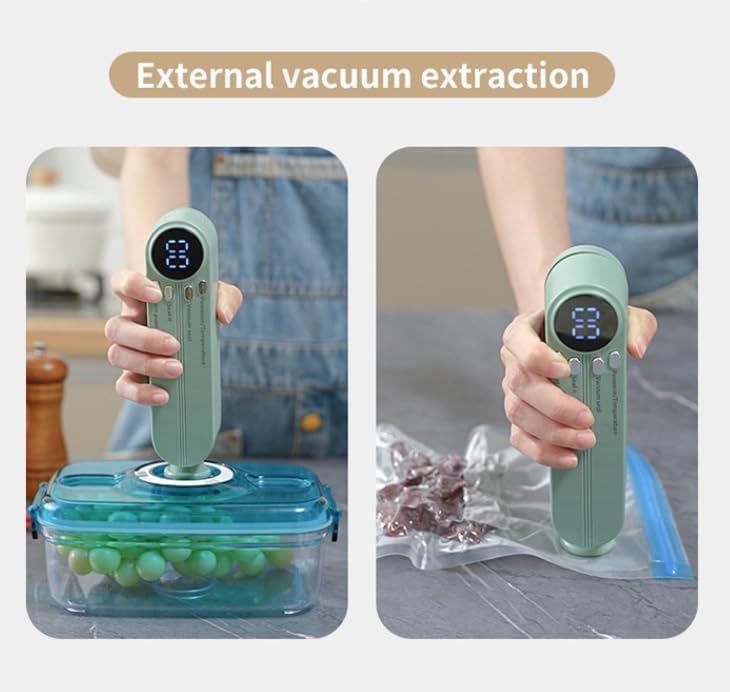
Figure 7: External inflation for sports balls and other inflatables.
4.5 Official Product Videos
For a visual guide on operating your villaesta Mini Food Saver Vacuum Sealer Machine, please refer to the following official product videos:
Video 1: Demonstrates the general operation and features of the Mini Food Saver Vacuum Sealer Machine.
Video 2: A detailed guide on how to use the vacuum sealer for various applications.
Video 3: Showcasing the Mini Vacuum Sealer's effectiveness for both dry and moist food items.
5. Maintenance
To ensure the longevity and optimal performance of your vacuum sealer, follow these maintenance guidelines:
- Cleaning: Wipe the device with a soft, damp cloth after each use. Ensure no food particles or liquids remain on the sealing strip or in the vacuum channel. Do not immerse the device in water.
- Sealing Strip: Regularly inspect the heating and sealing strips for any damage or residue. A clean and intact sealing strip is crucial for effective seals.
- Storage: Store the device in a cool, dry place away from direct sunlight and extreme temperatures.
6. Troubleshooting
If you encounter any issues with your villaesta Mini Food Saver Vacuum Sealer Machine, please consider the following common solutions:
- Device Not Turning On: Ensure the device is fully charged. If the battery is low, connect it to the charger.
- Poor Seal: Check if the sealing strip is clean and free of debris. Ensure the bag is properly aligned and the correct temperature setting (P1, P2, or P3) is selected for the bag's thickness.
- Insufficient Vacuum: Verify that the vacuum bags or containers are specifically designed for vacuum sealing and are free from punctures or damage. Ensure the external nozzle is correctly attached for evacuation mode.
For persistent issues or further assistance, please contact villaesta customer support.
7. Specifications
| Feature | Detail |
|---|---|
| Brand | villaesta |
| Model Number | SJT-818 |
| Material | Plastic |
| Color | Beige |
| Product Dimensions | 6.5"L x 1.7"W x 2.2"H |
| Item Weight | 12 ounces |
| Operation Mode | Automatic |
| Wattage | 10 Watt-hours |
| Voltage | 5 Volts |
| Battery Capacity | 1200mAh Lithium Battery |
| Suction Power | 60kPa |
| Charging Time | 2-5 hours |
| Uses per Charge | 40-60 uses |
8. Warranty and Support
For warranty information, product support, or any inquiries regarding your villaesta Mini Food Saver Vacuum Sealer Machine, please refer to the contact details provided with your purchase or visit the official villaesta website. Keep your purchase receipt for warranty claims.


