
1. Introduction
Thank you for choosing the Saiyin 40W TV Soundbar. This compact and elegant audio device is designed to enhance your entertainment experience, delivering clear and powerful sound for your TV, PC, gaming console, or projector. Featuring multiple connectivity options and sound modes, it is ideal for small to medium-sized living spaces.
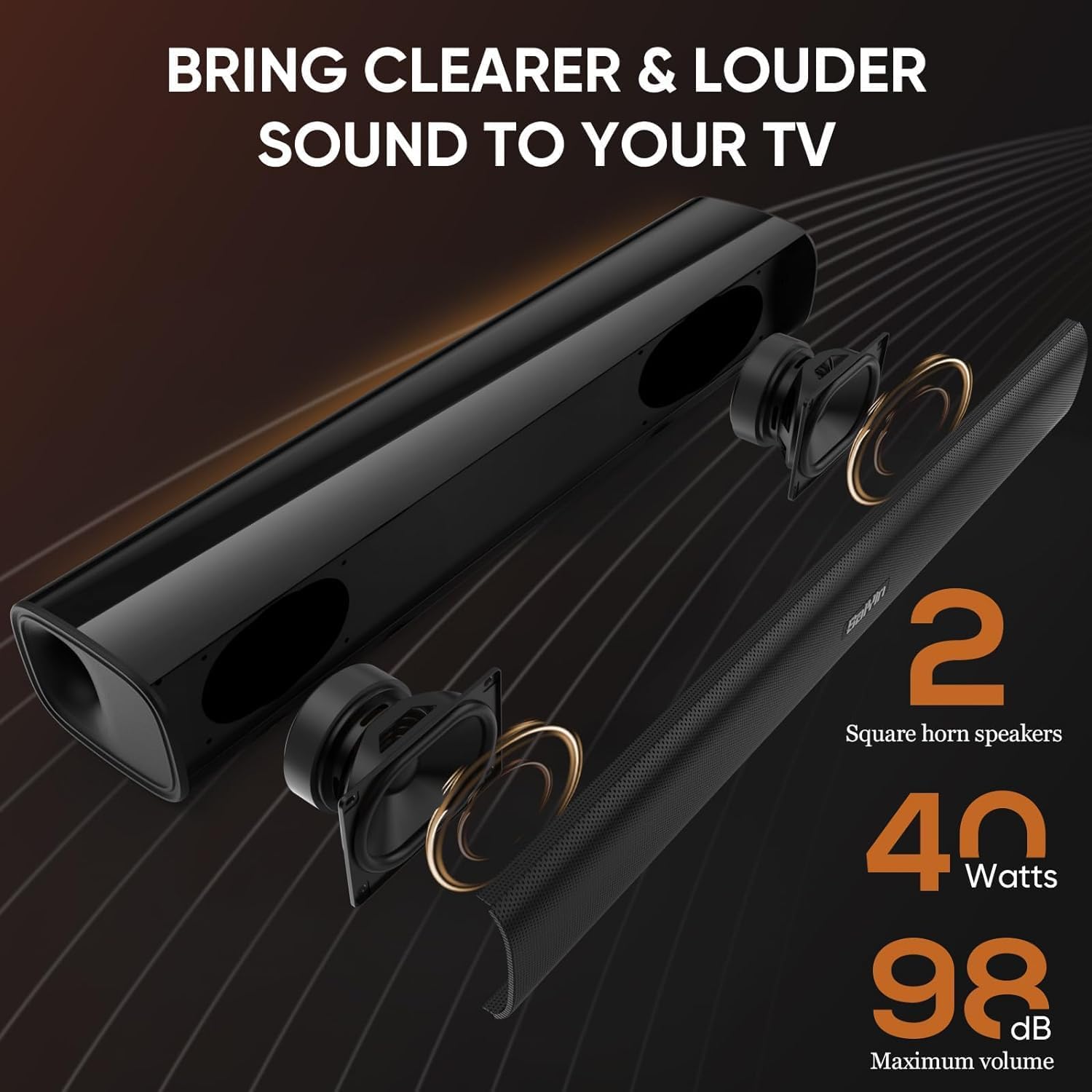
Image 1.1: The Saiyin 40W Soundbar's internal components, highlighting its two square horn speakers, 40 Watts of power, and a maximum volume of 98 dB, designed for clear and loud audio.

Image 1.2: A visual representation of the Saiyin Soundbar's compact dimensions, illustrating its suitability for placement beneath TVs ranging from 24 to 42 inches.
2. Package Contents
Please check the box for the following items:
- Saiyin 40W TV Soundbar (x1)
- Remote Control (x1)
- Wall Mount Kit & Quick Start Guide (x1)
- Power Adapter (x1)
- Optical Cable (x1)
- 3.5mm AUX Audio Cable (x1)

Image 2.1: All items included in the Saiyin Soundbar package: the soundbar unit, remote control, optical cable, 3.5mm audio cable, power adapter, user manual, and wall mounting screws.
3. Product Overview
3.1 Dimensions and Design
The Saiyin Soundbar measures approximately 17 inches in length, 3.5 inches in depth, and 2.5 inches in height, making it suitable for various setups without occupying excessive space.
3.2 Connectivity Ports
The soundbar offers versatile connectivity options:
- Optical Input: For high-quality digital audio connection to TVs, game consoles, etc.
- AUX Input: For analog audio connection using a 3.5mm cable to various devices.
- Bluetooth 5.3: For wireless audio streaming from smartphones, tablets, and other Bluetooth-enabled devices.
- SUB OUT: A dedicated port for connecting an active subwoofer (sold separately) to enhance bass performance.
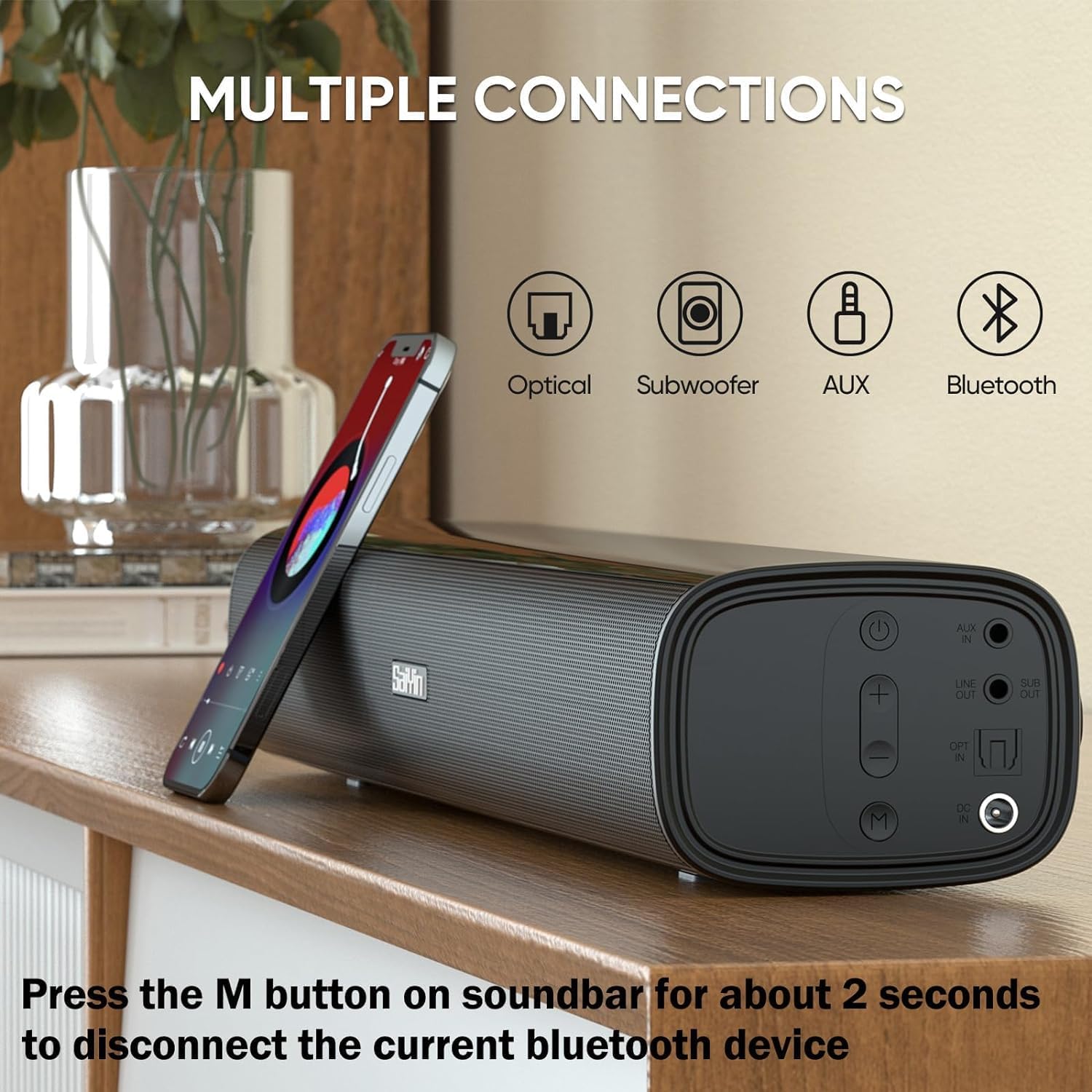
Image 3.1: The rear panel of the Saiyin Soundbar, illustrating its various input and output ports including Optical, Subwoofer Out, AUX In, and the Bluetooth connection indicator.

Image 3.2: Detailed view of the soundbar's LED indicators, showing green for AUX, blue for Bluetooth, and purple for Optical input modes.
3.3 Controls
The soundbar can be controlled using the included remote control or the buttons located on the unit itself.
- Remote Control: Provides full control over power, volume, input mode selection, and EQ modes.
- Soundbar Buttons: Includes power, volume up/down, and a multi-function 'M' button for switching input modes.

Image 3.3: The Saiyin Soundbar alongside its remote control, showcasing the unit's design and the comprehensive control options available via the remote.
4. Setup
4.1 Placement
The soundbar can be placed on a desktop or mounted directly on a wall. Ensure it is positioned centrally in front of your TV or display for the best audio experience.
- Desktop Placement: Simply place the soundbar on a stable surface below your TV.
- Wall Mounting: Use the provided wall mount kit and follow the instructions in the quick start guide for secure installation.
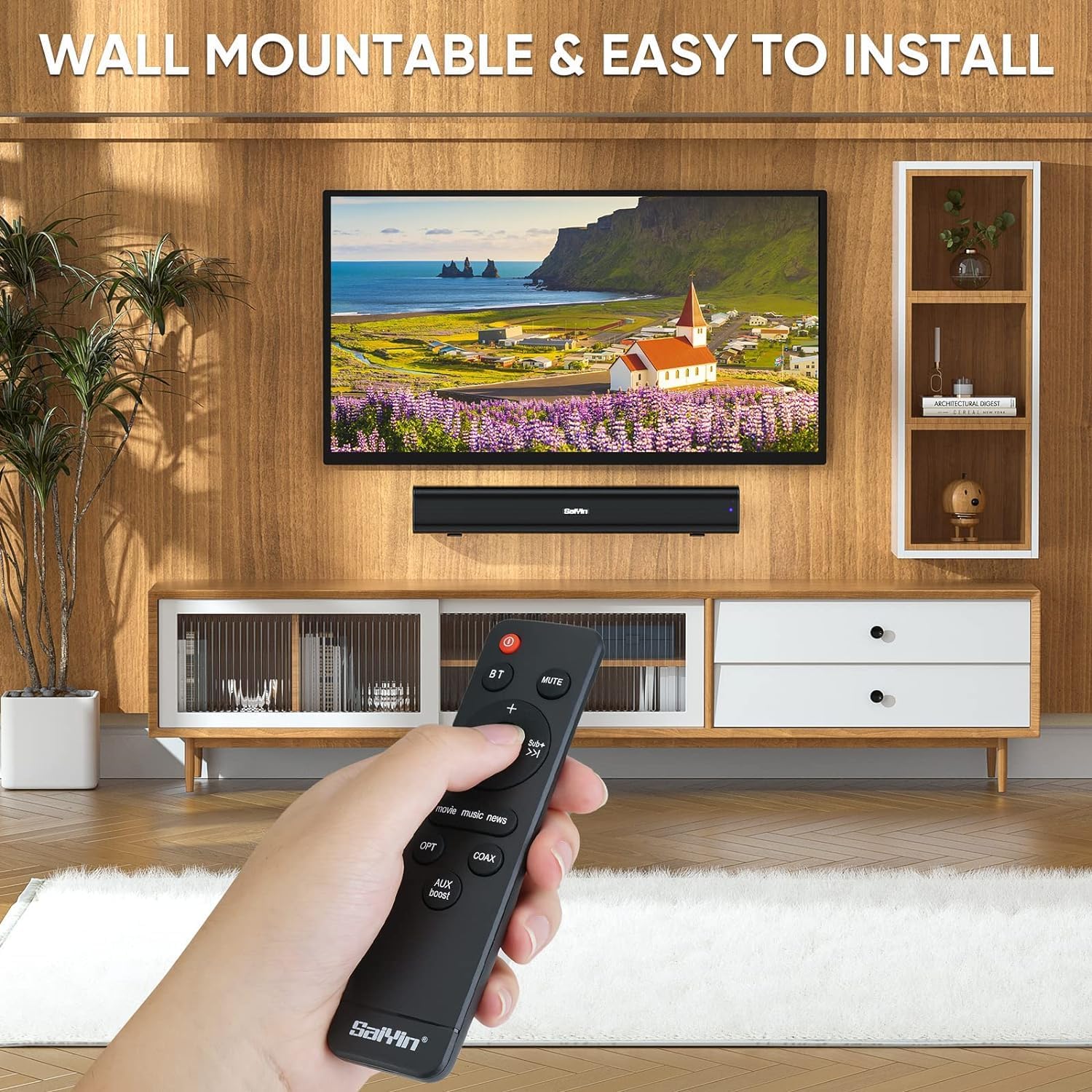
Image 4.1: The Saiyin Soundbar shown wall-mounted beneath a television, demonstrating its flexible placement options and ease of installation.
4.2 Connecting to Devices
Connect the soundbar to your audio source using one of the following methods:
- Optical Connection: Connect one end of the optical cable to the soundbar's OPTICAL IN port and the other end to your TV's optical output.
- AUX Connection: Connect the 3.5mm audio cable to the soundbar's AUX IN port and the other end to your device's 3.5mm audio output.
- Bluetooth Connection: Power on the soundbar and switch to Bluetooth mode. Enable Bluetooth on your device and select "Saiyin Soundbar" from the list of available devices to pair.
- Subwoofer Connection (Optional): If using an active subwoofer, connect it to the soundbar's SUB OUT port.
Important: For optimal sound and to avoid issues like crackling or no sound, ensure your audio source (e.g., TV, game console) is configured for PCM/Stereo/Non-Surround audio output when using Optical or AUX connections. The soundbar functions uniquely with standard audio outputs.
5. Operating Instructions
5.1 Power On/Off
Press the power button on the remote control or on the soundbar unit to turn the device on or off.
5.2 Selecting Input Mode
Press the 'M' button on the soundbar or the corresponding input button (BT, OPT, AUX) on the remote control to switch between Bluetooth, Optical, and AUX input modes. The LED indicator on the soundbar will change color to reflect the active mode.
To disconnect a currently paired Bluetooth device, press and hold the 'M' button on the soundbar for approximately 2 seconds.
5.3 Adjusting Volume
Use the volume up (+) and volume down (-) buttons on the remote control or the soundbar to adjust the audio level.
5.4 EQ Sound Modes
The soundbar offers three equalization modes to optimize your listening experience. Use the remote control to switch between them:
- Music Mode: Enhances musical clarity and depth.
- Movie Mode: Provides a more immersive cinematic audio experience with enhanced dialogue and effects.
- News Mode: Optimizes vocal clarity for news broadcasts and spoken content.

Image 5.1: A living room scene showing a TV screen with selectable 'Movie', 'Music', and 'News' sound modes, demonstrating the soundbar's ability to adapt audio profiles to different content types.
6. Maintenance
To ensure the longevity and optimal performance of your Saiyin Soundbar, follow these maintenance guidelines:
- Cleaning: Use a soft, dry cloth to wipe the surface of the soundbar. Do not use liquid cleaners or abrasive materials.
- Placement: Avoid placing the soundbar in direct sunlight, near heat sources, or in areas with high humidity.
- Ventilation: Ensure adequate airflow around the soundbar to prevent overheating.
7. Troubleshooting
If you encounter issues with your soundbar, please refer to the following common solutions:
| Problem | Possible Cause | Solution |
|---|---|---|
| No sound from the soundbar | Incorrect input mode selected; Cables not connected properly; TV audio output settings incorrect; Soundbar or TV volume too low. | Ensure the correct input mode (Optical, AUX, Bluetooth) is selected. Check all cable connections. Verify your TV's audio output is set to PCM/Stereo. Increase volume on both soundbar and TV. |
| Poor sound quality / Crackling sound | Loose cable connections; Incorrect audio output format from source; Interference (for Bluetooth). | Check all cable connections. Ensure your audio source is set to PCM/Stereo/Non-Surround output. Move the soundbar closer to the Bluetooth device or away from other electronic devices. |
| Bluetooth device cannot pair | Soundbar not in Bluetooth mode; Device too far; Bluetooth already connected to another device. | Switch the soundbar to Bluetooth mode. Ensure your device's Bluetooth is on and discoverable. Press and hold the 'M' button on the soundbar for 2 seconds to disconnect any existing Bluetooth connection, then try pairing again. |
| Remote control not working | Batteries are dead or incorrectly inserted; Obstruction between remote and soundbar. | Replace the batteries in the remote control. Ensure there is a clear line of sight between the remote and the soundbar's sensor. |

Image 7.1: An icon depicting speech bubbles with 'Q' and 'A', signifying the troubleshooting and question-and-answer section.
8. Specifications
| Brand | Saiyin |
| Model Name | SDS6301-FRSY soundbar |
| Max Speaker Output Power | 40 Watts |
| Connectivity Technology | Auxiliary, Bluetooth 5.3, Optical |
| Audio Output Mode | Stereo (PCM) |
| Mounting Type | Table Mount, Wall Mountable |
| Material | Acrylonitrile Butadiene Styrene (ABS) |
| Speaker Type | Soundbar |
| Recommended Uses | For TV, Computer, Game Console, Projectors |
| Compatible Devices | Personal Computer, Smartphone, Tablet, Television |
| Control Method | Remote Control |
| Speaker Size | 17 Inches |
| Product Dimensions (L x W x H) | 44.6 x 14.5 x 9.2 cm (approx. 17 x 3.5 x 2.5 inches) |
| Power Source | Corded Electric |
| Number of Audio Channels | 2.0 |
| Audio Driver Type | Dynamic |
9. Warranty and Support
9.1 Warranty Information
The Saiyin 40W TV Soundbar comes with a 2-year limited warranty. Please retain your proof of purchase for warranty claims. The warranty covers manufacturing defects and malfunctions under normal use.
9.2 Customer Support
For further assistance, technical support, or warranty inquiries, please refer to the contact information provided in your quick start guide or visit the official Saiyin website.


