
1. Product Overview
The JJC EAB-W1 Electric Compressed Air Duster is a versatile and powerful cleaning tool designed for various applications. Equipped with a high-performance brushless motor, it delivers strong and stable airflow for efficient dust removal. Its portable and cordless design, combined with a rechargeable battery and multiple working modes, makes it ideal for cleaning sensitive electronics, household items, and automotive interiors.
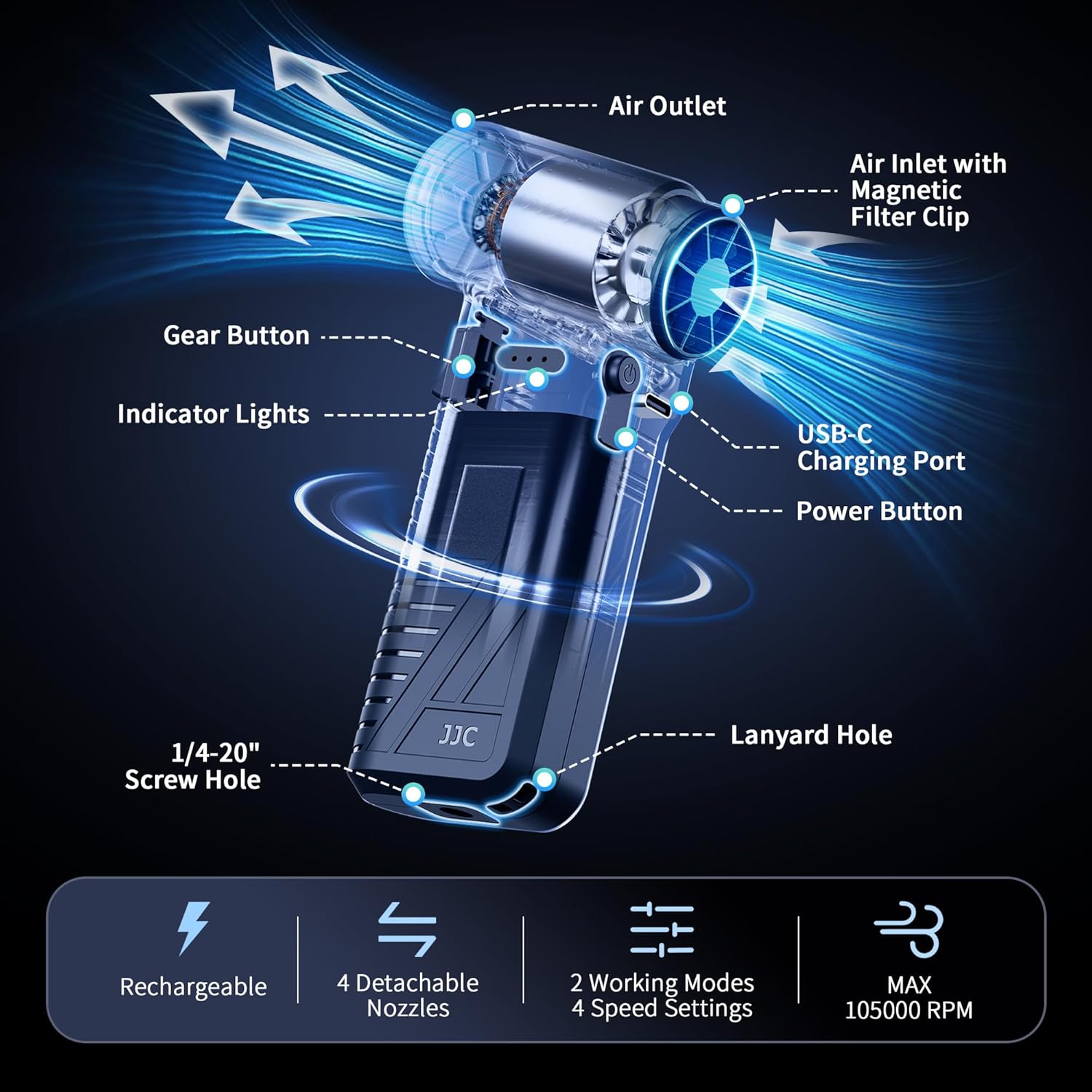
Image: The JJC EAB-W1 Electric Compressed Air Duster, highlighting its key components such as the air outlet, air inlet with magnetic filter clip, gear button, indicator lights, USB-C charging port, power button, 1/4-20" screw hole, and lanyard hole.
Key Features:
- Brushless Motor Technology: Provides strong and stable airflow for efficient cleaning.
- Powerful 2 Working Modes: Offers a long-lasting mode with 3 adjustable wind speeds (45000 RPM, 61000 RPM, 78000 RPM) and a storm mode with a maximum wind speed of 105000 RPM.
- Versatile Nozzles: Includes flat, soft brush, round, and narrow nozzles for various cleaning needs.
- Rechargeable Battery: Built-in 4000mAh battery provides extended use and supports fast charging via USB-C.
- Magnetic Filter Clip: Detachable filter at the air intake blocks dust and debris, ensuring clean airflow for sensitive devices.
2. Package Contents
Please verify that all items listed below are included in your package:

Image: All components included in the JJC EAB-W1 package, neatly arranged.
- Compressed Air Duster x 1
- Nozzle x 4 (Round, Narrow, Flat, Soft Brush)
- USB-C Charging Cable x 1
- Dust Filter x 2
- Wrist Strap x 1
- Storage Bag x 1
- User Manual x 1
3. Setup
Attaching Nozzles
Select the appropriate nozzle for your cleaning task. Align the nozzle with the air outlet and push it firmly until it clicks into place. To remove, gently pull the nozzle off.
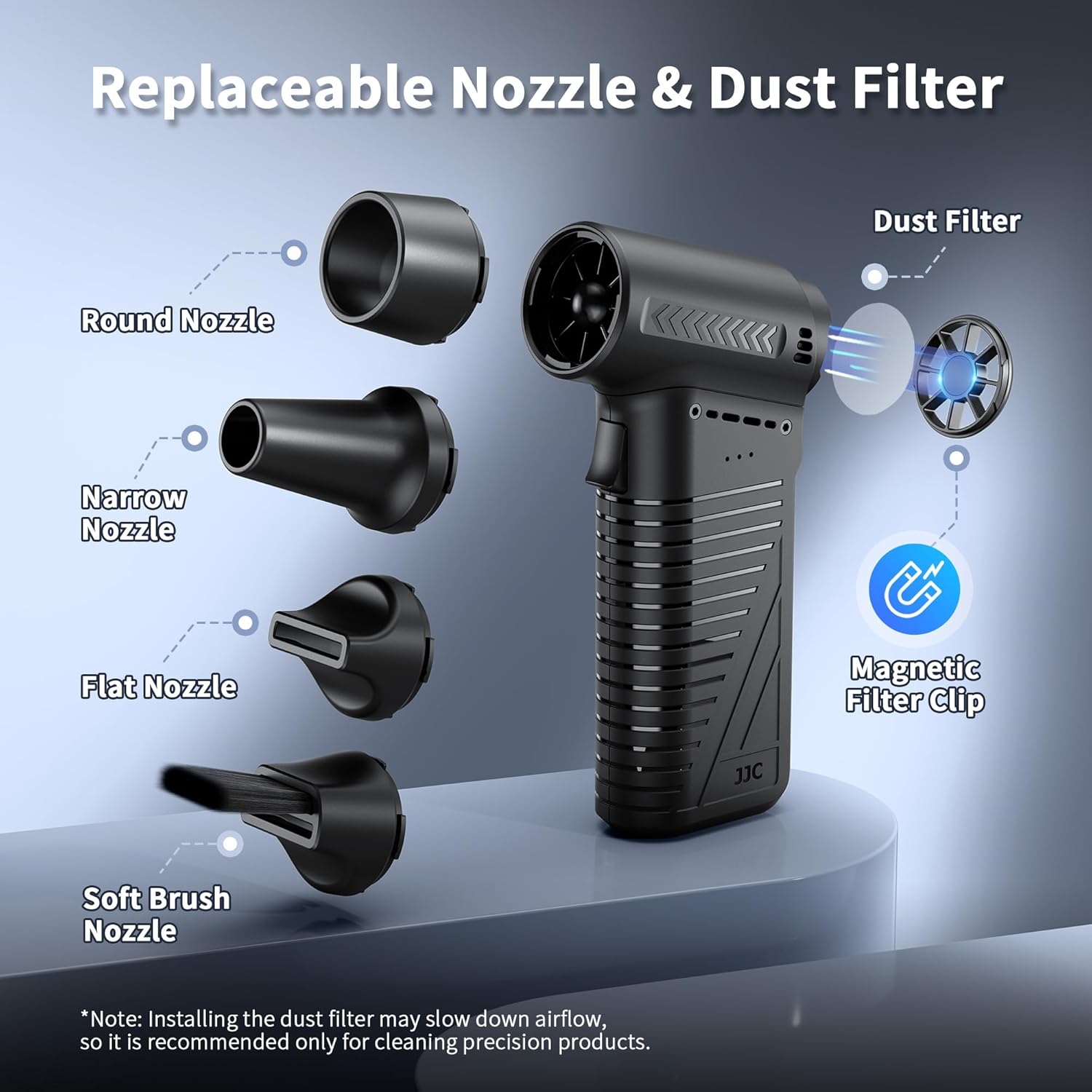
Image: The air duster shown with its four interchangeable nozzles (round, narrow, flat, soft brush) and the magnetic dust filter.
Installing/Removing Dust Filter
The air duster features a magnetic filter clip at the air intake. To install, simply place the filter over the air intake; the magnets will secure it. To remove, gently pull the filter off. The dust filter is recommended for cleaning precision products to prevent particles from entering the device. Note that using the dust filter may slightly reduce wind speed. For maximum wind speed, operate the duster without the filter.
4. Operating Instructions
Power On/Off
- To Power On: Press and hold the Power Button for 2 seconds. The indicator lights will illuminate.
- To Power Off: Press and hold the Power Button for 2 seconds. The indicator lights will turn off.
Working Modes and Speed Adjustment
The duster offers two main working modes: Long-Lasting Mode and Storm Mode.

Image: The air duster illustrating its two working modes: Long-Lasting Mode (continuous airflow with white indicator lights) and Storm Mode (strongest burst of air with red indicator lights).
- Long-Lasting Mode (Continuous Airflow): After powering on, press the Gear Button to activate continuous airflow. Each press of the Gear Button cycles through 3 adjustable wind speeds: 45000 RPM, 61000 RPM, and 78000 RPM. White indicator lights will show the current speed setting.
- Storm Mode (Maximum Airflow): To activate the strongest burst of air (105000 RPM), press and hold the Gear Button. Release the button to stop. Red indicator lights will be active in this mode.
Charging the Device
Connect the included USB-C charging cable to the USB-C Charging Port on the device and to a suitable USB power adapter (not included). The indicator lights will show charging status. A full charge provides approximately 110 minutes of use in Long-Lasting Mode (Gear 1) or 12 minutes in Storm Mode.

Image: The air duster connected to a USB-C charging cable, with an infographic detailing battery capacity and working times for each gear.
Typical Applications
The JJC EAB-W1 is suitable for a wide range of cleaning tasks:

Image: A collage demonstrating the air duster's use for cleaning cameras, keyboards, corners, windshields, and even assisting with barbecue fires, hair drying, and personal cooling.
- Electronics: Use the soft brush nozzle for camera lenses and delicate components, or the narrow nozzle for keyboards and computer vents.
- Household: Clean hard-to-reach corners, blinds, or small appliances.
- Automotive: Clear dust and debris from car interiors, vents, and windshields.
- Outdoor: Can be used to help start barbecue fires or clear light debris.
Video Demonstrations
Video: Demonstration of the JJC Portable Compressed Air Duster in various home and outdoor cleaning scenarios.
Video: A detailed look at the JJC Compressed Air Duster's high-speed dust-off capabilities and its effectiveness on different surfaces.
5. Maintenance
Cleaning the Dust Filter
Regularly inspect and clean the magnetic dust filter to maintain optimal performance and prevent debris from entering the motor. To clean, remove the filter from the air intake and gently tap out any accumulated dust. If necessary, wipe it with a dry, soft cloth. Ensure the filter is completely dry before reattaching.
General Cleaning
Wipe the exterior of the air duster with a soft, dry cloth. Do not use liquid cleaners or solvents, as these may damage the device.
6. Troubleshooting
- Device does not turn on: Ensure the battery is sufficiently charged. Press and hold the power button for 2 seconds to activate.
- Weak or no airflow: Check if the battery is low and recharge if necessary. Ensure the nozzle is securely attached. Verify that the air intake is not blocked. If the dust filter is installed, consider removing it for maximum airflow, especially for non-precision cleaning tasks.
- Indicator lights not working: If the device is functioning otherwise, this may indicate a minor electrical issue. Contact customer support if the problem persists after a full charge and restart.
7. Specifications
| Feature | Detail |
|---|---|
| Model Number | EAB-W1 |
| Motor Type | Brushless Motor |
| Max Wind Speed | Up to 42m/s (105000 RPM) |
| Working Modes | Long-lasting (3 speeds), Storm (1 speed) |
| Battery Capacity | 4000mAh Lithium Ion |
| Charging Port | USB-C |
| Working Time (Long-lasting Mode) | Gear 1: 110 min, Gear 2: 50 min, Gear 3: 25 min |
| Working Time (Storm Mode) | 12 min |
| Item Weight | 14.9 ounces |
| Dimensions | 5.87"W x 1.44"H (Product) |
8. Safety Information
- Do not immerse the device in water or expose it to excessive moisture.
- Keep the air duster away from flammable liquids, gases, or dust.
- Do not block the air intake or outlet during operation.
- Keep out of reach of children.
- Use only the provided charging cable and a compatible USB power adapter.
- Avoid pointing the airflow directly at eyes or sensitive body parts.
9. Warranty and Support
For detailed warranty information, product registration, and customer support, please refer to the warranty card included in your package or visit the official JJC website. Keep your purchase receipt as proof of purchase for any warranty claims.