
1. Introduction
This manual provides essential information for the safe and effective operation of your Motorola Solutions APX XE500 Remote Speaker Microphone (RSM). The APX XE500 RSM is engineered for use in extreme environments, offering robust performance and clear communication.
It features an ergonomic design for ease of use, even with bulky gloves, and incorporates advanced audio technology for superior sound quality in challenging conditions.
2. Safety Information
Always read and understand all safety precautions before using the device. Failure to do so may result in injury or damage to the equipment.
- Extreme Temperatures: While designed for high heat, avoid prolonged exposure beyond specified limits (500°F / 260°C for up to five minutes).
- Water Immersion: The device has an IP68 rating (2m, 4 hours). Ensure all ports are sealed before immersion.
- Cleaning: Use only recommended cleaning agents and methods. Do not use abrasive materials.
- Servicing: Refer all servicing to qualified Motorola Solutions personnel. Unauthorized modifications can void the warranty and compromise safety.
3. Product Overview and Features
The Motorola Solutions APX XE500 Remote Speaker Microphone is built for demanding situations, providing reliable communication when it matters most.
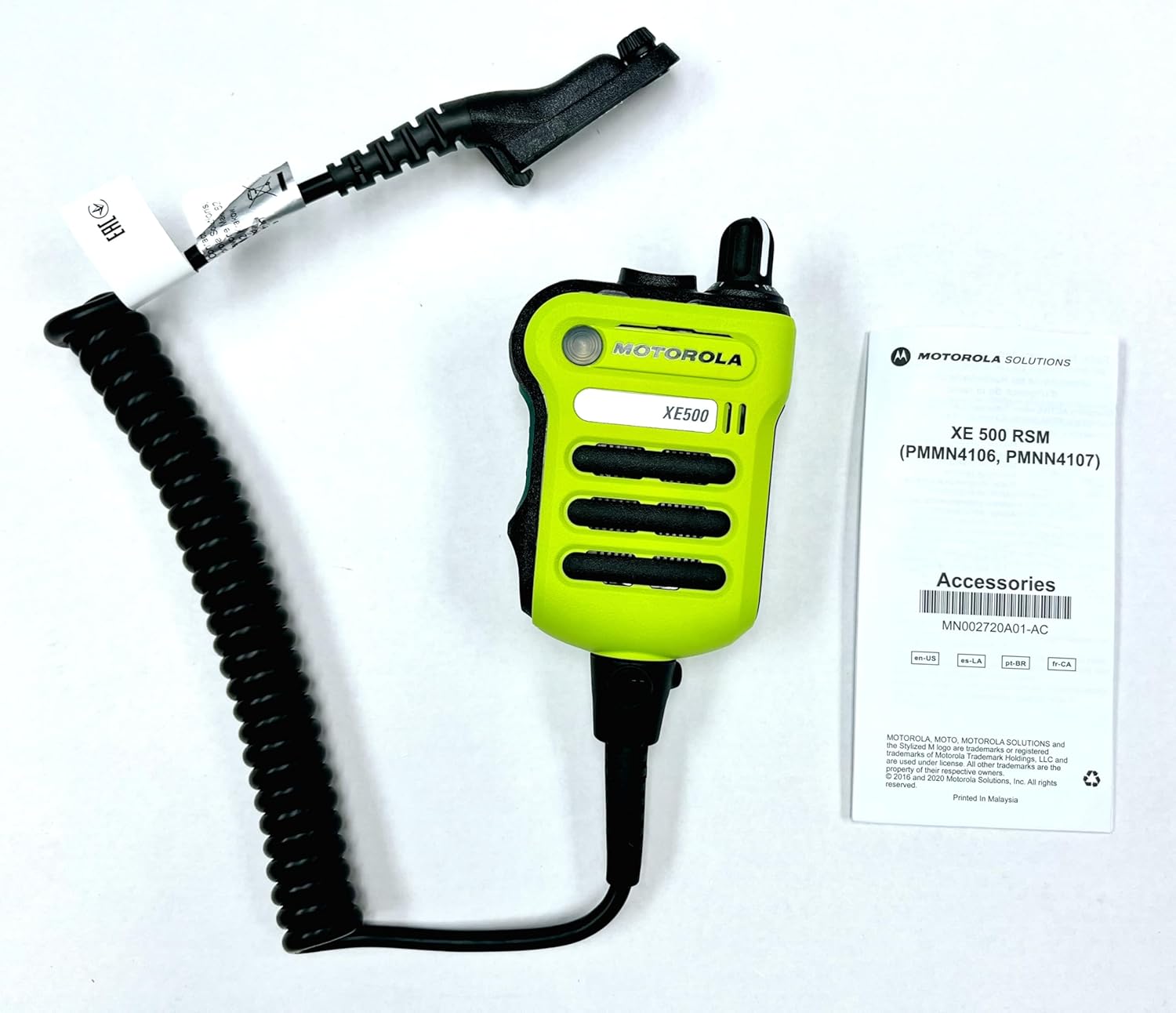
Image Description: This image displays the Motorola Solutions APX XE500 Remote Speaker Microphone (RSM) in high-impact green, connected to its coiled cable. The RSM features a large push-to-talk button and an emergency button. Also visible is a small instruction manual titled "XE 500 RSM (PMMN4106, PMMN4107) Accessories" with a barcode and "Motorola Solutions" branding. The overall view shows the product and its basic documentation.
- Adaptive Audio Engine: Features five integrated microphones that automatically adjust noise suppression, microphone gain, Windporting, and speaker equalization for clear audio in any environment.
- Extreme Durability: Designed to withstand heat exposure of 500°F (260°C) for up to five minutes.
- IP68 Submersibility: Rated for immersion up to 2 meters for 4 hours.
- Flexible Wear: Strategic microphone placement and enhanced water drainage allow for wearing the RSM straight, upside down, or sideways while maintaining audio clarity.
- Ergonomic Design: Asymmetrical shape and large, shielded buttons (Push-to-Talk, Emergency) for easy operation even with bulky gloves.
- Dedicated Channel Knob: Some models (PMMN4106, PMMN4106_BLK) include a channel knob mimicking the radio's knob for intuitive channel changes.

Image Description: This image shows several Motorola APX series radios in a vibrant green color, along with an APX XE500 Remote Speaker Microphone (RSM) lying in the foreground. The radios are upright, displaying their screens and antennas. The RSM is also green, highlighting its robust design and integration with the radio system. This visual demonstrates the compatibility and typical usage context of the RSM with Motorola APX radios.
4. Components and What's in the Box
Your Motorola Solutions APX XE500 Remote Speaker Microphone package typically includes the following items:
- APX XE Remote Speaker Microphone (RSM)
- Xtreme Temperature Cable
- Belt clip

Image Description: This image shows the top of a brown cardboard product box. A white label is affixed to the center, displaying product information. Key details visible on the label include "KIT #: PMMN4106D", "DESC: APX XE500 Remote Speaker, High Impact Green", "Serial Number: CAB24MHD0675", "MADE IN MALAYSIA", and a UPC barcode with the number "7 48091 02726 0". Various regulatory marks (EAC, UKCA, CE) are also present. This image confirms the model number and manufacturing details of the product.
5. Setup
- Attach Belt Clip: Securely attach the provided belt clip to the back of the RSM. Ensure it clicks into place firmly.
- Connect to Radio: Align the connector of the RSM cable with the accessory port on your compatible Motorola APX radio. Push firmly until it locks into place.
- Secure Cable: Route the cable in a way that prevents snagging or excessive strain. Use any integrated cable management features on your radio or uniform.
6. Operating the RSM
The APX XE500 RSM is designed for intuitive operation, even in high-stress environments.
- Push-to-Talk (PTT) Button: The large, prominent button on the side of the RSM. Press and hold to transmit, release to listen.
- Emergency Button: An extra-large button, typically orange and illuminated when activated. Press to initiate an emergency call (functionality depends on radio programming).
- Channel Knob (if applicable): For models with a channel knob (PMMN4106, PMMN4106_BLK), rotate to change radio channels. This mimics the radio's main channel knob.
- Volume Control: Adjust the volume using the radio's volume knob. The RSM's speaker output will reflect the radio's volume setting.
- Adaptive Audio: The RSM's integrated microphones and Adaptive Audio Engine automatically optimize audio for clarity. No user adjustment is typically required for this feature.
7. Maintenance and Care
Proper maintenance ensures the longevity and optimal performance of your RSM.
- Cleaning:
- Wipe the exterior with a damp cloth.
- For stubborn dirt, use a mild soap solution. Avoid harsh chemicals or abrasive cleaners.
- Ensure the microphone and speaker grilles are free of debris.
- Drying: After exposure to water, ensure the RSM is thoroughly dry before storage or continued use, especially around the connector. The enhanced water drainage helps, but manual drying is recommended.
- Storage: Store the RSM in a clean, dry environment away from extreme temperatures when not in use.
- Cable Inspection: Regularly inspect the cable for any signs of wear, cuts, or damage. Replace if necessary.
8. Troubleshooting
If you encounter issues with your RSM, try the following steps:
| Problem | Possible Cause | Solution |
|---|---|---|
| No audio from RSM speaker | Volume too low; RSM not fully connected; Radio issue. | Increase radio volume; Re-seat RSM connector; Test radio with another accessory. |
| Others cannot hear me | PTT not pressed; Microphone blocked; RSM not fully connected. | Ensure PTT is pressed firmly; Check microphone for obstructions; Re-seat RSM connector. |
| Emergency button not activating | Radio not programmed for emergency function; Button malfunction. | Consult radio programming guide; Contact support if button is unresponsive. |
| Distorted or unclear audio | Environmental noise; Microphone/speaker damage; Radio interference. | Ensure RSM is positioned correctly; Inspect for physical damage; Move away from interference sources. |
If the issue persists after attempting these solutions, please contact Motorola Solutions customer support.
9. Specifications
Detailed technical specifications for the APX XE500 Remote Speaker Microphone (PMMN4106D):
| Feature | Detail |
|---|---|
| Model Number | PMMN4106D (High-impact green, with channel knob) |
| Other Models | PMMN4106 (High-impact green, with channel knob), PMMN4106_BLK (Black, with channel knob), PMMN4107 (High-impact green, without channel knob), PMMN4107_BLK (Black, without channel knob) |
| Dimensions (Product) | 2.96 x 1.4 x 3.74 inches |
| Weight | 12 ounces (approx. 340 grams) |
| Heat Resistance | 500°F (260°C) for up to five minutes |
| Submersibility Rating | IP68 (2 meters for 4 hours) |
| Microphones | Five integrated microphones with Adaptive Audio and Windporting |
| Speaker Rated Power | 2W |
| Operating Temp | -40 Degree Celsius to +85 Degree Celsius |
| Humidity | 90-95% relative humidity at +50 Degree Celsius for 8 hours |
| Compatible Devices | Motorola APX Radios (e.g., APX 1000, 3000, 4000, 6000, 7000 series) |
| UPC | 724129218749 |

Image Description: This image displays a detailed specification sheet for the APX XE500 Remote Speaker Microphone. It includes tables outlining MIL-STD 810D, E, F, & G environmental specifications (Low Pressure, High Temperature, Low Temperature, Temperature Shock, Solar Radiation, Rain, Humidity, Salt Fog, Blowing Dust, Blowing Sand, Immersion, Vibration, Shock, Drop). It also lists mic acoustics, speaker, and control features, environmental specifications, and physical characteristics like weight. A section on radio compatibility and hazardous certification is included, along with a list of part numbers and descriptions for different models (PMMN4106, PMMN4106_BLK, PMMN4107, PMMN4107_BLK). This sheet provides comprehensive technical data for the product.
For more information, please visit: motorolasolutions.com/XE500
10. Warranty and Support
Your Motorola Solutions APX XE500 Remote Speaker Microphone comes with a 90-day limited warranty.
- Warranty Coverage: This warranty covers defects in materials and workmanship under normal use. It does not cover damage caused by misuse, accident, unauthorized modification, or external causes.
- Claiming Warranty: For warranty service, please contact Motorola Solutions customer support with your proof of purchase and product serial number.
- Manufacturer: Motorola Solutions
- Support: For technical assistance, troubleshooting, or service inquiries, please visit the official Motorola Solutions website or contact their customer service department.


