
EMOS E8610 Smart
EMOS GoSmart WiFi Weather Station E8610 Smart User Manual
Model: E8610 Smart | Brand: EMOS
1. Introduction
Thank you for choosing the EMOS GoSmart WiFi Weather Station E8610 Smart. This device provides precise measurements of indoor and outdoor temperatures, humidity, and a 5-day weather forecast. It integrates seamlessly with your smart home system via the EMOS GoSmart app, compatible with Tuya and Smartlife platforms. This manual will guide you through the setup, operation, and maintenance of your new weather station.

The EMOS GoSmart WiFi Weather Station E8610 Smart, its wireless outdoor sensor, and the accompanying mobile application interface.
2. Package Contents
Please check the package for the following items:
- 1x EMOS GoSmart WiFi Weather Station (Main Unit)
- 1x Wireless Outdoor Sensor
- 1x Power Adapter
- User Manual (this document)
Note:
- Batteries are not included. The outdoor sensor requires 2x AAA batteries, and the main station requires 3x AAA batteries for backup power.
3. Key Features
- Reliable Weather Analysis: Precise measurements of indoor and outdoor temperature and humidity.
- 5-Day Weather Forecast: Provides a detailed forecast for the next five days.
- Smart Home Integration: Seamless connectivity with the EMOS GoSmart app, compatible with Tuya and Smartlife platforms. Supports 2.4 GHz WLAN.
- WiFi Clock: Integrated clock with snooze alarm and calendar function.
- Temperature Alarm: Customizable temperature alerts.
- Large Color Display: Bright LED-backlit display with a wide viewing angle for clear overview.
- USB-A Charging Port: Can serve as a mobile phone charging output.
- Wireless Transmission: 433 MHz wireless transmission with up to 80m range for the outdoor sensor.
- Expandable: Supports connection of up to 3 outdoor sensors (additional sensors sold separately).

Overview of the smart weather station's features, including Wi-Fi connectivity, app control, and various measurement capabilities.
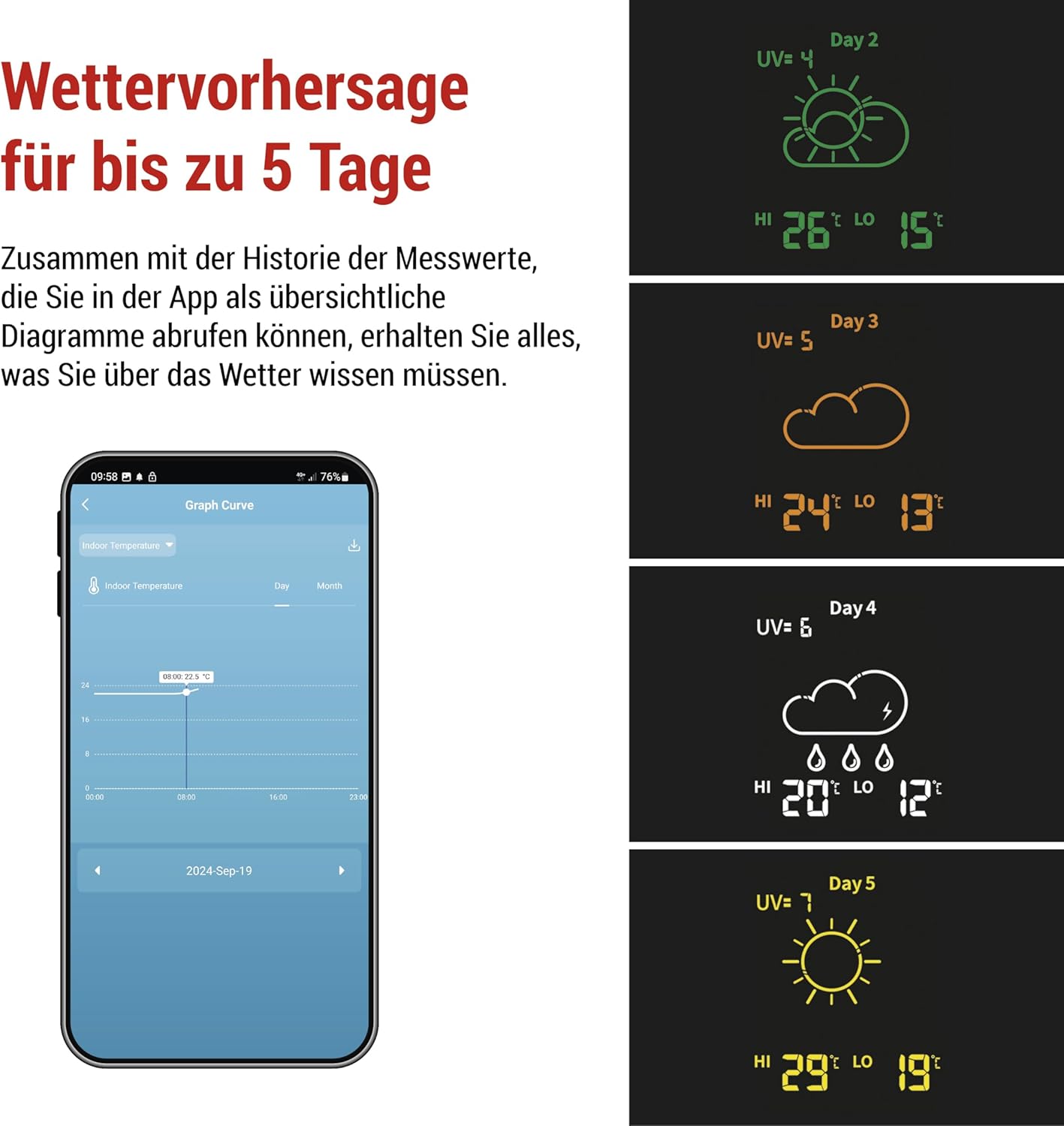
The weather station provides a detailed 5-day weather forecast, accessible via the mobile app.
4. Setup Guide
4.1. Powering the Devices
- Outdoor Sensor: Open the battery compartment on the back of the outdoor sensor. Insert 2x AAA batteries, ensuring correct polarity (+/-). Close the compartment.
- Main Unit: Insert 3x AAA batteries into the battery compartment on the back of the main weather station unit for backup power. Connect the provided power adapter to the DC IN port on the main unit and plug it into a power outlet. The display will light up.
4.2. Pairing the Outdoor Sensor
The outdoor sensor should automatically pair with the main unit once both are powered on. If pairing does not occur automatically, or if you are adding additional sensors:
- Ensure the sensor is within the 80m transmission range of the main unit.
- Press the 'Sensor' button on the main unit (refer to the diagram in the full manual for exact location) to initiate a manual search for sensors.

The smart weather station supports up to 3 sensors, which can be installed in various locations up to 80 meters from the weather station.
4.3. App Installation and Wi-Fi Connection
- Download App: Scan the QR code below or search for "EMOS GoSmart" in your smartphone's app store (Google Play Store or Apple App Store).
- Register/Login: Open the app and register a new account or log in if you already have one.
- Add Device: Follow the in-app instructions to add your EMOS GoSmart WiFi Weather Station. Ensure your smartphone is connected to a 2.4 GHz Wi-Fi network.
- Connect to Wi-Fi: The app will guide you through connecting the weather station to your home Wi-Fi network. This typically involves putting the weather station into pairing mode (refer to the device's display for Wi-Fi icon status) and entering your Wi-Fi credentials in the app.

Data transmission schema: The weather station connects to your Wi-Fi router, which then communicates with the EMOS GoSmart app on your smartphone.
5. Operating Instructions
5.1. Understanding the Display
The large color display shows various information at a glance:
- Current Time and Date (synchronized via Wi-Fi)
- Indoor Temperature and Humidity
- Outdoor Temperature and Humidity (from connected sensor)
- 5-Day Weather Forecast with corresponding icons
- UV Index (if available)
- Min/Max temperature records
5.2. Using the EMOS GoSmart App
The EMOS GoSmart app provides extended functionalities and control:
- Real-time Data: View current and historical temperature and humidity data.
- Forecast Details: Access detailed 5-day weather forecasts.
- Alerts: Set up custom temperature and humidity alerts.
- Smart Scenarios: Create automation rules to interact with other smart home devices (e.g., turn on a humidifier if humidity drops below a certain level).
- Settings: Configure display brightness, time format, temperature units, and other device settings.

The app allows for smart automation, enabling the weather station to trigger actions on other smart home devices based on environmental conditions.
5.3. USB Charging Port
The USB-A port on the side of the main unit can be used to charge mobile devices. Connect your device's charging cable to this port.
6. Maintenance
6.1. Battery Replacement
- Outdoor Sensor: Replace the 2x AAA batteries when the low battery indicator appears on the main unit's display or in the app.
- Main Unit: The 3x AAA backup batteries should be replaced periodically, especially if the unit is frequently unplugged or experiences power outages.
6.2. Cleaning
Wipe the weather station and sensor with a soft, damp cloth. Do not use abrasive cleaners or solvents, as these may damage the surfaces.
6.3. Sensor Placement
For accurate outdoor readings, place the wireless sensor in a shaded area, protected from direct sunlight and rain. Ensure it is within the 80m transmission range of the main unit.
7. Troubleshooting
| Problem | Possible Cause | Solution |
|---|---|---|
| No display on main unit | Power adapter not connected or faulty; backup batteries drained. | Ensure power adapter is securely connected and working. Replace backup batteries. |
| Outdoor temperature/humidity not displayed | Sensor not paired; sensor batteries low; sensor out of range. | Check sensor batteries. Move sensor closer to main unit. Initiate manual sensor search on main unit. |
| Wi-Fi connection failed | Incorrect Wi-Fi password; not connected to 2.4 GHz network; router issues. | Double-check Wi-Fi password. Ensure your phone is on a 2.4 GHz network during setup. Restart router and weather station. |
| Inaccurate readings | Sensor exposed to direct sunlight/rain; poor ventilation. | Relocate sensor to a shaded, well-ventilated area. |
8. Specifications
- Model: E8610 Smart
- Power Source (Main Unit): Power Adapter (included), 3x AAA batteries (not included) for backup
- Power Source (Outdoor Sensor): 2x AAA batteries (not included)
- Wireless Frequency: 433 MHz
- Wireless Range: Up to 80 meters (open area)
- Wi-Fi Connectivity: 2.4 GHz WLAN
- App Compatibility: EMOS GoSmart App (Tuya, Smartlife compatible)
- Display Type: Color LED-backlit display
- Measurements: Indoor/Outdoor Temperature, Indoor/Outdoor Humidity, 5-Day Forecast, Time, Date, Pressure
- Main Unit Dimensions (L x H x D): Approximately 205 x 127 x 29 mm
- Outdoor Sensor Dimensions (L x H x D): Approximately 50 x 95 x 25 mm

Physical dimensions of the EMOS GoSmart weather station and its outdoor sensor.
9. Warranty and Support
EMOS, a brand of Legrand, is committed to providing high-quality electronic products. All EMOS products undergo rigorous quality and performance testing in their dedicated laboratory.
For warranty claims, technical support, or further assistance, please refer to the contact information provided with your purchase or visit the official EMOS website. Keep your proof of purchase for warranty purposes.

EMOS is recognized as a popular brand, reflecting its commitment to quality and customer satisfaction.
Related documentsE8610 Smart


Ask a question about this manual
Ask about setup, troubleshooting, compatibility, parts, safety, or missing instructions. Manuals+ will review the question and use this page’s manual context to help answer it.