
Introduction
This manual provides essential information for the safe and efficient use of your Elecbee Smart DIN Rail Circuit Breaker. This device integrates traditional circuit protection with smart home capabilities, allowing for remote control, energy monitoring, and automation through Wi-Fi connectivity. Please read this manual thoroughly before installation and operation.

Image: The Elecbee Smart Circuit Breaker installed in a modern kitchen, demonstrating its application for controlling high-power appliances such as ovens and air conditioning units.
Safety Information
WARNING: Electrical installation should only be performed by a qualified electrician. Incorrect installation can lead to electric shock, fire, or other serious injury.
- Ensure the main power supply is disconnected before any installation or maintenance.
- Verify that the voltage and current ratings of the circuit breaker match your electrical system requirements.
- Do not operate the device if it appears damaged.
- This device is designed for indoor use in dry environments.
- Adhere to all local electrical codes and regulations.
Product Overview
Key Features
- Smart Home Integration: Transform traditional appliances into smart devices.
- Voice and App Control: Compatible with Tuya, Smart Life, Amazon Alexa, and Google Home for convenient control.
- Timer Switch Functionality: Schedule automatic switching to save energy and enhance convenience.
- Real-time Monitoring: Accurately monitors switch status, current, voltage, and power consumption.
- Overcurrent and Overload Protection: Provides essential electrical safety.
- Family Sharing: Allows multiple users to control the device with hierarchical permission management.

Image: An overview of the smart circuit breaker's capabilities, highlighting features such as multi-user control, energy data recording, scheduling, and built-in safety protections.
Components
The device consists of a 1P+N circuit breaker module designed for DIN rail mounting. It includes input (IN) and output (OUT) terminals for neutral (N) and live (L) wires, a status indicator, and a manual power button.
Setup
1. Electrical Installation
- Power Off: Ensure the main power supply to the electrical panel is completely turned off before beginning installation.
- Mounting: Securely mount the circuit breaker onto a standard DIN rail within your electrical distribution box.
- Wiring: Connect the incoming neutral (N) and live (L) wires to the 'IN' terminals. Connect the outgoing neutral (N) and live (L) wires to the 'OUT' terminals. Ensure all connections are tight and secure. Refer to the wiring diagram on the device for correct polarity.
- Power On: Once wiring is complete and verified, restore the main power supply.
2. App Pairing (Tuya/Smart Life)
- Download App: Download the Tuya Smart or Smart Life app from your smartphone's app store (iOS/Android).
- Register/Login: Create an account or log in to your existing account.
- Add Device: In the app, tap '+' or 'Add Device'. Select 'Electrical' > 'Circuit Breaker (Wi-Fi)' or similar category.
- Enter Pairing Mode: Follow the app's instructions to put the circuit breaker into pairing mode. This usually involves pressing and holding the manual button until the status indicator blinks rapidly.
- Connect to Wi-Fi: Enter your 2.4 GHz Wi-Fi network password when prompted. The device does not support 5 GHz Wi-Fi.
- Completion: The app will detect and connect to the device. Once connected, you can rename the device and assign it to a room.
Operating Instructions
1. Manual Control
Press the physical button on the circuit breaker to manually turn the connected circuit ON or OFF.
2. App Control
Through the Tuya Smart or Smart Life app, you can:
- Remote ON/OFF: Toggle the power to the connected circuit from anywhere.
- Timer & Schedule: Set daily or weekly schedules for automatic power on/off.
- Energy Monitoring: View real-time and historical data for current, voltage, and power consumption. Set alarms for abnormal energy usage.
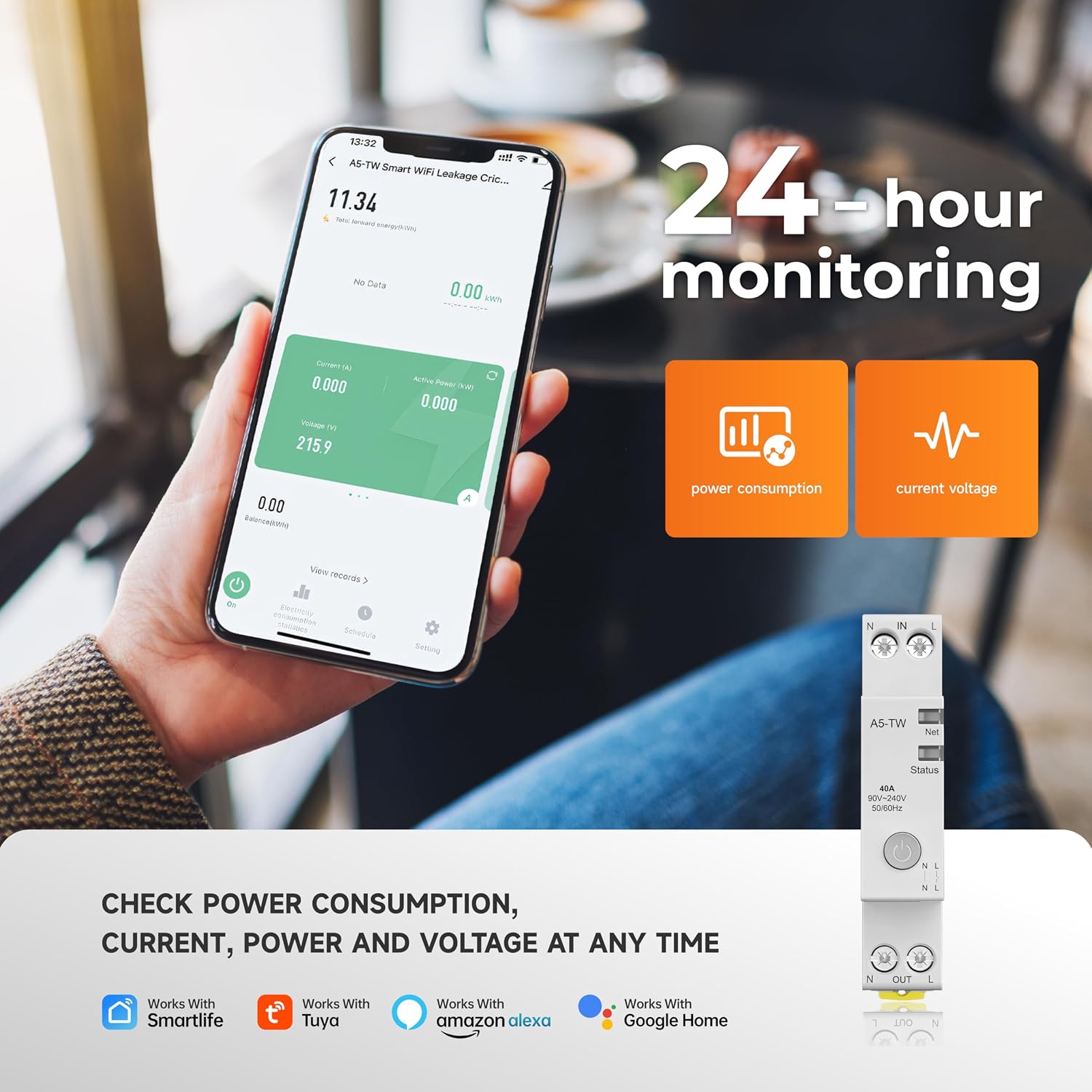
Image: A smartphone displaying the Smart Life app, illustrating the 24-hour monitoring feature for power consumption, current, and voltage, with the physical circuit breaker visible.
3. Voice Control
Integrate the circuit breaker with Amazon Alexa or Google Home for hands-free control.
- Link Accounts: In the Alexa or Google Home app, link your Tuya Smart/Smart Life account.
- Discover Devices: Ask Alexa or Google to discover new devices.
- Voice Commands: Use commands such as:
- "Alexa, turn on [Device Name]"
- "Hey Google, turn off [Device Name]"

Image: A user interacting with a smart speaker and smartphone to control home appliances, showcasing the voice control feature compatible with Alexa and Google Assistant.
4. Family Sharing
Share control of the device with family members through the app. This allows multiple users to manage the circuit breaker remotely with customizable permissions.

Image: Two individuals sharing control of smart devices via their smartphones, illustrating the group and family sharing feature of the application.
Maintenance
- Cleaning: Periodically wipe the device with a dry, soft cloth. Do not use harsh chemicals or abrasive cleaners.
- Connection Check: Ensure all wiring connections remain tight and free from corrosion. This should be done by a qualified professional.
- Firmware Updates: Keep the device firmware updated through the app for optimal performance and security.
Troubleshooting
Device Not Connecting to Wi-Fi
- Ensure your Wi-Fi network is 2.4 GHz. The device does not support 5 GHz.
- Check Wi-Fi signal strength at the installation location.
- Verify the Wi-Fi password entered in the app is correct.
- Restart your Wi-Fi router and try pairing again.
- Ensure the device is in pairing mode (status indicator blinking rapidly).
Device Not Responding to App/Voice Commands
- Check if the device is online in the app.
- Verify your smartphone has an active internet connection.
- Ensure your Alexa/Google Home account is correctly linked to your Tuya Smart/Smart Life account.
- Check for any app or device firmware updates.
Circuit Breaker Trips Frequently
- This indicates an overcurrent or short circuit. Immediately disconnect appliances from the circuit.
- Consult a qualified electrician to diagnose and resolve the underlying electrical issue.
Specifications

Image: Detailed technical specifications and dimensions of the Elecbee Smart Circuit Breaker, including voltage, current, power, and operating conditions.
| Specification | Value |
|---|---|
| Model Number | EB-JJL-0011 |
| Brand | Elecbee |
| Rated Current | 40 A |
| Power Rating | 9200 Watts |
| Operating Mode | ON-OFF |
| Connectivity Protocol | Wi-Fi (2.4 GHz only) |
| Control Method | Voice, App |
| Mounting Type | DIN Rail Mount |
| Circuit Type | 1 Way |
| Material | Copper |
| Contact Type | Normally Open |
| Operating Temperature | -20°C to 70°C |
| Working Humidity | <95% |
| Dustproof Rating | IP20 |
| Reference Voltage | 220V, 230V |
| Prescribed Working Voltage | 90%UN-110%UN |
| Extended Working Voltage | 80%UN-115%UN |
| Frequency | 50-60Hz |
Warranty and Support
For warranty information and technical support, please refer to the documentation provided with your purchase or contact Elecbee customer service directly. Keep your purchase receipt for warranty claims.