
Introduction
Welcome to your new 5Rcom Rolling TV Stand. This manual provides detailed instructions for the assembly, operation, and maintenance of your TV stand. Please read all instructions carefully before beginning assembly and retain this manual for future reference.
Important Safety Information
- Do not exceed the maximum weight capacity of 88 lbs (40 kg) for the TV mount and 22 lbs (10 kg) for the shelf. Exceeding these limits may result in instability and potential injury.
- Ensure all screws are securely tightened before placing a television on the stand and before moving it.
- Do not allow children to climb on or play with the TV stand.
- Use caution when moving the stand, especially on uneven surfaces. Avoid sudden stops or rapid movements.
- Always lock the wheels when the stand is in a stationary position to prevent accidental movement.
- Ensure the power cord is not pinched, damaged, or creating a tripping hazard.
- This product is designed for indoor use only.
Package Contents
Please verify that all components are present and undamaged before proceeding with assembly. If any parts are missing or damaged, contact customer support.
- Main Support Column
- Base Plate
- TV Mounting Brackets (Left & Right)
- Adjustable Media Shelf
- Power Outlet Unit with Power Cord
- Lockable Caster Wheels (x4)
- Hardware Kit (various screws, washers, spacers, Allen wrenches)
- Cable Management Straps
Assembly Instructions
Follow these steps carefully to assemble your TV stand.
Step 1: Attach Wheels to Base
Secure the four rotating, lockable caster wheels to the base plate using the provided screws. Ensure they are tightened firmly.

A close-up view of the TV stand's base with four white and black wheels attached. One wheel is highlighted, showing "Lock" and "Unlock" positions for its 360-degree rotating mechanism.
Step 2: Assemble Main Column and Shelf
Connect the main support column to the base plate. Attach the adjustable media shelf to the main column at your desired height. The shelf can be adjusted later if needed.

A person sitting on the floor in a yoga pose, facing a TV mounted on the stand. The image illustrates the height adjustment feature, showing the TV screen at a maximum height of 52.0 inches and a minimum of 49.5 inches from the floor.
Step 3: Install TV Mounting Brackets
Attach the vertical TV mounting brackets to the back of your television using the appropriate VESA screws and spacers from the hardware kit. Ensure the brackets are centered and level on the TV's back panel.
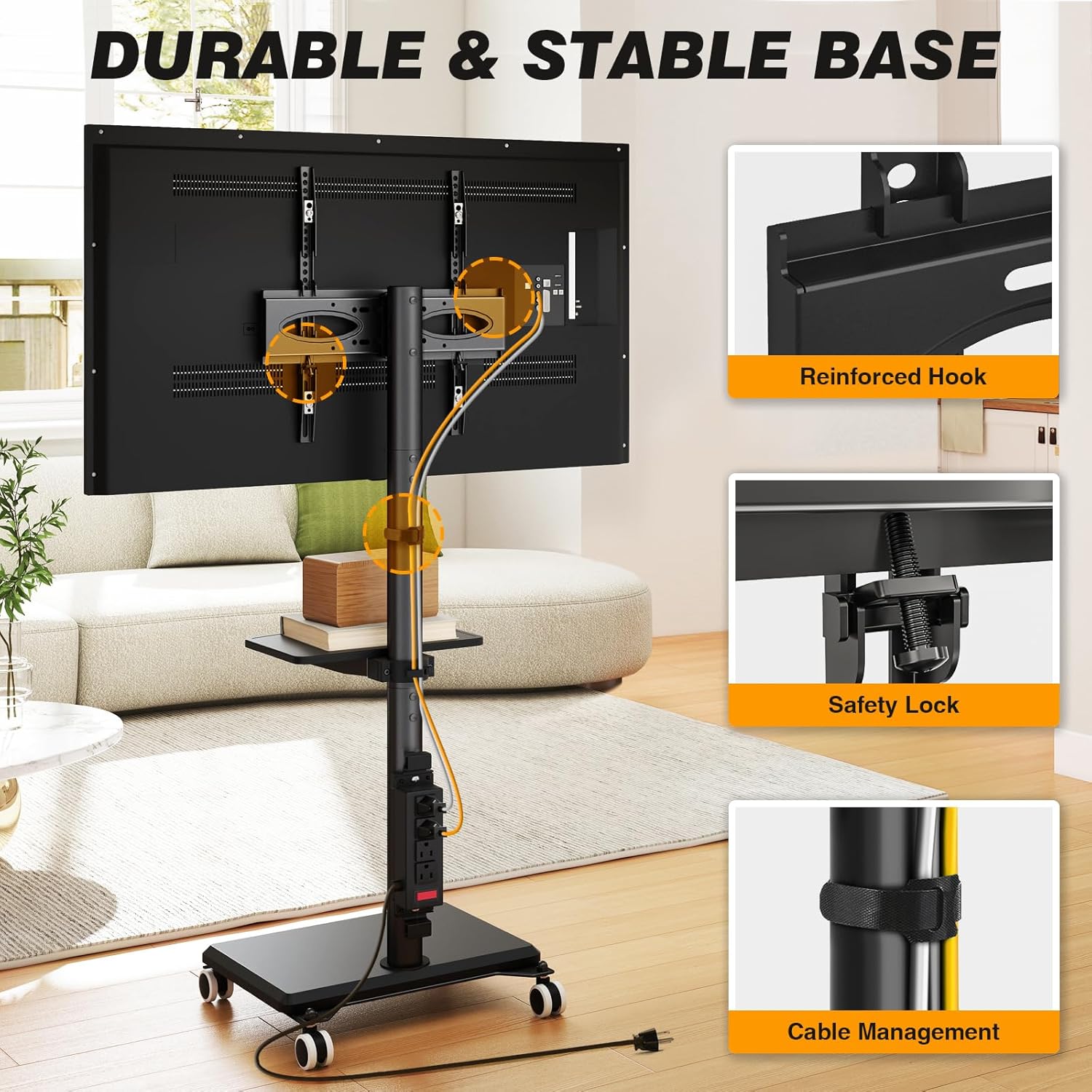
The rear view of a television mounted on the stand, highlighting the reinforced hook and safety lock mechanisms for secure attachment. Cable management straps are also visible, organizing wires along the stand's column.
Step 4: Mount TV to Stand
With assistance, carefully lift the television and hook the mounting brackets onto the main support column's TV plate. Secure the TV by engaging the safety locks on the mounting brackets.
Step 5: Connect Power Outlet
Attach the power outlet unit to the main column at a convenient height. Plug the stand's integrated power cord into a functional wall outlet.

A close-up of the TV stand's integrated power strip, featuring four AC outlets and a red master safety switch. A 6.5ft power cord extends from the unit to a wall outlet.
Step 6: Cable Management
Use the provided cable management straps to organize and secure all cables neatly along the stand's column, preventing tangles and maintaining a clean appearance.
Operating Instructions
Swivel Function
The TV mount allows for a bidirectional rotation of ±35 degrees, providing a total swivel range of 70 degrees. To adjust, gently rotate the TV screen to your desired viewing angle. No tools are required for this adjustment.

A living room scene with a TV mounted on the stand, demonstrating the ±35° swivel capability. The TV screen is shown rotated to an angle, indicating a 70° total swivel range for comfortable viewing.
Height Adjustment
To adjust the TV height, loosen the locking mechanism on the main column, slide the TV mount to the desired height (between 49.5 inches and 52.0 inches from the floor), and then re-tighten the lock securely.
A person sitting on the floor in a yoga pose, facing a TV mounted on the stand. The image illustrates the height adjustment feature, showing the TV screen at a maximum height of 52.0 inches and a minimum of 49.5 inches from the floor.
Using the Integrated Power Outlet
The integrated power strip provides four AC outlets (125V/12A) for convenient charging and powering of your devices. Use the red master switch to turn power to the outlets on or off.
A close-up of the TV stand's integrated power strip, featuring four AC outlets and a red master safety switch. A 6.5ft power cord extends from the unit to a wall outlet.
Moving the TV Stand
To move the TV stand, unlock all four caster wheels by flipping the lever on each wheel. Gently push the stand to its new location. Once positioned, lock all four wheels to secure the stand and prevent unintended movement.
A living space illustrating the mobility of the TV stand. The stand is shown being moved across a room, with an inset highlighting the 360° rotating, lockable, and silent wheels.
Maintenance
- Cleaning: Wipe all surfaces with a soft, damp cloth. Avoid using abrasive cleaners or harsh chemicals, as these may damage the finish.
- Inspection: Periodically inspect all screws and connections to ensure they remain tight. Re-tighten any loose fasteners to maintain stability.
- Wheel Care: Keep the caster wheels free of dust, hair, and other debris to ensure smooth movement.
Troubleshooting
| Problem | Possible Cause | Solution |
|---|---|---|
| Stand is unstable or wobbles | Loose connections or uneven floor | Check and tighten all assembly screws. Ensure the stand is on a flat, level surface. |
| TV is not level | Mounting brackets unevenly installed | Re-adjust the TV mounting brackets on the back of the television to ensure level installation. |
| Wheels not rolling smoothly | Debris in wheels or wheels locked | Clear any debris (e.g., hair, lint) from the wheels. Ensure all wheels are unlocked before attempting to move the stand. |
| Power outlet not working | Master switch off or not plugged in | Ensure the red master switch on the power outlet unit is in the "ON" position. Verify the stand's power cord is securely plugged into a functional wall outlet. |
Specifications
- Model: DTF1405
- Material: Alloy Steel
- Compatible TV Sizes: 32-60 inches
- Maximum TV Load Capacity: 88 lbs (40 kg)
- Maximum Shelf Load Capacity: 22 lbs (10 kg)
- VESA Compatibility: Minimum 100x100mm, Maximum 400x400mm
- Height Adjustment Range: Approximately 49.5 inches to 52.0 inches (from floor to TV center)
- Swivel Range: ±35° (70° total)
- Power Outlet: 4 AC outlets, 125V/12A, with 6.5ft power cord
- Product Dimensions: 50.8 x 35.56 x 137.16 cm (approx. 20 x 14 x 54 inches)
- Item Weight: 7.3 kg (approx. 16.1 lbs)

A diagram illustrating the key dimensions of the TV stand, including TV size compatibility (32-60 inches), maximum TV load capacity (88 lbs), and shelf capacity (22 lbs).

A diagram detailing the wide compatibility of the stand, including support for 32-60 inch TVs, a maximum load of 88 lbs, VESA patterns from 100x100mm to 400x400mm, and suitability for both flat and curved TV screens.
Warranty and Support
For warranty information or technical support, please refer to the product packaging or contact 5Rcom customer service directly through their official website or the retailer where the product was purchased. Please have your model number (DTF1405) and purchase date available when contacting support.
