
OPPO A57s
OPPO A57s Dual-SIM Smartphone User Manual
Model: A57s
Introduction
This manual provides detailed instructions for the proper use and maintenance of your OPPO A57s Dual-SIM smartphone. The OPPO A57s features a 2.3 GHz Octa-core processor, 4GB of RAM, 128GB of internal storage (expandable via microSDXC), and runs on Android 12. It is powered by a 5000 mAh non-removable battery, designed for reliable performance and extended usage.
Package Contents
Upon opening the package, please verify that all items are present and in good condition.
- OPPO A57s Smartphone
- USB Cable
- Quick Start Guide (may vary by region)
- SIM Ejector Tool (may vary by region)
Setup
1. Inserting SIM Cards and microSD Card
The OPPO A57s supports Dual-SIM functionality and a microSDXC card for expandable storage.
- Locate the SIM card tray on the side of the device.
- Insert the SIM ejector tool into the small hole on the tray to open it.
- Place your Nano-SIM cards into the designated slots with the gold contacts facing down. If using a microSD card, place it in its dedicated slot.
- Gently push the tray back into the device until it clicks into place.
2. Initial Power On and Setup Wizard
To power on your device for the first time:
- Press and hold the Power button (located on the right side) until the OPPO logo appears.
- Follow the on-screen instructions to complete the initial setup, including language selection, Wi-Fi connection, Google account setup, and fingerprint registration.

Image: Front view of the OPPO A57s smartphone, showing the display and front camera. This view is typical during initial setup.
Operating Your Device
Basic Navigation
- Touch Gestures: Tap, swipe, pinch-to-zoom are standard Android gestures.
- Home Screen: Access apps, widgets, and notifications.
- Notification Panel: Swipe down from the top of the screen to access quick settings and notifications.
Calls and Messaging
- Making Calls: Open the Phone app, dial the number, and tap the call icon.
- Sending Messages: Open the Messages app, tap the new message icon, enter recipient and text.
Camera Usage
The OPPO A57s features a 50 MP main camera and an 8 MP wide-angle camera.
- Open the Camera app from the home screen or app drawer.
- Select desired mode (Photo, Video, Portrait, etc.).
- Tap the shutter button to capture an image or start/stop video recording.
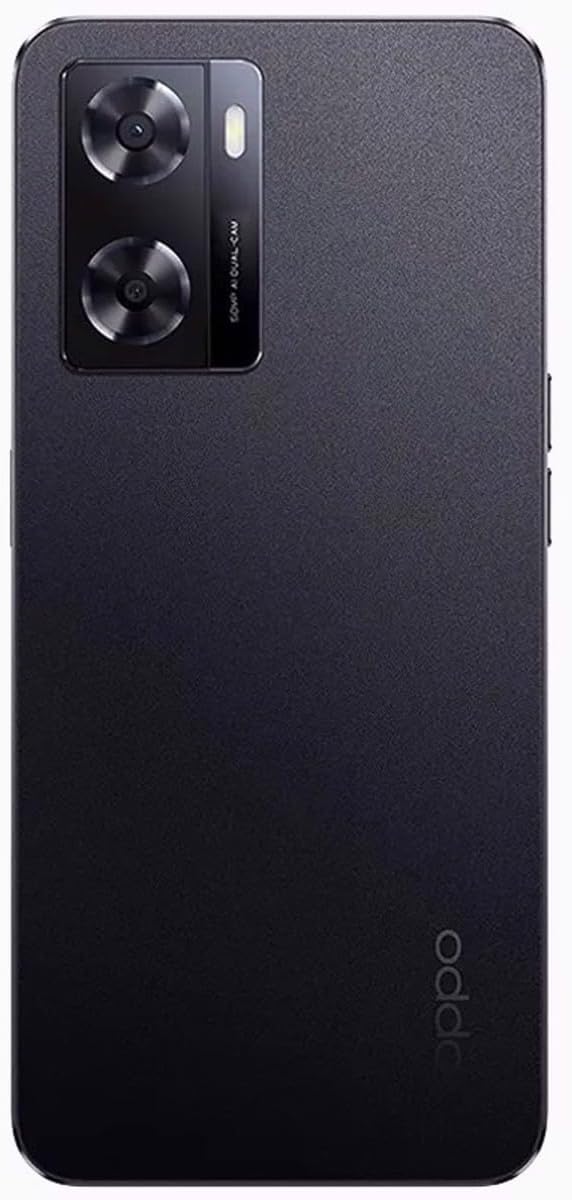
Image: Rear view of the OPPO A57s smartphone, highlighting the dual camera system and the textured back panel.
Maintenance
Battery Care
- Avoid extreme temperatures (hot or cold) as they can degrade battery life.
- Use only the provided USB cable or certified chargers.
- For optimal battery longevity, avoid frequently draining the battery completely or charging it to 100% for extended periods.
Cleaning Your Device
- Use a soft, lint-free cloth to clean the screen and body.
- Avoid using harsh chemicals, abrasive materials, or aerosol sprays.
- Do not expose the device to excessive moisture.
Software Updates
Regularly check for and install software updates to ensure optimal performance, security, and access to new features. Navigate to Settings > About phone > Software update.
Troubleshooting
| Problem | Possible Solution |
|---|---|
| Device not powering on | Ensure the battery is charged. Connect to a charger for at least 15 minutes, then try powering on again. |
| Apps crashing or freezing | Clear the app's cache and data (Settings > Apps > [App Name] > Storage). If the issue persists, uninstall and reinstall the app. |
| Poor network signal | Check SIM card insertion. Restart the device. Ensure you are within network coverage. Contact your service provider if issues persist. |
| Battery drains quickly | Reduce screen brightness, disable unnecessary background apps, turn off Wi-Fi/Bluetooth when not in use. Check battery usage in Settings to identify power-hungry apps. |
Specifications
Detailed technical specifications for the OPPO A57s smartphone.
| Feature | Detail |
|---|---|
| Model Name | OPPO A57s |
| Operating System | Android 12.0 |
| Processor | Mediatek MT6765G Helio G35 (12 nm), Octa-core (4x2.3 GHz Cortex-A53 & 4x1.8 GHz Cortex-A53) |
| RAM | 4 GB |
| Internal Storage | 128 GB (expandable via microSDXC) |
| Display | 6.56 Inches IPS LCD, 720 x 1612 pixels |
| Rear Camera | 50 MP (wide), 8 MP (wide) |
| Battery Capacity | 5000 mAh (non-removable) |
| Connectivity | Dual-SIM (Nano-SIM), 4G LTE, Wi-Fi, Bluetooth, USB Type C |
| Special Features | Fingerprint Sensor |
| Color | Starry Black |

Image: The OPPO A57s smartphone, showcasing both its front display and rear camera module and finish.
Warranty and Support
For warranty information and technical support, please refer to the warranty card included with your product or visit the official OPPO support website. Keep your proof of purchase for warranty claims.
OPPO Official Support: https://www.oppo.com/en/support/
Related documentsA57s


Ask a question about this manual
Ask about setup, troubleshooting, compatibility, parts, safety, or missing instructions. Manuals+ will review the question and use this page’s manual context to help answer it.