
1. Introduction
The TUNAI S0B0 BO-058 Multifunction Clean Pump is designed to simplify aquarium maintenance. This electric pump efficiently performs water changes, gravel cleaning, and waste removal, contributing to a healthier aquatic environment for your fish. Please read this manual thoroughly before use to ensure proper operation and longevity of the product.
2. Product Components
Before assembly, ensure all components are present and undamaged. The S0B0 BO-058 pump includes the following parts:
- Motor Unit: The main pumping mechanism.
- ON/OFF Switch: For controlling power to the pump.
- Inlet Pipe: The main extension pipe.
- Handle: For comfortable grip and control during operation.
- Various Nozzles: Angled strainer inlet, Duckbill nozzle, Gravel cleaner, and a general strainer for different cleaning tasks.

Figure 2.1: Exploded view of the S0B0 BO-058 pump components.
3. Setup and Assembly
Follow these steps to assemble your S0B0 BO-058 pump:
- Attach the motor unit to the main inlet pipe. Ensure it is securely fastened.
- Connect the ON/OFF switch cable to the motor unit.
- Select the appropriate nozzle for your task (e.g., gravel cleaner for substrate cleaning, duckbill nozzle for general debris) and attach it to the end of the inlet pipe.
- Adjust the handle to a comfortable length for your aquarium depth.
- Ensure all connections are tight to prevent leaks and ensure optimal suction.
4. Operating Instructions
The S0B0 BO-058 pump offers multiple functions for comprehensive aquarium cleaning.
4.1. Functions Overview
- Change Water: Efficiently removes old aquarium water.
- Dirt Absorption: Sucks up suspended debris and waste.
- Sand Washing / Gravel Cleaning: Cleans substrate without removing gravel from the tank.

Figure 4.1: Key functions of the S0B0 BO-058 pump.
4.2. Using Different Nozzles
The pump comes with specialized nozzles for various tasks:
- Angled Strainer Inlet: Ideal for cleaning sand and small stones in the aquarium corners and edges.
- Duckbill Nozzle Inlet: Features 360° rotation for easy debris removal, especially in hard-to-reach or blind angles.
- Gravel Cleaner: Designed to agitate and clean gravel, separating debris for removal while retaining the gravel.

Figure 4.2: Specialized nozzles for targeted cleaning.
4.3. General Operation Steps
- Submerge the pump's inlet end into the aquarium water. Ensure the water level is above the minimum operating level indicated on the pump.
- Direct the outlet hose into a bucket or drain.
- Plug the power cord into an electrical outlet.
- Turn on the pump using the ON/OFF switch.
- For water changes, allow the pump to remove the desired amount of water.
- For gravel cleaning, gently move the gravel cleaner nozzle through the substrate to dislodge debris. The pump will suction the debris while clean water passes through.
- For dirt absorption, move the appropriate nozzle near suspended particles or waste.
- Once cleaning is complete, turn off the pump using the ON/OFF switch before unplugging it.
- Carefully remove the pump from the aquarium.
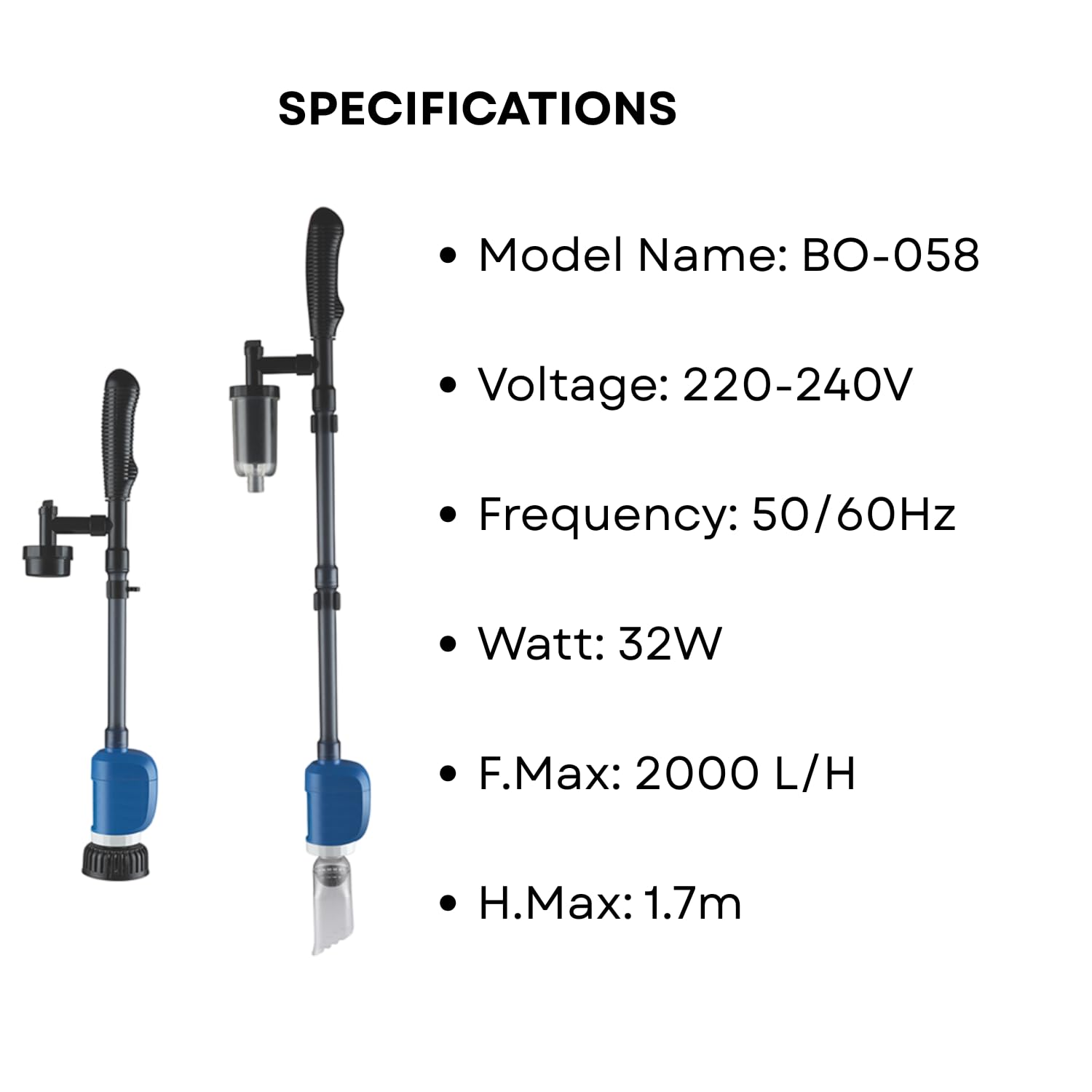
Figure 4.3: Pump in operation within an aquarium.
5. Maintenance
Regular maintenance ensures the optimal performance and lifespan of your S0B0 BO-058 pump.
- After Each Use: Disassemble the nozzles and rinse them thoroughly with clean water to remove any trapped debris.
- Motor Unit: Periodically check the motor impeller for any blockages or buildup. Clean gently with a soft brush if necessary.
- Hoses and Pipes: Ensure all hoses and pipes are free from kinks or obstructions. Rinse them regularly.
- Storage: Store the pump in a clean, dry place away from direct sunlight when not in use.
6. Troubleshooting
If you encounter issues with your S0B0 BO-058 pump, refer to the following common problems and solutions:
| Problem | Possible Cause | Solution |
|---|---|---|
| Pump does not turn on. | No power, faulty switch, or motor issue. | Check power connection. Ensure ON/OFF switch is in 'ON' position. Test outlet with another device. |
| Weak suction or slow water flow. | Clogged intake, blocked impeller, air leak in connections, or insufficient water level. | Clean intake and impeller. Check all connections for tightness. Ensure pump is adequately submerged. |
| Pump is noisy or vibrating excessively. | Impeller obstruction, worn impeller, or improper seating. | Turn off and unplug the pump. Inspect and clean the impeller. Ensure it is correctly seated. |
| Water leakage. | Loose connections or damaged seals. | Tighten all connections. Inspect O-rings and seals for damage and replace if necessary. |
If the problem persists after attempting these solutions, please contact customer support.
7. Specifications
Technical details for the S0B0 BO-058 Multifunction Clean Pump:
- Model: BO-058
- Power Consumption: 32 Watts
- Maximum Flow Rate (F.Max): 2000 liters per hour (L/H)
- Maximum Lifting Height (H.Max): 1.7 meters
- Voltage: 220-240V
- Frequency: 50/60Hz
- Power Source: Corded Electric
- Product Dimensions: Approximately 30 x 10 x 10 cm
- Item Weight: Approximately 300 g

Figure 7.1: S0B0 BO-058 Technical Specifications.
8. Warranty and Support
For any questions, concerns, or assistance with your TUNAI S0B0 BO-058 Multifunction Clean Pump, please contact our customer support team.
- Customer Support: Our dedicated team is available to assist you. Please refer to your purchase documentation or the Tunai Store for contact details.
- Warranty Information: Specific warranty details are not provided in the product information. Please retain your proof of purchase and contact the retailer or Tunai Store for any warranty-related inquiries.